Mobile Pixels Duex Float 2 Pro Review
I have previously reviewed several of the Mobile Pixels monitors including the Mobile Pixels Duex Max Portable Monitor and Mobile Pixels Trio and competing products such as the Aura Displays Triple Aero 15.6 Pro Max.
I have liked the previous Mobile Pixels models, but was never keen on fixing magnets to the back of my laptop.
The Duex Float 2 Pro is a little different; the portable monitor isn’t a side screen but instead sits above your laptop monitor. You can still attach magnets for a secure fit, but I don’t really see the point, because the Duex Float 2 Pro can free-stand. So, it basically works like an independent portable monitor sits above your laptop, which can then open up the possibility of pairing it with two other freestanding portable monitors for a 4-display set-up.
Specification
- 16-inch 2.5K (2560 x 1600) anti-glare display, 16:10 aspect ratio
- 120Hz refresh rate, 350 nits peak brightness, 1200:1 contrast ratio
- 100% sRGB / 72% NTSC colour gamut, 9ms response time
- 33% lighter and 20% thinner than the previous Duex Float model
- Weighs around 1.3kg and is 1.8cm thick when unfolded
- Stacked design with a redesigned, built-in kickstand
- Built-in dual speakers
- Two USB-C ports with 65W pass-through charging
- One mini HDMI port
- Three viewing modes: stacked, presentation, and freestanding
Design
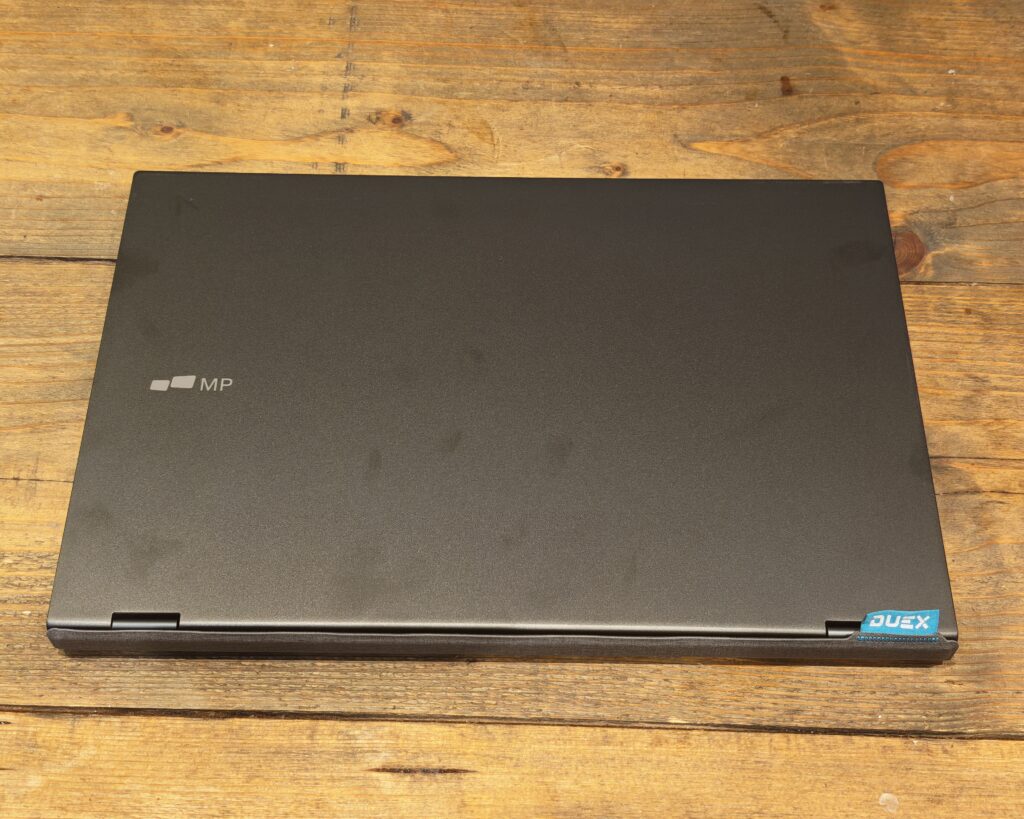
One issue with this design is that it is much bulkier than a normal portable monitor. You have the monitor itself, but then the stand that sits behind your laptop lid roughly doubles the overall thickness. I think it is better suited to home use, letting you set up a multi-monitor workstation that is easy to pack away once you have finished for the day, rather than something you would want to carry around all day in a bag.
Closed up, the Duex Float 2 Pro looks and feels much like the lid of a slim laptop. It has a matte graphite finish with a small “MP” logo, and the only real giveaway that it is not a laptop is the lack of a hinge along one long edge. Open it out and you get a two-stage fold: the screen lifts away from a middle hinge, while a section behind it, finished in a grey fabric-effect material, folds down and out into the kickstand. That fabric panel is a nice touch, since it means the part resting on your desk, or against the back of your laptop, is not just bare metal or plastic.


The design of the stand also allows for alternative setups. For example, you can fold the monitor back on itself to duplicate the display and use it to demo something to a client, or for a presentation, simply by tilting the top screen fully back so someone opposite you can see it. Or you can use it as a normal portable monitor sitting to the side, with the kickstand folded flat rather than propping the screen up above a laptop.
I like that there are USB-C ports on the left and right for convenient cabling, and these are located on the stand section of the monitor rather than the screen itself, so you do not end up with a cable dangling awkwardly down the side of your laptop while you are typing.


When fully unfolded into freestanding mode, the kickstand forms a proper triangular base rather than a thin prop, which makes the whole thing considerably steadier than most portable monitor stands I have used. It is not going anywhere on a desk, even at a fairly upright viewing angle. The hinge mechanism does feel slightly stiff when new, and I found it loosened up a little after the first few dozen open and close cycles, which is fairly typical of laptop-style hinges.
Build Quality and Portability
The unit weighs about 1.3kg and is roughly 1.8cm thick when unfolded, which Mobile Pixels quotes as 33% lighter and 20% thinner than the outgoing Duex Float. For comparison, that is lighter than a 16-inch MacBook Pro, and only a little heavier than most 14 to 16-inch Windows ultrabooks, so it will not be a shock to your bag if you do decide to take it with you.
The overall fit and finish is solid rather than premium. The hinges are metal, the outer shell resists flex reasonably well, and the fabric-effect stand panel should hold up to being opened and closed a lot better than a painted plastic one would, since there is no coating to chip or scratch. There is a small “DUEX” branded fabric pull tab at one corner, presumably intended to help you open the case, though in practice I found it just as easy to prise open from the front edge.
Connectivity
Down one edge of the stand section you get a row of speaker perforations, three small OSD buttons for brightness and menu navigation, a power or screen flip button, and a single USB-C port. On the opposite edge sits a second USB-C port, a mini HDMI port, and a matching row of speaker perforations. Having a USB-C port on both sides is a genuinely useful bit of thinking, since it means you can route the cable from whichever side suits your desk setup, rather than being stuck with it trailing across in front of the keyboard.
Either USB-C port will carry video, data, and up to 65W of pass-through power back to your laptop, so in most cases a single cable handles the connection to your laptop’s own charger. If your laptop does not support USB-C DisplayPort Alt Mode, the mini HDMI port is there as a fallback, though you will need to supply your own mini HDMI to HDMI cable and a separate power source for the monitor in that case.
Screen Quality and Viewing Modes


The 2.5K panel is genuinely good. At 2560 x 1600 with a 16:10 aspect ratio, 350 nits of brightness, a 1200:1 contrast ratio, and a quoted 100% sRGB colour gamut, it comfortably outclasses most budget portable monitors, and it is a clear step up from the 15.6-inch 1080p non-Pro Duex Float 2. Text is sharp, colours look accurate rather than oversaturated, and the anti-glare coating does a reasonable job under my office lighting, though it will not eliminate reflections entirely under a bright window.
The 120Hz refresh rate is a nice bonus, even if most people will be using this for productivity work rather than gaming. There is an EyeCare mode in the on-screen display, which warms up the colour temperature to reduce eye strain during long sessions, and an orientation setting for when you flip the panel around for presentation mode.
The three viewing modes work as advertised. Stacked mode extends your desktop upward, which is the setup I used for most of this review. Presentation mode lets you tip the screen fully back and mirror your laptop’s display, then use the flip button to correct the orientation for whoever is sitting opposite you, which is a genuinely useful feature for anyone who does client presentations away from the office. Freestanding mode folds the kickstand into a flat base and lets you use the Duex Float 2 Pro as a conventional single portable monitor, sat beside your laptop rather than above it.
Setup and Software
Setup itself could not be simpler. Plug in the USB-C cable and the display is recognised immediately, with no drivers or software to install on either Windows or macOS. On my Honor laptop, Windows detected it as a second display straight away and defaulted to extending the desktop upward, matching the physical arrangement of the two screens.
Windows recommended 200% scaling at the Duex Float 2 Pro’s native 2560 x 1600 resolution, which is worth knowing before you buy, since it means your actual usable desktop space at the recommended setting is closer to a 1280 x 800 canvas rather than a full 2.5K workspace. You can drop this down manually if you want more screen real estate.
In Use
The monitor runs at 2560 x 1600, but Windows defaults to 200% scaling, which gives you a comparatively small working area for a screen this size, since everything on it is rendered noticeably larger to compensate for the pixel density.
Switching to 100% scaling does make text a little on the small side, but I still found it perfectly readable at a normal desk viewing distance. For writing, I typically kept my main work on the laptop’s own screen, then used the top monitor to display reference material such as source documents or a browser tab, which worked well even with the display left at 100% scaling.
Where this setup genuinely shines is exactly the kind of workflow that photographer Becca Lueck describes in her own review of the Duex Float 2 Pro. She uses it to keep presenter notes visible while recording course content in Canva, since previously she either had to crop her screen recording or lose the notes entirely. I found the same benefit for anything involving screen recording or screen sharing: keeping a second reference window open above your primary display, rather than squeezed alongside it, avoids the constant side to side glance that two monitors placed next to each other usually forces on you.
Simon Jary’s review for Macworld makes a similar point about neck strain. Two screens placed side by side mean you are frequently turning your head, while a stacked pair mostly just means shifting your eyes up and down, which is a genuinely more comfortable arrangement over a long working day, particularly if you are working from a small desk where side by side monitors are not practical anyway.
Speakers
The Duex Float 2 Pro has built-in stereo speakers, and while they are perfectly usable for a notification chime or a quick video call in a pinch, they are noticeably thin and lack any real bass compared with a laptop’s own speakers, let alone a dedicated desktop speaker or soundbar. I would not rely on them for music or anything you actually care about the sound quality of. Treat them as a backup rather than a reason to buy.
Price and Alternative Options
The Mobile Pixels Duex Float 2 Pro is available directly from mobilepixels.us for $263.49, discounted from an RRP of $389.99. UK buyers are better served checking UK retailers directly, since pricing swings around noticeably between them. At the time of writing it was listed at £269 through HDEW Cameras and around £259.99 through Amazon UK and Mobile Pixels’ own direct listing, with Scan UK also stocking it. Given the RRP is close to $390, anything under £270 for the Pro model represents a reasonably fair price for what you are getting, though it is worth shopping around rather than paying full price, since discounts of this kind appear to be fairly common.
Other Mobile Pixels models worth knowing about, priced through the US site, include:
- Duex DS Series (1080p, mounted to the side of your laptop): 13.3-inch at $195.49, 14-inch at $229.49
- Trio 3 Pro (two 1400p monitors mounted to the left and right): $433.49
- Glance (standalone 16-inch monitor with a 1080p FHD display and adjustable stand): $161.49
If your priority is the largest possible resolution bump for the least outlay, the Glance or a basic Duex DS model will get you there for less money, but neither replicates the stacked, above-the-laptop arrangement that makes the Float 2 Pro distinctive. The standard Duex Float 2, at 15.6 inches and 1080p, is the more direct budget alternative if you want the same stacked concept without paying for the higher resolution 2.5K panel.
Overall
The Mobile Pixels Duex Float 2 Pro is a well thought out portable monitor that solves a genuine problem: side by side portable monitors are useful, but they are not always practical on a small desk, and they do nothing for neck strain. Stacking a second screen above your laptop instead is a simple idea, and Mobile Pixels has executed it well, with a sturdy kickstand, a genuinely good 2.5K panel, sensible port placement, and three viewing modes that all work as intended.
The trade-offs are the ones you would expect from any portable monitor with a built-in stand: it is noticeably bulkier than a slimline travel monitor, the built-in speakers are weak, and Windows’ default 200% scaling at native resolution eats into the extra screen space you are paying for, though that is easily adjusted. None of these are dealbreakers, but they are worth knowing before you buy, particularly if you were expecting something you could slip into a laptop bag without noticing the extra bulk.
For home or hybrid working, where you can set it up once and fold it away at the end of the day, I think it is a strong option, and one of the more genuinely useful takes on the portable monitor concept I have tested. If you travel with your laptop every day and need something as thin as possible, it is worth looking at the smaller Duex DS models instead, but for a proper second screen you can pack away in seconds, the Duex Float 2 Pro is a sound purchase.
Mobile Pixels Duex Float 2 Pro Review
-
Overall - 85%85%
Summary
The Mobile Pixels Duex Float 2 Pro is one of the more practical portable monitors I have tested, particularly for home and hybrid working. Its stacked design makes better use of limited desk space than a conventional side-mounted display, while the sharp 16-inch 2.5K panel, 120Hz refresh rate and sturdy integrated stand provide a noticeably better experience than most budget alternatives. It is bulky for daily travel, and the speakers are poor, but as a second screen that can be quickly set up and packed away, it is a well-designed and versatile option.
Pros
- Sharp 2.5K 120Hz display
- Stable and versatile stand
- Useful stacked screen design
- Convenient dual USB-C ports
Cons
- Bulkier than typical portable monitors
- Built-in speakers sound weak
- Windows scaling reduces workspace

I am James, a UK-based tech enthusiast and the Editor and Owner of Mighty Gadget, which I’ve proudly run since 2007. Passionate about all things technology, my expertise spans from computers and networking to mobile, wearables, and smart home devices.
As a fitness fanatic who loves running and cycling, I also have a keen interest in fitness-related technology, and I take every opportunity to cover this niche on my blog. My diverse interests allow me to bring a unique perspective to tech blogging, merging lifestyle, fitness, and the latest tech trends.
In my academic pursuits, I earned a BSc in Information Systems Design from UCLAN, before advancing my learning with a Master’s Degree in Computing.
I’m proud to share that Vuelio has consistently ranked Mighty Gadget as one of the top technology blogs in the UK. With my dedication to technology and drive to share my insights, I aim to continue providing my readers with engaging and informative content.
I work directly with the companies he reviews products for or their chosen PR agency.
For Social Media, you can find me on: