EPOMAKER TH108PRO Mechanical Keyboard Review
I recently reviewed the 98% PIIFOX LUNA Grid98 Mechanical Keyboard, which I thought was excellent.
While I appreciate that full-sized keyboards have fallen out of fashion, I am old-fashioned and like a number pad and generally as many keys as possible.
If, like me, you are a fan of fully sized keyboards, then the EPOMAKER TH108PRO is well worth your consideration. It is a well-specced keyboard considering the price of £100 from Amazon.
This mechanical keyboard has hot-swappable switches, 5-layer sound optimisation and tri-mode connectivity, as well as a smart display and a volume knob.

Related Reviews
- PIIFOX LUNA Grid98 Mechanical Keyboard Review
- PIIFOX LUNA Muse65 Pro Mechanical Keyboard Review
- Vaydeer JP1011 Programmable Macro Mechanical Keyboard Review
- CHERRY KW X ULP Keyboard Review
- Cherry MX 8.2 TKL Wireless Mechanical Keyboard Review
- JamesDonkey RS2 Hot-Swappable Mechanical Keyboard Review
Specification
| Specification | EPOMAKER TH108 PRO |
| Layout | Full-size (100%) |
| Number of keys | 104 |
| Layout options | ANSI, ISO-DE and JIS |
| Colourways | Black Grey, White Blue and Pink |
| Connectivity | 2.4 GHz wireless, Bluetooth and USB wired |
| Compatibility | Windows, macOS and Android |
| Battery | 10,000 mAh rechargeable |
| Switches | Factory-lubricated EPOMAKER Creamy Jade or Sea Salt Silent V2 |
| Hot-swappable | Yes; supports 3-pin and 5-pin mechanical switches |
| Mounting structure | Gasket-mounted |
| Case material | ABS plastic |
| Plate | Flex-cut polycarbonate (PC) |
| PCB | Flex-cut FR4 |
| Stabilisers | Plate-mounted; incompatible with PCB-mounted or screw-in stabilisers |
| Sound dampening | Five layers: PORON sandwich foam, IXPE switch pad, sound-enhancement PET, EPDM switch socket foam and bottom silicone |
| Keycaps | Double-shot PBT, Cherry profile |
| RGB lighting | Per-key LEDs; south-facing on ANSI models, north-facing on ISO models |
| Display | 23.3 x 14 mm TFT |
| Knob | Aluminium |
| Polling rate | USB and 2.4 GHz: 1,000 Hz; Bluetooth: 125 Hz |
| Stated latency | USB: 2 ms; 2.4 GHz: 5 ms; Bluetooth: 11 ms |
| Anti-ghosting | N-key rollover |
| Typing angles | 6°, 8° and 10.5° |
| Kickstand | Two-stage adjustable |
| Front height (spacebar side) | 28 mm with keycaps; 20 mm without |
| Rear height (Esc side) | 42 mm with keycaps; 34 mm without |
| Dimensions | 445 x 140 x 42 mm |
| Weight | 1.12 kg |
Switch Options
The two switch options are the EPOMAKER Creamy Jade and the Sea Salt Silent V2. Both are factory-lubricated linear switches, and there is little or no price difference between them.
My keyboard came with the Creamy Jade switches. These have a 45gf actuation force, 50gf bottom-out force, 2.0 mm pre-travel and 3.6 mm total travel. They are smooth, with no noticeable scratchiness or spring ping.
The product page is slightly confusing here. It lists the Creamy Jade as linear, but also describes it as “tactile and crisp” with a “satisfying bump”. In use, it is a linear switch with no tactile bump, so ignore that part of the description.
The Sea Salt Silent V2 is a silent linear switch with a 45gf actuation force, 51gf bottom-out force, 1.8 mm pre-travel and 3.5 mm total travel. The feel is similar on paper, but the switch is dampened to reduce noise. If you are buying for a shared office or for typing late at night, this is the one I would choose.
The PCB is hot-swappable and accepts both 3-pin and 5-pin switches, and EPOMAKER includes two spare switches and a 2-in-1 keycap and switch puller in the box. epomaker.com also sells a wide range of alternative switches you could swap to, including tactile, silent and linear options.
EPOMAKER sells magnetic switches too, but these are designed for Hall Effect keyboards. They will not work in the TH108 PRO, which uses standard mechanical switch sockets.
Design & Build
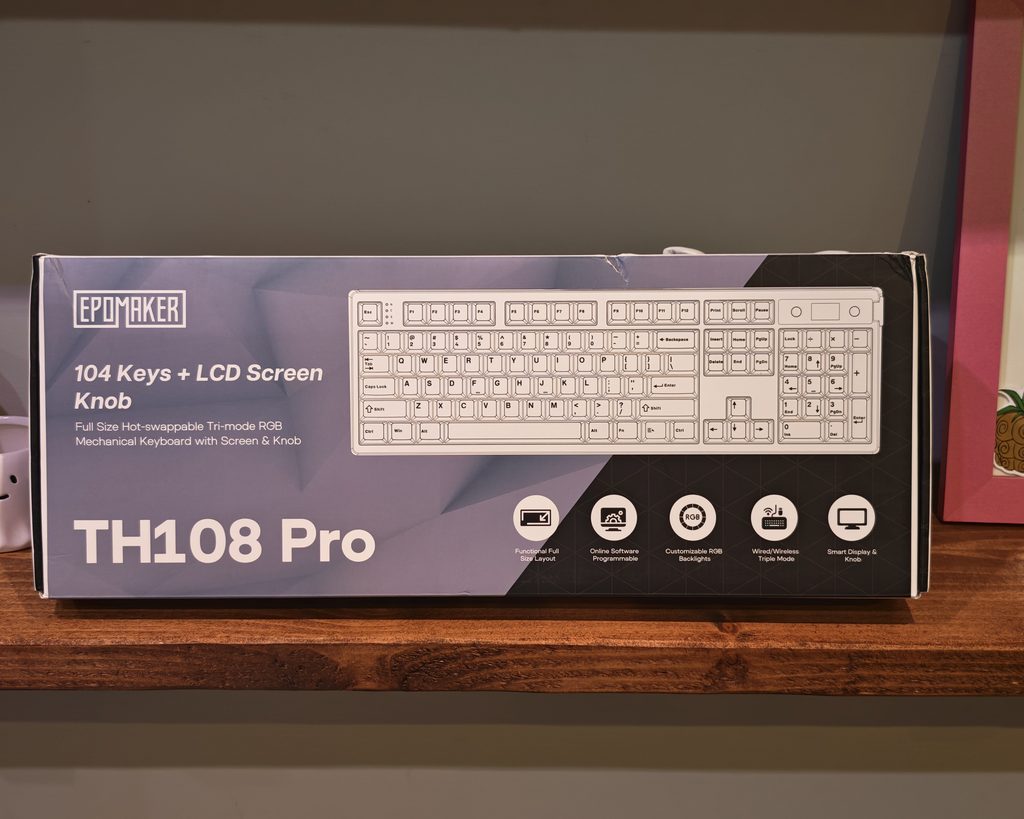
The TH108 PRO is a full-size 104 key keyboard in an ABS plastic case, measuring 445 x 140 x 42 mm and weighing 1.12 kg. Much of that weight comes from the 10,000mAh battery and the five layers of foam and silicone inside, and it means the keyboard stays put on the desk. A plastic case is normal at this price, and the Keychron V5 Max takes the same approach. The shell feels well put together, but it lacks the dense, cold feel of an aluminium board.
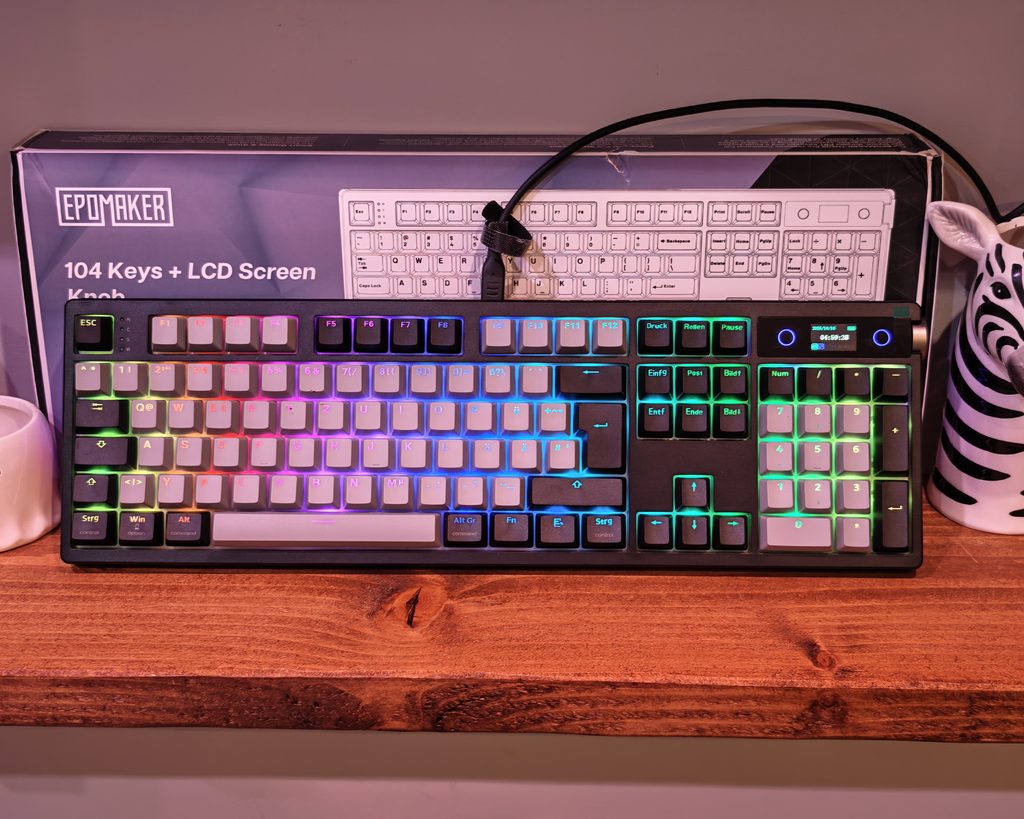
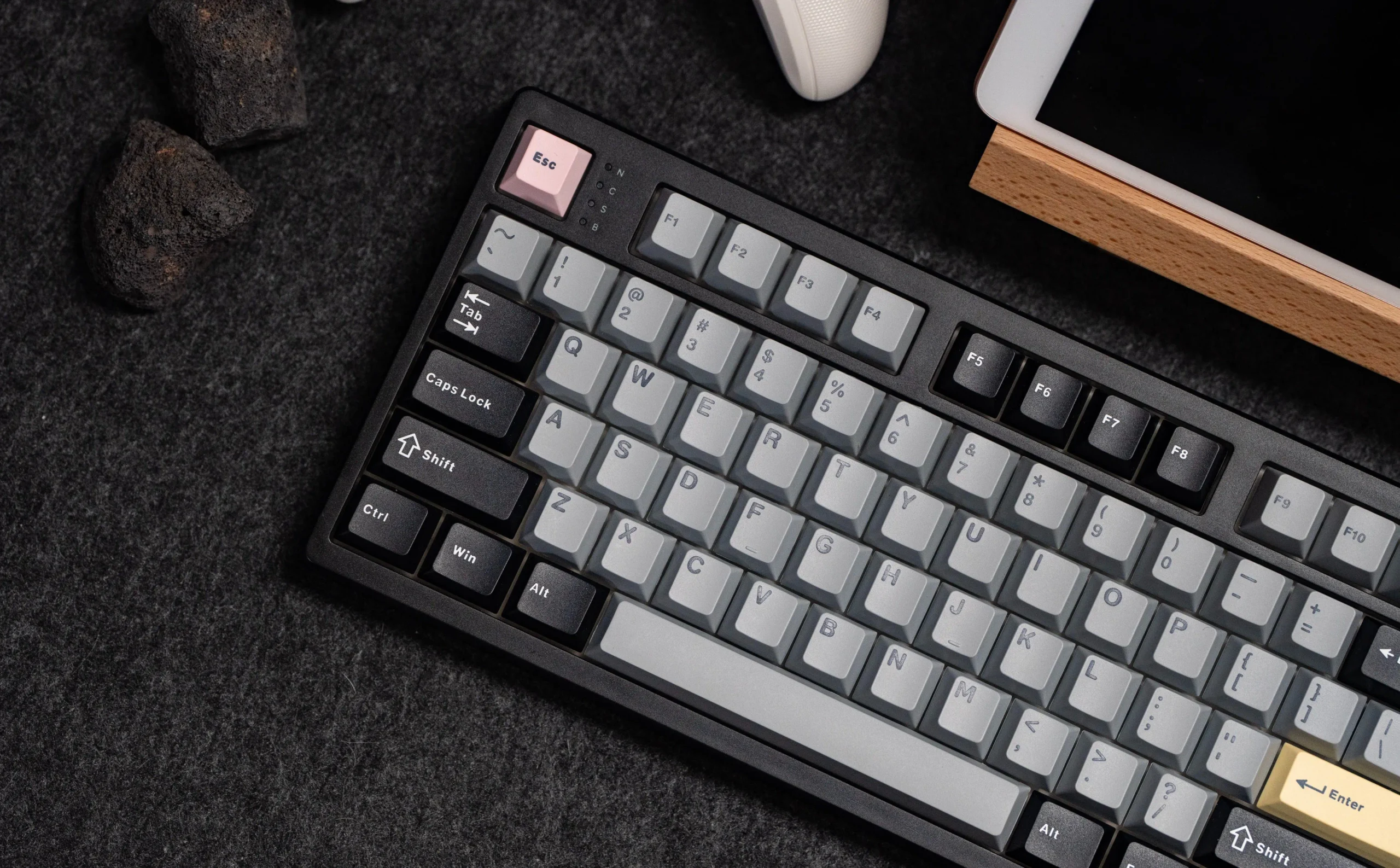
I have the black version, which pairs grey alphas with black modifiers and adds a few accent keys. There is a pink Esc, yellow Enter keys on the main block and the numpad, and a pastel arrow cluster where each key is a different colour. The result is a retro look that avoids being too loud, although the multi-coloured arrows will not suit everyone.
The keycaps are double-shot PBT in Cherry profile. They have a lightly textured finish that should resist shine for a long time, and Cherry profile sits lower than OEM, which I find more comfortable for long typing sessions. The legends are not shine-through, so the south-facing RGB works as underglow around the keys rather than lighting up the characters. If you type in the dark, that is a drawback. Personally, I prefer the underglow as it is a bit more subtle. The modifiers carry both Windows and macOS labels to match the Mac/Win toggle on the back.
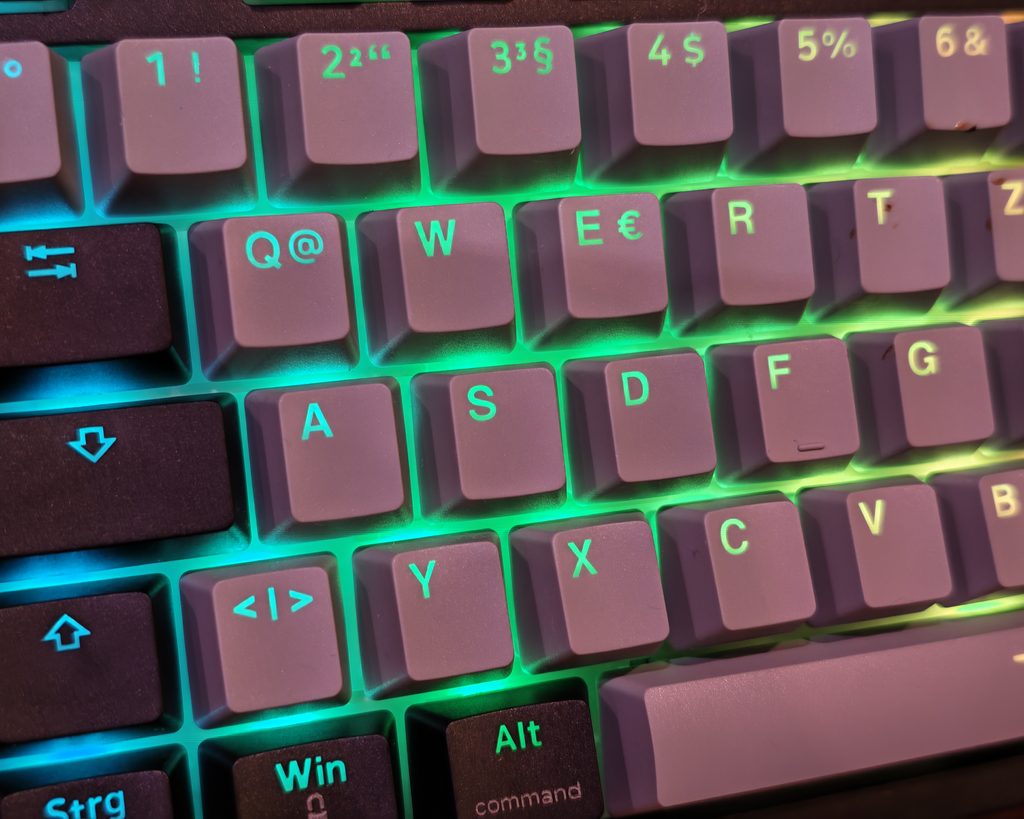
I was sent two samples. One uses the US ANSI layout, so there is a long left Shift, a single-height Enter, and the @ and ” symbols are swapped compared with a UK keyboard. As far as I can tell, there is no UK ISO version, which will put some buyers off.
The second sample was ISO-DE, which is quite different from the UK layout as it is QWERTZ and has various accented keys. However, if you really need a UK layout, this may be the better choice, as there are far more keycap options for ISO-UK than ANSI-UK, which are quite hard to get. The ISO-DE board has the same physical key shapes as a UK keyboard, including the tall Enter and short left Shift, so a standard UK ISO keycap set will fit.
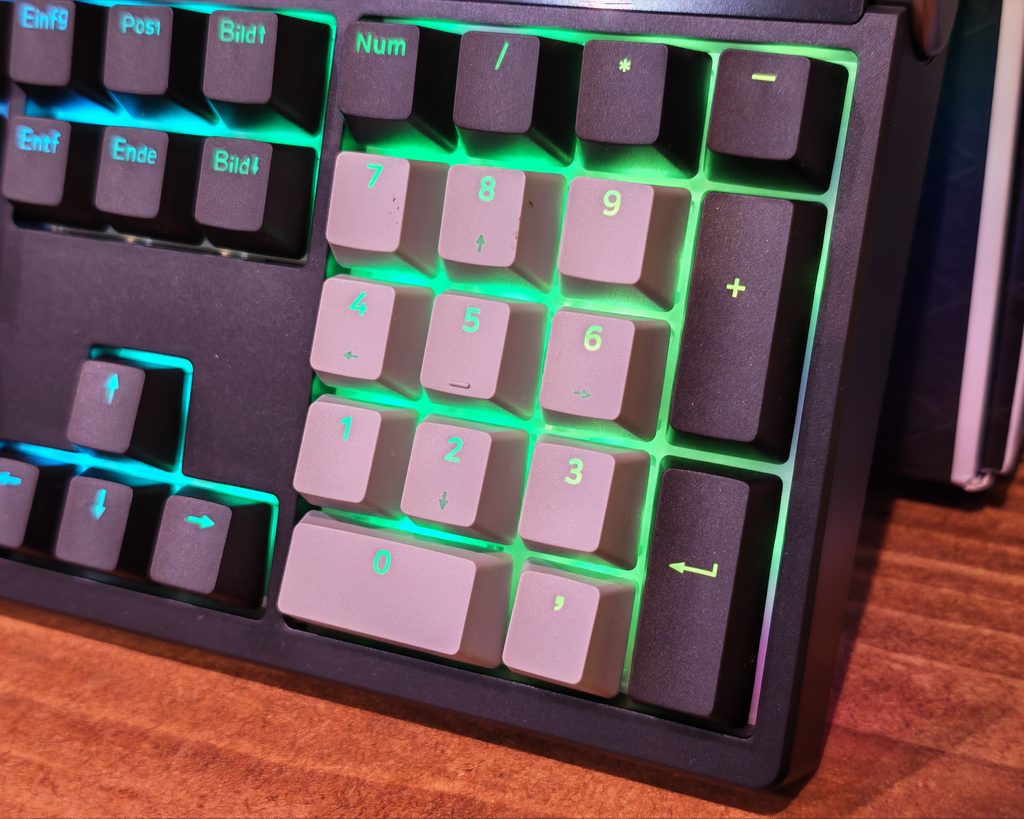
EPOMAKER has rearranged the top right corner. The four status LEDs for Num Lock, Caps Lock, Scroll Lock and Win lock now sit in the gap between Esc and F1. That frees the space above the numpad for a small TFT display flanked by two illuminated rings, with a metal volume knob set into the corner of the case. The knob is aluminium, feels solid and has a good weight to it. I cover the display in more detail below.
On the rear edge, a recessed panel holds a Mac/Win slider, the USB-C port and a 2.4G/USB/BT slider. I prefer physical switches to key combinations because you can see what mode the keyboard is in at a glance.
Underneath, there are rubber pads and two-stage flip-out feet with rubber tips, giving typing angles of 6°, 8° and 10.5°. There are also translucent light bars along both sides, and the 2.4 GHz dongle is stored under the left kickstand, which is useful if you move the keyboard between machines.
The front edge is 28 mm tall with keycaps fitted, which is fairly high, so some people may want a wrist rest for long sessions, though I have not had any issues with it so far. The width is the other thing to consider. If you use a mouse a lot, a 96% or 98% layout like the PIIFOX LUNA Grid98 or Ajazz AK980 saves a few centimetres of reach while keeping a numpad.
Smart Display
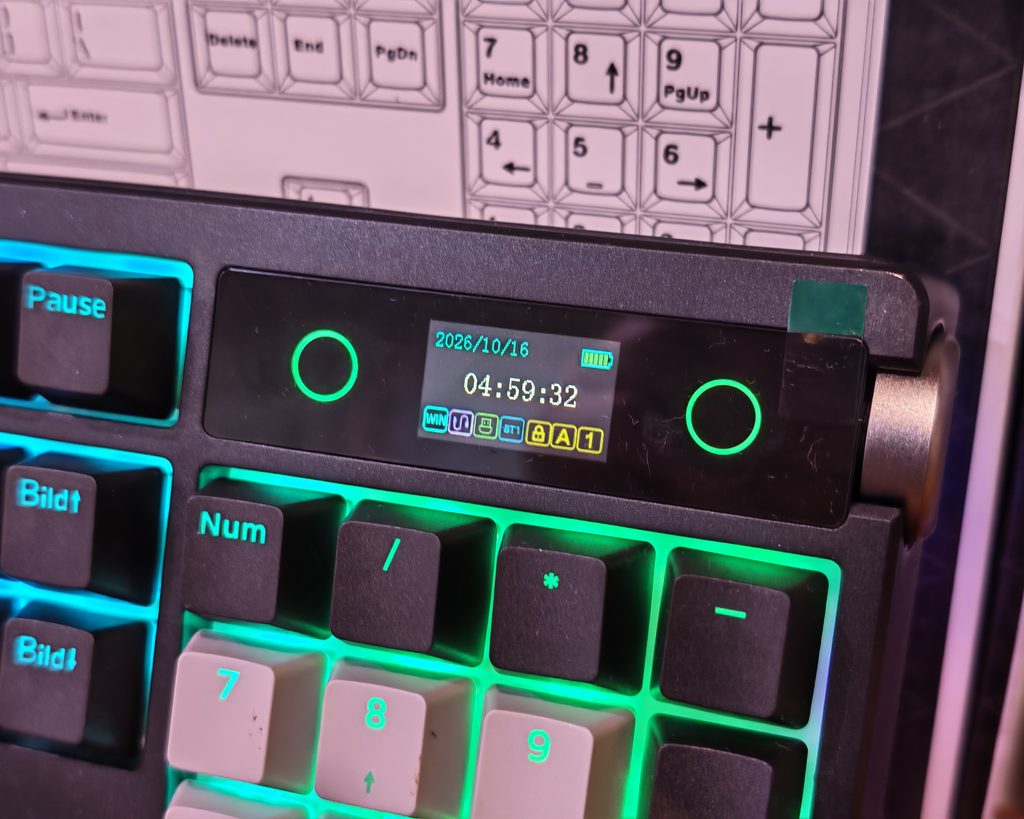
The display is a small 23.3 x 14 mm colour TFT panel above the numpad. By default, it shows the date, time and battery level, along with a row of icons for Windows or Mac mode, the current connection (wired, 2.4 GHz or Bluetooth 1, 2 or 3), Win lock, Caps Lock and Num Lock.
As a status display, it works well. A quick glance tells you which device the keyboard is connected to and whether Caps Lock is on, which saves some guesswork when switching between machines. The battery icon is also more useful than a single LED that only changes colour when the battery is nearly empty.
You can replace the home screen with a custom image or animated GIF using EPOMAKER’s software, which I cover below. Uploading a GIF took a couple of minutes even when connected by cable, which is longer than I expected. Screen changes can only be made in wired mode, not over 2.4 GHz.
The clock also has to be synced through the software. There is no way to set it from the keyboard, so if you only ever use Bluetooth, you will need to plug it in at least once to get the correct time.
Pressing Fn and the knob switches the knob from volume control to screen control. Rotating the knob then moves through menus to change the lighting effect, colour, brightness and speed, switch the screen language between English and Chinese, or show the splash screen. Pressing the knob confirms a selection. The keyboard flashes when you switch modes, so it is obvious which mode you are in. It is a reasonable way to adjust lighting without software or memorising shortcuts, but navigating a small menu with a rotary knob is slower than using the Fn shortcuts.
In volume mode, turning the knob adjusts the volume and pressing it mutes. This is the function I use most, and it is quicker than reaching for the Fn and F-key media shortcuts.
The panel itself is basic. Viewing angles are not great, so it looks washed out from your normal typing position unless you lean over it, and it is too small to show much detail in a GIF. I could not find any option to show system information such as CPU temperature, and the screen cannot act as a shortcut panel. A clock and status icons are nice to have, but it is not a feature I would buy the keyboard for. The Ajazz AK980 offers a similar screen, so it is not a unique selling point either.
Connectivity and Battery Life
The TH108 PRO supports USB-C wired, 2.4 GHz wireless via the included dongle, and Bluetooth with up to three paired devices. You select the mode with the slider on the back, then pair Bluetooth devices by holding Fn with Q, W or E. Switching between paired devices is a short press of the same combination. In 2.4 GHz mode, holding Fn and R re-pairs the dongle.
Polling is 1,000 Hz in wired and 2.4 GHz modes, dropping to 125 Hz over Bluetooth. EPOMAKER quotes latency of 2 ms wired, 5 ms over 2.4 GHz and 11 ms over Bluetooth. Bluetooth is fine for typing on a laptop or tablet, but I would use the dongle or a cable for gaming.
I have mostly used the keyboard wired at my desk, as it gives the most stable connection and keeps the battery topped up. The 2.4 GHz connection has also been reliable when I have used it, and the keyboard wakes quickly from sleep with a single keypress.
The 10,000mAh battery is much larger than most wireless keyboards. The Keychron V5 Max, for example, uses a 4,000mAh battery. EPOMAKER claims around 42 hours with the lighting and screen on, and over 200 hours with them off.
The 42-hour figure sounds modest, but it is continuous use. In practice, I went through a full week of mixed use with the lighting on and still had charge left. If you switch the lighting off and use the keyboard for normal office hours, charging every few weeks should be realistic.
There is one oddity. The manual includes a charging safety warning that you should always charge from a computer USB port, and that using a power adapter directly may damage the battery. This is unusual for a keyboard with such a large battery. It is not a problem if you charge while connected to your PC, but it does mean you should not leave it on a phone charger overnight.
RGB Lighting
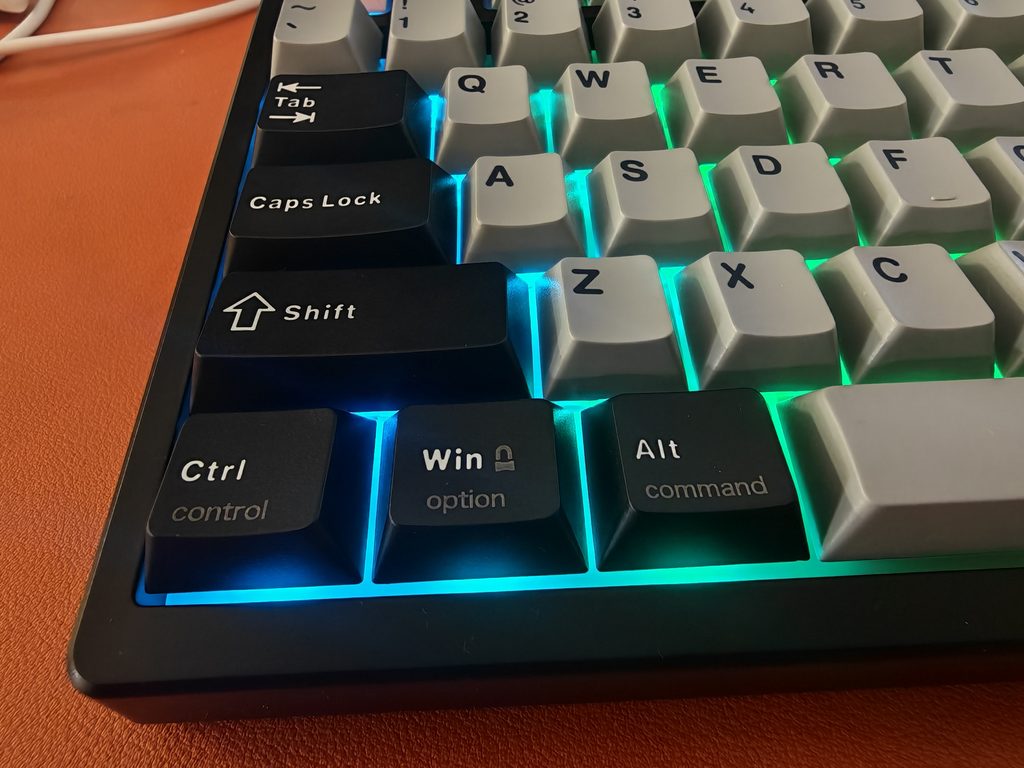
Perhaps it is because I am getting old, but I am indifferent to RGB. Having some backlighting is good, but I do not need a big light show to use my keyboard.
Depending on your preferences, the RGB may not be great on this keyboard. The ANSI model uses south-facing LEDs, and none of the light shines through the keycaps, so you get a glow around the keys rather than illuminated legends. That gives the lighting a more subtle look, which some people may not like if they game or work in the dark. The ISO-DE model uses north-facing LEDs, which is normal for ISO keyboards.
The white polycarbonate plate helps spread the light, and the grey alphas reflect it reasonably well. In a dark room, you can see the glow between the keys and a slight reflection on the desk, but you cannot read the legends. The LEDs are bright enough to be noticeable without being distracting.
There are three lighting zones. The main backlight covers the keys, the light bars run along both sides of the case, and the rings either side of the display have their own effects. You can adjust all of them from the keyboard. Fn and Insert cycles through the backlight effects, including off, while Fn and Delete changes the colour in single colour mode. Fn and the arrow keys adjust brightness and speed, Fn and Home cycles the side lights, and Fn and End changes the effect around the display.
The side light bars add some ambient lighting without making the keyboard look like a toy. My only complaint is that each zone has to be switched off separately. A single shortcut to turn all lighting off would be useful for saving battery.
The software adds around 20 preset effects, per-key custom colours and a music mode that reacts to audio. The effects are typical for this type of keyboard, with the usual breathing, ripple, wave and reactive options.
Driver / Web UI Customisation
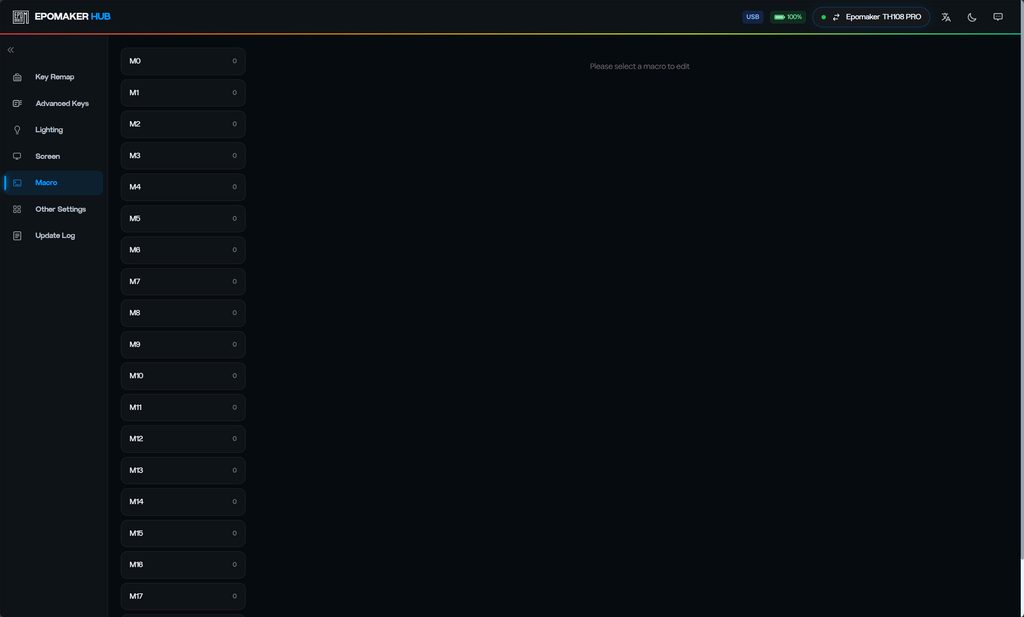
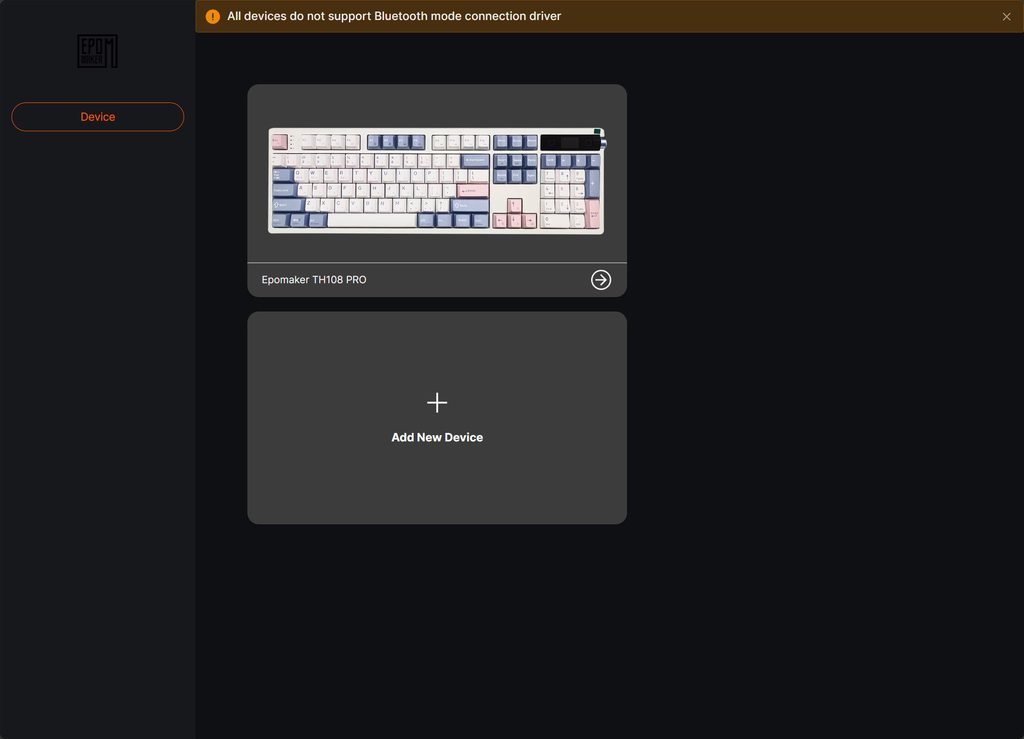
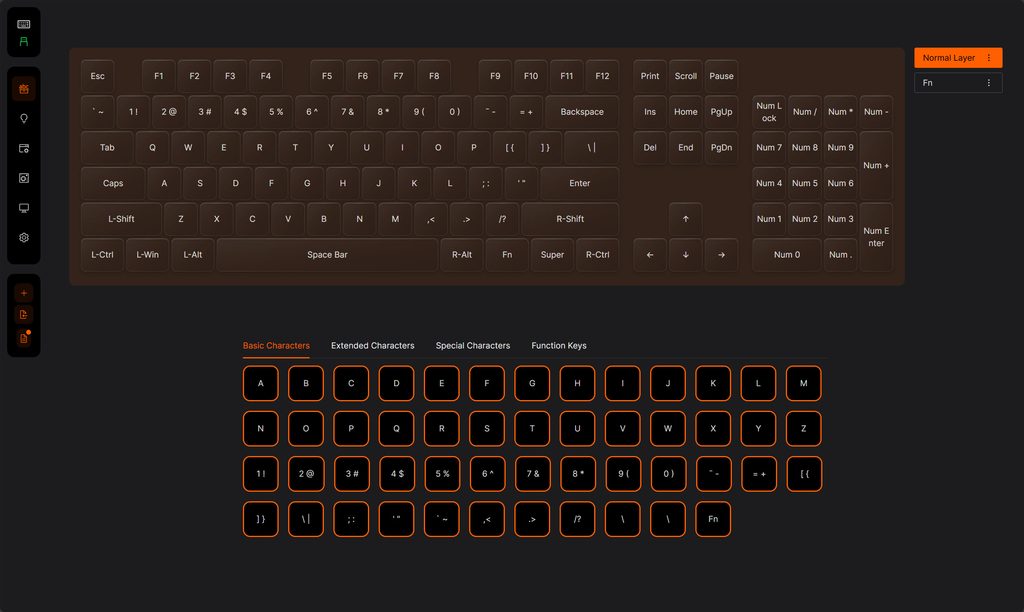
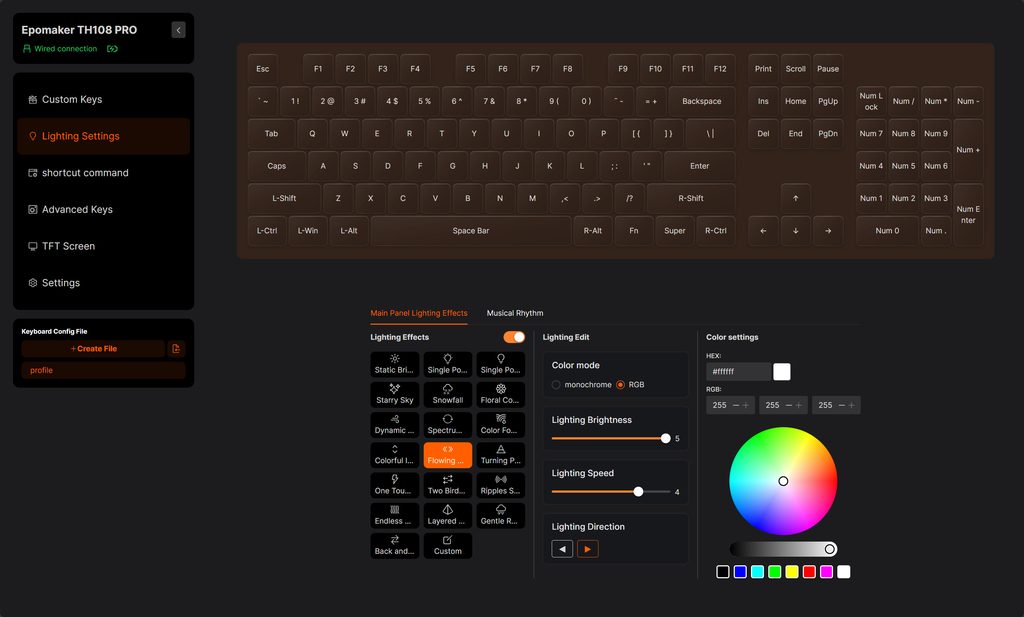
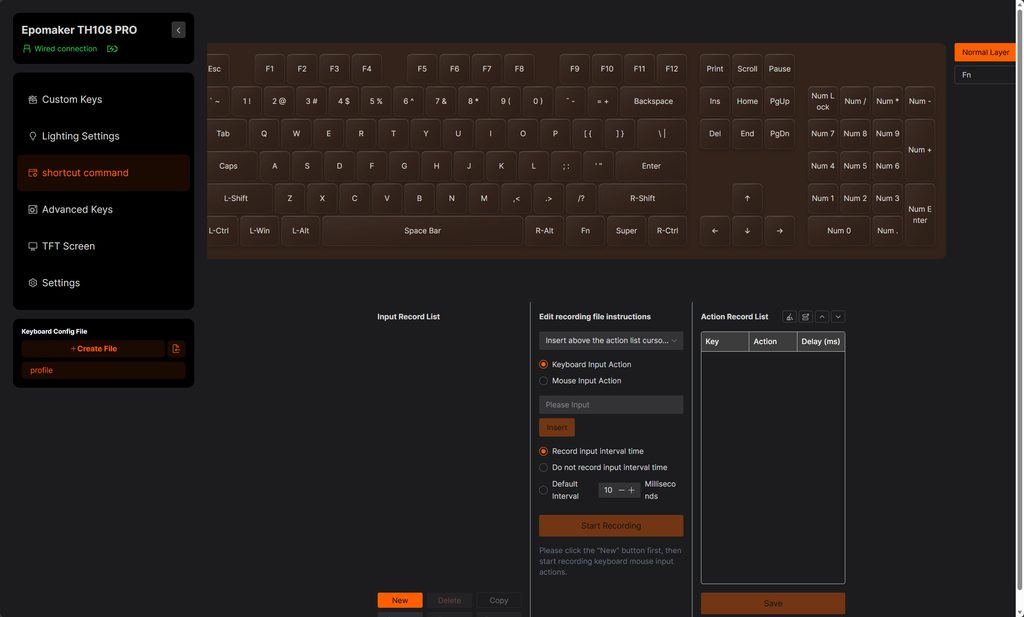
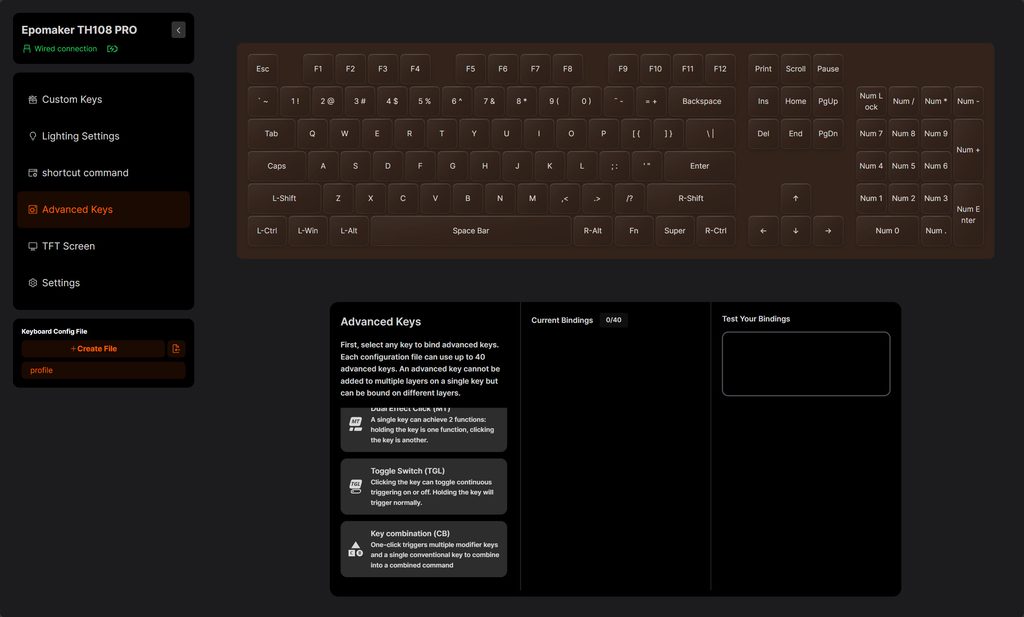
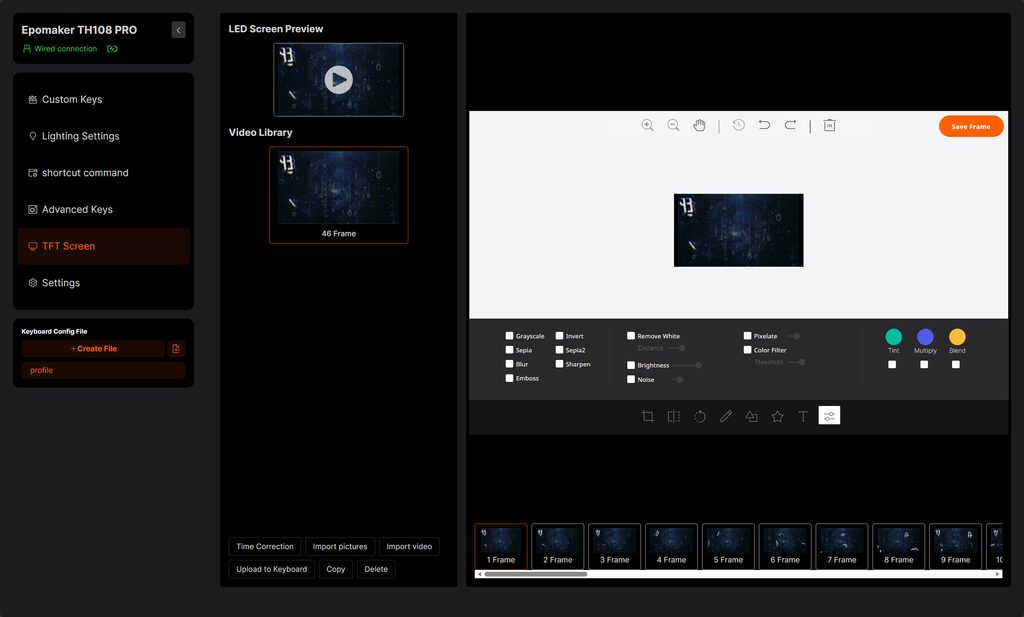
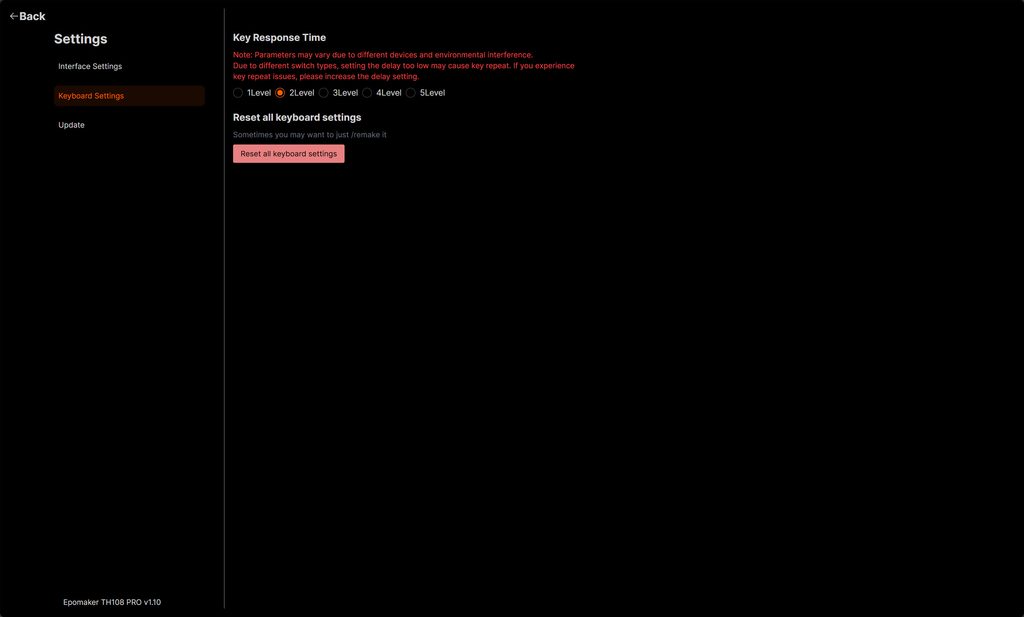
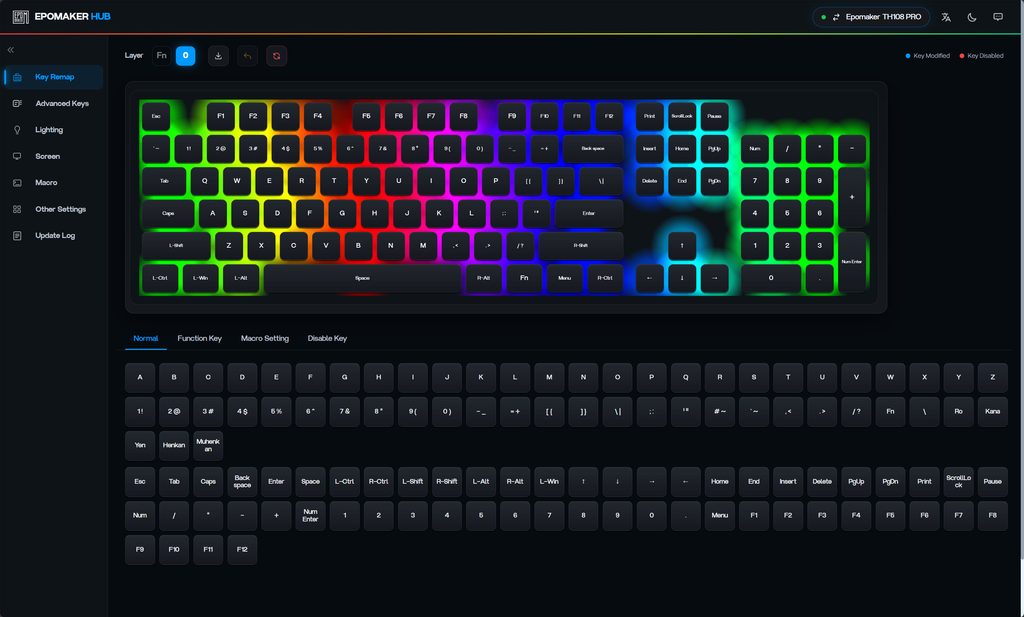
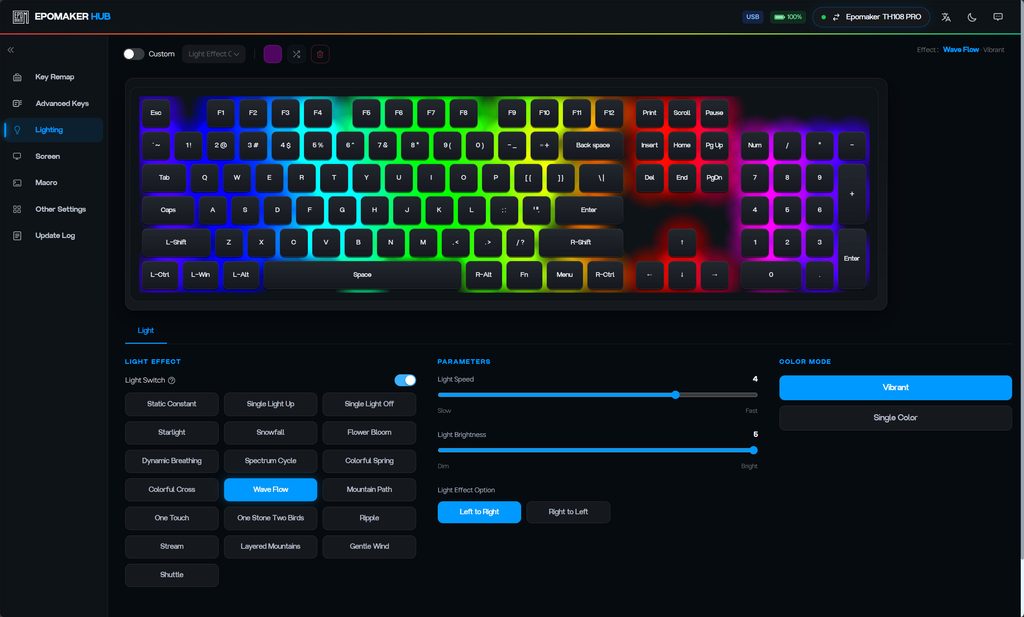
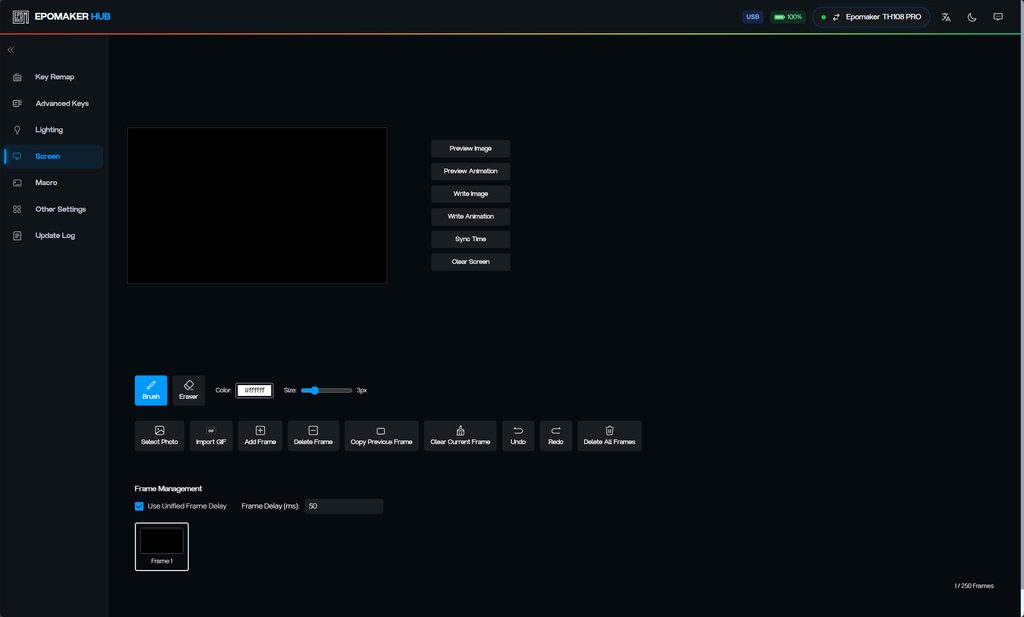
EPOMAKER offers two ways to configure the TH108 PRO: an online driver via epomaker.driveall.cn and the browser-based EPOMAKER HUB. Both cover remapping, lighting, macros and the screen, but they look and work differently. Both also need a wired or 2.4 GHz connection. The online driver warns that it does not work over Bluetooth, which is common with this type of keyboard but still worth knowing if you mainly pair it with a laptop.
Online driver
The online driver (version 1.10 on my sample) has six sections: Custom Keys, Lighting Settings, shortcut command, Advanced Keys, TFT Screen and Settings. Remapping works across a normal layer and an Fn layer, and you pick replacement keys from tabs for basic characters, extended characters, special characters and function keys. Settings save to profiles, so you can keep separate setups for work and gaming.
Lighting has around 20 preset effects plus a custom per-key mode, a monochrome or RGB colour mode, five brightness levels, speed and direction controls, and a colour wheel with hex and RGB entry. There is also a Musical Rhythm tab that makes the lighting react to audio.
“Shortcut command” is EPOMAKER’s name for the macro editor. It can record keyboard and mouse input, either capturing the real delay between actions or applying a fixed interval in milliseconds. You can then edit the action list line by line, which is more flexible than many budget keyboard drivers.
Advanced Keys allows up to 40 bindings per profile. Options include Dual Effect Click, where tapping and holding a key trigger different functions, a toggle mode that repeats a key until pressed again, and key combinations that send several modifiers and a key in one press. These features are usually associated with QMK, so it is good to see them here.
The TFT Screen section is the most complete part of the driver. You can import pictures or video, trim and edit individual frames, and apply crop, rotate, text, drawing tools and a long list of filters before uploading to the keyboard. There is also a time correction button to sync the clock.
Settings includes firmware updates, a full reset, and a Key Response Time option. This is effectively a debounce setting with five levels, but EPOMAKER does not say what each level means in milliseconds. A warning explains that low settings can cause key chatter with some switches, so most people will leave it alone.
EPOMAKER HUB
The web-based HUB runs in the browser, so there is nothing to install. As with most web configurators, you will need a Chromium-based browser such as Chrome or Edge. It shows the connection mode and battery level at the top of the page, which the online driver does not.
Key Remap has tabs for normal keys, function keys, macros and disabling keys, and modified or disabled keys are marked on the layout. The key list includes ISO and JIS keys, so you can work around some of the ANSI limitations through remapping, although the keycap legends will not match. I also remapped the pipe key (where the hash key is on a UK keyboard) to backslash, as I use it a lot working in IT support. It is a nice feature, and having a full-size keyboard gives you more flexibility over the keys you map.
The lighting page offers 19 effects with speed, brightness and direction sliders, a multicolour or single colour mode, and per-key custom colours. The macro page lists at least 18 slots, and the Screen page has a simpler editor than the online driver. You can import a photo or GIF, draw frame by frame with a brush and eraser, set a frame delay, and write up to 250 frames to the display. There is a Sync Time button for the clock, too.
Overall, the software is capable and easy to use, but having two tools with overlapping features and different names for the same things is confusing. The translation is also rough in places, with labels like “shortcut command” and “2Level”. If you prefer open firmware, the Keychron V5 Max with VIA support is the better route.
Performance
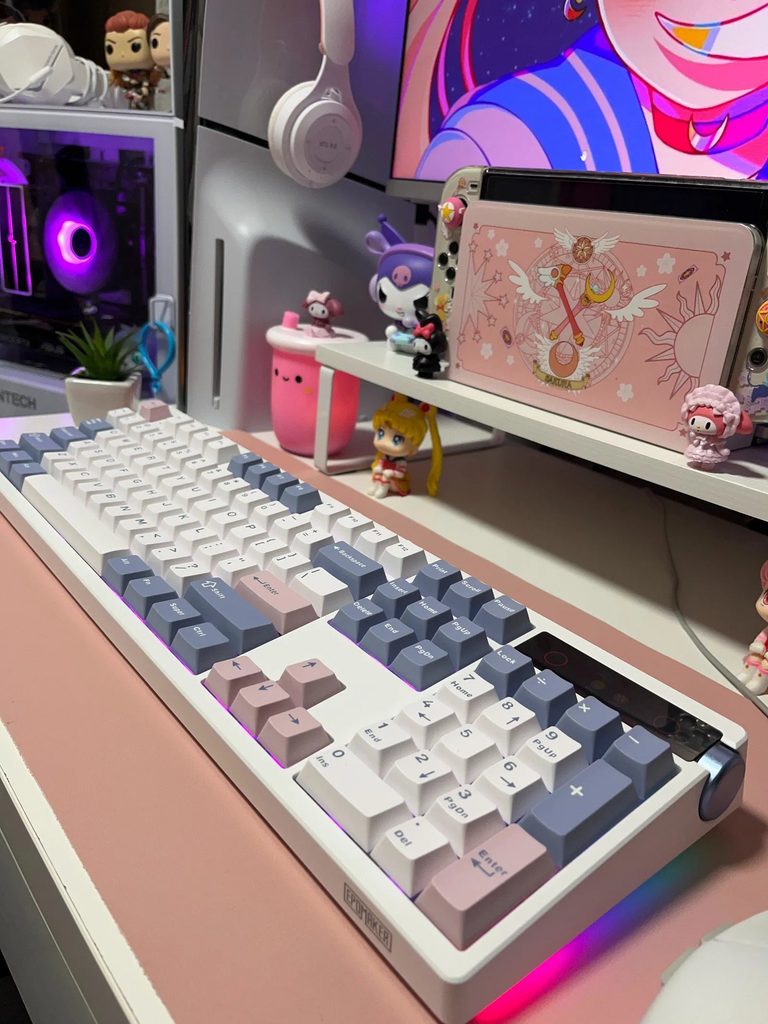
My keyboard came with the Creamy Jade switches, and the overall day-to-day performance is similar to the LUNA Grid98 I previously used, which had Jade Peak switches.
I actually thought they were the same switches, but when I started using the keyboard, it felt slightly different. The actuation force is a bit over 10% higher (45±5gf vs 40±5gf), with a fractionally longer total travel.
The overall experience is very similar, but you can tell that the keys require a bit more force.
The stabilisers are pre-lubed and well-tuned, so the spacebar, Enter and Shift keys feel consistent with the rest of the keyboard. The gasket mount and flex-cut plate give a slightly softer bottom-out than a tray-mounted board, and I have used the TH108 PRO for long writing sessions without any discomfort.
The case does flex if you look for it. Pressing hard in the middle of the keyboard, especially with the feet extended, makes the deck move, and twisting the case shows some give. You have to press much harder than you would when typing to notice it, and with the keyboard flat, it is even less obvious. For a plastic keyboard at this price, I think it is acceptable.
For gaming, the TH108 PRO is fine for casual use. It has N-key rollover, a Win lock and 1,000 Hz polling over wired and 2.4 GHz connections. However, there is no rapid trigger, no adjustable actuation and no high polling rate option. Many gaming keyboards now use Hall Effect switches and support polling rates of up to 8,000 Hz, so if you play competitive shooters, EPOMAKER’s own HE series would be a better fit. For mixed work and gaming, most people will not notice the difference.
Typing Sound and Acoustics
The typing sound is pleasant and relatively office-friendly thanks to the “creamy thock” switches. That seemed like an odd term when I read it, but it does seem accurate to the overall sound of these. The thock is subdued with a low tone in comparison to many keyboards.
The five layers of dampening, made up of PORON sandwich foam, an IXPE switch pad, a PET sound-enhancement layer, EPDM switch socket foam and silicone in the base, remove most of the hollow sound you get from cheaper plastic keyboards. There is no noticeable ping from the springs or the case, and the stabilisers do not rattle.
The spacebar, Enter and Shift keys have a slightly different pitch from the alphas, which is normal, but they sound clean. EPOMAKER lists the Creamy Jade as its louder option, and it is audible in a quiet room. If you share an office or regularly type on video calls, the Sea Salt Silent V2 version will be the better choice.
Price and Alternative Options
The EPOMAKER TH108 PRO is available from Amazon for £100, or if you buy directly from epomaker.com, it is available for $101.04, which works out to around £76.50. That is around the same price as the PIIFOX LUNA Grid98, which I reviewed a few weeks ago, and I am inclined to say that I prefer the EPOMAKER.
There are two things to consider before buying direct. Standard shipping takes two to three weeks, and EPOMAKER’s one-year warranty only applies to keyboards bought from its own store. If you buy from Amazon or another retailer, warranty claims go through that seller instead.
Something like the Keychron V5 Max uses the QMK driver and has a similar overall specification with tri-mode connectivity, RGB and hot-swappable keys, but it will set you back £114.99. It does have the advantage of coming with a proper UK ISO layout, three Gateron Jupiter switch options, official VIA support and a UK warehouse for warranty claims. The battery is smaller at 4000mAh, and there is no screen, but for a lot of UK buyers the ISO layout alone justifies the extra £23.
The Ajazz AK980 is the closer match on features, with a 98 key layout, a TFT display, a knob and a considerably larger battery, and it turns up on UK marketplaces at roughly similar money to the PIIFOX. Build quality is a step below, and the software is proprietary rather than QMK-based, so which you prefer depends on whether you value the configuration route or the battery figure more.
Overall
Overall, I think the EPOMAKER TH108 PRO is a superb keyboard for anyone who likes a 100% keyboard.
The main issue is that there are no UK layout options. The ANSI option is the easiest to get along with if you are not going to replace the keycaps, as there are only a few minor differences, so if you can semi-touch type, you probably will not have any issues.
The ISO-DE option has a lot of differences from the UK layout, so it is harder to use if you cannot touch type. I would say I am reasonably good, and even I got a few mix-ups with symbols. However, this is the preferable choice if you plan to swap the keycaps, as UK ISO sets are easier to find and cheaper.
UK ANSI keycaps are possible to find, with some sellers doing sets with both layouts. If you are happy with all one colour, this Etsy seller has UK ANSI keycaps for £29.
Most affordable mechanical keyboards on Amazon are US ANSI, since that is a much larger market, so the fact that you have a choice of ANSI and ISO is good.
I also prefer the Jade Peak switches on the LUNA Grid98, but it is a fractional difference I would not have noticed if I had not come straight from that keyboard. The hot-swappable switches make this an easy fix, and switches are surprisingly affordable.
The smart display is a nice extra rather than a reason to buy, and the advice to only charge from a computer USB port is a little odd. Finally, while it did not bother me in the slightest, some people may prefer a different design for the RGB.
While the above does seem like a lot of criticism, I think it is minor, and the layout issue is common in the UK, with most affordable brands having the same problem.
All the other aspects of this keyboard are great; the overall build quality and feature set are superb for the price point. I like the look; it is quite utilitarian, and the 100% size complements it.
Overall, I like this keyboard enough that it has now become my full-time keyboard.
EPOMAKER TH108PRO Mechanical Keyboard Review
-
Overall - 90%90%
Summary
The EPOMAKER TH108 PRO offers a comfortable typing experience, subdued acoustics and a comprehensive feature set for £100. I particularly like the full-size layout, smooth switches and dedicated volume knob, and it has become my everyday keyboard. The lack of a UK layout is the main drawback, while the display adds limited practical value. Nevertheless, I think it represents very good value for anyone wanting a full-size mechanical keyboard for work and occasional gaming.
Pros
- Smooth switches make typing comfortable.
- Sound dampening keeps acoustics subdued.
- Hot-swappable switches allow easy customisation.
- Three connection modes provide flexibility.
- Dedicated volume knob proves useful.
Cons
- No UK layout comes standard.
- Display viewing angles are limited.
- Overlapping configuration tools cause confusion.
- Full-size footprint needs desk space.

I am James, a UK-based tech enthusiast and the Editor and Owner of Mighty Gadget, which I’ve proudly run since 2007. Passionate about all things technology, my expertise spans from computers and networking to mobile, wearables, and smart home devices.
As a fitness fanatic who loves running and cycling, I also have a keen interest in fitness-related technology, and I take every opportunity to cover this niche on my blog. My diverse interests allow me to bring a unique perspective to tech blogging, merging lifestyle, fitness, and the latest tech trends.
In my academic pursuits, I earned a BSc in Information Systems Design from UCLAN, before advancing my learning with a Master’s Degree in Computing.
I’m proud to share that Vuelio has consistently ranked Mighty Gadget as one of the top technology blogs in the UK. With my dedication to technology and drive to share my insights, I aim to continue providing my readers with engaging and informative content.
I work directly with the companies he reviews products for or their chosen PR agency.
For Social Media, you can find me on:

![The best passive speakers for a PC for use with an amplifier & DAC [vs active computer speakers]](https://mightygadget.com/wp-content/uploads/2026/04/The-best-passive-speakers-for-the-PC-768x461.jpg "The best passive speakers for a PC for use with an amplifier & DAC [vs active computer speakers] 25")