PIIFOX LUNA Grid98 Mechanical Keyboard Review
I reviewed the excellent PIIFOX LUNA Muse65 Pro Mechanical Keyboard a couple of weeks ago. Since I prefer larger keyboards with a number pad, PIIFOX also sent me the LUNA Grid98.
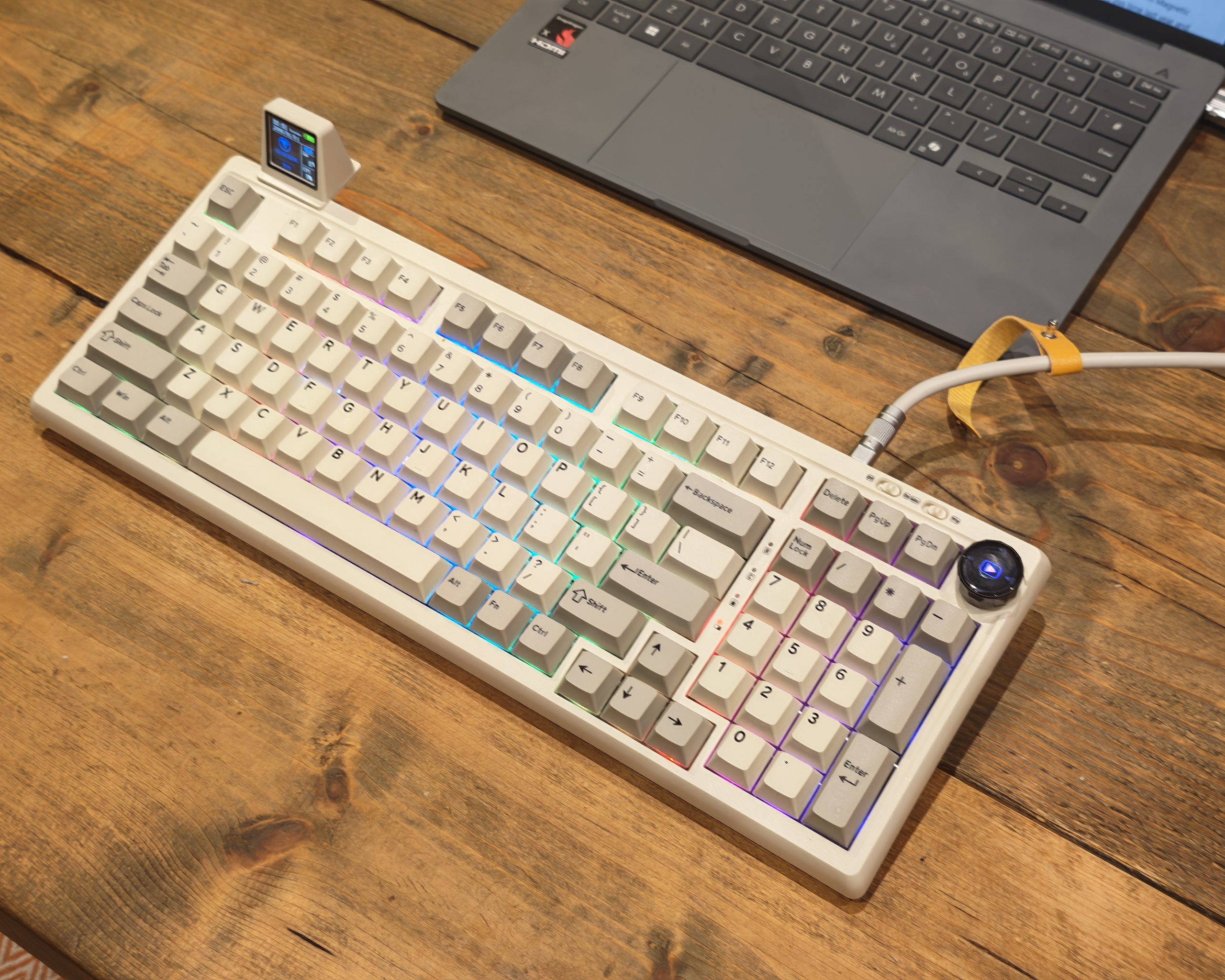
These are very similar keyboards, which use the same multi-layer sound dampening design, switch options, tri-mode connectivity, keycaps and old school IBM styling. The main difference is that this is a larger keyboard with a 98 key layout, including the number pad.
The Grid98 also has a dedicated RGB media knob, which is fixed in place rather than being one of the hot-swappable modules used on the Muse65, and you can get it with a plug-in smart screen. Unlike the Muse65, this does not take up the space of existing keys. Instead there is a small USB-C port that the display plugs into, and it sticks out of the back of the keyboard like an old fashioned CRT monitor. This RGB display can show a variety of information.
Because it is a bigger keyboard, it also includes a larger 5000mAh battery.
PIIFOX remains a fairly obscure brand in the UK. There is no UK distributor, so you buy directly from the company and take on the import side yourself. That is worth keeping in mind before you read the pricing section, because the sticker price and the delivered price are not the same thing.
Specification
| Category | Specification | Details |
| Basic Info | Model | PIIFOX LUNA Grid98 |
| Layout | 96% | |
| Number of Keys | 98 | |
| Switch Type | Mechanical | |
| Screen | Yes | |
| Knob | Yes | |
| Language | ANSI | |
| Switch Feel | Linear, Tactile, Silent | |
| Connectivity & Control | Battery | 5000mAh |
| Connectivity | Tri-mode | |
| Compatibility | Windows / macOS / Android | |
| Hot-Swappable | Yes | |
| RGB | South-facing RGB | |
| Polling Rate | 1000Hz (Wired), 1000Hz (2.4GHz), 500Hz (Bluetooth) | |
| Latency | 0.125ms | |
| Anti-Ghosting | Yes | |
| Structure & Materials | Case Material | ABS Plastic |
| Plate Material | PC | |
| Flex-Cut | Yes | |
| Stabilisers | Plate-mounted stabilisers | |
| Mounting Structure | Gasket Mount | |
| Sound Dampening | Multi-layer sound dampening structure | |
| Keycap Profile | Cherry Profile | |
| Keycap Material | PBT | |
| Keycap Manufacturing Process | Double-shot PBT | |
| Size & Ergonomics | Height (Spacebar Side) | 21.97mm |
| Height (ESC Side) | 32.28mm | |
| Kickstand | Yes | |
| Typing Angle | 3-level adjustment | |
| Keyboard Dimensions | 440 x 205 x 62mm +/- 4mm | |
| Keyboard Weight | 1.02kg | |
| Gaming Features | Adjustable Actuation | No |
| Trigger Precision | No | |
| Rapid Trigger | No | |
| Per-key Adjustable Actuation | No | |
| SOCD / Snap Key | No | |
| Dynamic Keystroke (DKS) | No | |
| Mod-Tap | No | |
| Toggle Key | No | |
| Dead Zone | No | |
| Macro Support | Yes | |
| Onboard Memory | Yes |
Worth flagging up front is the gaming feature list, which is a row of no entries. There is no adjustable actuation, no rapid trigger, no SOCD handling and no dynamic keystroke support. This is a mechanical keyboard rather than a Hall effect board, so if you want those features you need to look at magnetic switch boards such as the PIIFOX Defender68 or the Varmilo Muse65 HE. What you do get is macro support and onboard memory, so a remapped layout travels with the keyboard between machines.
Switch Options
| Specification | PIIFOX Jade Peak | PIIFOX Jade Spike | PIIFOX Jade Ripple |
| Switch type | Mechanical | Mechanical | Mechanical |
| Switch feel | Linear | Tactile | Tactile |
| Operating force | 40 +/-5 gf | 47 +/-10 gf | 47 +/-5 gf |
| Bottom-out force | 48 gf | 60 gf | 55 gf |
| Pre-travel | 2.0 +/-0.5 mm | 2.0 +/-0.6 mm | 2.0 +/-0.5 mm |
| Total travel | 3.5 +/-0.3 mm | 3.6 +/-0.3 mm | 3.8 +/-0.3 mm |
| Sound profile | Thocky | Thocky | Quiet |
| Factory lubricated | Yes | Yes | Yes |
| Pin configuration | 5-pin | 5-pin | 5-pin |
| Stem material | POM | POM | POM |
| Top housing material | Polycarbonate (PC) | Polycarbonate (PC) | Polycarbonate (PC) |
| Bottom housing material | Nylon | Nylon | Nylon |
| Spring length | 20 mm | 22 mm | 15 mm |
| Lighting support | Yes | Yes | Yes |
| Rated lifespan | Up to 60 million keystrokes | Up to 60 million keystrokes | Up to 60 million keystrokes |
Jade Peak is the lightest of the three at 40 gf operating force, which puts it in the same territory as a Gateron Red or a Cherry MX Red, and it bottoms out at 48 gf. Jade Spike is the tactile option at 47 gf with a heavier 60 gf bottom out, so it takes noticeably more effort per keystroke. Jade Ripple sits at 47 gf but has the heaviest bottom out at 55 gf and the longest travel at 3.8 mm.
There is a small inconsistency in PIIFOX’s own materials worth pointing out. The Jade Ripple is described as tactile in the specification table but listed as silent on the product page, with a quiet sound profile. The sensible reading is that it is a dampened tactile switch, so it should give you feedback without the noise. All three are factory lubricated, use POM stems in polycarbonate top housings, and are 5 pin, so they drop straight into the hot swap sockets without any wobble.
The 60 million keystroke rating is on the modest side. Gateron and Cherry typically quote 100 million for their current switches. In practice, hot-swap sockets make that number close to academic, because replacing a failed switch costs a few pence and takes about ten seconds.
Design
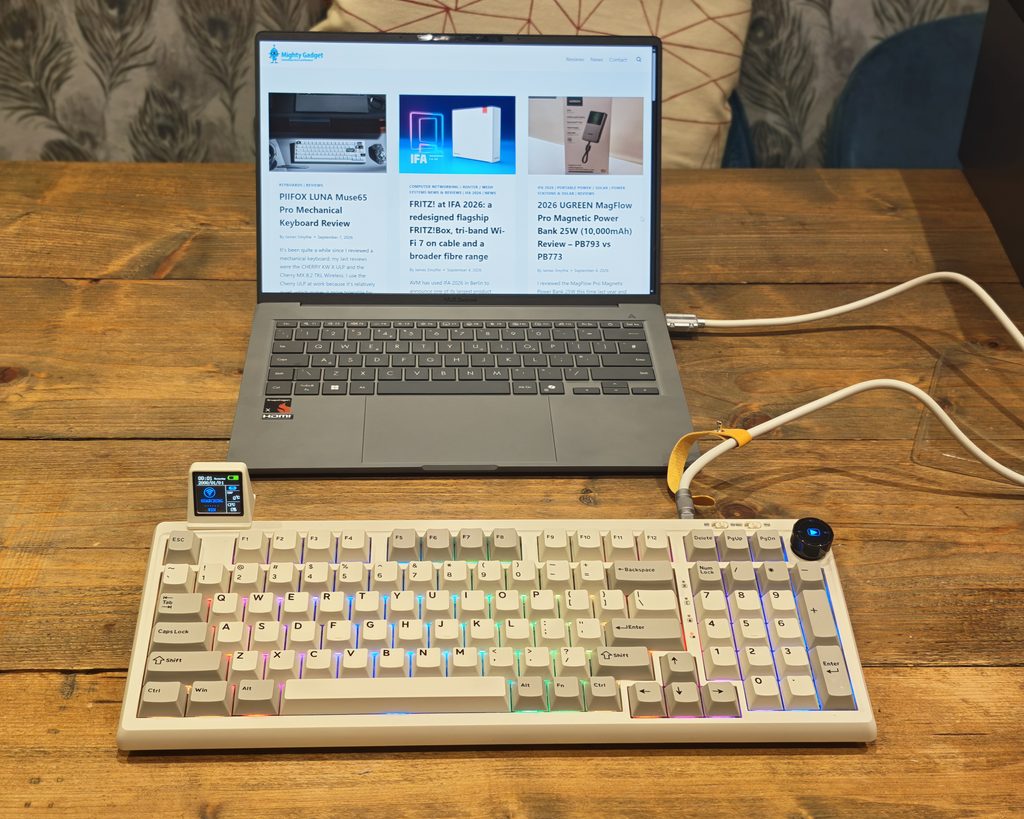
The Grid98 uses a 96 percent layout, sometimes called an 1800 layout, which squeezes a full number pad, arrow cluster and Delete, Page Up and Page Down column into a footprint barely wider than a tenkeyless board. At 440 x 205 x 62mm and 1.02kg it is a noticeably bigger keyboard than the Muse65 Pro, but the trade-off is that almost nothing has been moved onto a function layer.
The case is ABS plastic in the same off-white and grey colourway, and the fit and finish is the same as the smaller board. There is no creak when you pick it up by a corner and the case halves line up evenly. It is a gasket mount with a flex-cut polycarbonate plate, so the typing surface has a small amount of give across the middle rather than the flat, hollow feel of a cheap tray mount board.
The kickstand offers three typing angles rather than the usual two, and the board sits at 21.97mm at the spacebar and 32.28mm at the Esc row. That is a fairly steep front to back rake by modern standards, so a wrist rest is worth considering.
The connectivity sliders sit along the top edge rather than on the side, one for off, 2.4GHz and Bluetooth, and a second for Mac and Windows layouts. Having them on the top face is more convenient than fishing around the left edge, though it does mean they are easy to nudge when you move the board.
What You Get in the Box
- LUNA Grid98 Keyboard x 1
- Type-C Cable x 1
- Keycap & Switch Puller x 1
- 2.4G Dongle x 1
- Smart Screen x 1
- PIIFOX Switch x 2
- PIIFOX Keycap x 3
- User Manual x 1
The two spare switches and three translucent keycaps are the same inclusions as the Muse65 Pro. The translucent caps are effectively a sales pitch for the shine-through keycap sets, which I will come back to in the RGB section.
Hot-Swappable Keys & Keycaps
The Grid98 uses standard MX style 5 pin hot swap sockets, so you can drop in almost any third party switch without clipping the plastic legs off a 3 pin switch first. The included puller handles both keycaps and switches, and the sockets have enough grip that switches seat with a positive click rather than sitting proud of the plate.
The keycaps are Cherry profile double-shot PBT. The legends are moulded into the plastic rather than printed on top, so they will not wear shiny or fade, which is the single biggest quality difference between a board at this price and the ABS caps found on cheaper keyboards. The texture is fine grained and slightly grippy, and it has not developed any shine over several weeks of use.
The layout is ANSI only, which is the recurring problem with buying direct from a Chinese brand. There is no UK ISO option, so you lose the tall Enter key and the pound sign is not where the legend says it is unless you switch to a US keyboard layout in Windows. I am used to this from other imports, but it is a genuine annoyance if you type a lot of currency figures, as I do. Replacement keycap sets are $33, which is about £24.40, and none of the sets on offer are ISO compatible either.
Smart Screen and Media Keys
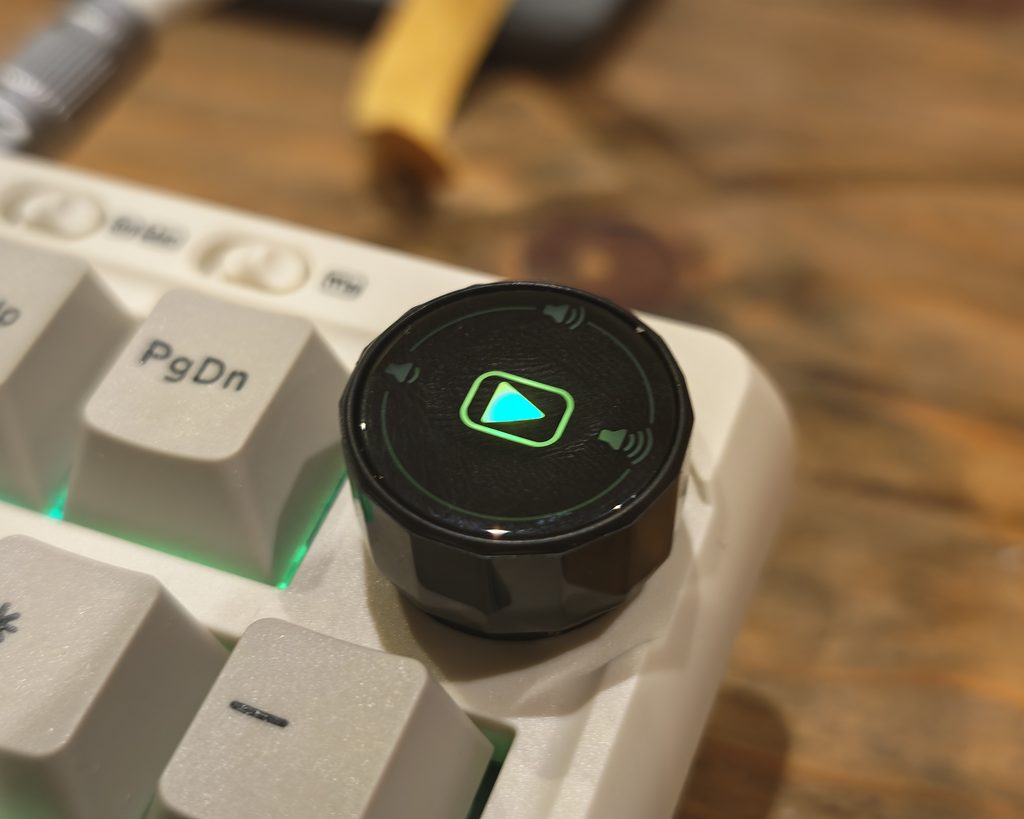
One of the main differences with this keyboard is the smart screen and media keys.
I am a big fan of media keys, as I always have music playing and like quick, easy control over volume and pause and play. The knob on the Grid98 is fixed in place at the top right corner rather than being a swappable module, and it is a better implementation for it. It has a lit ring around the top face, defined detents when you turn it, and unlike the Muse65 knob it can be pressed, so play and pause works without reaching for a modifier layer.
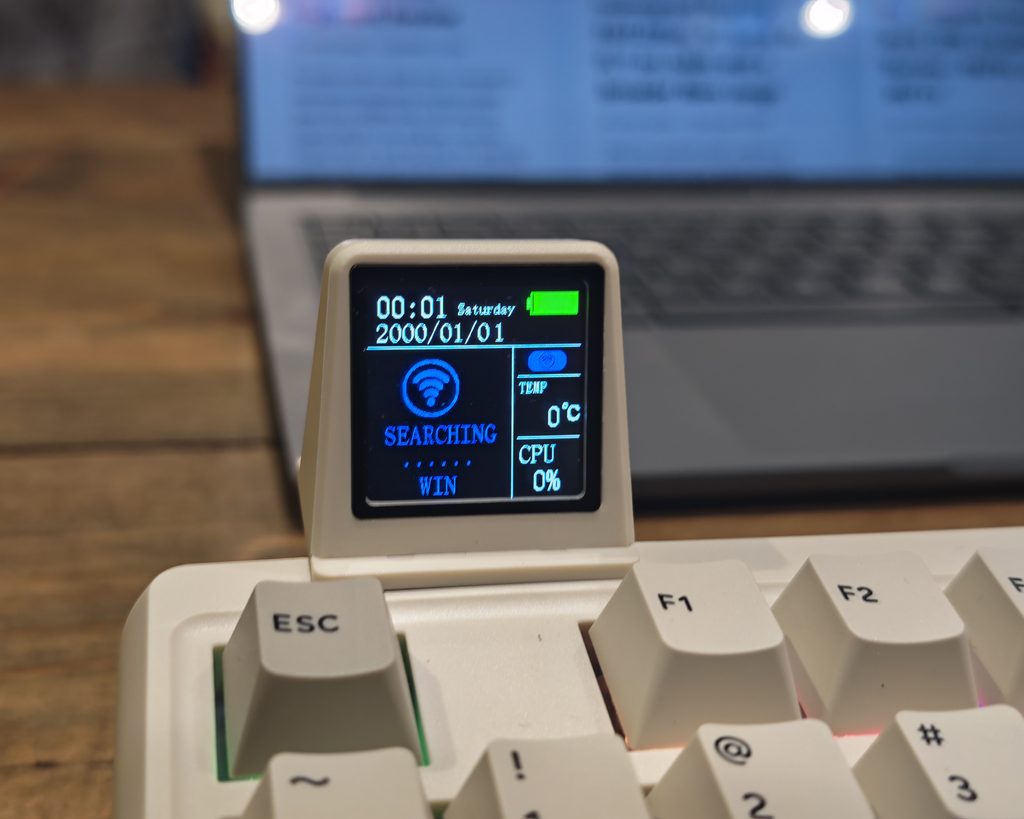
The smart screen is more interesting. It slots into the recess where the wireless dongle would otherwise live, using a small USB-C connector, and then hangs off the back edge of the board. You need to be quite careful with it. I knocked it while moving the keyboard around and bent the USB port slightly, which is not something you can do to the Muse65 module because that one drops into a switch socket and sits flush.
The display itself is more functional than the one on the Muse65 because it shows more data at once. It gives you the time, the date, battery level, connection mode, system temperature and CPU usage on a single screen, and you can upload your own graphics through the web configurator.
I liked the concept of the smart display at first, but after a week or so it did feel a bit of a gimmick. The information it shows is either already on your monitor or not worth glancing down for, and it needs the driver installed on the host machine to sync the clock and pull the CPU and temperature figures. Unplug the keyboard, move it to another computer, and the clock resets to 2000/01/01 until the driver catches up. It is only a 10 dollar difference, so it is worth trying out, but I would not call it the reason to buy this board.
QMK Driver / Web UI Customisation
The web customisation is the same as the Muse65, which uses the QMK Driver and is then managed via https://qmk.top/.
The main difference is the option to customise the smart display and upload graphics. You also need to install the driver so that the smart display actually works properly and the time is synced correctly.
The browser based approach has real advantages. There is no bloated utility sitting in your system tray, nothing running at startup and nothing phoning home in the background. Remapping keys, building macros, setting up layers and configuring lighting all happen in the browser, and the settings are written to the onboard memory so they follow the keyboard.
My reservation is the same one I had with the Muse65 Pro. This is a third party portal rather than something PIIFOX control, and it is not the official QMK Configurator or VIA either. If that site disappears, or changes hands, you lose the only supported way of reconfiguring the board. Publishing a VIA compatible JSON file as a fallback would cost PIIFOX nothing and would remove the risk entirely. As it stands, this is the part of the package I would most like to see changed.
Connectivity and Battery Life
As I do not have one of these perfectly organised gaming desks, I tend to favour using wired connectivity. This keyboard comes with a more visually impressive USB cable than the Muse65, a thick braided cable with a metal aviator style connector partway along, which is the sort of thing you normally have to buy separately.
Tri-mode covers Bluetooth 5.0 with three device slots, 2.4GHz through the bundled dongle and wired USB-C. Polling is 1000Hz on both wired and 2.4GHz, dropping to 500Hz on Bluetooth. PIIFOX quote 0.125ms latency, which does not square with a 1000Hz polling rate, since 1000Hz gives you a 1ms report interval. I would treat that figure as marketing rather than measurement. In use, neither wired nor 2.4GHz produced anything I could perceive as lag, and Bluetooth was fine for typing but I would not choose it for gaming.
The 5000mAh battery is a 25 percent increase over the Muse65 Pro, which matters because the Grid98 has 31 more RGB LEDs to drive. PIIFOX quote weeks of use on a charge, and with the lighting off that is accurate. With RGB at roughly half brightness I was charging about once a fortnight on mixed wired and wireless use. Turn the lighting up and that drops sharply, which is true of every RGB board.
The warranty position is unchanged and still disappointing. PIIFOX offer 12 months on the keyboard but only 3 months on the battery, and the battery is the component most likely to degrade. On a board you might reasonably expect to keep for five years, that is the wrong way round.
RGB Lighting
The Grid98 has south-facing per key RGB with a long list of preset effects, all adjustable for brightness and speed either from the keyboard or through the web configurator. The colours are bright and well saturated, and because the case is off-white the light bleeds around the edges of the keycaps and reflects off the plate, which looks better than it sounds.
The problem is the same as on the Muse65 Pro. The standard PBT keycaps are not shine-through, so the legends stay dark and all you see is the glow escaping around the sides of each cap. On a board with a number pad the effect is at least larger and more even, but it is still the weakest part of the package. The three translucent keycaps in the box show you what you are missing, and getting the full effect means buying a shine-through set at $33, which pushes the delivered cost up meaningfully.
If RGB matters to you, budget for the keycaps at the point of purchase rather than treating them as an optional extra.
Performance
As this is essentially the same build with identical switches, the overall performance is essentially the same as the Muse65 Pro, but with more keys.
I prefer the additional keys as I write a lot and do not like having to use key combinations and shortcuts for basic navigation. The trend in mechanical keyboards has been towards fewer keys for a while now, and I understand the appeal of the desk space saving, but for anything involving spreadsheets, remote desktop sessions or long form writing the 96 percent layout is simply less friction. The function row is present, the arrow keys are separate, and Home, End, Page Up and Page Down do not need a modifier.
The number pad is the part I missed most on the Muse65 Pro. I do a lot of data entry for site analytics and household energy figures, and going back to a full pad after a few weeks on a 68 percent board was a relief. The trade-off is that your mouse hand sits further right, which is worth thinking about if you have had wrist trouble. On a 440mm wide board your shoulder is doing a bit more work than it would with a tenkeyless.
The Jade Peak switches at 40 gf encourage a lighter typing style once you stop bottoming out on every keystroke. Over several weeks of heavy use I had no accidental double presses and no chattering. Typing speed settled at roughly where it does on my other linear boards, so around 85 to 90 words per minute on familiar text, which is a little faster than I manage on tactile switches.
For gaming, it is competent rather than specialised. N-key rollover and anti-ghosting are present, and 1000Hz polling on wired and 2.4GHz is what you want. What is absent is everything the current crop of Hall effect boards offers, so no adjustable actuation point, no rapid trigger and no SOCD cleaning. For anything other than competitive shooters that is unlikely to matter.
Typing Sound and Acoustics
As this has the same Jade Peak switches as the Muse65 Pro, the typing sound and acoustics are near identical.
The internal construction is the same multi-layer arrangement. From the top down there is a flex-cut polycarbonate plate, a Poron switch pad, an IXPE switch pad, a PET sound damping sheet, switch seat foam and bottom case foam. That amount of material inside an ABS case does the job it is meant to do, which is to kill the hollow, metallic ping that gives cheap mechanical keyboards away. Bottoming out produces a deep, muted note rather than a sharp clack.
The larger case does change the character slightly. There is more air inside a 440mm board than a 352mm one, and the Grid98 sounds a touch deeper and marginally louder than the Muse65 Pro, particularly across the number pad where there is less foam coverage relative to the case volume. It is a small difference and I only noticed it because I had both boards on the desk at the same time.
The stabilisers remain the weak point. The spacebar, both Enter keys and the number pad plus key have a slightly rattlier note than the alphas, because these are plate-mounted stabilisers rather than lubed screw-in units. On a 98 key board there are more stabilised keys to go wrong, so the issue is a little more noticeable here than on the smaller model. It is not bad enough to need fixing, but a lubed screw-in stabiliser would have been the finishing touch, and it is the one change that would move this board from good to very good acoustically.
Price and Alternative Options
The PIIFOX LUNA Grid98 is priced at $97.90 with Jade Peak switches without the smart screen, versus $96.40 for the Muse65 Pro. Using Jade Spike switches, the price increases to $98.90. Jade Ripple takes the price to $107.90. The smart screen then adds another $10.
| Configuration | Price (USD) | Approximate price (GBP) |
| Jade Peak, no smart screen | $97.90 | about £72 |
| Jade Spike, no smart screen | $98.90 | about £73 |
| Jade Ripple, no smart screen | $107.90 | about £80 |
| Smart screen option | Add $10 | Add about £7 |
| My review unit: Jade Peak plus smart screen, delivered | $123.80 including $15.90 shipping | £91.60 |
Keycap sets cost $33 and extra sets of mechanical switches cost $5.25, $6.65 or $9.45 depending on type, so about £24.40 for keycaps and £3.90 to £7 for switches.
For me, I got the model with Jade Peak switches and the smart display. This cost $107.90 plus $15.90 shipping, totalling $123.80, which works out at £91.60. Delivery took a little under two weeks. Import duty is your responsibility, and returns go back to the manufacturer rather than to a UK address, which is the practical cost of buying direct.
Something like the Keychron V5 Max uses the QMK driver and has a similar overall specification with tri-mode connectivity, RGB and hot-swappable keys, but it will set you back £114.99. It does have the advantage of coming with a proper UK ISO layout, three Gateron Jupiter switch options, official VIA support and a UK warehouse for warranty claims. The battery is smaller at 4000mAh and there is no screen, but for a lot of UK buyers the ISO layout alone justifies the extra £23.
The Ajazz AK980 is the closer match on features, with a 98 key layout, a TFT display, a knob and a considerably larger battery, and it turns up on UK marketplaces at roughly similar money to the PIIFOX. Build quality is a step below and the software is proprietary rather than QMK based, so which you prefer depends on whether you value the configuration route or the battery figure more.
Epomaker also cover this size bracket from around £60, but at that price you generally choose between the foam layering, the wireless and the display rather than getting all three.
Strengths and Weaknesses
Strengths:
- Full 96 percent layout with number pad in a footprint close to a tenkeyless
- Multi-layer foam and flex-cut plate give acoustics well above the price
- Pressable, lit media knob that is better implemented than the Muse65 module
- 5000mAh battery gives a fortnight or more between charges with moderate RGB
- Double-shot PBT keycaps and 5 pin hot-swap sockets
- QMK based configuration with onboard memory and no resident software
Weaknesses:
- Smart screen is fragile where it protrudes from the rear and is of limited daily use
- No ISO layout option, and no ISO keycap sets either
- RGB is largely wasted behind non shine-through keycaps
- Plate-mounted stabilisers rattle slightly on the larger keys
- Configuration depends on a third party web portal rather than official QMK or VIA
- 3 month battery warranty is too short
Overall
Unsurprisingly, my overall experience of the PIIFOX LUNA Grid98 is very similar to the Muse65 Pro.
The keyboard has the same construction, switches and keycaps. The only real differences are the keyboard size, with an increased key count, and the changes to the media knob and smart screen. The knob is better here. The screen is arguably worse, because it hangs off the back and is easy to damage.
As I prefer a larger keyboard, I like this more than the Muse65 Pro, but it seems that most mechanical keyboard enthusiasts prefer the smaller compact designs nowadays. If you have already made peace with a 65 or 68 percent layout, there is nothing here that will change your mind. If, like me, you want the number pad and the function row without giving up the acoustic treatment and the hot-swap sockets, this is a well judged board.
The things holding it back are the ANSI only layout, the reliance on a third party configuration site and the short battery warranty. None of those are dealbreakers at £91.60 delivered, but all three are reasons a UK buyer might reasonably pay the extra £23 for a Keychron V5 Max and get an ISO layout with local support instead.
Overall, I can give both keyboards a strong recommendation. They are well made, have a good typing experience and a solid feature set, while being more affordable than better known brands like Keychron. The Grid98 is the one I have kept on my desk.
PIIFOX LUNA Grid98 Mechanical Keyboard Review
-
Overall - 90%90%
Summary
The PIIFOX LUNA Grid98 combines a satisfying typing experience with a practical number pad, useful media knob and flexible connectivity. I prefer its larger layout to the Muse65 Pro, and the dampened acoustics, PBT keycaps and hot-swappable switches make it an appealing option for everyday work. However, the fragile smart screen adds limited value, while the lack of a UK ISO layout, reliance on a third-party configuration website and short battery warranty temper its appeal. Despite these compromises, it is a well-built keyboard that I have enjoyed keeping on my desk.
Pros
- Satisfying typing feel and acoustics
- Practical layout with number pad
- Useful pressable media knob
- Wired, Bluetooth and 2.4GHz connectivity
- Hot-swappable switches and PBT keycaps
Cons
- No UK ISO layout
- Fragile smart screen connection

I am James, a UK-based tech enthusiast and the Editor and Owner of Mighty Gadget, which I’ve proudly run since 2007. Passionate about all things technology, my expertise spans from computers and networking to mobile, wearables, and smart home devices.
As a fitness fanatic who loves running and cycling, I also have a keen interest in fitness-related technology, and I take every opportunity to cover this niche on my blog. My diverse interests allow me to bring a unique perspective to tech blogging, merging lifestyle, fitness, and the latest tech trends.
In my academic pursuits, I earned a BSc in Information Systems Design from UCLAN, before advancing my learning with a Master’s Degree in Computing.
I’m proud to share that Vuelio has consistently ranked Mighty Gadget as one of the top technology blogs in the UK. With my dedication to technology and drive to share my insights, I aim to continue providing my readers with engaging and informative content.
I work directly with the companies he reviews products for or their chosen PR agency.
For Social Media, you can find me on:

![Nacon MG-X Review – Xbox Cloud Gaming Controller for Android Phones [Xbox Game Pass on Mobile]](https://mightygadget.com/wp-content/uploads/2026/03/Nacon-MG-X-review-1-768x432.jpg)