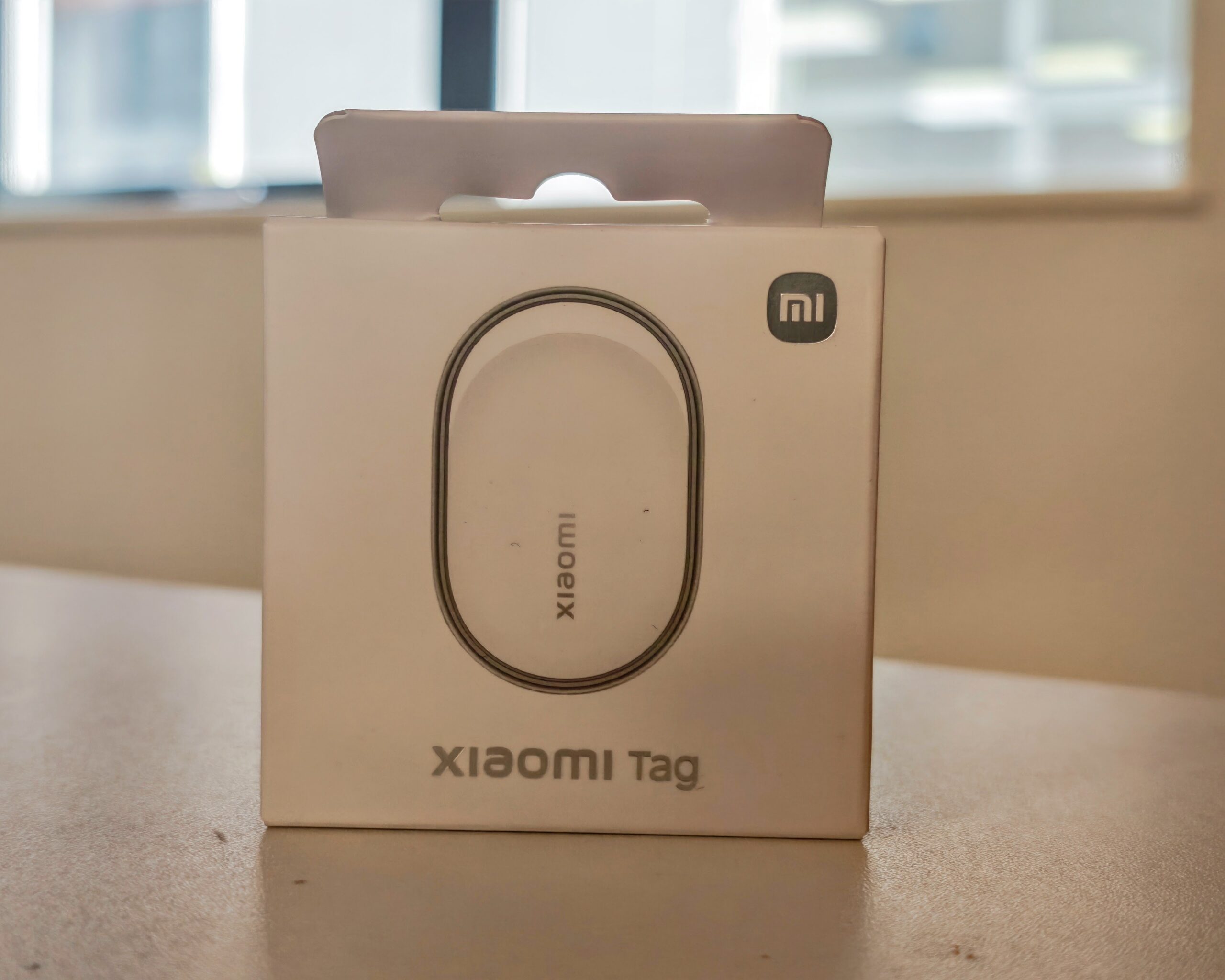
Xiaomi Tag Review vs Ugreen FineTrack Duo – Bluetooth Tracker Compatible with Apple Find My and Google Android Find Hub
Back in February, I reviewed the Ugreen FineTrack Duo, which at the time was the first Bluetooth tracker available in the UK that supported both Apple Find My and Google Find Hub. Xiaomi recently launched its own Tag, which also supports both Apple Find My and Google Find Hub. There is very little difference between the core functionality of these two trackers, with the main distinctions coming down to design and the type of battery used.
Before getting into the comparison, it is worth explaining how these trackers actually work, because the underlying networks matter far more than any individual spec. There are two separate ecosystems here. Apple’s Find My network benefits from hundreds of millions of iPhones that passively scan for nearby trackers at all times, which is why AirTags work reliably almost anywhere. Google’s Find Hub network is newer and operates on an opt-in basis, meaning the density of contributing devices is considerably lower in most regions. Crucially, these two worlds do not mix – Apple devices do not assist Android trackers, and Android devices do not assist AirTags. So the real-world performance of either the Xiaomi Tag or the Ugreen FineTrack Duo will depend heavily on which network you pair them to, and how well covered your area is.
Both the Xiaomi Tag and the Ugreen FineTrack Duo give you the choice of either network, which is one of their key selling points. You can only use one network at a time, but you can switch between them by unpairing and re-pairing the device.
Specification
| Feature | Specification |
| Product Net Weight | 10 g |
| Dust and Water Resistance | IP67 |
| Connectivity | Bluetooth BLE 5.4, NFC (Lost Mode – Apple Find My only) |
| Speaker | Built-in piezoelectric buzzer |
| Battery Type | Removable CR2032 button cell |
| Sensor | Accelerometer |
| Compatibility (Android) | Android 9+ (Google Find Hub) |
| Compatibility (Apple) | iOS/iPadOS 14.5+ (Apple Find My) |
| Package Contents (Single) | Xiaomi Tag x1, User Manual x1 |
| Package Contents (4 Pack) | Xiaomi Tag x4, User Manual x1 |
One notable omission from the spec sheet is Ultra Wideband (UWB) support, and this matters more than it might initially appear. UWB is the technology behind AirTag’s Precision Finding feature, which gives you a directional arrow and a distance readout when you are within a few metres of your lost item. Without it, you are relying solely on Bluetooth signal strength and audio alerts to home in on something nearby. That is fine for most scenarios, but it does mean the close-range experience is noticeably less guided than what you get with an AirTag.
The Ugreen FineTrack Duo shares the same UWB limitation. Its key specifications differ in a few areas: it uses a built-in rechargeable USB-C battery rather than a replaceable CR2032, it carries an 80dB speaker rating, and there is no NFC on the Ugreen. The Xiaomi Tag adds NFC, but this only functions in Lost Mode on the Apple Find My network, so it is a fairly limited addition in practice.
Design
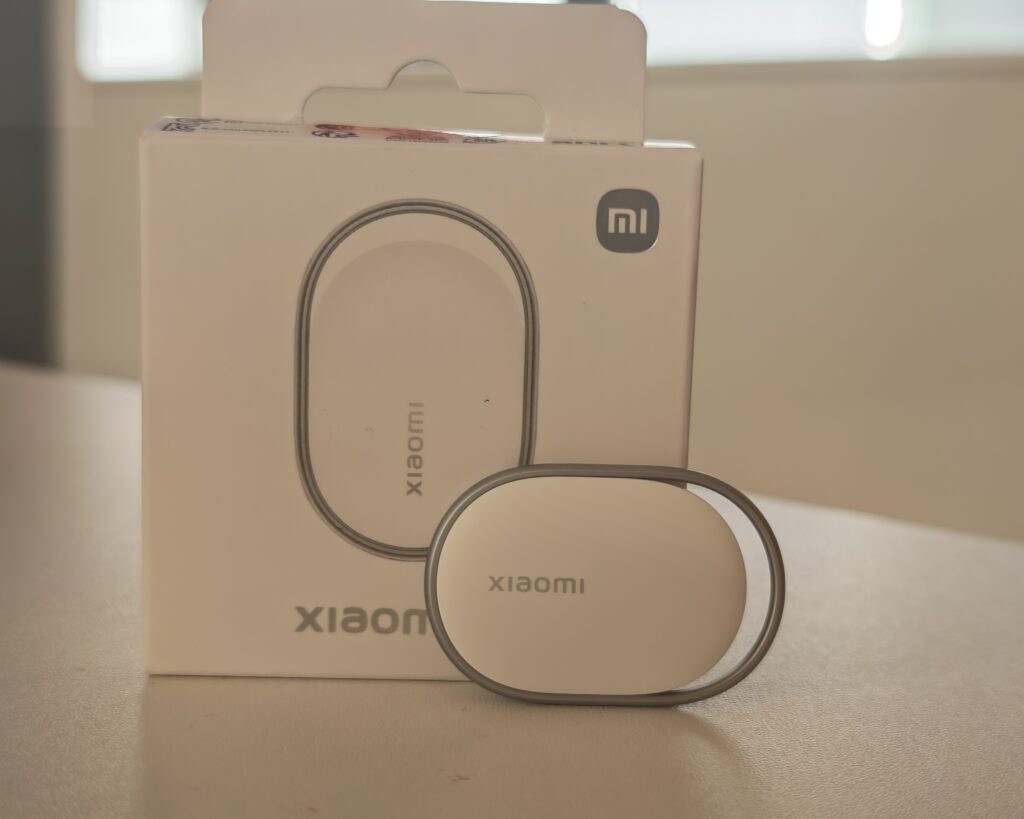
The Xiaomi Tag has a distinctive elongated shape that sets it apart from the typical circular trackers on the market. It consists of a central polycarbonate puck held within an integrated metal ring, giving it more of a premium keychain accessory appearance than most trackers manage. The metal loop means you can attach it directly to a keyring or bag strap without needing a separate case or accessory holder, which is a practical advantage over the AirTag right out of the box.
At 46.5 x 31 x 7.2 mm and just 10 grams, the Xiaomi Tag is lighter than most of its rivals. It slips easily into a wallet, pocket, or small bag without adding noticeable bulk. The IP67 rating means it can handle rain and splashes without issue, which is a reasonable level of protection for a tracker that will likely spend most of its life attached to keys or bags.
The Ugreen FineTrack Duo takes a more conventional circular form factor, which is practical and unobtrusive. It also has a keyring hole built into the design, so neither tracker requires additional accessories for everyday attachment. The Ugreen’s main design differentiator is its USB-C port for charging, protected by a rubber cover that needs to stay in place to maintain water resistance. The overall build quality on both feels solid for the price.
If aesthetics matter to you – for instance if you want something on your keys that does not look like a piece of tech equipment – the Xiaomi Tag has the edge. The metal ring construction looks considerably more refined. The Ugreen is perfectly functional but unremarkable in appearance.
Set Up
Setting up the Xiaomi Tag is straightforward. For Android, you pull out the battery tab and the tracker becomes immediately discoverable. Open the Google Find Hub app, and a pairing prompt should appear automatically within a few seconds. You can then rename the device and assign a category. The whole process takes under five minutes. For Apple Find My, you press the button on the tracker to enter pairing mode, bring it near your iPhone, and follow the steps in the Find My app under the Items tab.
One thing to be aware of is that the Xiaomi Tag is not managed through the Xiaomi Home app. Even if you own a Xiaomi phone, setup and ongoing management happens entirely through either Google Find Hub or Apple Find My. This is not a problem in practice, but it may catch some buyers off guard if they expect a Xiaomi-branded companion app.
One drawback worth flagging is the lack of anti-tampering protection. If the tracker is lost and found by someone else, they can reset it and pair it to their own device without any account-based restriction. This is a notable omission compared to AirTags, where the activation lock mechanism makes re-pairing by another person impossible without removing it from the original account first.
The Ugreen FineTrack Duo sets up in a similar way on both platforms. Some users have reported occasional pairing issues on certain Android devices, which can typically be resolved by clearing the Find Hub app cache or toggling nearby device permissions. Ugreen does not offer a dedicated companion app, which means there is no route for firmware updates or extra features beyond what the native apps provide.
Performance
I have not tested the Xiaomi Tag with an iPhone and the Apple Find My network. What I can say with confidence, based on my experience with both this tracker and the Ugreen FineTrack Duo, is that the Apple Find My network is substantially more reliable than Google’s Find Hub for long-range location updates. Apple devices have network participation enabled by default for the vast majority of users, whereas Google’s network requires opt-in. The practical result is that if you are in a smaller town or rural area – as I am – Apple’s network will give you far more frequent and accurate location updates.
I tested the Ugreen FineTrack Duo on the Android network by placing it in my partner’s car while she was at work. Despite living in a town rather than a city, I was able to identify the tracker’s location correctly during the test period. The cross-platform benefit is real: even when an Android-paired tracker is involved, any nearby Apple device running a compatible iOS version can pick up its Bluetooth signal and relay the location anonymously. This means that in most populated areas, an Android-paired tracker can still benefit from the density of Apple devices around it.
For close-range finding, both trackers rely on Bluetooth signal strength and their built-in buzzers. Neither has UWB, so there are no direction arrows or precise distance readings when you are nearby. You get a general signal strength indicator in the app and then you follow the sound. This is adequate for most situations – finding keys at home, locating a bag in a room – but it is noticeably less precise than the AirTag experience on a UWB-capable iPhone.
The Xiaomi Tag’s buzzer is described by Xiaomi as a piezoelectric buzzer, and it produces a clear enough alert to be heard through a bag or across a room. It is not as loud as the Chipolo Pop, which advertises a 120dB output, but it is sufficient for everyday use. The Ugreen FineTrack Duo’s 80dB speaker performs similarly.
Neither tracker supports location history, which means you can only see where the device currently is (or where it was last detected), not a trail of where it has been. If you want to use a tracker in a vehicle for monitoring purposes, this is a limitation to be aware of. For general item tracking – keys, bags, luggage – it is not a problem.
Both trackers support separation alerts, lost mode, location sharing with contacts (useful for sharing luggage location with airlines), and unwanted tracking notifications on both Find Hub and Find My.
Battery
I obviously have not had the Xiaomi Tag long enough to test battery longevity properly. Xiaomi states the battery life is over one year, and that figure is based on four searches per day. In practice, a CR2032 battery in a low-power Bluetooth device used less actively than that could plausibly last considerably longer. The battery sits in a removable slide-out tray, which makes replacement simple when the time comes.
The Ugreen FineTrack Duo takes a different approach with a built-in rechargeable USB-C battery, also claiming up to 12 months between charges. I personally prefer USB-C charging over hunting for coin cell batteries, and having the same cable serve your tracker as your phone or laptop is genuinely convenient. However, there is a real-world caveat: trackers with built-in lithium batteries cannot be placed in checked luggage on most airlines due to aviation regulations. If you intend to track a suitcase in the hold, you need a tracker with a removable CR2032 battery, which means the Xiaomi Tag is the better choice for that specific use case.
The Ugreen FineTrack Duo’s 12-month claim is notably shorter than some non-rechargeable alternatives – the Tile Mate states three years and the Ugreen FineTrack Slim Wallet claims five years – but it is comparable to other trackers using replaceable CR2032 cells, including the AirTag second generation. Both approaches have their merits, and the right choice depends on how you intend to use the tracker.
Price and Alternative Options
The Xiaomi Tag is available as a single unit for £12.99 or a four-pack for £44.99. At that price, it is one of the most affordable dual-network trackers you can buy in the UK right now.
The Ugreen FineTrack Duo is the most direct alternative. The four-pack has an RRP of £39.99 but has been available on Amazon for around £24-30 at the time of writing, making it cheaper per unit at the discounted price than the Xiaomi four-pack. There are single-ecosystem Ugreen variants available too: the Apple-only model sits at around £18-20 and the Android variant at around £28.
The Chipolo Pop is the other dual-network option on the market and costs around £30 for a single unit or £90 for a four-pack. It does offer some advantages: a 120dB speaker, a stated 300ft Bluetooth range, IP55 water resistance, and a companion app with additional features like reverse phone finding. But at that price per unit, it is not a serious contender when the Xiaomi and Ugreen alternatives exist.
A four-pack of Apple AirTags costs around £70. For iPhone users who are fully committed to the Apple ecosystem and want the best possible tracking experience, the AirTag remains the logical choice thanks to UWB Precision Finding and the unmatched density of the Find My network. The second-generation AirTag also adds a slightly louder speaker and longer-range Bluetooth compared to the original. But AirTags do nothing for Android users.
The Samsung Galaxy SmartTag2 four-pack sits at around £48. Like the AirTag, it benefits from a mature and well-populated network – Samsung’s SmartThings – and offers up to two years of battery life in power-saving mode. But it is locked to Samsung Galaxy devices, which makes it a non-starter if you own a different Android phone.
Tile’s Mate four-pack comes in at around £65 and the Mate Pro at around £80. Tile works across both platforms but relies on its own proprietary network, which in my experience provides weaker coverage than either the Apple or Google native networks in most UK locations. At that price, there is little reason to choose Tile over the alternatives listed here.
For both the Xiaomi and Ugreen trackers, you can find unbranded alternatives on Amazon at even lower prices. I would not recommend going down that route. Both the Xiaomi Tag and the Ugreen FineTrack Duo are already cheap enough that the savings on a no-name alternative are minimal, and with unknown brands you have no real assurance of firmware stability, network certification, or build quality.
Overall
Functionally, the Xiaomi Tag and the Ugreen FineTrack Duo offer almost identical tracking experiences. Both support Apple Find My and Google Find Hub, both lack UWB, both rely on Bluetooth signal strength and audio alerts for close-range finding, and both perform well for everyday item tracking. The core differences come down to design, battery type, and price.
The Xiaomi Tag is more attractive and better suited to use cases where appearance matters, such as on a keychain. The integrated metal ring is a practical touch that removes the need for any additional accessory. The removable CR2032 battery is also the right choice if you plan to track checked luggage on flights.
The Ugreen FineTrack Duo is more practical in day-to-day terms, particularly if you appreciate USB-C charging and want to avoid replacing coin cell batteries. When the Ugreen four-pack is at its discounted Amazon price, it undercuts the Xiaomi four-pack meaningfully, making it the better value for anyone buying multiple units.
For Android users outside of the Samsung ecosystem, both are strong options and represent some of the best value available in this product category right now. The dual-network compatibility is genuinely useful for mixed households, for people who switch phone platforms when upgrading, or simply as future-proofing against changing your phone brand.
For Apple users, the AirTag remains the better tracker. The UWB Precision Finding feature alone is a meaningful practical advantage, and the Find My network density is unmatched. That said, if you are looking for a more affordable entry into the Find My ecosystem, either of these dual-network options can work with Apple’s network at a fraction of the AirTag price, with the trade-off being the loss of precision finding.
Neither tracker is perfect. The lack of anti-tampering protection on the Xiaomi Tag is a missed feature, and the absence of a companion app on either device limits customisation. Google’s Find Hub network, while improving, is still some way behind Apple’s in terms of coverage reliability in less densely populated areas.
Both are superb options for Android users. The Xiaomi is arguably the more attractive product and may be better suited for everyday carry on keys. The Ugreen is more affordable at its discounted price, and I find the USB-C charging more convenient. Either is a solid choice.
Xiaomi Tag Review
-
Overall - 80%80%
Summary
The Xiaomi Tag and Ugreen FineTrack Duo deliver broadly the same core experience, with dual-network support being the real differentiator in this category rather than any individual feature. In practice, your experience will be dictated far more by the strength of the underlying network than the tracker itself. For most users, particularly in the UK, Apple’s Find My network still provides more consistent coverage than Google’s Find Hub.
The Xiaomi Tag stands out for its more refined design and practical integrated keyring, alongside the flexibility of a replaceable CR2032 battery, which is particularly relevant for travel use. The Ugreen FineTrack Duo, on the other hand, is the more pragmatic option, with USB-C charging and stronger value when discounted in multi-packs.
Neither device offers UWB, so close-range finding lacks the precision of higher-end alternatives, and the absence of anti-tamper protection or companion apps limits functionality slightly. However, for straightforward item tracking at a low cost, both perform reliably.
Overall, the choice comes down to preference: Xiaomi for design and battery flexibility, Ugreen for convenience and value. Either represents a solid, low-cost entry point into dual-network tracking.
Pros
- Dual-network tracking flexibility
- Simple setup and operation
- Affordable multi-pack pricing
- Integrated keyring design
Cons
- No UWB precision finding
- Limited Google network coverage
- No anti-tamper protection
- No companion app features
- Bluetooth-only close-range tracking

I am James, a UK-based tech enthusiast and the Editor and Owner of Mighty Gadget, which I’ve proudly run since 2007. Passionate about all things technology, my expertise spans from computers and networking to mobile, wearables, and smart home devices.
As a fitness fanatic who loves running and cycling, I also have a keen interest in fitness-related technology, and I take every opportunity to cover this niche on my blog. My diverse interests allow me to bring a unique perspective to tech blogging, merging lifestyle, fitness, and the latest tech trends.
In my academic pursuits, I earned a BSc in Information Systems Design from UCLAN, before advancing my learning with a Master’s Degree in Computing.
I’m proud to share that Vuelio has consistently ranked Mighty Gadget as one of the top technology blogs in the UK. With my dedication to technology and drive to share my insights, I aim to continue providing my readers with engaging and informative content.
I work directly with the companies he reviews products for or their chosen PR agency.
For Social Media, you can find me on: