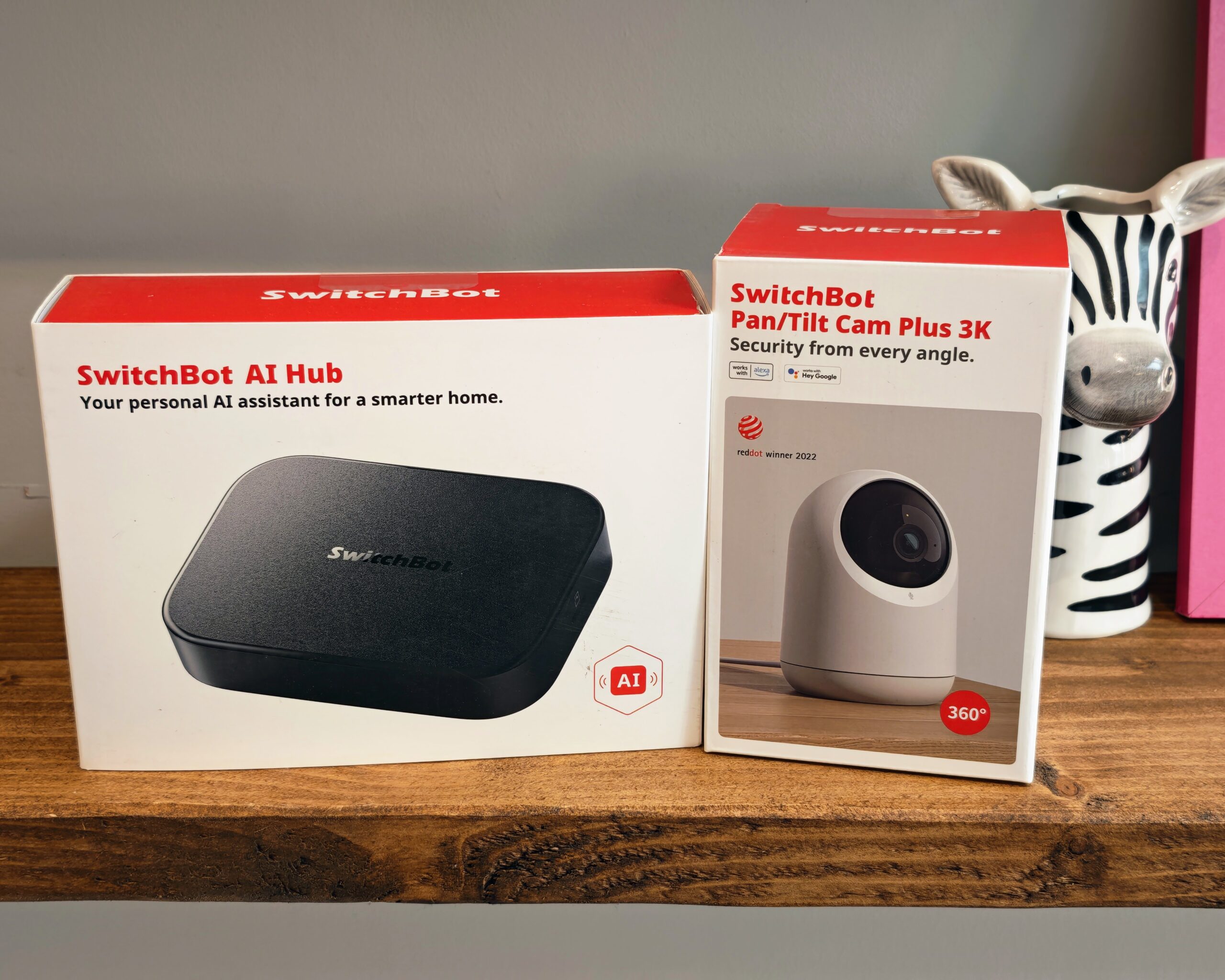
SwitchBot AI Hub Review
When SwitchBot announced its AI Hub a few weeks ago, I did not pay much attention to it, assuming it was a typical smart home hub with AI thrown in as a marketing buzzword. We have all seen plenty of products slap ‘AI’ on the box without offering anything meaningful, and I expected this to be more of the same.
However, SwitchBot were kind enough to send me a model to review, and it turns out to be much more than a generic hub. Rather than being just a proprietary smart home hub, this diminutive device also supports Home Assistant and Frigate and can support third-party RTSP-enabled cameras. This makes it quite a unique hub that bridges the gap between proprietary devices and self-hosted solutions, which often require a moderate amount of technical knowledge to set up.
Specification and Features
The SwitchBot AI Hub is powered by a local AI chip rated at 6 TOPS (Trillions of Operations Per Second), designed to run a Vision Language Model (VLM) directly on the device. This is what sets it apart from traditional smart home hubs. Rather than relying entirely on cloud processing for AI tasks, much of the object detection and analysis happens on the device itself.
The core specifications are as follows:
- Dimensions: 126 x 94 x 26 mm
- Weight: 235 g
- Internal storage: 32 GB
- RAM: 8 GB
- Storage expansion: microSD up to 1 TB, USB storage or HDD up to 16 TB
- Connections: 1x USB-C 3.0, 1x USB-C 2.0, 1x microSD slot, DC barrel jack
- Network: Wi-Fi 2.4 GHz and 5 GHz, Bluetooth Low Energy
- Camera support: Up to 8 cameras (SwitchBot and RTSP third-party)
- Smart home: Matter bridge for up to 30 devices, control of over 100 SwitchBot devices
- Software: Frigate NVR, Home Assistant Core (containerised), OpenClaw support
- Power: 12 V / 1.5 A barrel jack power supply (included)
The hub runs three containers internally. The first handles Home Assistant, the second runs OpenClaw and the third runs Frigate NVR, which supports up to eight 2K cameras via both SwitchBot cameras and third-party RTSP feeds. The 8 GB of RAM and 32 GB of internal storage provide a reasonable foundation, though the included 16 GB microSD card will fill up quickly if you are recording multiple camera feeds.
One of the more practical hardware features is the USB-C 3.0 port, which can accept an external SSD for expanded storage up to 16 TB. Alternatively, you can use this port with a USB-C to Ethernet adapter for a wired network connection. SwitchBot states the hub can handle 2.5 Gigabit Ethernet speeds through this method, which is useful if you want the most reliable connection possible. On my 2500 Mbps CityFibre FTTP line, a wired connection would be the preferred option for NVR duties.
Design
The SwitchBot AI Hub is a compact, understated device. The top is finished in matt black plastic, while the underside uses a metal plate that appears to be aluminium, which likely helps with passive heat dissipation. Despite running multiple containers and AI processing tasks, the device does not get noticeably warm during use, and there are no fans or ventilation slots to worry about.
At just 26 mm tall and weighing 235 g, it is small enough to tuck behind a monitor or sit on a shelf without drawing attention. Two rubber feet on the underside keep it stable on flat surfaces. On the rear, you will find the DC barrel jack for power, a reset button and two USB-C ports. The microSD card slot sits on one side and is slightly recessed, which makes inserting and removing cards a bit fiddly, but it does mean the card sits flush with the housing once installed.
Overall, the design is functional rather than flashy. It does not need to be attractive since it will likely be hidden away in a cabinet or behind other equipment, and the compact form factor means it will not take up much space wherever you put it.
Set Up
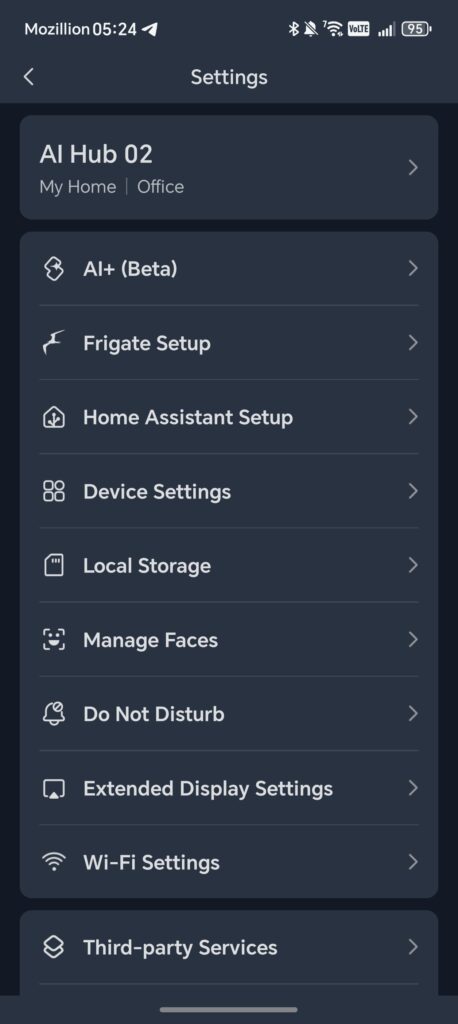
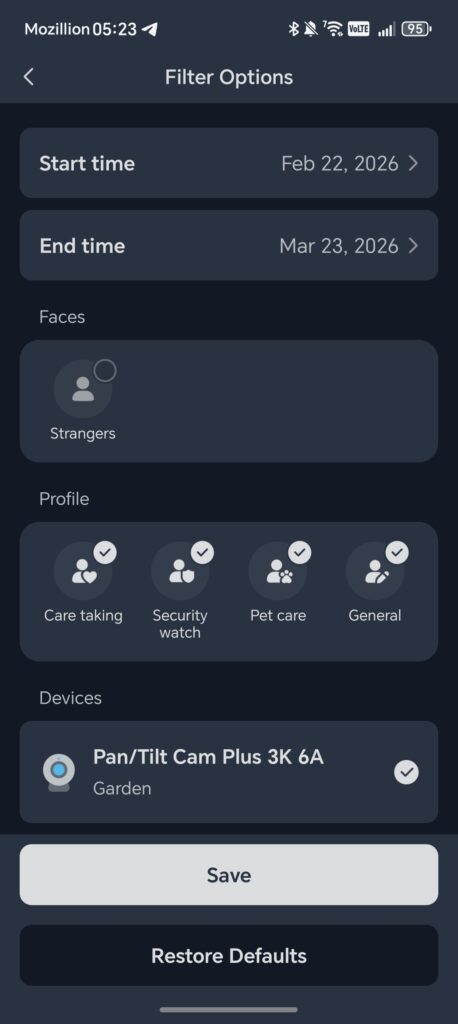
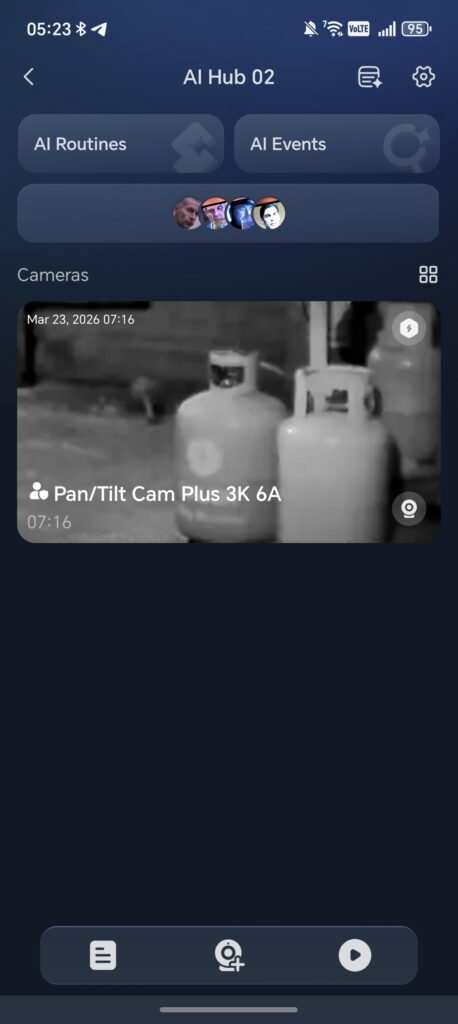
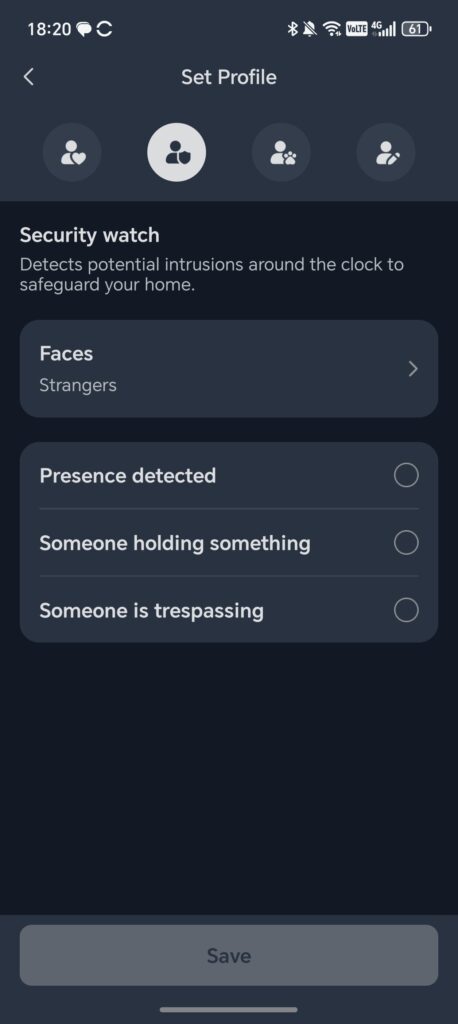
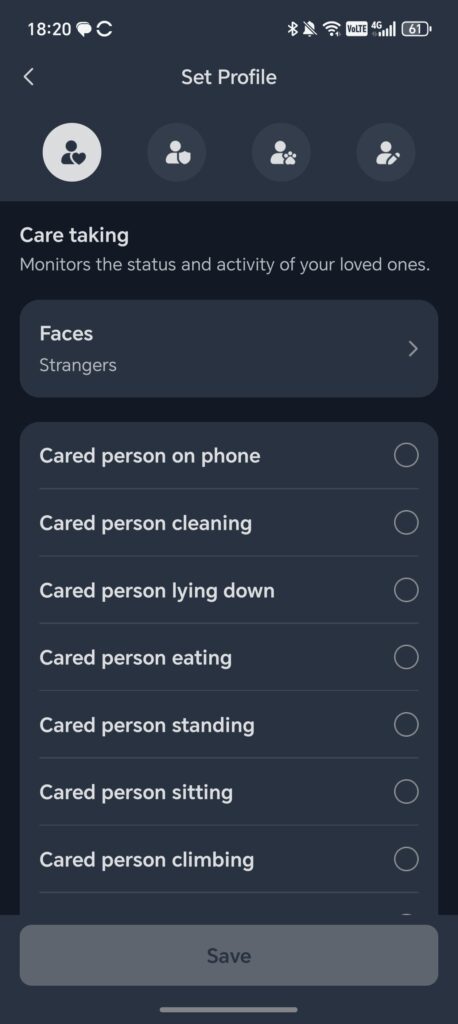
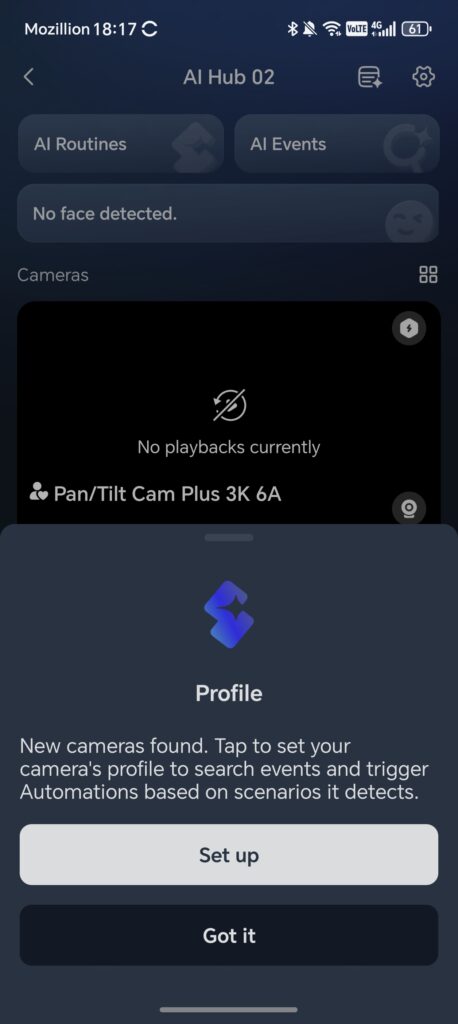
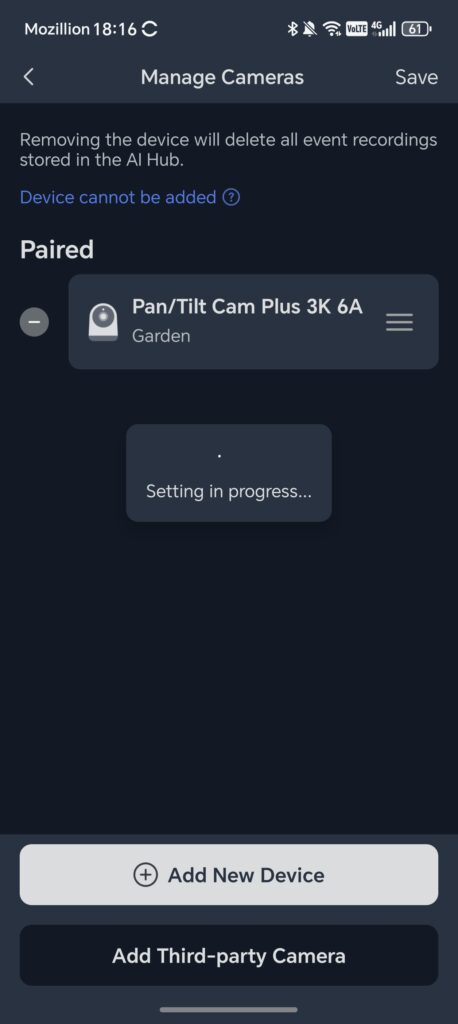
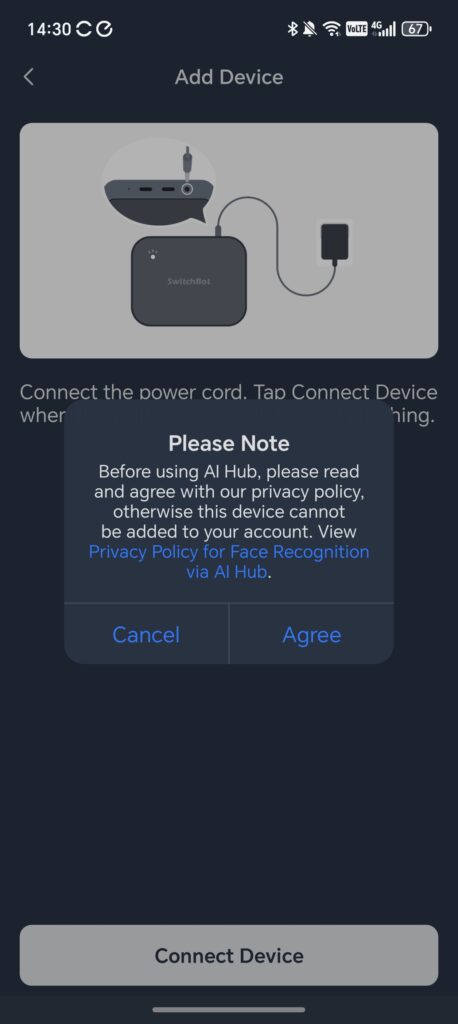
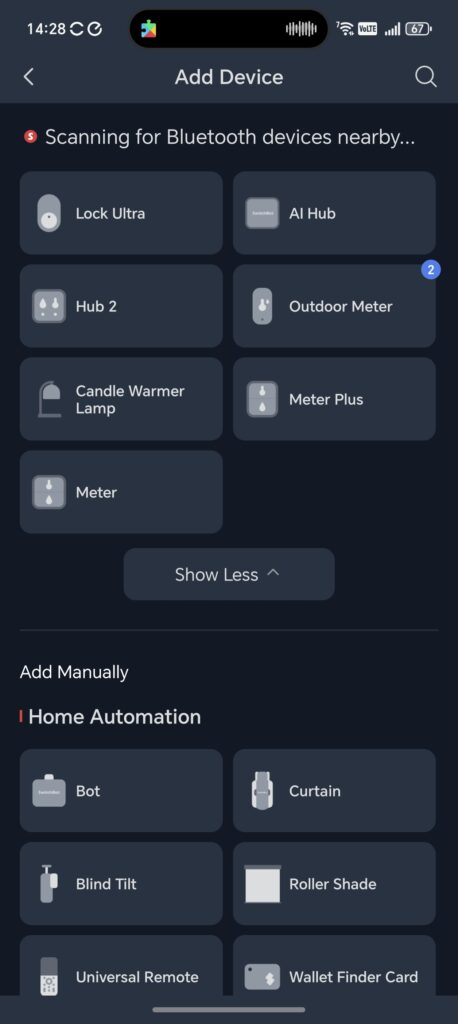
Initial setup is straightforward. The app connects to the hub via Bluetooth first, then walks you through connecting it to your Wi-Fi network. You need to enter your SSID and password, after which the hub connects and appears on your dashboard. On my UniFi network, this process completed without any issues.
After the initial pairing, the hub runs a firmware update. This is automatic and does not require any intervention, but it does take a few minutes. Once the update completes, the hub is ready for camera pairing and further configuration.
From the SwitchBot app, you can access the setup pages for each of the three containers. The app provides the local IP address and port number for Home Assistant, Frigate and OpenClaw (but this wasn’t available for me at the time of writing), so you can access each service from any device on the same network via a web browser. This is a clean approach that avoids the need to hunt for IP addresses manually, and it means you can manage the hub from a laptop, desktop or tablet as well as the app itself.
AI Subscription
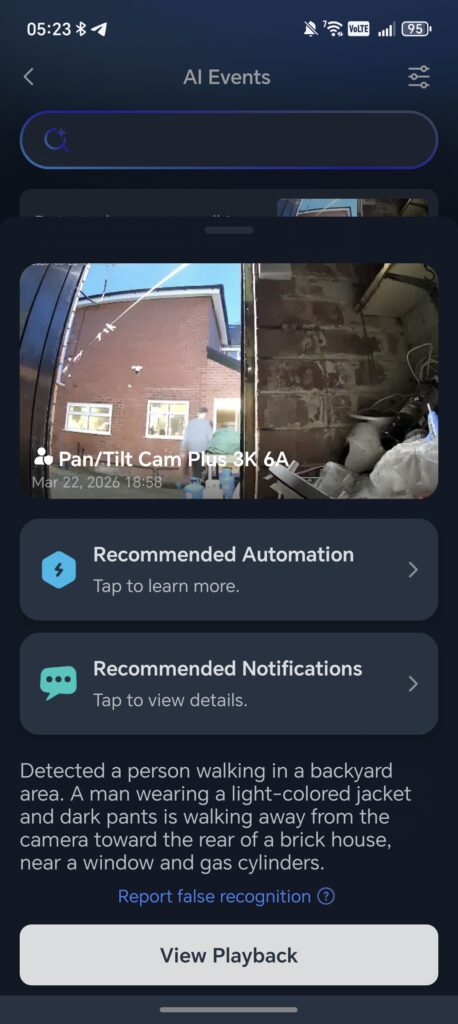
To enable the advanced AI features (without using OpenClaw) you need to subscribe to the AI+ service. This is £6.99 per month, free for the first month and at the time of writing, discounted to £4.99 for subsequent months.
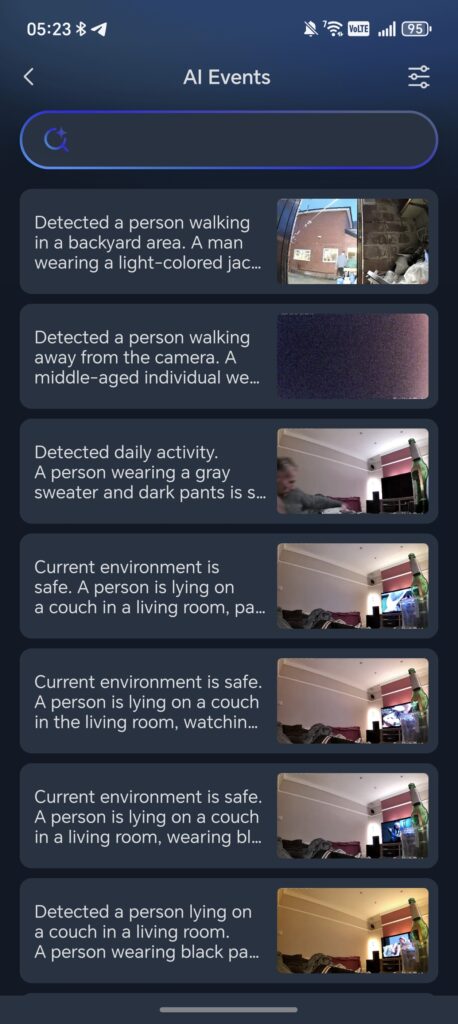
With the subscription, you get the standard advanced object detection, such as human and pet recognition, plus more advanced face detection. However, it then takes things a step further and provides a natural language description of the footage along with the ability to run scenario-driven automations.
So, for example, when I first set up the camera, I was watching TV on the couch, and the camera correctly described me lying on the couch wearing a grey sweater and dark trousers. This is more than simple motion detection or basic person recognition. The VLM analyses the scene and produces a contextual summary of what it sees, which can then be used as a trigger for automations.
In testing, the AI descriptions were impressively detailed. The system also categorises events into useful groups, such as Security Manager, Care Manager and Pet Manager, making it easier to filter relevant notifications.
The free tier still provides local AI detection for humans, pets, vehicles and general motion, which is functional for basic use. The subscription adds the VLM-powered contextual analysis, daily event summaries and the ability to search through footage using natural language queries. Whether the subscription is worth it depends on how much you value those advanced features, but the base functionality without it is still more capable than most competing hubs.
Adding SwitchBot Cameras and Third-Party RTSP Cameras
With the AI Hub set up, you can begin adding cameras. SwitchBot sent me a 3K Pan/Tilt Cam Plus to test alongside the hub. You need to add the camera to the SwitchBot app first and make sure it is running a compatible firmware, and you can then add it to the hub. The SwitchBot camera pairing process involves scanning a QR code displayed in the app with the camera itself, and it connects within seconds. The pan and tilt motors are whisper-quiet, and the camera controls are responsive with minimal lag.
For third-party cameras, I used one of my Reolink models. For this, you need the RTSP feed URL, ideally defining the primary and sub feeds. For Reolink, the URLs look like:
- Main Stream: rtsp://admin:111111@192.168.10.92/Preview_01_main
- Sub Stream: rtsp://admin:111111@192.168.10.92/Preview_01_sub
The SwitchBot camera works perfectly with the hub, as you would expect. However, I have found the Reolink camera to be a bit temperamental. It appears to struggle to load the primary feed and then encounters artefacts on the stream. The motion detection appears to work without issue on the Reolink, and I suspect the main problem is with the Reolink cameras themselves rather than the hub. Other reviewers have reported similar RTSP compatibility issues with certain camera brands, and SwitchBot are actively working on improving third-party camera support through firmware updates.
Matter Integration
The SwitchBot AI Hub acts as a Matter bridge, exposing up to 30 SwitchBot sub-devices to ecosystems like Apple Home, Google Home, Amazon Alexa and SmartThings. This is not a new feature for SwitchBot hubs, as the Hub Mini Matter and Hub 3 already provide this functionality, but it is expected at this price point.
The 30-device Matter bridge limit could be restrictive for larger smart home setups. If you have a substantial number of SwitchBot devices spread across multiple rooms, you may find yourself bumping up against this ceiling. That said, the hub can control over 100 SwitchBot devices directly through Bluetooth and Wi-Fi, so the Matter bridge limit only affects cross-ecosystem exposure.
One limitation at the time of writing is that SwitchBot cameras are not yet exposed to Apple Home via the hub. This will require Matter 1.5 support from both the hub and Apple Home, which is not yet available. For now, camera management and viewing are handled entirely through the SwitchBot app, Frigate or Home Assistant.
Frigate
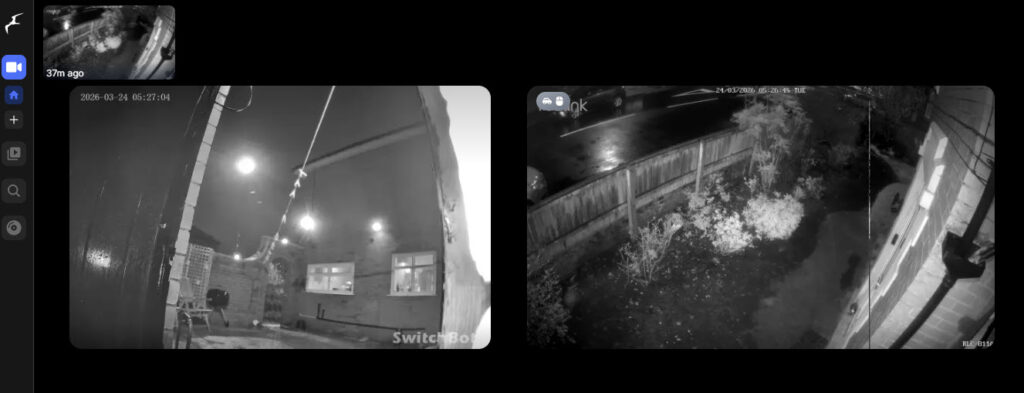
One pleasant surprise was the ability to install Frigate, the open-source NVR. This may seem redundant given that the SwitchBot app can handle events and notifications on its own, but the Frigate installation provides several advantages. It allows you to access the camera streams via a web browser from any device on the network, and it supports a wide variety of advanced AI object detection options that offer much more customisation than the SwitchBot app alone.
Frigate on the AI Hub appears to be a full version of the software. You get the live view of all connected cameras, a review tab with a timeline that lets you scrub through 24 hours of footage, and face detection training.
The event detection in Frigate is detailed. It recognises objects like couches, cups, TVs and people, and provides hover-over previews of events on the timeline. For anyone familiar with Frigate on a dedicated server, the experience is essentially the same, just running on this compact hub rather than a mini PC or Raspberry Pi.
Frigate also experienced issues with my Reolink camera, which is probably more evidence to suggest the issue is with the camera rather than the hub. One thing to be aware of is that Frigate playback can appear slightly stuttery. This is a known characteristic of Frigate in general and not specific to the SwitchBot AI Hub. For smooth continuous recording, you would ideally pair Frigate with a separate NVR for footage storage while using Frigate for AI detection and event management. At the time of testing, the system was running at approximately 25% CPU and 4% GPU utilisation, suggesting there is headroom for additional cameras.
Home Assistant
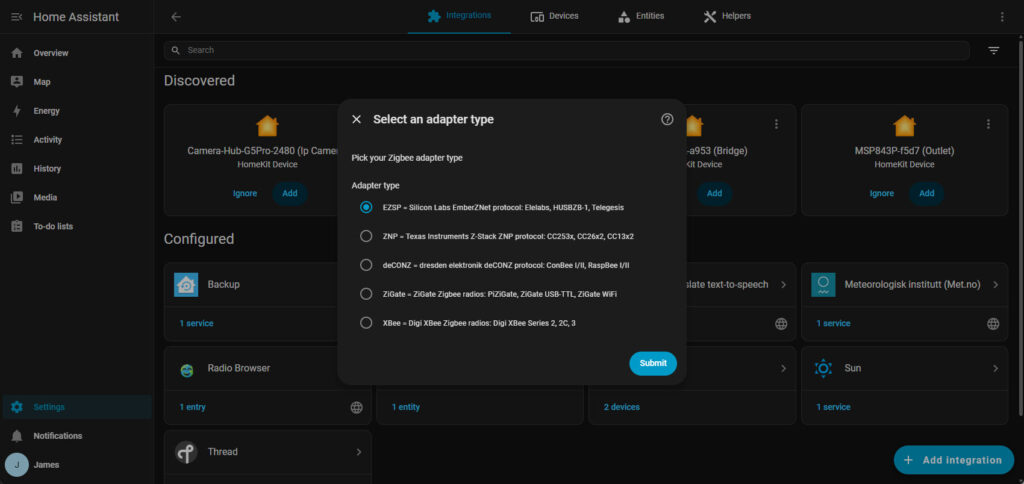
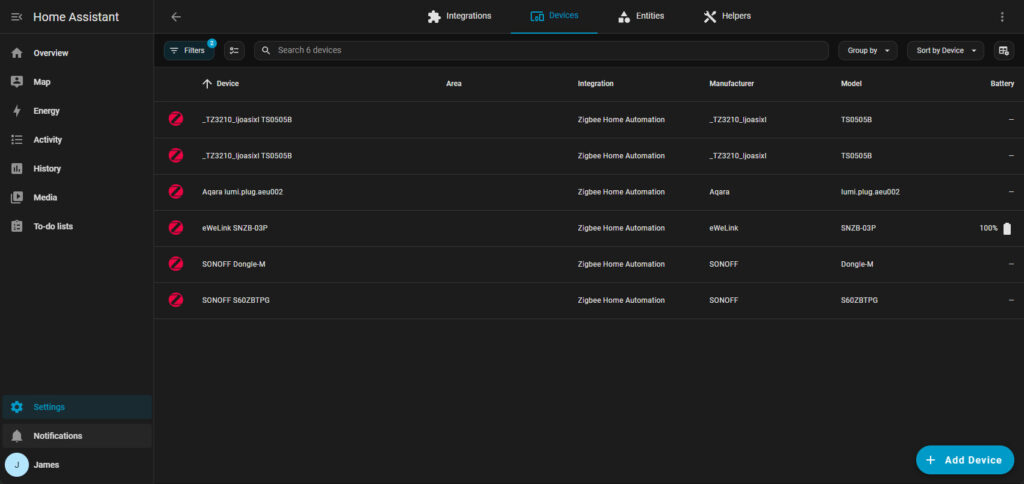
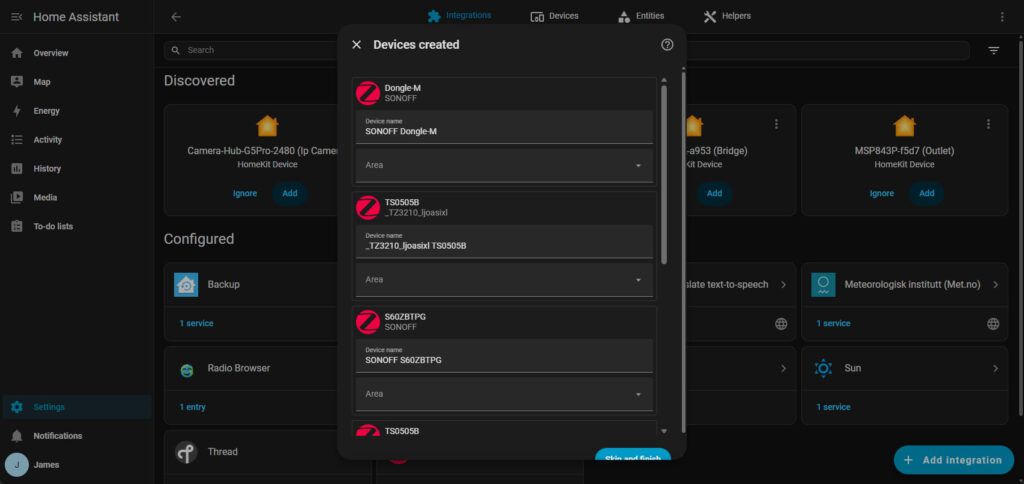
The Home Assistant installation on the AI Hub is a containerised version of Home Assistant Core. This means it runs as a Docker container managed by SwitchBot, which has both advantages and disadvantages.
On the positive side, it is pre-installed and ready to go. You access it by typing the hub’s IP address with port 8123 into a browser, and you are presented with the standard Home Assistant setup wizard. The system automatically discovered most of my Wi-Fi smart home devices, including my Philips Hue bulbs. I was able to create a basic dashboard and control devices within minutes. The integration with the SwitchBot app also makes it easy to access Home Assistant from the app’s settings page without needing to remember the address.
The main issue with the Home Assistant support is that the AI Hub only supports Wi-Fi and Bluetooth devices because the hub itself does not have built-in Zigbee or Thread radios. You cannot pass through a USB Zigbee or Z-Wave stick to the Home Assistant container, which means the USB ports on the device are not available for this purpose.
You can partially overcome this issue by integrating devices through Matter. For example, I was able to add my Philips Hue bulbs through this method. The best solution for Zigbee would be to use something like the SONOFF PoE Dongle Max, which provides Zigbee or Thread functionality over Ethernet rather than USB. As a test, I disabled the dongle on my main Home Assistant installation, connected it to the AI Hub and imported a backup. This worked, confirming that network-based Zigbee solutions are a viable workaround.
Because this is a containerised version, you do not have access to the Home Assistant Supervisor. This means you cannot install add-ons, which limits some of the more advanced functionality. Standard integrations work fine, so you can add devices from Philips Hue, SwitchBot, Lifx and many other brands that have official integrations. However, if you rely on add-ons for specific functionality, such as certain local-only integrations, you will need to check whether the standard integration covers your needs.
Another consideration is that Home Assistant updates are managed by SwitchBot. You cannot update Home Assistant independently. When a new version of Home Assistant is released, you have to wait for SwitchBot to push a compatible update to the hub. This may not be a problem if your setup works as expected, but if you want the latest features or bug fixes, the delay could be frustrating.
If you want to connect the Home Assistant instance to cloud services like Amazon Alexa or Google Home for voice control, you will need a Nabu Casa subscription from the Home Assistant team. This is not a SwitchBot limitation but rather how Home Assistant handles cloud integrations. It is worth factoring in this additional cost if voice control is important to you.
Despite these limitations, the Home Assistant integration is a strong selling point for people who want to dip their toes into self-hosted smart home management without the complexity of setting up a dedicated server. You can back up your Home Assistant configuration from the hub and, if you later decide to move to a dedicated mini PC or Raspberry Pi, restore that backup onto a full installation. It is a sensible stepping stone rather than a dead end.
OpenClaw and Security Concerns
SwitchBot has been quick to jump on the OpenClaw bandwagon. It is certainly a standout feature, but somewhat controversial due to the huge number of security risks it currently carries. At the start of February, Hacker News reported a researcher had found 341 malicious skills across multiple campaigns. The OpenClaw GitHub page has 5,000+ outstanding issues, and in a security analysis carried out at the end of January, there were 512 security risks identified, with 8 classed as critical.
OpenClaw is an open-source agentic AI framework that, when connected to a large language model like ChatGPT, can interact with your smart home devices autonomously. The setup on the AI Hub is straightforward. You start the Docker container from the hub’s settings, enter your OpenAI API key and select a model. Once connected, you can chat with the AI agent through a browser interface, and it can access both Home Assistant and Frigate running on the same hub.
While I haven’t been able to test OpenClar yet, other reviews have. They found that OpenClaw demonstrated some genuinely impressive capabilities. One tester was able to instruct it to watch a kitchen camera for a person and then turn on a specific light when someone was detected. The AI correctly monitored the camera, detected the person and triggered the light. Another was able to ask it to describe what was happening in a camera feed, and it accurately reported details about the room and objects visible.
The response times with OpenClaw also vary considerably. Simple queries may return in seconds, while more complex tasks can take minutes. This is partly due to the round-trip time to the OpenAI API and partly due to the current state of OpenClaw’s processing pipeline.
However, if you can set up your network to mitigate the security risks (or when OpenClaw matures enough to fix all these issues), it has the potential to offer powerful AI features that do not lock you into the SwitchBot subscription. You would, however, need to pay for tokens from OpenAI, and at present, those costs can add up quickly.
My recommendation is to treat OpenClaw as an experimental feature rather than a production-ready tool. It shows what is possible, and it is genuinely exciting to see natural language control of a smart home in action, but it is not yet reliable or secure enough for everyday use without careful consideration.
Privacy and Data Processing
Privacy is a legitimate concern with any camera-based smart home system, and the SwitchBot AI Hub deserves careful consideration in this area. The basic local AI detection for humans, pets and vehicles runs entirely on the device itself, which means your camera footage stays on your local network and is stored on the microSD card or connected USB drive.
However, the advanced VLM features that provide contextual scene descriptions require cloud processing. When a camera event triggers, the footage is sent from the camera to the hub, checked for an event locally, and then that event data is sent to SwitchBot’s cloud for VLM analysis. The translated context is then returned to the hub, which triggers whatever notification or automation you have configured.
This cloud dependency for VLM processing is where the privacy trade-off lies. If you are comfortable with basic local detection and do not need the advanced contextual features, your data stays entirely local. If you want the full AI experience with scene descriptions and natural language search, some data does leave your network.
SwitchBot state they are committed to privacy, and the ability to run Frigate and Home Assistant locally without any cloud dependency is a positive sign. You could, in theory, use the hub entirely offline for local automation with basic detection, only enabling cloud features for the specific cameras and scenarios where you want them.
For my setup, I would be comfortable using the VLM features on exterior cameras and in common areas like the kitchen and living room, but I would not be inclined to put cloud-connected cameras in bedrooms or private spaces. The local processing for basic detection is fast and reliable for those areas where privacy is a higher priority.
Price and Alternative Options
The SwitchBot AI Hub has an RRP of £260, and at the time of writing, there was a 15% discount code taking it down to £221.
As for alternative options, there is not really anything like for like. The combination of NVR, Home Assistant, Frigate and AI-powered automation in a single compact device is unique in the market at this price.
The Home Assistant Green is probably the closest competitor for the Home Assistant and automation side of things. It runs Home Assistant OS with Zigbee and Matter support built in. It is also possible to get Frigate working on it, although it is recommended to use a Google Coral TPU for AI detection. The Home Assistant Green is only around £120, which makes it a much cheaper option if you primarily want Home Assistant functionality. However, it lacks the built-in NVR capabilities, the VLM-powered AI detection and the SwitchBot ecosystem integration.
Homey is an alternative universal smart home hub, but it lacks the NVR functions entirely and is priced at around £200. It is a solid option for bridging multiple smart home ecosystems, but it does not attempt to do what the SwitchBot AI Hub does with cameras and AI.
Setting up a mini PC with Home Assistant and Frigate would be a more powerful and flexible solution. You would have full access to Home Assistant Supervisor and add-ons, and you could add a Zigbee dongle directly. However, the cost of capable mini PC hardware has increased in recent years. Amazon still has options that are more affordable than the SwitchBot hub, such as the NiPoGi Pinova P2, priced at around £210, with an AMD Ryzen 4300U, 8 GB RAM and 256 GB SSD. Add a Zigbee dongle and a Google Coral, and you have a more powerful setup, but it requires considerably more technical knowledge to configure and maintain.
The SwitchBot AI Hub’s appeal is that it provides all of these services pre-installed and ready to go. You trade some flexibility and power for convenience and simplicity. For someone who wants to explore Home Assistant, Frigate and AI-powered automation without spending hours on initial configuration, the AI Hub offers a genuinely compelling shortcut.
Overall
The SwitchBot AI Hub turned out to be much more impressive than I expected. It packs an impressive amount of functionality into a device that is smaller than most paperback books, and it acts as a genuinely useful introduction to self-hosted smart home services.
The VLM-powered AI detection is the headline feature, and it delivers. The ability to receive contextual descriptions of camera events rather than generic ‘motion detected’ alerts is a noticeable improvement over traditional security cameras. Scene-based automations, where you can trigger actions based on what the camera actually sees rather than just whether something moved, represent the direction the smart home industry is heading.
Frigate works well on the hub and provides a full NVR experience with advanced detection options. Home Assistant, while limited by its containerised implementation, is functional enough for most standard use cases and provides a solid entry point for newcomers. OpenClaw is the most experimental piece of the puzzle, showing genuine potential but currently held back by security concerns, inconsistent performance and the cost of API tokens.
A counterargument to the AI Hub might be that the people who are technical enough to make full use of Home Assistant, Frigate and OpenClaw would also be competent enough to set up a cheaper and more powerful mini PC. That is a fair point, and for those users, a dedicated server will always offer more flexibility. But the AI Hub is not really aimed at that audience. It targets the growing number of people who are curious about self-hosted smart home technology but do not want to spend weekends troubleshooting Docker containers and YAML files.
The subscription model for the advanced AI features is a slight sore point. The base local detection is good, but if you want the full VLM experience, you are looking at an ongoing monthly cost on top of the hardware price. That said, £4.99 per month for the discounted AI+ subscription is not unreasonable compared to cloud NVR subscriptions from the likes of Ring or Arlo.
Where the AI Hub falls short is in its third-party camera compatibility, which is still inconsistent, and the lack of Zigbee and Thread radios for Home Assistant. The containerised Home Assistant also means you are dependent on SwitchBot for updates and cannot install add-ons. These are limitations that technical users will notice, but for the target audience, they are acceptable trade-offs.
At £260, the SwitchBot AI Hub is not cheap, but it offers a unique combination of features that no other single device currently matches. If you are already in the SwitchBot ecosystem, or if you want an accessible entry point to Home Assistant and Frigate without building a server from scratch, it is well worth considering.
SwitchBot AI Hub Review
-
Overall - 80%80%
Summary
The SwitchBot AI Hub is a surprisingly capable smart home hub that goes well beyond simple ecosystem control. Its combination of local AI detection, Frigate NVR and Home Assistant support makes it a genuinely interesting option for anyone wanting more advanced smart home features without building a system from scratch. It is not without compromises, particularly around third-party camera compatibility, Home Assistant limitations and the added cost of AI subscriptions, but for the right user it offers a distinctive and convenient all-in-one solution.
Pros
- Useful all-in-one smart hub
- Frigate and Home Assistant included
- Impressive local AI features
- Simple setup for beginners
Cons
- Limited third-party camera support
- Home Assistant has restrictions
- Advanced AI needs subscription
- No built-in Zigbee or Thread

I am James, a UK-based tech enthusiast and the Editor and Owner of Mighty Gadget, which I’ve proudly run since 2007. Passionate about all things technology, my expertise spans from computers and networking to mobile, wearables, and smart home devices.
As a fitness fanatic who loves running and cycling, I also have a keen interest in fitness-related technology, and I take every opportunity to cover this niche on my blog. My diverse interests allow me to bring a unique perspective to tech blogging, merging lifestyle, fitness, and the latest tech trends.
In my academic pursuits, I earned a BSc in Information Systems Design from UCLAN, before advancing my learning with a Master’s Degree in Computing.
I’m proud to share that Vuelio has consistently ranked Mighty Gadget as one of the top technology blogs in the UK. With my dedication to technology and drive to share my insights, I aim to continue providing my readers with engaging and informative content.
I work directly with the companies he reviews products for or their chosen PR agency.
For Social Media, you can find me on: