iGulu F1 Review – Smart All-in-One Home Brewer – Beer, Cider, Kombucha & More
iGulu has been around for a surprisingly long time, with the original model being available back in 2016. From what I can gather, it launched in the UK with the F1 back in 2024.
The F1 is an all-in-one machine that handles fermentation, temperature control, carbonation and dispensing in a single countertop unit. You add water, the contents of a brew kit and the supplied yeast, scan an RFID card, and the machine runs the entire fermentation schedule automatically. Around ten days later, you pour chilled, carbonated beer straight from the tap on the front. The closest analogy I can think of is a bread maker, but for beer, cider, kombucha and various other fermented drinks.
I have reviewed all three generations of the Pinter, including the Pinter 3, the Pinter 2 and the original Pinter, as well as the PerfectDraft Pro keg dispenser. Before any of those, I went through a proper home brewing phase with 20 litre buckets, so I have a reasonable idea of what the traditional process involves and where the pain points are.
The iGulu F1 sits at the premium end of this market with an RRP of £700, which immediately raises questions about value. I have been using it for several weeks with the supplied brew kits, and this review covers the design, the brewing process, the results, and the all-important cost per pint compared with the Pinter, PerfectDraft and simply buying beer from the supermarket.
iGulu vs Pinter
The Pinter is the obvious point of comparison for most people in the UK, so it is worth explaining how different these two products actually are before getting into the detail.
The Pinter is, at its core, a well-designed plastic pressure vessel. You mix the Fresh Press concentrate with water and yeast, leave it somewhere warm for a few days to ferment, then move it somewhere cold to condition. There is no electronics, no heating, no cooling and no monitoring. The success of your brew depends heavily on the ambient temperature of your house, and in my Pinter reviews, this was consistently the weakest part of the experience. A UK home in winter can easily sit below the ideal fermentation temperature, and in summer it can swing well above it. You also need fridge space for conditioning, which is a bigger practical problem than it sounds when the Pinter holds 10 pints.
The iGulu F1 removes all of that variability. It has a compressor-based cooling system and a heating element, so it holds the fermentation temperature to the exact schedule the recipe demands, regardless of what your house is doing. It ferments under pressure, monitors everything with internal sensors, cold crashes the beer at the end, then chills it to serving temperature and dispenses it through a proper tap. The whole process happens inside one machine, and you can watch the progress from an app.
The trade-offs are capacity and price. The Pinter produces 10 pints per brew and costs £139 including shipping. The iGulu F1 produces 3.8 litres, which is about 6.7 pints, and costs £700. So you are paying five times the price for a machine that makes roughly two thirds of the volume per batch. What you get in return is consistency, convenience and a far lower chance of a failed brew. Whether that exchange makes sense depends entirely on how you value your time and how much patience you have for babysitting fermentation temperatures.
Specification / Features
- Brewing capacity: 3.8 litres (1 US gallon)
- Fermentation keg: Clear Tritan plastic with dip tube and pressure-sealed lid
- Temperature range: 2°C to 40°C
- Pressure control: 0 to 2 bar (0 to 200 kPa, roughly 24 psi monitoring)
- Cooling: Micro DC inverter compressor, 60W
- Heating: 13.2W heating element
- Carbonation and dispensing: SodaStream-style CO2 cylinder adapter or built-in air pump
- Recipe system: RFID cards included with each brew kit, plus over 10 built-in fermentation programmes
- Master Mode: Unlocks manual control of temperature, time and pressure for custom recipes
- Connectivity: Bluetooth and Wi-Fi with iOS and Android app
- Display: LCD screen on the tap unit with status light strip on the body
- Dimensions: 343mm x 368mm x 521mm
- Weight: 11.3kg
- Power: 100-240V
A few of these specifications deserve some explanation, because they are the difference between this and cheaper alternatives.
The compressor cooling is the headline feature for me. The cheaper iGulu S1 uses a semiconductor (Peltier) cooler, which is the same technology you find in cheap mini fridges and wine coolers. Peltier cooling is quiet and compact but inefficient, and it struggles to pull temperatures down quickly or hold them low. The F1 uses an actual inverter compressor, the same basic technology as a proper fridge, which is what allows it to cold crash a brew down to 2°C. Cold crashing matters because it drops the yeast and proteins out of suspension, giving you clearer beer with a cleaner taste. It is a step that is essentially impossible with a Pinter unless you have a spare fridge.
Pressurised fermentation is the other feature worth understanding. Fermenting under pressure suppresses some of the off-flavours yeast produces at higher temperatures, which means the machine can ferment warmer and faster without the beer tasting worse. It also means the beer carbonates naturally during fermentation, rather than needing a separate priming or force-carbonation stage. This is a technique that serious home brewers use with kegs and spunding valves, and the F1 automates it completely.
The CO2 system is sensibly designed. The F1 accepts standard SodaStream-style cylinders, which screw into a port on the back. With CO2 connected, the machine maintains carbonation and keeps the beer fresh for up to 30 days. Without a cylinder, the built-in air pump can pressurise the keg for dispensing, but because you are pushing air rather than CO2 onto the beer, iGulu recommends drinking it within about 24 hours before oxidation sets in. Realistically, you want a CO2 cylinder, and a SodaStream swap costs around £15 in the UK, which adds a small but ongoing running cost.
How does it work?
The brewing process is genuinely simple, and this is the main selling point of the entire system. iGulu reduces brewing to three steps: mix, scan, and wait.
You start by sanitising the keg, which is the one step you cannot skip or rush. Sanitisation is the cause of most failed home brews, and while the F1 automates everything else, it cannot save you from a contaminated vessel. iGulu includes sanitiser, and the process is a straightforward rinse and soak.
Next, you fill the keg with water to the marked one gallon line. iGulu recommends filtered or bottled water, which is sensible advice since heavily chlorinated tap water can produce medicinal off-flavours. You then add the contents of the brew kit, which for the beer kits consists of a large bag of dry malt extract, a smaller hop extract, and a sachet of yeast. The instructions on my kits suggested adding the hop extract and malt first, giving it a stir, then sprinkling the yeast on top.
Each kit comes with an RFID card. You tap this against the machine, and it automatically loads the correct fermentation programme for that specific recipe. This is where the automation earns its keep. A typical programme runs through multiple stages, for example a day at 16°C for the yeast to establish, around eight days at 18°C for primary fermentation, then two days at 2°C for the cold crash. The machine manages every transition itself, monitoring temperature and pressure constantly and adjusting as needed. You do not need to check on it, move it, or do anything at all.
The status light on the front shows orange while fermentation is in progress and turns green when the brew is ready. The app mirrors all of this, showing the current stage, temperature, pressure and estimated completion. When it is done, you connect a CO2 cylinder if you have not already, set the serving temperature, and pour from the tap. The tap itself has a small LCD display showing the current temperature, and a flow control dial for managing the pour.
Total hands-on time for a brew is around 20 minutes, most of which is sanitising. Compare that with a traditional all-grain brew day, which takes five to six hours before fermentation even starts, or even a Pinter, which needs the same mixing effort plus the manual move to cold conditioning, and the appeal is obvious.
Unboxing / Design / Set up
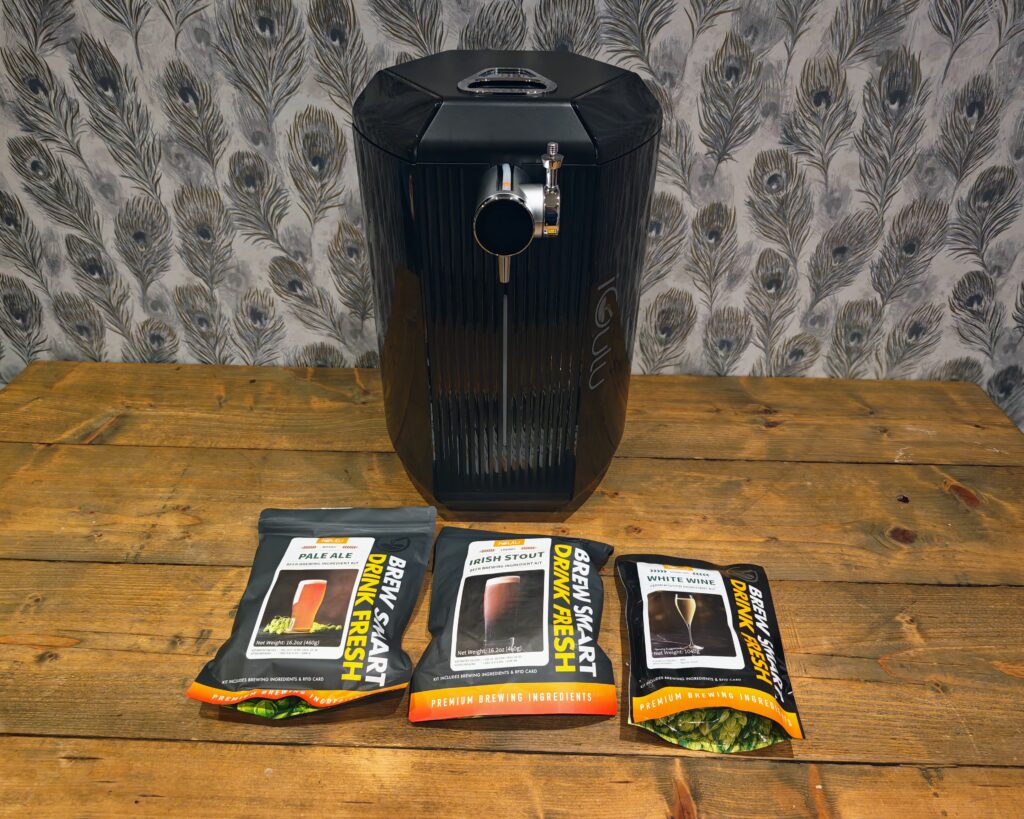
The F1 arrived well packaged, and the bundle I received included the machine, the 3.8 litre Tritan fermentation keg, a drip mat, and three brew kits: a Mosaic Pale Ale, an Irish Stout and a sparkling White Wine kit.
The design is more striking than I expected. The body is a glossy black hexagonal column with a ribbed texture on the front panels and a vertical status light strip. The tap is chrome with a black handle and the small circular LCD on the side. It looks more like a high-end small appliance than a piece of brewing equipment, and it has had several positive comments from visitors, which is not something I can say about a fermentation bucket. It is also available in white and mint if black does not suit your kitchen.
Size is worth checking before you buy. At 521mm tall, it will not fit under standard UK kitchen wall units, which typically leave around 450mm to 500mm of clearance above the worktop. You will likely need a spot at the end of a counter, on an island, or in a utility room. The 11.3kg weight means it is movable but not something you want to shuffle around regularly, especially with a full keg inside. For context, it occupies a similar footprint to the PerfectDraft Pro but is a touch taller.
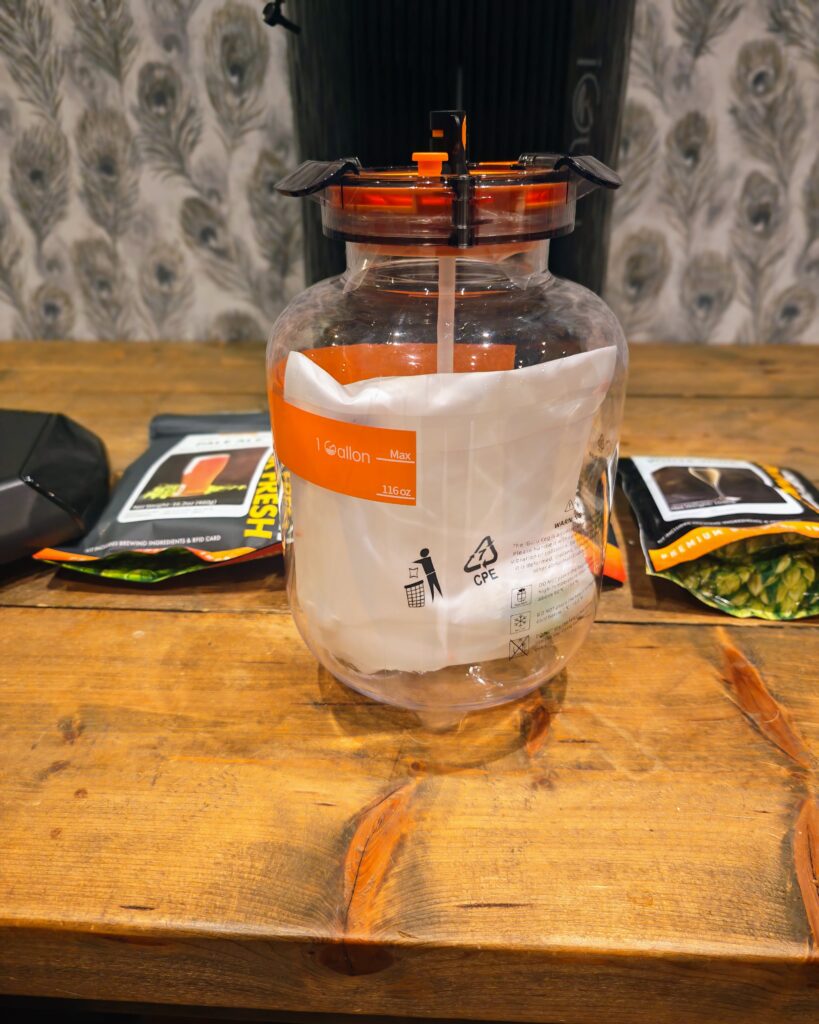
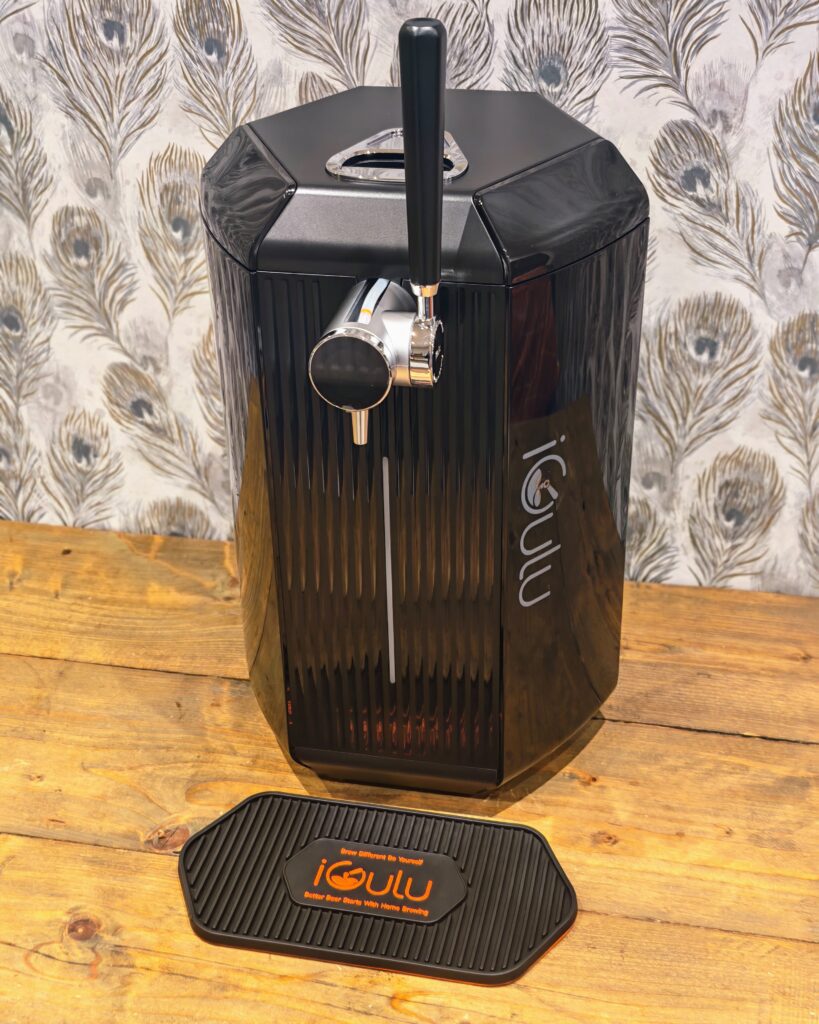
The keg itself is well made. It is clear Tritan plastic, the same BPA-free material used in premium water bottles and blender jugs, with a chunky orange and black lid that incorporates the pressure valve and dip tube. The printed warnings make clear it should not go in the dishwasher or be exposed to temperatures above 90°C, so cleaning is a manual job with warm water and sanitiser.
Set up involves the usual smart device dance. You pair with the machine over Bluetooth from the iGulu app, then hand it your Wi-Fi credentials so it can connect to your network and receive firmware updates. The process worked first time for me, which puts it ahead of a depressing number of smart home products I have reviewed. Most core functions can be controlled directly on the machine, so the app is a convenience rather than a dependency, which is the right way round.
Noise is minimal. The compressor produces a low hum comparable to a small fridge when it is actively cooling, and it is silent for long stretches during fermentation when the temperature is stable. I had it in the kitchen-diner and never found it intrusive, though I would think twice about a bedroom or home office.
Home Brewing Beer
My first brew was the Mosaic Pale Ale kit. The kit weighs 460g and lists an original gravity of 12.5 to 13°BX, 25 to 30 IBUs, and a target ABV of 4.8 to 5.2%, which puts it firmly in approachable session pale ale territory. The kit contents are dry malt extract, hop extract and a yeast sachet, all pre-measured.
The process went exactly as described above. Sanitise, fill with water, add ingredients, stir, add yeast, scan the card, press start. From that point, the machine took over completely, and the app tracked it through each stage of fermentation. The whole brew, including the cold crash, took around ten days.
The results were better than I expected. The beer poured with a proper head, decent clarity for an unfiltered home brew, and a clean, hoppy character with the tropical fruit notes you would expect from Mosaic hops. Most importantly, it had none of the harsh, slightly homebrew twang that plagued the kit beers I made in buckets years ago. That twang usually comes from fermenting too warm or from oxidation, and the F1 controls for both with its temperature management and pressurised, sealed fermentation.
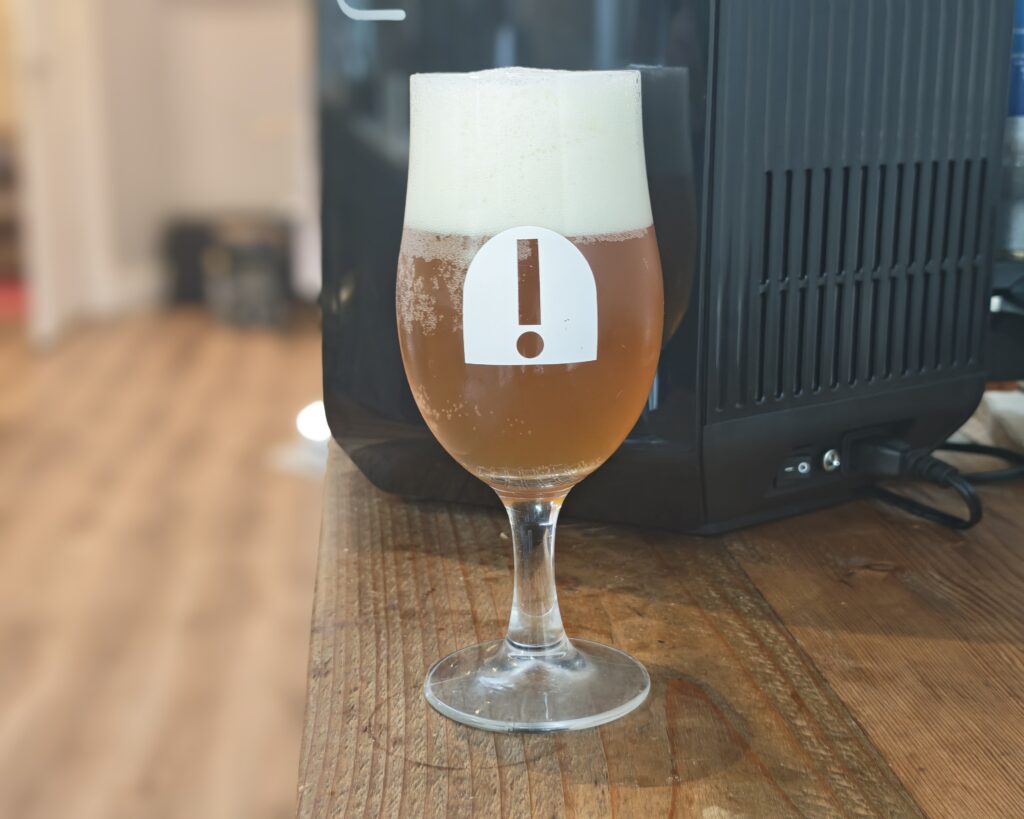
I would describe the result as comparable to a decent canned craft pale ale. It is not going to embarrass a good local brewery, but it is comfortably better than the budget end of the supermarket craft shelf, and it is noticeably fresher tasting than anything that has been sitting in a can for months. Fresh hop character fades quickly in packaged beer, and drinking a pale ale within days of fermentation finishing is genuinely a different experience.
A few practical observations from the first batch. The first pour from a new keg tends to be foam-heavy until the system settles, and pouring too soon after the cold crash, before the beer has fully chilled to serving temperature, makes this worse. Patience helps. The flow control dial on the tap takes a little practice, but once dialled in, pours were consistent. With the CO2 cylinder connected, carbonation held nicely across the two weeks it took me to get through the batch, and the last glass tasted as fresh as the first.
The Irish Stout kit is next in the queue, and on paper it is a more interesting test. It lists 30 to 35 IBUs, a target ABV of 5.5 to 6.0% and an SRM of 40, so a properly dark beer. Darker, maltier styles were traditionally more forgiving for home brewers, so I would expect good things, and stouts also suit the slightly softer carbonation you can dial in through the app.
On that note, carbonation adjustment is a genuinely useful feature. You can nudge the carbonation level up or down from the app to suit the style, with a crisper, fizzier profile for a pale ale and a softer, smoother profile for a stout. It is a small thing, but it is the kind of control that no other product in this price bracket offers.
The obvious limitation is volume. A brew produces 6.7 pints, and then the machine is occupied. You cannot start the next batch until the current one is finished or transferred out, so if you find a kit you love, there is a built-in waiting period of around ten days between batches. iGulu sells additional kegs and a pressure bottle set for transferring and storing finished brews, which partially solves this, but it is more expense on top of an already expensive machine. For a casual drinker like me, one batch every couple of weeks is about right. For anyone hosting regularly, it will feel restrictive.
Master Mode and Custom Recipes
Out of the box, the F1 is a closed system built around iGulu’s own brew kits and their RFID cards. Master Mode is the escape hatch. Once activated with the Master Mode card, it unlocks full manual control: you can set your own fermentation stages, temperatures, durations and pressure targets, and save custom recipes.
This matters for two reasons. The first is cost. iGulu’s kits run from £14 to £25 per batch, and Master Mode lets you use cheaper third-party ingredients instead. Standard home brew extract kits cost around £15 but are designed for 23 litre batches, so you would need to split them down to one gallon portions, with some risk of the remainder spoiling before you use it. Done carefully, that could drop the ingredient cost per batch to £3 to £5, which transforms the value equation. The second reason is creativity. You can follow online one gallon recipes, experiment with different hops and yeasts, and treat the F1 as a precision fermentation chamber rather than a pod machine for beer.
The caveat is that Master Mode assumes you know what you are doing. The presets exist because most buyers do not want to think about fermentation schedules, and going off-piste reintroduces all the ways a brew can go wrong. My advice would be to run several kits first, learn what a successful brew looks and tastes like from this machine, and then start experimenting. It is also worth confirming exactly what is bundled before you buy, as the Master Mode card has been included in some packages and sold separately in others, and in markets where it is an extra, it has been priced at the equivalent of around £50.
Beyond Beer: Cider, Wine, Kombucha and Kefir
Beer is the headline act, but the F1’s 2°C to 40°C temperature range covers essentially every common home fermentation, and this is where the machine gets more interesting for me personally.
My bundle included a sparkling White Wine kit, which is a 1040g pack with a target ABV of around 10.5%. The idea of countertop wine sounds slightly absurd, but the same logic applies as with the beer: controlled temperature, sealed pressurised fermentation, and carbonation on tap should produce something in the territory of a simple sparkling wine. I will report back on that one once it has had its run in the machine.
iGulu also sells cider kits, and hard cider is arguably an even better fit for this format than beer. Cider is mostly about clean fermentation at a controlled temperature, which is exactly what the F1 does, and other reviewers have singled out the cider kits as a highlight.
Kombucha is the use case I suspect will quietly become the most valuable. Supermarket kombucha is expensive for what it is, typically £2 to £3 for a small bottle, and the ingredients are tea, sugar and a culture, which cost very little. Kombucha ferments happily in the mid 20s Celsius, well within the F1’s range, and the machine has a built-in programme for it. The same applies to water kefir and milk kefir, both of which I pay over the odds for at the supermarket as part of my reluctant transformation into a boring, health-focused millennial. If the F1 can reliably knock out kombucha and kefir between beer batches, the running costs start to look very different from the beer-only calculation below.
The App and Smart Features
The iGulu app handles setup, monitoring and notifications. During a brew, it shows the current fermentation stage, live temperature and pressure readings, and progress through the overall schedule. It sends notifications when the brew moves between stages and when it is ready to drink, and it lets you adjust carbonation and serving temperature remotely.
In use, it has been solid rather than spectacular. The information is clear, the notifications arrive when they should, and I have not experienced the sync delays some early reviews mentioned, though the app does occasionally take a few seconds to refresh live readings. Importantly, the machine is not dependent on the app or the cloud for core operation. The RFID cards work directly with the machine, and the on-device controls cover the essentials. Given the number of smart appliances that become expensive bricks when a company’s servers go down, this is the right architecture.
My one ongoing concern is the broader ecosystem dependency. The kit-based workflow relies on iGulu continuing to manufacture and ship kits to the UK at reasonable prices. Master Mode is the insurance policy here, since the machine remains a capable fermentation system with third-party ingredients even if the kit supply dried up, but it is a factor worth weighing for a £700 purchase from a relatively young brand.
Cleaning and Maintenance
Cleaning is more involved than a PerfectDraft, where you simply swap kegs, but far less involved than traditional brewing. After each batch, the keg needs emptying of the yeast sediment, a wash with warm water, and a sanitise before the next brew. The lid assembly, dip tube and tap line need the same treatment, and these are the parts where skipping the job will show up in your next pour. None of this is difficult, but it adds perhaps 20 to 30 minutes per brewing cycle, and the keg’s no-dishwasher restriction means it is always a manual task.
Consumables are minimal: sanitiser, which lasts many batches, and CO2 cylinders at around £15 per SodaStream swap. A single cylinder should comfortably cover several batches since the beer carbonates naturally during fermentation, and the CO2 is mainly maintaining pressure and freshness rather than carbonating from scratch.
Price and Alternative Options
The iGulu F1 has an RRP of £700 with no discounts currently available.
The more affordable S1 is £499.
For the S1, you can also get it on a subscription package where you pay £49 per month for 12 months, including 2 brew kits per month. This works out at good value, as you pay £588 and get 24 brew kits, which would be worth a minimum of £192.
Pinter is the main competitor. As discussed, it is a much more basic system, and the Pinter by itself costs £139 including shipping. Similar to iGulu, you can get it on subscription for nothing up front but a commitment to buy 2 beers up front, then make 6 more orders (though it is not clear if that is 6 lots of 2 beers, or just 1 at a time).
There are other all-in-one systems, but they are more geared toward more serious home brewers. There is the BrewZilla, which can produce 35L and costs £429, or the more famous Grainfather at £1000. Neither are comparable to the iGulu or Pinter, as they handle the hot side of brewing (mashing and boiling) and you still need separate fermentation vessels, temperature control and kegging or bottling equipment.
Value for money: Price per pint vs Pinter vs Perfect Draft
With the F1 costing £700, it is clearly never going to be the best value for money if you want a cheap pint at home. But I have been critical of Pinter and PerfectDraft for not offering very good value for money compared to just buying your beer from the supermarket. So, it is only fair to do the same here.
Brew kits cost between £14 for the Bavarian Hefeweizen and £25 for the English IPA. Most seem to be £16-19.
The brewing capacity is 3.8L, and if you managed to drink 100% of that without wastage, you would have the equivalent of:
- 6.7 x British pints (568ml)
- 7.6 x 500ml cans
- 8.6 x 440ml cans
- 11.5 x 330ml cans/bottles
- At £14, the cost works out at £3.68 per litre, £1.84 per 500ml or £2.09 per pint.
- At £16, the cost works out at £4.21 per litre, £2.11 per 500ml or £2.39 per pint.
- At £19, the cost works out at £5.00 per litre, £2.50 per 500ml or £2.84 per pint.
- At £25, the cost works out at £6.58 per litre, £3.29 per 500ml or £3.74 per pint.
The Pinter is substantially cheaper to buy at £139, but far less advanced. It is basically a barrel that you brew your beer in, with no ability to control the temperature.
The Pinter produces 10 pints. I found there was a lot of wastage with this, but I will call it 5.6L.
The cheapest beer they have is £15, and they go up to £40 for the beer collabs from big brands such as Guinness, Lagunitas, Yeastie Boys and BrewDog. Typical prices seem to be £15, £18, £25, and then £40. The premium-priced branded ones normally come with a glass.
- At £15, the cost works out at £2.68 per litre, £1.34 per 500ml or £1.52 per pint.
- At £18, the cost works out at £3.21 per litre, £1.61 per 500ml or £1.82 per pint.
- At £25, the cost works out at £4.46 per litre, £2.23 per 500ml or £2.53 per pint.
- At £40, the cost works out at £7.14 per litre, £3.57 per 500ml or £4.06 per pint.
If you are viewing these gadgets purely as a way to reduce the cost of beer, they don’t look great when you can buy a wide variety of craft beers from Tesco or other supermarkets for £5-7 per litre, depending on offers. More generic options such as Punk IPA can be had for around £3.30 per litre. They may not taste quite as good out of the can, but there is less wastage, it is less time-consuming, and there is little risk of them being spoiled.
A fairer comparison might be the PerfectDraft system. This costs £159 for the basic model plus one keg, or £275 for the Pro model with one keg.
Kegs are 6L and cost from £30 (for Bud Light, though) or around £38 for actual drinkable beer, and up to £46 for premium strength beer like PerfectDraft Vocation Life & Death. You also get £5 back per keg, so say £33 to £41 per keg.
- At £33, the cost works out at £5.50 per litre, £2.75 per 500ml or £3.12 per pint.
- At £41, the cost works out at £6.83 per litre, £3.42 per 500ml or £3.88 per pint.
So, quite a bit more expensive per pint than the iGulu kits, but not by a massive amount, and there is no brewing needed. But it is a limited selection with no ability to tinker with how the beer is produced.
It is also worth running the numbers with the up front cost included, because £700 takes a long time to amortise. If you brewed two kits per month at an average of £17.50, after two years you would have spent £700 on the machine plus £840 on kits for around 320 pints, which works out at roughly £4.80 per pint. After five years of the same usage, it falls to around £3.30 per pint. In other words, on beer kits alone, the F1 only approaches supermarket prices if you use it heavily for years, and it never beats them. The machine has to justify itself on freshness, the brewing hobby itself, and the cheaper things it can make beyond the official kits.
Overall
As a tech geek and a craft beer fan who has become more of a casual drinker in my older age due to mental and physical health, it is hard not to love the iGulu F1.
I went through a home brewing phase using big buckets, and it worked out incredibly cheap, but it was a big hassle, and you produce 20L of beer which you may not like, or it may spoil. It just wasn’t worth the time and effort as I got older and drank substantially less.
So, things like the iGulu and Pinter are great for casuals like me.
The iGulu F1 is far superior to the Pinter system, which is the bare minimum you would expect for a product that is 5 times the cost.
When looking at it from the value for money perspective, for beer, the iGulu is not great. You are never really going to recoup that £700 up front cost, and the beer kits are relatively expensive.
I think the iGulu still has the potential to offer good value for money if you want to move away from the kits and experiment with other things. For example, you could try to use cheap pre-mix kits, but these are typically for 23L, so you’d need to split it up and risk ruining the leftovers. These are available for around £15.
Even better is the ability to produce things like kefir and kombucha, which cost a lot at supermarkets but should be incredibly cheap to produce via this machine. As I have become a boring, health-focused millennial in my older age, I will almost certainly try to make my own kefir.
Judged purely as a product, the F1 is excellent. It does what it claims, the beer it produces is genuinely good, the design is attractive, and the automation removes almost every traditional barrier to home brewing. The criticisms are all about economics and capacity rather than function: the £700 RRP is a lot for 6.7 pints per batch, the kits create an ecosystem you need Master Mode to escape, and you will wait around ten days between brews unless you invest in extra kegs.
If you want the cheapest possible pint, buy from the supermarket. If you want fresh draught beer with zero effort, the PerfectDraft is cheaper and simpler. If you want to dip a toe into brewing on a budget, the Pinter remains the sensible starting point despite its flaws. But if you want the brewing hobby without the work, with genuinely good results, and with the flexibility to make kombucha, kefir, cider and wine on the side, the iGulu F1 is the best execution of this idea I have used, and the price is the only real thing standing against it.
iGulu F1 Review
-
Overall - 80%
80%
Summary
The iGulu F1 is the most polished home brewing system I have used, combining automated fermentation, precise temperature control and excellent beer quality in a genuinely easy-to-use appliance. Its high purchase price and relatively small batch size make it difficult to justify on cost alone, but for anyone who values convenience, consistency and the flexibility to brew beer, cider, wine, kombucha or kefir, it delivers an experience that few rivals can match.
Pros
- Excellent beer quality
- Fully automated brewing process
- Precise temperature control
- Attractive premium design
- Supports multiple drink types
- Potentially good value for money if brewing things like kombucha or kefir
Cons
- Expensive upfront purchase
- Small 3.8L batch size
- Official kits are costly
- Extra kegs improve usability
- Limited value for casual users

I am James, a UK-based tech enthusiast and the Editor and Owner of Mighty Gadget, which I’ve proudly run since 2007. Passionate about all things technology, my expertise spans from computers and networking to mobile, wearables, and smart home devices.
As a fitness fanatic who loves running and cycling, I also have a keen interest in fitness-related technology, and I take every opportunity to cover this niche on my blog. My diverse interests allow me to bring a unique perspective to tech blogging, merging lifestyle, fitness, and the latest tech trends.
In my academic pursuits, I earned a BSc in Information Systems Design from UCLAN, before advancing my learning with a Master’s Degree in Computing.
I’m proud to share that Vuelio has consistently ranked Mighty Gadget as one of the top technology blogs in the UK. With my dedication to technology and drive to share my insights, I aim to continue providing my readers with engaging and informative content.
I work directly with the companies I review products for or their chosen PR agency.
For Social Media, you can find me on: