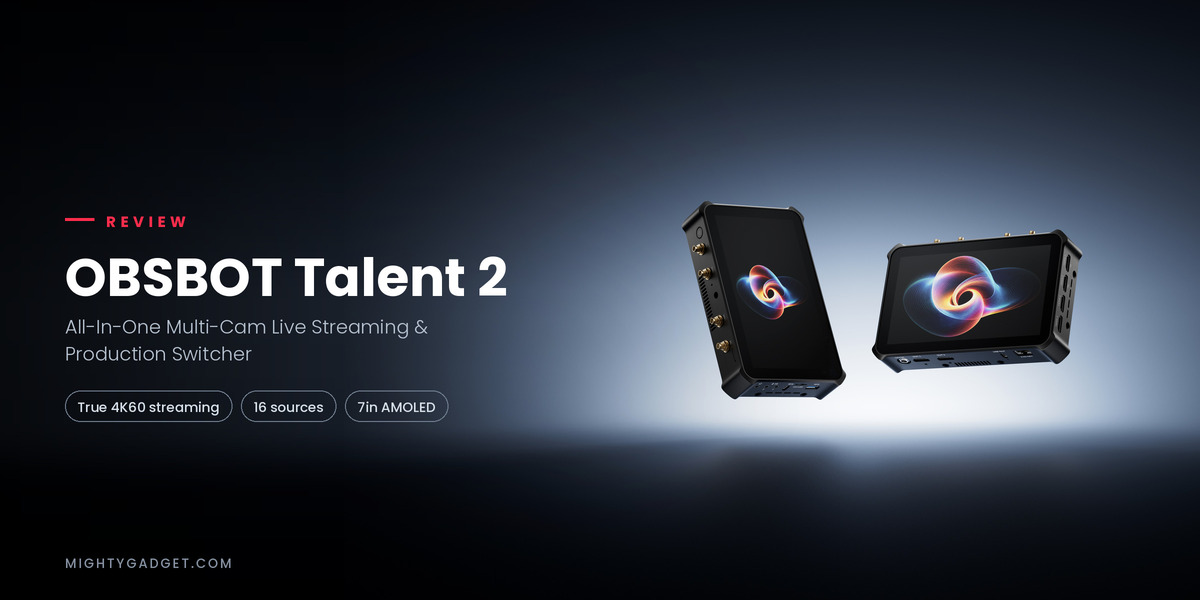
OBSBOT Talent 2 Review – All-In-One Multi-Cam Live Streaming & Production Switcher
I reviewed the incredibly powerful and versatile OBSBOT Talent two years ago. It is an impressive piece of kit that functions as a multi-input switcher designed for live streaming, combining an encoder, switcher, recorder, monitor, and controller into a single device.
While the original Talent is still a powerful tool for streamers in 2026, the new Talent 2 takes things to the next level with more inputs and many other improvements across its extensive range of features.
Related Reviews
- Obsbot Tail 2 Review
- Obsbot Meet SE Review
- Obsbot Tiny SE Review
- Obsbot Meet 2 AI Webcam Review
- OBSBOT Tail Air AI-Powered 4K PTZ Streaming Camera Review
What is the OBSBOT Talent 2 / Features
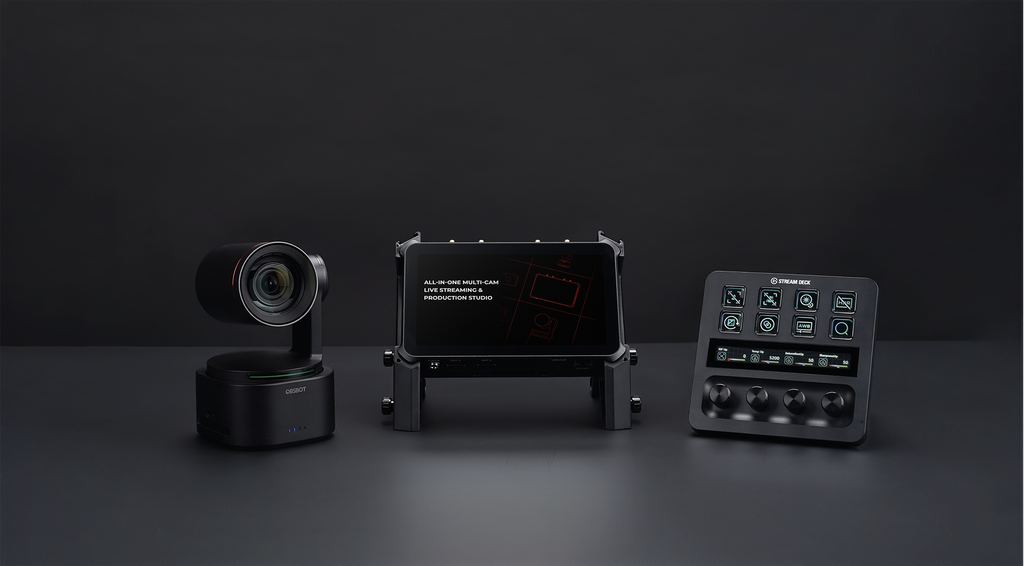
The OBSBOT Talent 2 is the follow up to the original OBSBOT Talent, which I reviewed back in 2024. Like that first model, it is an all in one live production device that combines an encoder, switcher, monitor, recorder and streaming controller into a single unit, so you can run a multi camera stream without a laptop or a separate workstation.
OBSBOT calls it an “All-In-One Multi-Cam Live Streaming and Production Studio”, and the basic idea has not changed since the original Talent. You plug your cameras in, control everything from the touchscreen or an app, and push the output live to your chosen platforms. What has changed is the scale of what the device can handle. The original Talent topped out at 1080p output and three NDI sources. The Talent 2 supports true 4K streaming and up to 16 simultaneous video sources across HDMI, USB and IP, which puts it in a different tier of hardware entirely.
That jump in capability comes with a jump in price. OBSBOT lists the Talent 2 at $2,099 in the US, nearly double the $1,099 the original Talent launched at. UK pricing has not been confirmed at the time of writing.
OBSBOT Talent 2 vs OBSBOT Talent Specification Comparison
| OBSBOT Talent 2 | OBSBOT Talent | |
|---|---|---|
| Price | USD 2,099 | USD 1,099 |
| Dimension | 185.2 mm x 117.2 mm x 32.8 mm | 147.2 mm x 90 mm x 28.5 mm |
| Weight | 869.1 g | 402 g |
| Screen | 7″ AMOLED, 1920×1080, 800 nits, 100,000:1 contrast, 100% NTSC | 5.44″ AMOLED, 1920×1080, 350 nits, 6,000:1 contrast, 105% NTSC |
| 4K Streaming | Yes, up to 4K@60 | No, up to 1080p@60 |
| Video Input | 4x HDMI; 1x USB-A, 1x USB-C; SRT/RTMP/RTSP/NDI | 2x HDMI; 2x USB-A, 1x USB-C; RTMP/SRT/NDI |
| Video Output | 1x USB 3.0 Type-C, 2x HDMI 2.0 Type-A | 1x USB 3.0 Type-C |
| NDI Support (up to) | 10 | 3 |
| Ethernet Data Rate | 10/100/1000/2500 Mbps | 10/100/1000 Mbps |
| Box with integrated stand | Yes | No |
| PTZ Control | Yes (OBSBOT exclusive interface) | Yes |
| VISCA Control | Yes | Yes |
| Phone Control | Yes | No |
| Phone Camera Input | Yes | No |
| Built In App Store | Yes | No |
| Multi View | Yes | Yes |
| GFX Support | Yes | Yes |
| Picture in Picture | Yes | Yes |
| Chroma Key | Yes | Yes |
| Direct Live Stream | Facebook / Twitch / YouTube | Facebook / YouTube / Twitch |
| ISO Recording | Yes, up to 4x 4K60 | Yes, up to 2x 1080p60 |
| Encoder | H.264, H.265 | H.264, H.265 |
| Connection | Ethernet, Wi-Fi, Cellular, Bluetooth, USB Modem | Ethernet, Wi-Fi, Cellular, Bluetooth, USB Modem |
| Battery | Requires separate purchase. 7800mAh for 3 hours 30 minutes, 2200mAh for 2 hours 20 minutes | Requires separate purchase. 7800mAh for 3 hours 30 minutes, 2200mAh for 2 hours 20 minutes |
OBSBOT Talent 2 vs OBSBOT Talent Differences / Features
Screen and Design
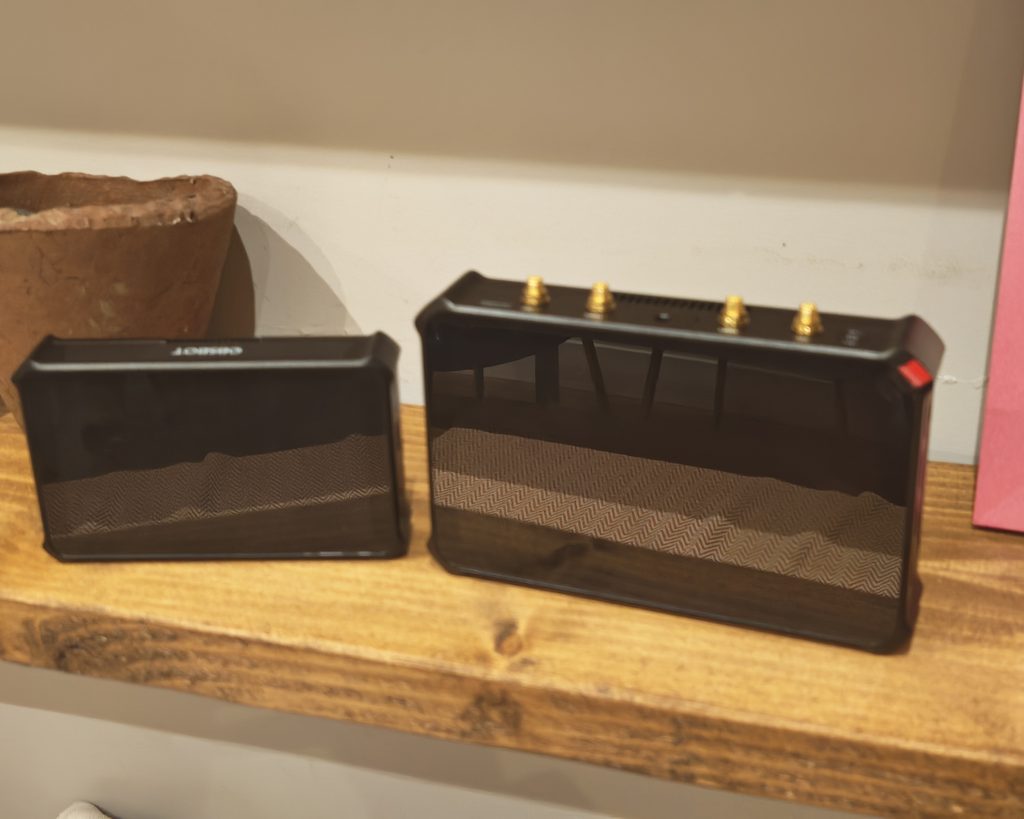
The most obvious change is the display, up from a 5.44 inch AMOLED panel at 350 nits and 6,000:1 contrast on the original Talent to a 7 inch AMOLED touchscreen at 800 nits and 100,000:1 contrast, with 100% NTSC colour coverage. It is a genuine improvement for monitoring footage in bright conditions, though it does mean the whole device has grown considerably. The Talent 2 measures 185.2 x 117.2 x 32.8mm and weighs 869.1g, compared with 147.2 x 90 x 28.5mm and 402g for the original, so this is a noticeably larger and heavier unit to carry around. The body is an aluminium alloy unibody with active cooling, and OBSBOT says it fits into a standard backpack alongside a set of cameras, though it will take up more room than before.
Source Acquisition
Input options have expanded significantly. The Talent 2 has four HDMI 2.0 ports, though only the first two support 4K, with the other two limited to 1080p. For USB, two ports function as video inputs, one USB-A and one USB-C, both capable of 4K at 60fps. A second USB-C port on the base, marked USB OUT, is a dedicated output for an external monitor rather than an additional input, so it does not add to the source count. On top of the physical ports, the Talent 2 adds IP based sources over NDI (HX2, HX3 and High Bandwidth), SRT, RTSP and RTMP, with up to 10 IP sources running at once. Combined with the physical inputs, OBSBOT quotes a maximum of 16 4K sources, against three NDI sources on the original Talent.
A newer addition is phone camera input. With the OBSBOT Live app and the latest Talent 2 firmware, a phone’s front or rear camera can be added as a source over USB-C, which is useful for adding an extra angle without buying another camera. This is a recent firmware addition rather than a feature that has been in the field for long, so I would treat it as one to test carefully rather than assume it behaves as smoothly as the native camera inputs.
Audio input is largely carried over from the original Talent: two 3.5mm mic or line inputs, one monitor output, and a built in mixer, with additional audio available from HDMI, USB, Bluetooth and incoming IP streams.
Streaming and Networking
The headline streaming feature is true 4K output to up to four platforms simultaneously, in either landscape or portrait orientation, up from the original Talent’s 1080p ceiling. Encoding is handled with H.264 and H.265, with H.265 offering meaningfully better quality per megabit on constrained connections.
Network connectivity has also been overhauled. The Talent 2 adds 2.5GbE Ethernet, up from Gigabit on the original, along with a built in 5G SIM slot and support for an external cellular dongle. There is also an upgraded antenna system with four dedicated connectors for 5G and Wi-Fi 6. None of this was available on the original Talent, which relied on 2.4G and 5G Wi-Fi plus a USB modem for cellular access, so this should make the Talent 2 a more reliable option for streaming from venues with patchy fixed line internet.
OBSBOT also quotes smart network bonding across 4G, 5G, Wi-Fi and Ethernet with automatic failover. That is the kind of feature that only proves itself over a long outdoor event, and it is one of the harder things to verify in a short review window, but the hardware is at least there to support it.
OBSBOT Ecosystem Control and Recording
Camera control, AI tracking and preset recall for connected OBSBOT cameras remain built into the interface, as they were on the original Talent, and the Talent 2 adds compatibility with the Tail Air Smart Remote for operating scenes and cameras away from the unit itself. Synchronised recording across up to three OBSBOT cameras is also carried over.
ISO recording has been upgraded substantially, from two 1080p60 streams on the original Talent to four independent 4K60 streams on the Talent 2, so every angle can be preserved at full quality regardless of what gets switched live. Storage options are similar to before: 128GB built in, microSD expansion, external hard drive recording, and per camera SD card recording, none of which is supplied in the box.
Broadcast graphics, including picture in picture, scoreboards, lower thirds and countdown timers, along with built in chroma key and instant replay, are all present and appear to work the same way as on the original Talent. I have covered how these function in more detail in my original Talent review, and nothing in OBSBOT’s materials suggests the workflow has changed here, only the resolution and source count feeding into it.
Power
Power remains one area where the Talent 2 has not moved on from its predecessor. It runs on two hot swappable NP-F style batteries, which is a sensible, widely available format, but as with the original Talent, no batteries are included in the box. Anyone wanting genuine portability will need to budget for these separately, and given the increase in screen size and processing demands, it would be reasonable to expect runtime per battery to be shorter than on the original, though OBSBOT has not published a figure to confirm this either way.
This is where the Talent 2 loses ground to some of its rivals. The YoloLiv YoloBox Ultra, for example, has a 20,000mAh battery built into the chassis and quotes around six hours of use. Buying a pair of decent 7,800mAh NP-F batteries and a charger for the Talent 2 adds perhaps £80 to £120 on top of a device that is already expensive, and it is frustrating that a product pitched on going anywhere arrives unable to leave the desk without an extra purchase.
OBSBOT Talent 2 vs OBSBOT Talent Design Comparison
Sat side by side, the size difference is immediately clear: the original Talent looks almost like an accessory next to it, and the Talent 2 has visibly more depth as well as a larger footprint, in line with the dimensions quoted earlier (185.2 x 117.2 x 32.8mm against 147.2 x 90 x 28.5mm). Both units share the same textured, dark grey herringbone finish across the lower half of the rear panel, so OBSBOT has at least kept a consistent look across the two generations rather than starting from scratch.
Rear and battery bays
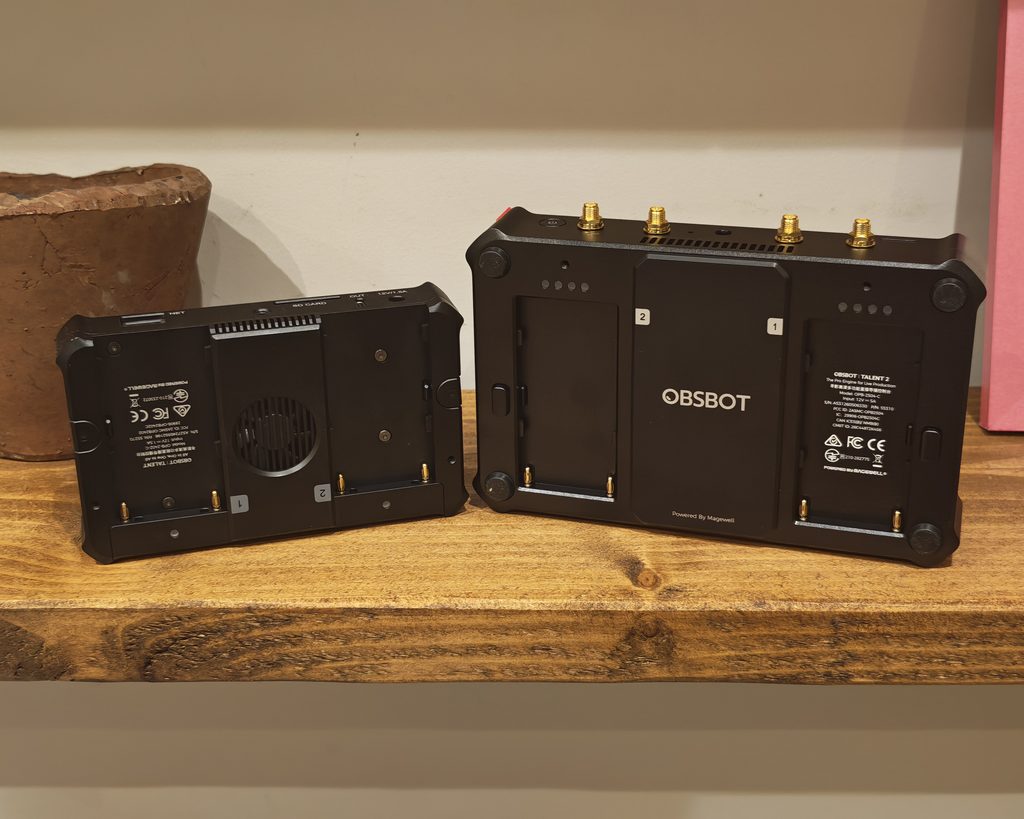
Both devices take two hot swappable NP-F style batteries, numbered 1 and 2, but the layout has changed. The original Talent has a cooling fan grille sitting between the two battery bays. The Talent 2 drops the visible rear fan and instead has a solid centre panel with the OBSBOT logo and a “Powered By Magewell” credit, with cooling presumably handled through the vents cut into the top and side edges instead. Each battery bay on the Talent 2 has its own cluster of four small LED indicators, which should correspond to the four stage charge indicators described in OBSBOT’s specification (green for 75 to 100%, down to red below 25%), so you can check either battery’s level without needing to look at the screen.
The Magewell credit is worth pausing on. Magewell is a well regarded name in capture and IP video hardware, and its involvement goes some way to explaining how OBSBOT has jumped from three NDI sources to ten in a single generation. It also sets an expectation about protocol handling that the device largely lives up to in use.
Top edge
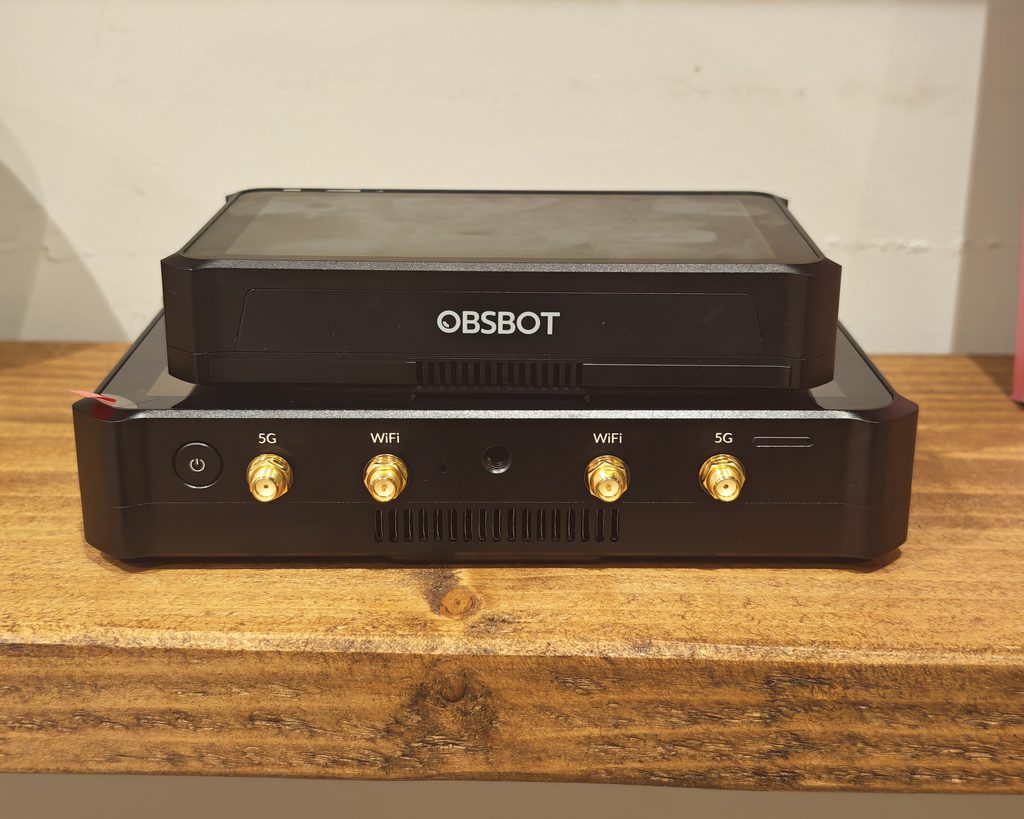
This is where the Talent 2’s networking upgrade is most visible. The original Talent’s top edge is largely unmarked. The Talent 2 has a power button plus four gold SMA antenna connectors, labelled 5G, WiFi, WiFi and 5G from left to right, alongside a row of ventilation slats. That is a direct, visible expression of the enhanced antenna system mentioned in OBSBOT’s materials, and it is not something the original Talent has any equivalent of.
HDMI side
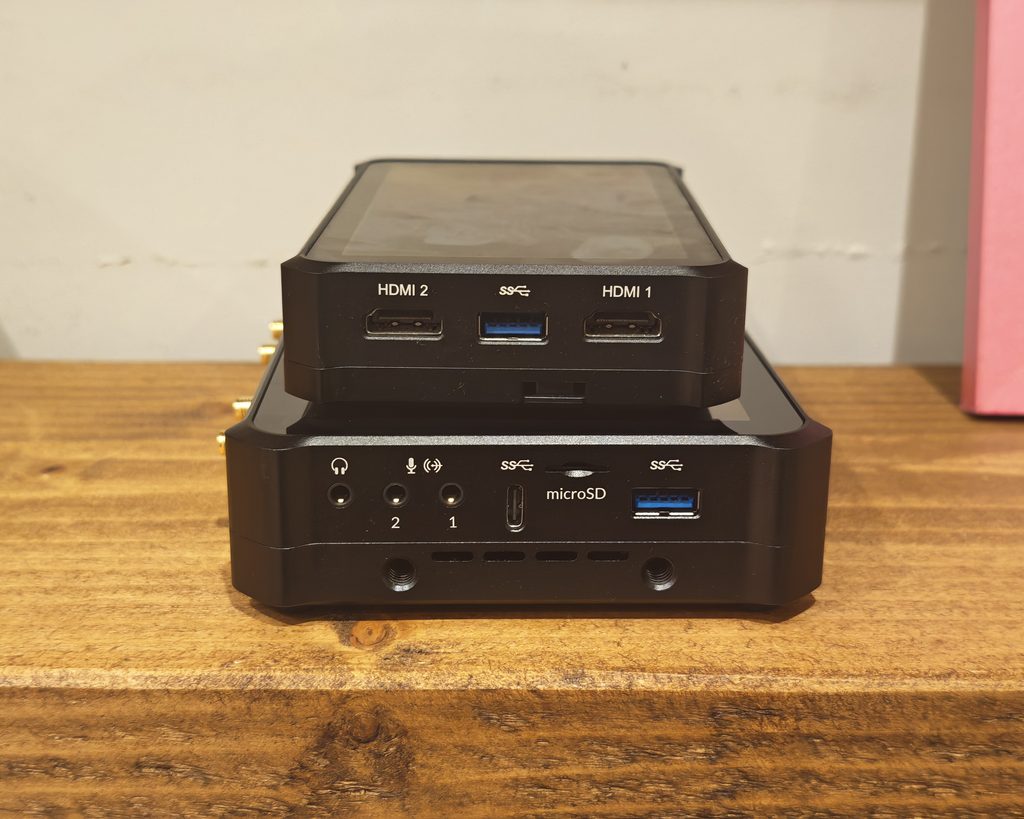
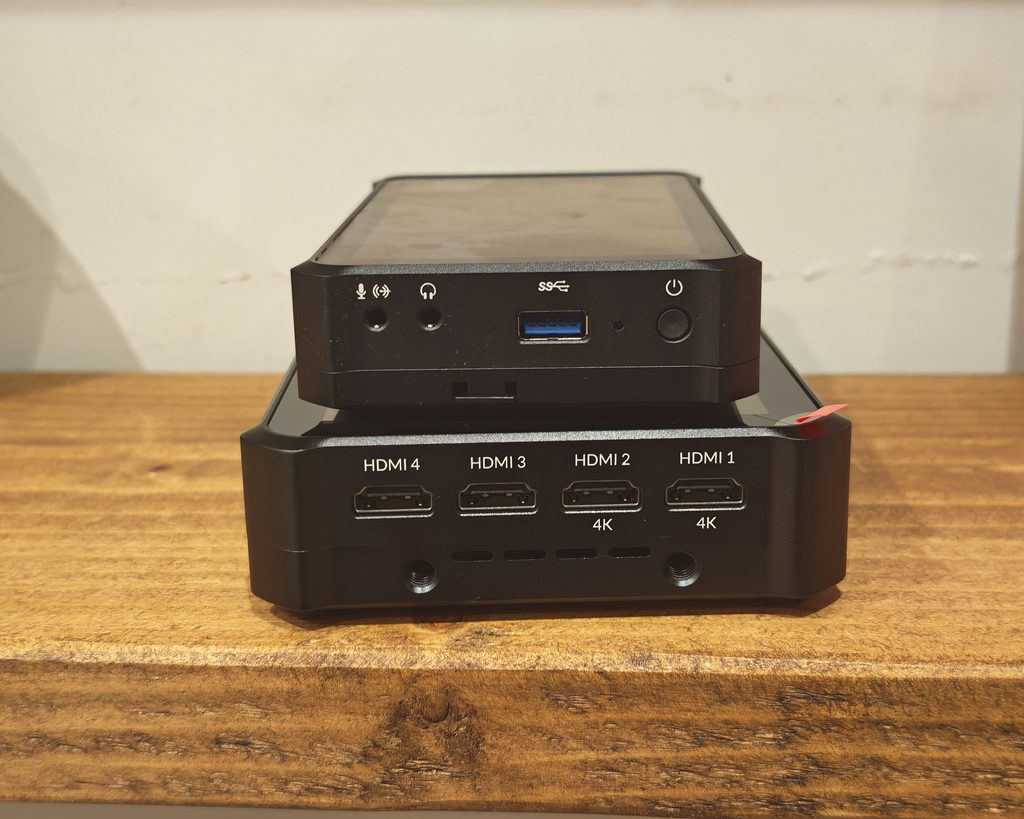
The original Talent has two HDMI 2.0 inputs, labelled HDMI1 and HDMI2, with no onscreen distinction between them since both were limited to the same 1080p output regardless of input resolution. The Talent 2 doubles this to four HDMI ports, labelled HDMI1 through HDMI4, but only HDMI1 and HDMI2 are marked “4K” on the casing, confirming that the other two are input only at up to 1080p. It is a sensible way to add extra HDMI capacity without pretending all four ports are equal, though it does mean checking the casing labels carefully when connecting cameras if 4K matters for a particular source.
Audio, USB and microSD side
The original Talent keeps things simple here: a single 3.5mm jack, one USB-A 3.0 port and the power button. The Talent 2 is considerably busier. It has a headphone jack alongside two numbered 3.5mm inputs, one of which carries a small wireless icon next to the microphone symbol, which may point to support for a wireless lapel mic receiver, though OBSBOT’s documentation does not spell this out directly. Alongside the audio jacks, the Talent 2 adds a USB-C 3.0 port and a microSD card slot, both absent from this side of the original Talent, plus a USB-A 3.0 port that mirrors the one on the original.
Bottom edge
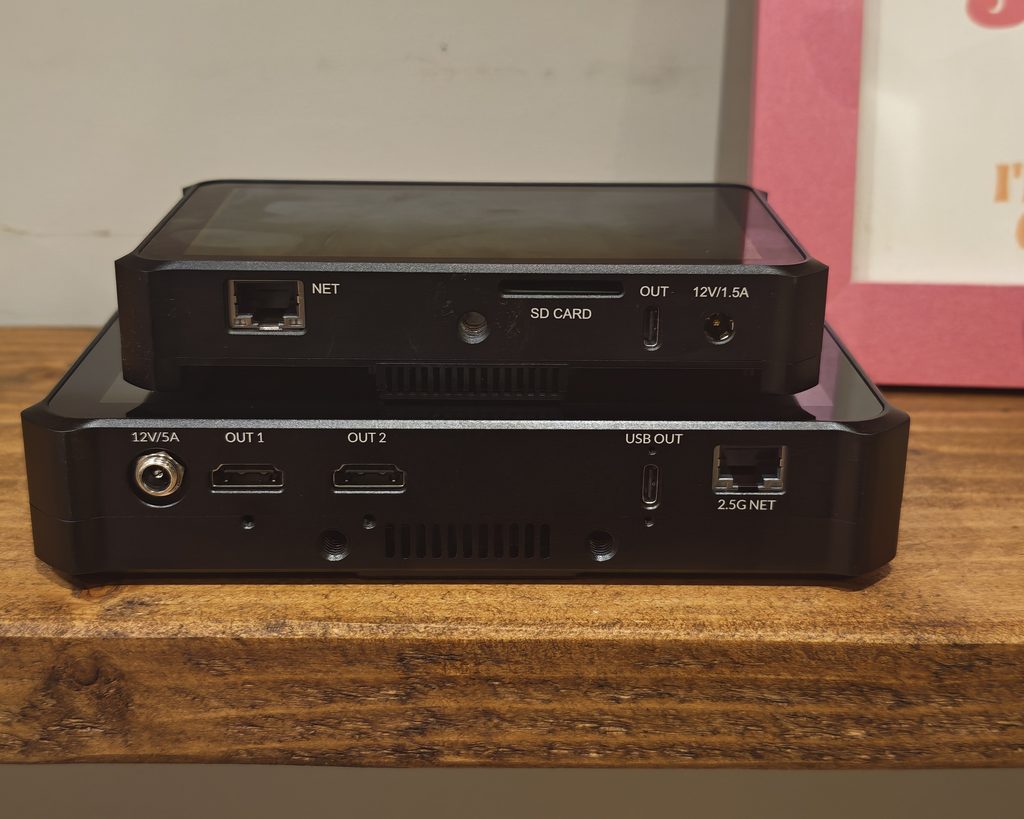
The original Talent’s base carries a Gigabit Ethernet port labelled NET, an SD card slot, a single USB-C output labelled OUT, and a 12V/1.5A power input. The Talent 2 replaces all of this with a noticeably more capable set: a 12V/5A power input using a locking barrel connector rather than the plain jack on the original, two HDMI outputs labelled OUT 1 and OUT 2, a USB-C output labelled USB OUT, and a 2.5 Gigabit Ethernet port labelled 2.5G NET. The move from a single HDMI-less output to two HDMI outs is a genuine practical upgrade for anyone feeding a confidence monitor and a second screen at the same time.
The locking power connector is a small detail that matters more than it sounds. On the original Talent, a knocked cable meant a dropped show unless batteries were fitted. On the Talent 2 the barrel screws down, which is exactly the sort of thing you want on a device that spends its life surrounded by cable runs and people.
Set Up
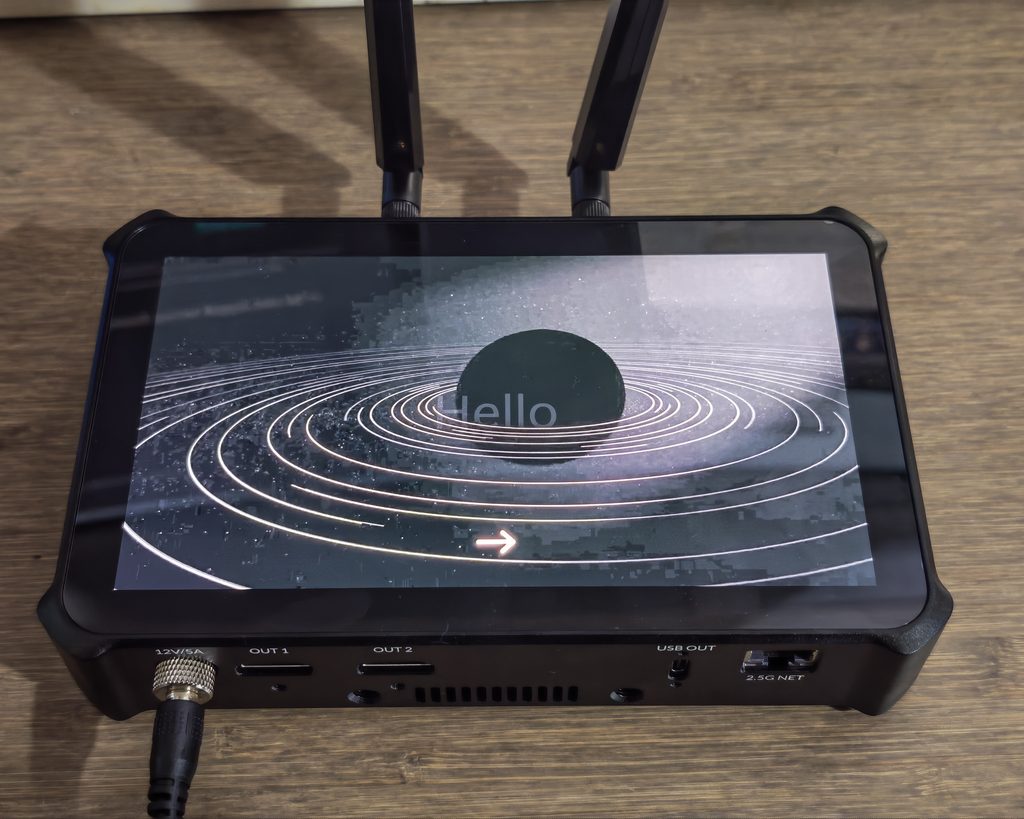
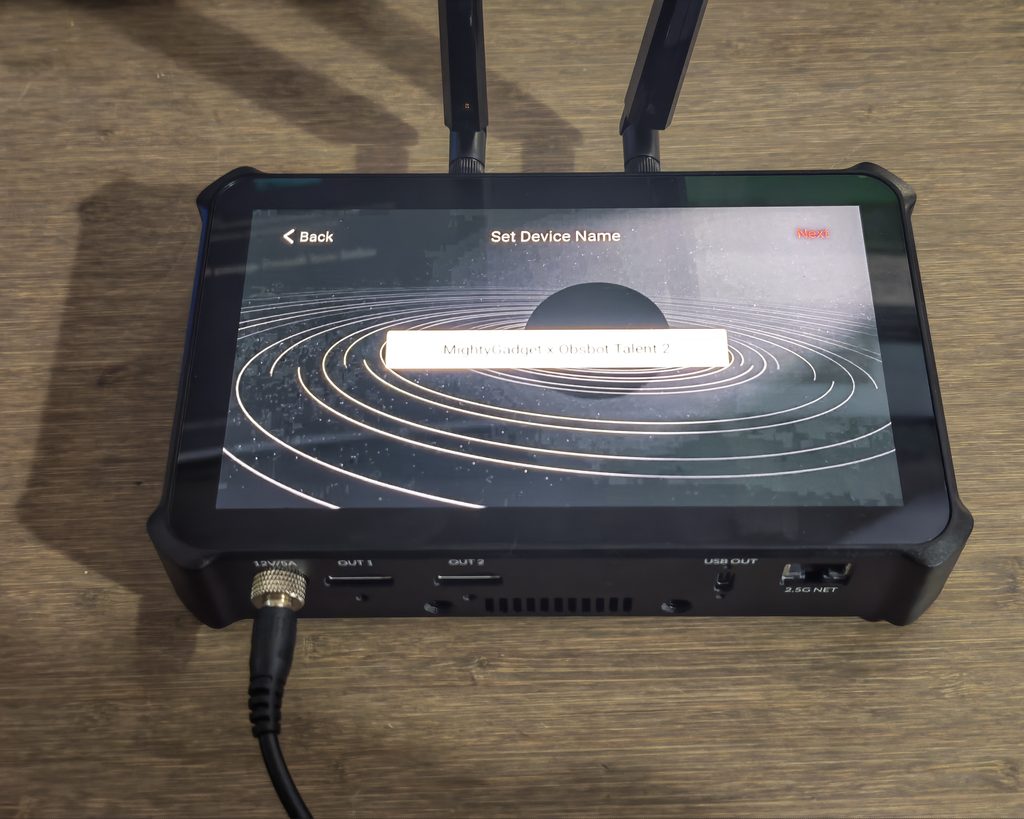
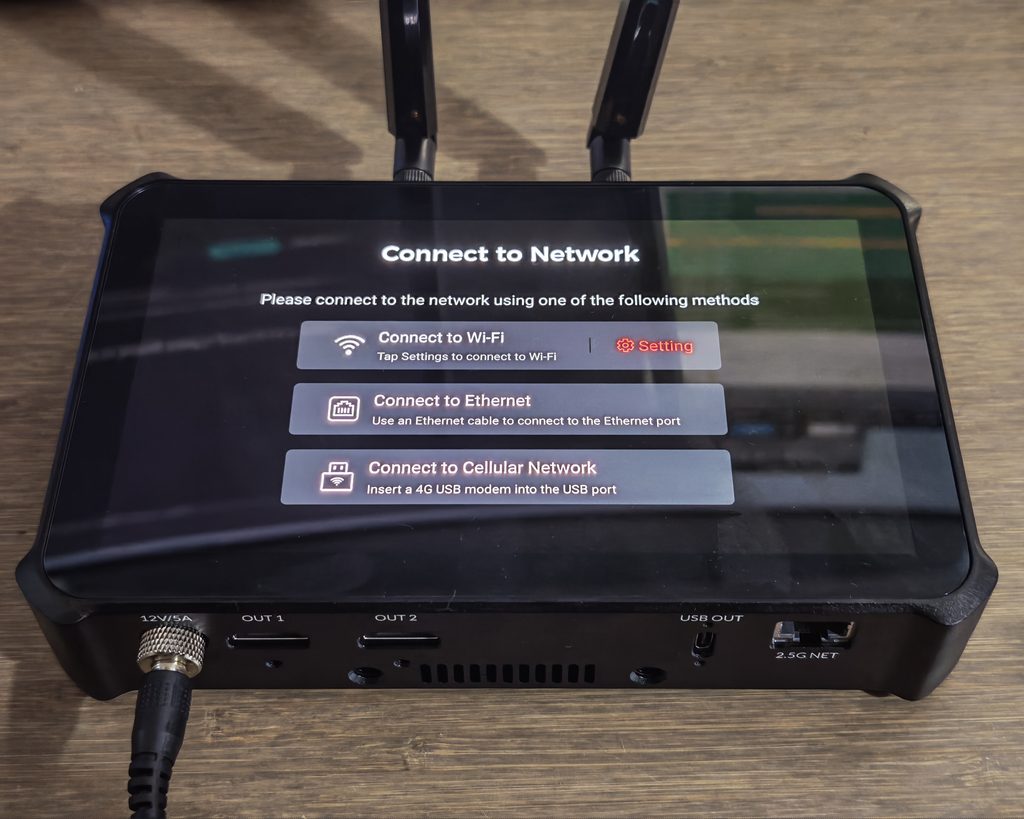
Getting the Talent 2 ready to use takes a bit more effort than plugging in a webcam, but that is to be expected from a device that is replacing an entire production desk. The box includes a screw locking power adapter with five regional plug adapters, an assembly stand kit, a sunhood kit with two thumb screws, four antennas (two for 5G and two for Wi-Fi 6), a USB-C to USB-A cable, a USB-A to USB-C adapter, a SIM card ejector and a fitted screen cover.
Before doing anything else, the four antennas need screwing into the connectors along the top edge, and the assembly stand kit clips onto the underside if you want the unit propped up at an angle on a desk rather than lying flat. None of this is complicated, but it is an extra step compared with a device that works straight out of the box, and it is easy to forget the antennas until you notice weak Wi-Fi or cellular reception later on.
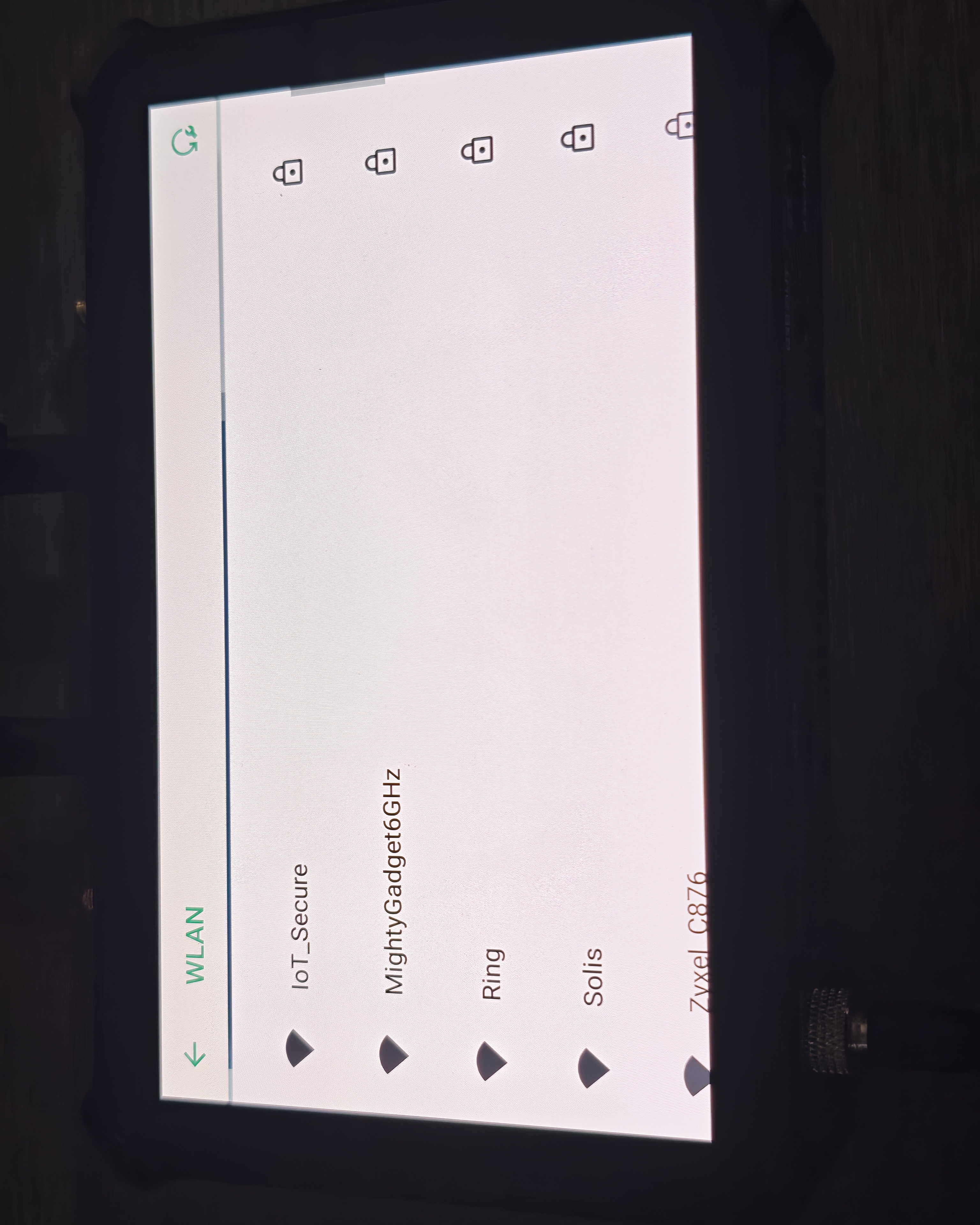
Powering on for the first time brings up a short animated “Hello” screen, followed by a language selection screen. Only English, Simplified Chinese and Traditional Chinese were available on my unit. From there you are asked to set a device name, which I set to “MightyGadget x Obsbot Talent 2” so it would be easy to identify on the network, followed by a network connection screen with three options: Wi-Fi, Ethernet or a cellular network via a 4G USB modem. Talent 2 also has a built in SIM card slot for direct cellular access, though the onboarding screen itself only mentions the USB modem route. The whole process is built on Android underneath, and it shows in a good way. Menus, the network picker and the general navigation all feel familiar if you have used an Android phone or tablet, so most people should find the setup process straightforward without needing a manual.
Networking is one area where OBSBOT has not cut corners, which is often where devices at this sort of price start to disappoint. The Wi-Fi picker found my 6GHz network without issue, and checking the connection through my UniFi controller confirmed it had negotiated Wi-Fi 6 (6E), rather than falling back to an older band or a weaker connection despite the marketing on the antennas. Talent 2 also has a 2.5GbE Ethernet port, an upgrade over the Gigabit port on the original Talent, which is worth using instead of Wi-Fi wherever a cable run is practical for anything approaching the full 4K output.
Once connected, the touchscreen runs a short four step walkthrough pointing out the main areas of the interface, covering the Scene List along the left edge, where sources such as HDMI 1 to 4 and a static Picture slot sit ready to be added and switched between, and the Stream and Record controls along the bottom, which cover starting a broadcast, recording locally and grabbing screenshots at any point during a show. It is a sensible bit of hand holding for anyone coming to this for the first time, though it does not go much further than labelling the buttons.
Creating a new show adds two more decisions before you get to actually plugging in cameras: orientation, with a straight choice between landscape 16:9 and portrait 9:16, and output quality, with 1080p, 1440p or full 2160p 4K on offer. Frame rate is set here too, defaulting to 60fps. Having quality set at the show level rather than buried in a settings menu is a good approach, since it is one of the first things you would want to check before an event rather than something to hunt for once you are already live.
Compared with the original OBSBOT Talent, which I reviewed back in 2024, this is a noticeably more structured process. The first Talent ran a fairly basic Android style setup with on screen prompts but no equivalent device naming step or guided tour of the interface, and network configuration was something you sorted out mostly through trial and error. Talent 2 turns the same job into a proper out of box wizard, which suits a device aimed at people who may not have used a hardware switcher before. As with the original, a browser based Web UI is also available once the unit is on a network, giving a larger view of the same settings for anyone who would rather configure things from a laptop than tap through the touchscreen.
One point worth flagging for anyone picking up a review or early retail unit is that a firmware and companion app update was needed before the phone camera source feature would work, which took a few minutes over Wi-Fi. It is a minor inconvenience rather than a real problem, but worth doing before an event rather than discovering it on the day. My unit arrived on firmware 3.3.1025 with 3.3.1107 waiting on the server, and at 1.2GB it is not a download you want to start ten minutes before a show. The update screen offers both an automatic download and a manual option using a .mwf file, the latter being useful if the device is on a network without internet access.
OBSBOT Talent 2 UI and Settings
While this is a heavily skinned version of Android, it is easy to navigate. The main production view keeps the scene list on one side, the program and preview area in the middle, and the record, stream and screenshot controls within thumb reach, which is broadly the same layout the original Talent used. The difference is that the 7 inch panel gives all of it room to breathe. On the 5.44 inch screen of the original, tapping between small source thumbnails during a live show took more care than it should have. That pressure is largely gone here.
The settings menu is laid out as a single grid of sixteen tiles: Network, Display, Audio, Storage, Encode, Stream, Record, Switch, Back LED Lights, HDMI Out, USB Out, Replay, OSC Remote Control, Shortcuts, Auto Switching and System. Having everything on one screen rather than nested three levels deep is the right call for a device that gets operated under time pressure, and the naming is mostly self explanatory. Shortcuts is worth finding early, since it lets you map frequently used actions to hardware controls and connected accessories.
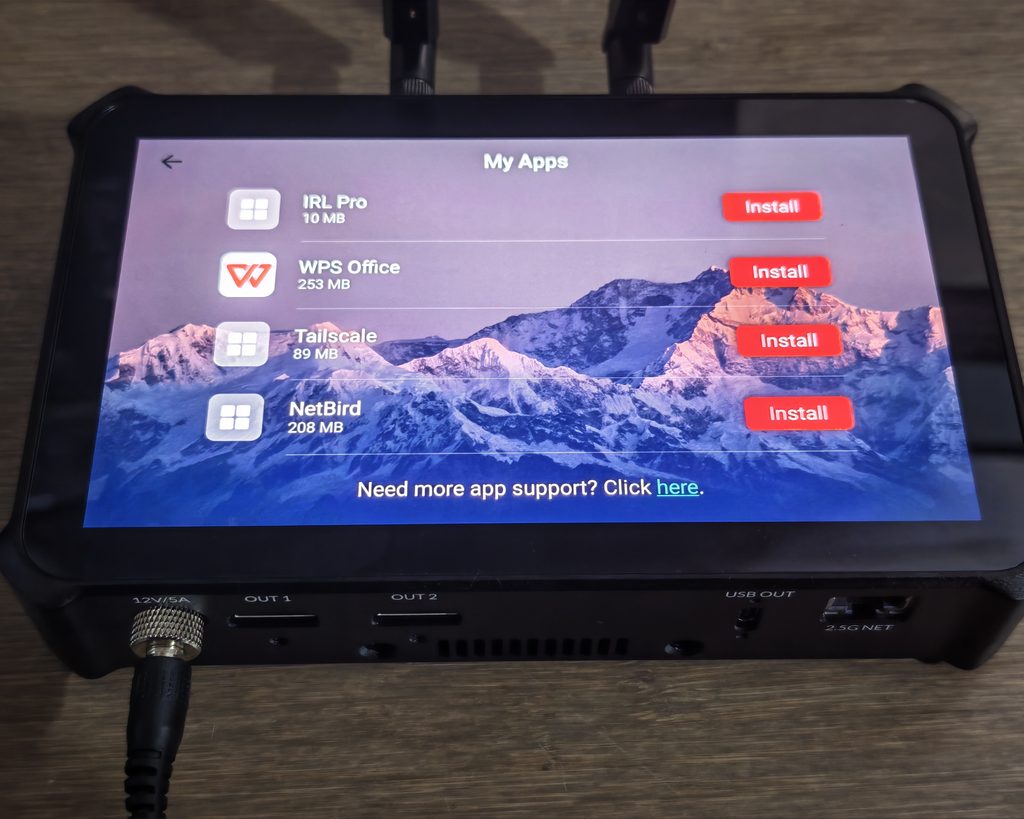
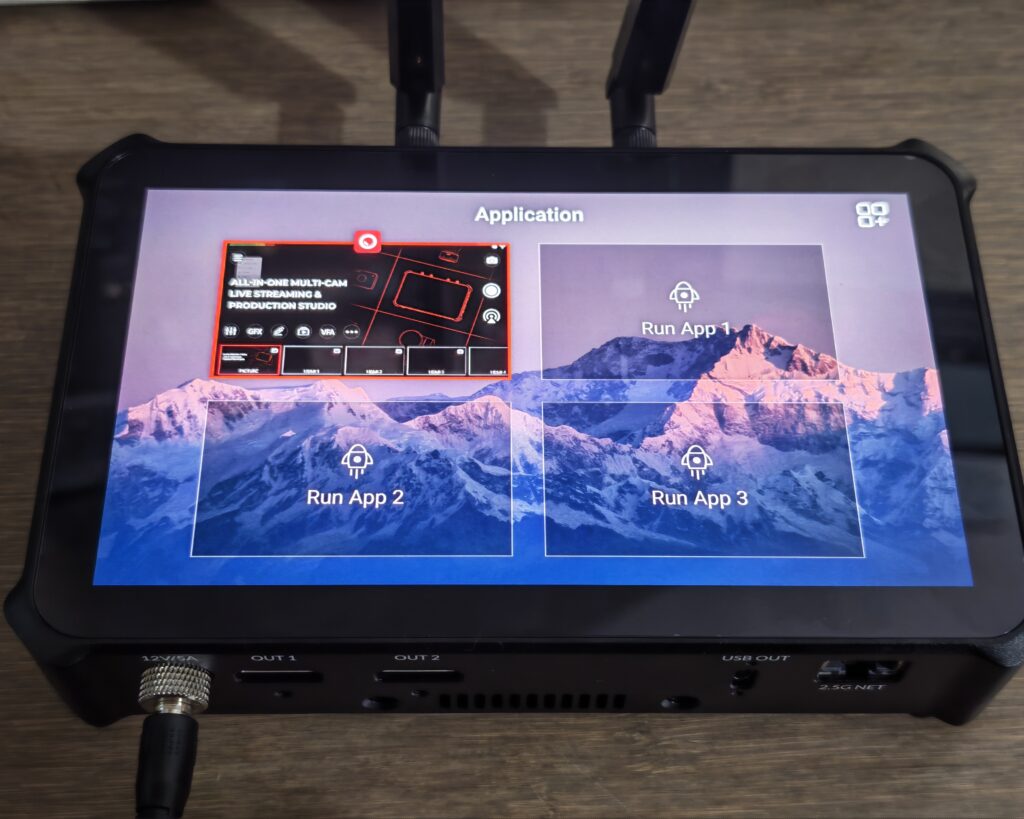
There is also the option to install additional apps, which seemed odd at first, but presumably this is to be able to livestream to these social networks and to monitor them during a show. Chromium comes preinstalled, and the My Apps list on my unit offered IRL Pro, WPS Office, Tailscale and NetBird as optional installs. OBSBOT’s press material also refers to TikTok and Instagram being built in, with up to three platform dashboards open at once, so there is a slight mismatch between the marketing and what appeared in the app list on my unit, and the picture here may well change with firmware.
You also have the option for Tailscale and Netbird giving you an easy way to connect to resources on remote networks. For anyone running a home lab or managing a production remotely, that is more useful than it might first appear. A Tailscale connection means the Talent 2 can pull an NDI or SRT source from a machine on another site, or be reached for configuration from outside the venue network, without asking a client’s IT department to open ports. It is an unusually practical inclusion for a piece of broadcast hardware, and it says something about who OBSBOT thinks is buying this.
The app store approach does raise a question about long term support. These are Android packages curated by OBSBOT rather than a full Play Store, so you are dependent on the company keeping them current. Social media apps in particular have a habit of dropping support for older Android versions, and it is not clear how long the underlying platform will keep receiving updates.
Web UI
Once the Talent 2 is on the network, typing its IP address into a browser gives you the same production interface at desktop scale. This is carried over from the original Talent, and it remains one of the more useful features for anyone running a fixed installation. Working through a browser on a large monitor with a mouse is simply faster than tapping at a 7 inch panel, particularly for fiddly jobs such as positioning picture in picture windows, typing lower third text or building a scoreboard before a match.
It also opens up an operating model the touchscreen alone does not allow. The Talent 2 can sit at the back of a room next to the cameras while the operator works from a laptop elsewhere, which is exactly how most people run a church service or a conference stream. Combined with the Tail Air Smart Remote and Stream Deck support, there are enough control routes here to suit most team sizes, from one person doing everything to a small crew splitting camera control and graphics.
The web interface is not a full replacement for the device screen. Some functions still want you at the unit, and performance depends on the quality of the network link, which is another argument for using the 2.5GbE port rather than Wi-Fi in a permanent setup.
Performance
The Talent 2 runs cool and quiet for what it is doing. The aluminium unibody works as a passive heat sink and the internal fan only becomes audible when the device has been encoding 4K for a sustained period, at which point it is a low hum rather than anything that would carry into a room microphone a metre away. Under an extended session with multiple sources active and a 4K encode running, the chassis gets warm to the touch across the rear panel but does not become uncomfortable to hold, and I saw no sign of the device throttling its output or dropping frames as a result of heat.
The interface stays responsive while the device is under load, which is not a given on hardware like this. Switching sources, opening the settings menu and adjusting audio levels all happen without the lag that would make you hesitate mid show. Boot time from cold is around thirty seconds, which is worth knowing if you are the sort of person who arrives at a venue with minutes to spare.
The one area where the Android foundation shows through is in occasional interface quirks. Dialogs sometimes need a second tap to register, and the odd menu transition is less smooth than the rest. None of it affects the output, but it is a reminder that this is a fairly complex software stack on top of a mobile operating system rather than a purpose built embedded product.
Video Input and Switching
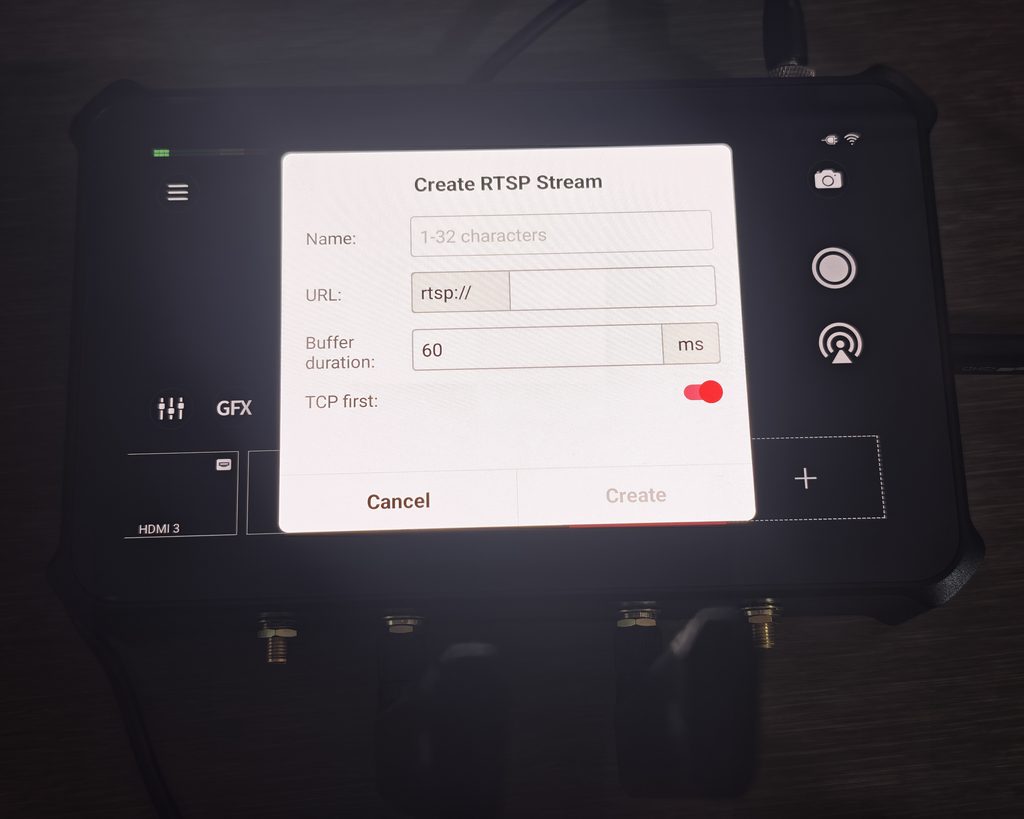
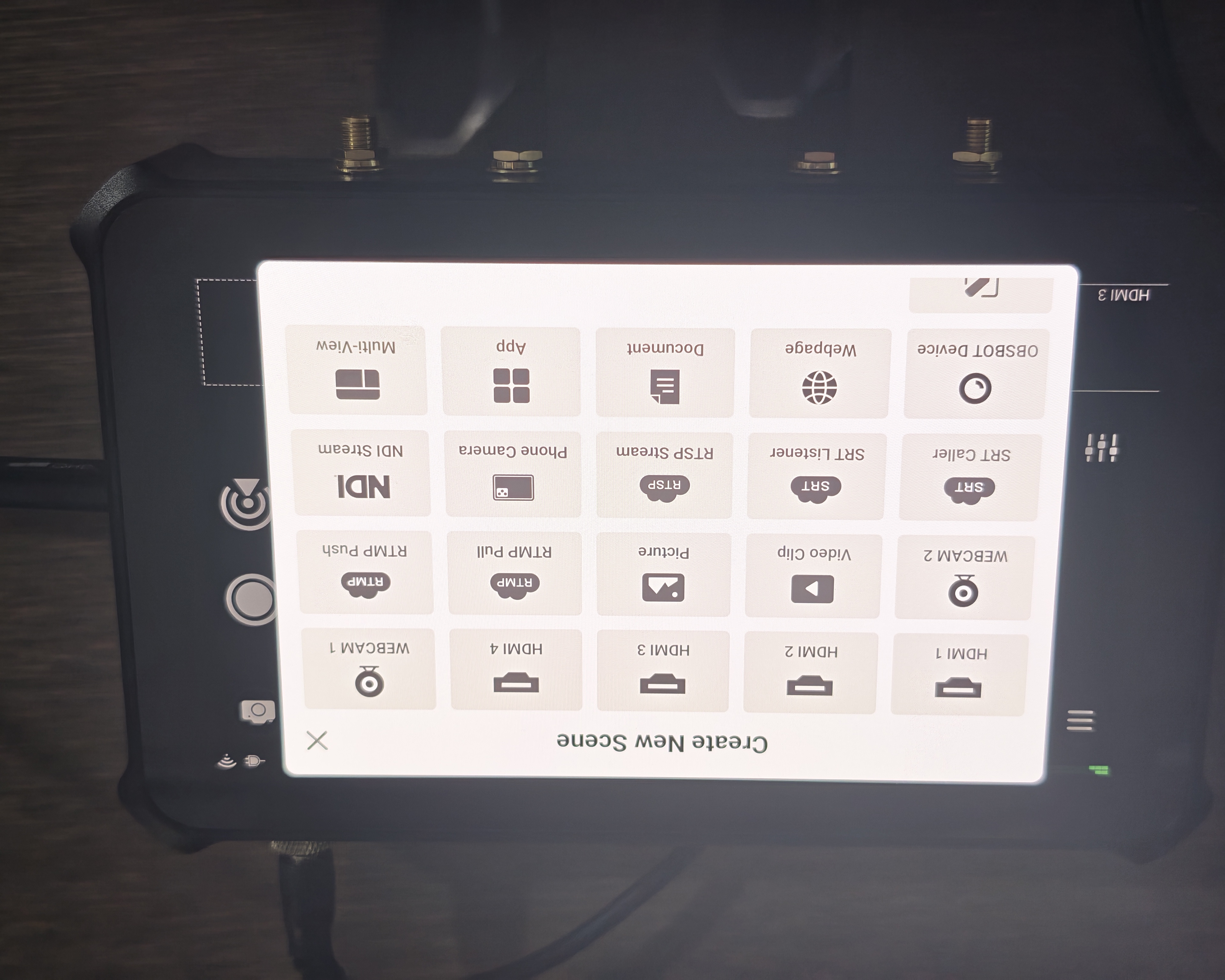
As I have reviewed several Obsbot cameras, I used these for the video inputs. Having the Tiny 2, Tail Air and Tail 2 available meant I could test the mix of connection types the Talent 2 is built around, feeding some cameras in over HDMI and others over the network as NDI sources, which is closer to how the device is actually meant to be used than plugging four identical cameras into the HDMI ports.
Adding a source is done through the Create New Scene menu, and the list of options gives a good sense of the device’s ambitions. Alongside HDMI 1 to 4 and WEBCAM 1 and 2, you get Video Clip, Picture, RTMP Pull, RTMP Push, SRT Caller, SRT Listener, RTSP Stream, Phone Camera, NDI Stream, OBSBOT Device, Webpage, Document, App and Multi-View. Each has its own configuration dialog. Creating an RTSP source, for example, asks for a name, the rtsp:// URL, a buffer duration defaulting to 60ms and a “TCP first” toggle. That buffer setting is the sort of control that gets omitted from consumer gear and matters a great deal when you are pulling a feed from a camera on a busy network, and it is welcome to see it exposed rather than hidden.
The OBSBOT Device option is the smoothest route for anyone already in the ecosystem, since it discovers compatible cameras on the network and brings them in with their control interface attached rather than as a generic video stream. The Webpage and Document sources are a neat addition for anyone doing presentations or training content, since they remove the need for a separate laptop feeding slides over HDMI.
Switching itself is quick and predictable. Tapping a scene brings it to program, with cut and fade transitions available, and the switch happens without a visible glitch or resync pause on the HDMI sources. IP sources behave differently by nature, since there is inherent latency in an NDI or SRT feed, and that latency is worth measuring for your own setup rather than assuming it matches your HDMI cameras. If you are cutting between an HDMI camera and an NDI camera pointed at the same subject, any mismatch shows up immediately in the audio sync.
The smart auto switching modes cover sequential, random and Video Follows Audio. The VFA screen is more configurable than I expected: rather than a single on or off toggle, each source gets its own policy, so you can assign specific audio channels to specific scenes and leave others out of the rotation entirely. For a panel discussion with individual microphones, that means the device can cut to whoever is speaking while ignoring a static picture slot or a graphics source. It works well enough for podcasts and panels, though as with every implementation of this idea, it can get twitchy when people talk over each other, and a short delay is applied before the cut to avoid flicking back and forth constantly.
Streaming Capabilities
The Live Stream panel lists six destination types: YouTube, Twitch and Facebook Live, each requiring an account login, plus NDI, RTMP and SRT Caller, each with a Configure option for manual entry. Logging into the major platforms is handled through a standard OAuth flow on the device, and once authorised the Talent 2 can create or select a broadcast without you touching a computer. The RTMP and SRT options cover everything else, which matters for anyone streaming to a corporate CDN, a church platform such as Resi or a custom server.
Up to four destinations can run simultaneously. In practice, whether you can actually use all four at full quality has more to do with your uplink than the device. A single 4K60 stream at a sensible bitrate needs serious upstream bandwidth, and four of them needs more than most UK venues can supply. The Talent 2 handles this through its Encode section, which lets you define separate encode profiles and assign them to different destinations. On my unit the defaults were Encode 1 at Program 2160p60, H.264, 16.0 Mbps, and Encode 2 at Program 1080p60, H.264, 6.0 Mbps, with the option to add more.
That default 16 Mbps figure for 4K60 deserves comment. YouTube’s own recommendation for 4K at 60fps using H.264 sits considerably higher than that, and at 16 Mbps you will see the encoder struggle on high motion content such as sport or live music, which is exactly where 4K is supposed to earn its keep. The good news is that it is adjustable, and switching to H.265 buys back a meaningful amount of quality at the same bitrate. Anyone buying this device for 4K should treat the defaults as a starting point rather than a recommendation, and should check what their target platform actually accepts, since not every service ingests H.265.
Vertical streaming is handled at the show level rather than as an afterthought. Choosing 9:16 when creating a show sets the entire production up for portrait, including how sources are framed and where graphics land, which is a cleaner approach than cropping a landscape feed. What you cannot do is run landscape and portrait outputs simultaneously from the same show, so if you want both, you are running two shows or accepting a crop somewhere.
Video Quality
With a 4K60 source over HDMI and the show set to 2160p, the Talent 2 passes through detail faithfully. Text on a slide stays legible, skin tones from the OBSBOT cameras look the same on the program output as they do on the camera’s own feed, and there is no obvious colour shift or contrast crush introduced by the device. The step up from the original Talent is substantial for anyone who was previously feeding 4K cameras into a 1080p switcher and watching that detail get thrown away.
The AMOLED panel is a genuine asset for judging this. At 800 nits with 100% NTSC coverage, it is bright enough to work with in a lit hall and accurate enough that a focus or exposure decision made on the screen holds up when you look at the recording afterwards. The supplied sunhood helps further outdoors. The original Talent’s 350 nit screen was usable indoors but became a guessing game in daylight, and this is the single change that most improves day to day operation.
Where quality is determined by the encoder rather than the panel, the picture is more nuanced. As noted above, the default bitrates are conservative, and a 4K stream at 16 Mbps of H.264 is not going to look like a 4K stream at 40 Mbps. Push the bitrate up to what your connection allows, or switch to H.265 where the platform supports it, and the output holds together well. ISO recordings avoid this question entirely, since they are captured at their own settings independent of what is being streamed, and the four 4K60 ISO streams are the most convincing argument for the Talent 2 over cheaper alternatives.
Audio Handling
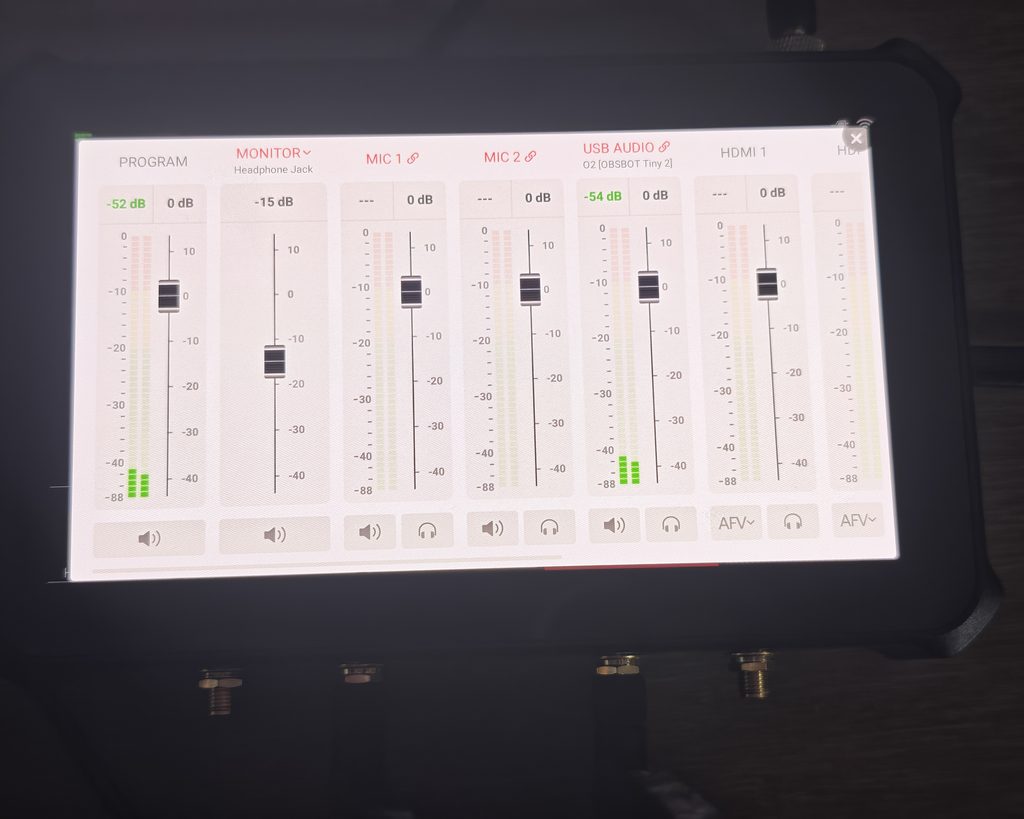
The audio mixer is reached from the sliders icon in the main interface and opens as a horizontally scrolling row of channel strips. On my unit these were PROGRAM, MONITOR (set to Headphone Jack), MIC 1, MIC 2, USB AUDIO and then one strip per HDMI input. Each strip has a level meter, a fader with a numeric dB readout, a mute button and, where relevant, a headphone icon for monitoring that channel in isolation. HDMI channels also carry an AFV toggle so their audio follows the video switch, which is what you want for a camera with an on board microphone and not what you want for a static graphic.
Connecting an external audio device brings up a prompt on screen. Plugging in an OBSBOT Tiny 2 over USB triggered an “External audio device detected” dialog offering to add it as a source, which it then appeared as a USB AUDIO channel in the mixer. That is a small piece of interface polish that saves hunting through a settings menu, and it is the kind of thing that separates a mature product from a first attempt.
The two 3.5mm inputs handle mic or line level, and levels are adjusted live from the mixer with the meters responding immediately. Monitoring through the headphone jack is clean and the latency is low enough to be usable for spoken word. What you do not get is the sort of channel processing a dedicated audio interface would provide. There is no compressor, no EQ and no noise gate visible in the mixer, so if you are running several microphones in a difficult room, you will still want a small hardware mixer upstream. For a two microphone podcast or an interview setup, the built in mixer is enough on its own.
OBSBOT says the audio mixer was improved in the OBSBOT Live app v1.5.0 and firmware update, which suggests this is an area still under active development, so it is worth keeping the firmware current.
GFX and Overlays
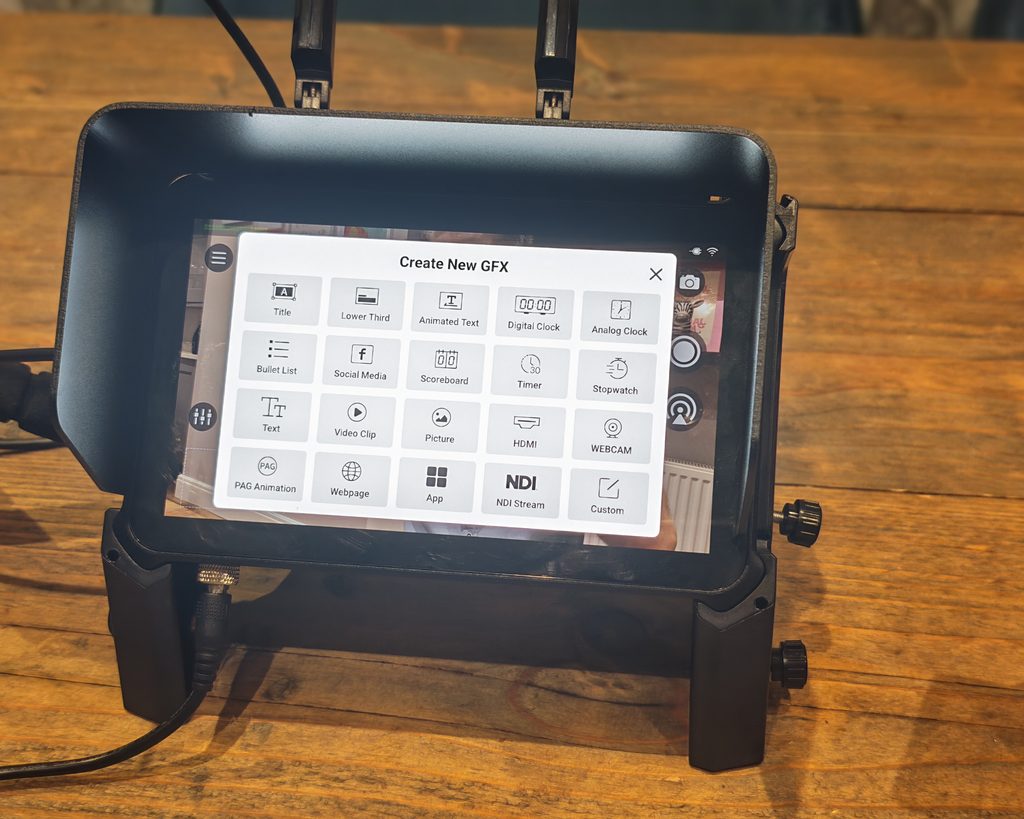
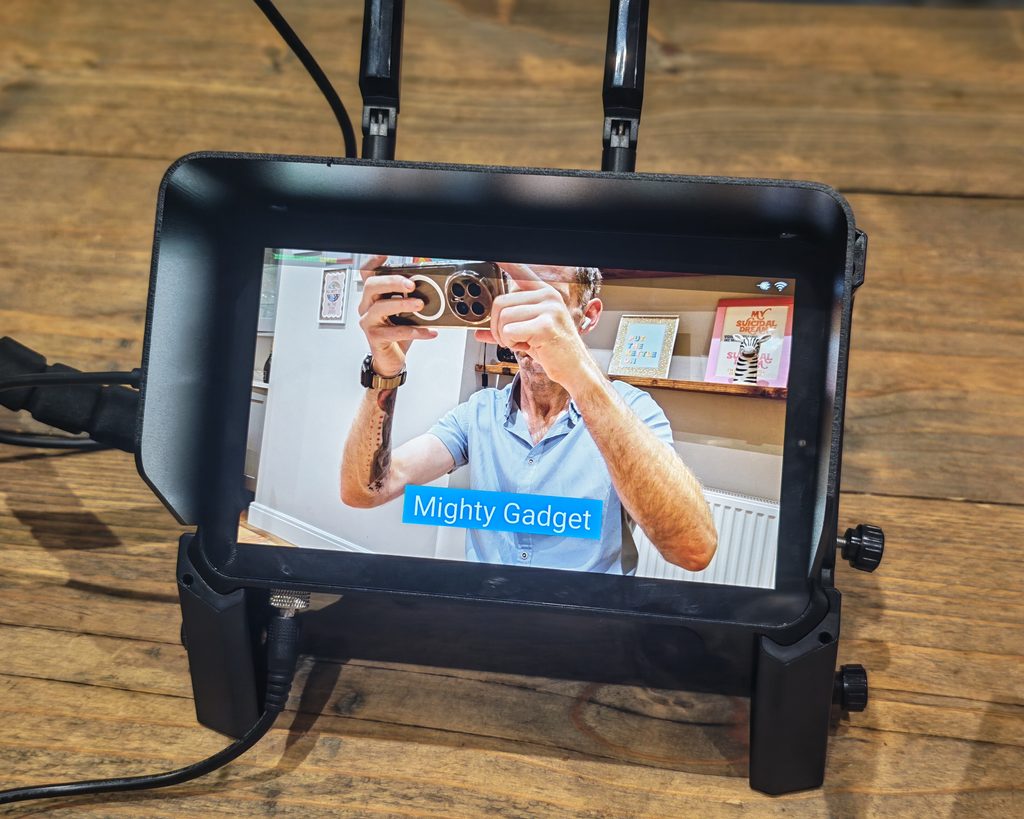
The Create New GFX menu is where the Talent 2 shows how far ahead it is of a simple switcher. It offers twenty overlay types: Title, Bullet List, Text, PAG Animation, Lower Third, Social Media, Video Clip, Webpage, Animated Text, Scoreboard, Picture, App, Digital Clock, Timer, HDMI, NDI Stream, Analog Clock, Stopwatch, WEBCAM and Custom. That is a wider set than OBSBOT’s own documentation lists, and considerably more than most hardware switchers at any price offer without an external graphics machine.
The practical ones get used most. Lower thirds and titles are straightforward to build and trigger, scoreboards cover the common sports layouts with configurable team names and logos, and countdown timers are the sort of thing a church or conference stream reaches for constantly. PAG Animation deserves a mention for anyone with motion graphics skills, since it accepts animated assets exported from After Effects via the PAG format, which means branded animated stings rather than static overlays.
The HDMI, NDI Stream and WEBCAM options under GFX are more interesting than they sound, because they let you place a live video source as an overlay rather than as a full scene. That is picture in picture without needing a dedicated PiP layout, and it gives you more freedom over size and position.
Building graphics on the device is workable but slow, which is where the Web UI earns its place. Typing names and captions on a touchscreen keyboard before an event is tedious, and doing the same job from a laptop takes a fraction of the time. Anyone using overlays heavily should plan on preparing them in advance through the browser rather than improvising during a show.
Chroma key is built in and configured per source, which covers interview setups, course recording and virtual sets. It does what it needs to do given decent lighting on the green screen, though as with any keyer, the result is only as good as the lighting and the camera feeding it.
Integration with Obsbot Cameras
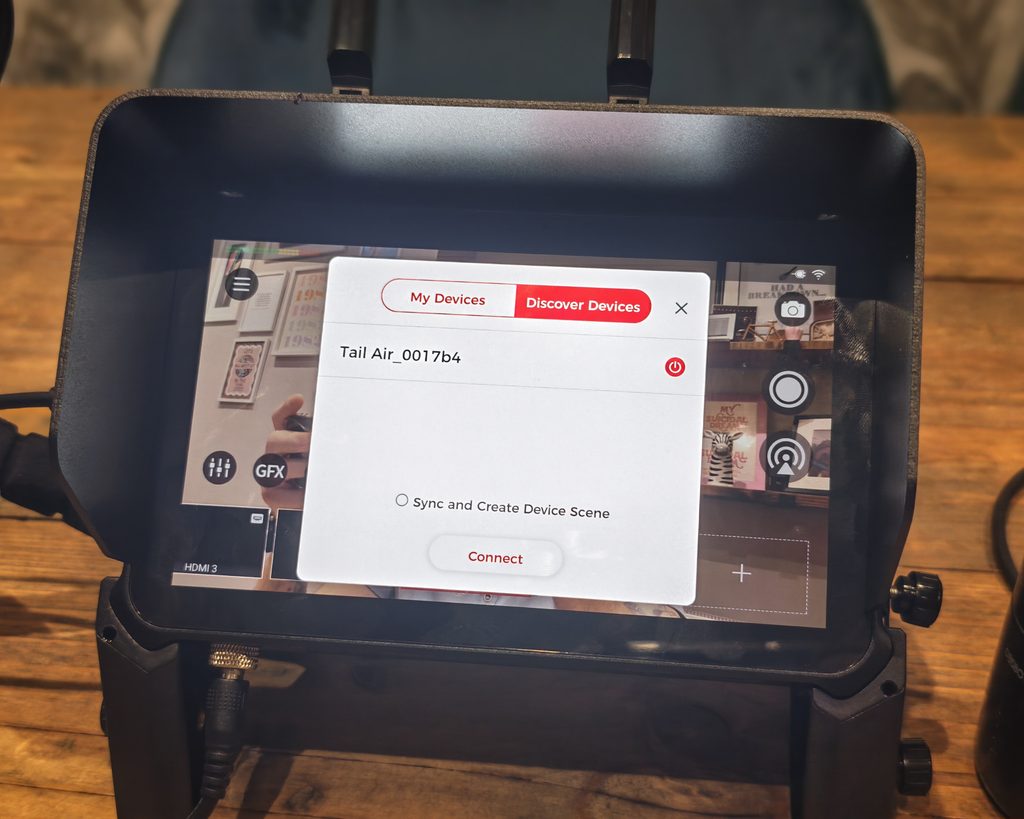
This is the part of the Talent 2 that no competitor can match, and it is the strongest single argument for buying one. If your cameras are OBSBOT, the Talent 2 stops being a switcher that happens to accept their video and becomes the control surface for the whole system.
Adding an OBSBOT camera as a source brings its control interface with it. PTZ movement, AI tracking modes, image settings and preset recall all appear inside the Talent 2 interface, so you can reframe a shot or change a tracking mode without picking up a phone or opening a separate app on a laptop. On a one person production, that difference is significant. Reframing a camera that has drifted off during a panel discussion becomes a two second job on the same screen you are cutting from, rather than a scramble between devices.
Synchronised recording works across up to three connected OBSBOT cameras, with a single command starting and stopping all of them and each camera writing its own footage to its local SD card. All three cameras need to be on the same IP network as the Talent 2 for this to work, which is worth checking before an event if your cameras are split across subnets or VLANs. The value here is in the edit rather than the live show: timecodes line up because everything started at the same moment, instead of drifting because someone pressed record on each camera by hand.
The Tail Air Smart Remote adds the ability to switch scenes and control cameras away from the unit, which is useful in a venue where the Talent 2 is rigged somewhere inaccessible. Combined with the Web UI and Stream Deck support, the control options are comprehensive.
The obvious flip side is that all of this only pays off if you are buying into the OBSBOT ecosystem. With third party cameras over HDMI, the Talent 2 is still a capable switcher, and VISCA control is supported, but you lose the integrated control layer that justifies a good part of the price. Anyone with an existing set of Sony or Panasonic PTZ cameras should weigh the Talent 2 against cheaper switchers with the same scepticism they would apply to any other closed ecosystem.
Battery
Battery remains the Talent 2’s weakest point, and it is the same weakness the original Talent had. The device takes two hot swappable NP-F style batteries, which is the right format. NP-F is a long established pro video standard, the batteries are cheap and available everywhere, and being able to swap one while the other keeps the show running is exactly how this should work.
The problem is that OBSBOT does not include any. The specification sheet quotes three hours thirty minutes from a 7,800mAh cell and two hours twenty minutes from a 2,200mAh cell, but those are the same figures published for the original Talent, which had a smaller screen and less demanding processing to feed. I would treat them as optimistic for the Talent 2, particularly with the AMOLED panel running near full brightness outdoors and a 4K encode in progress, and I would plan for meaningfully less than the quoted time in a realistic scenario.
With two 7,800mAh batteries fitted and hot swapping, an all day event is achievable, but that is a purchase you need to make before the device is any use away from mains power. On a product costing over $2,000, shipping without a single battery is hard to defend, and it compares poorly with the YoloBox Ultra’s integrated cell.
The locking barrel connector on the 12V/5A power input is at least a good decision for mains use, and the four stage LED indicators on each battery bay mean you can see how much is left in each cell without waking the screen.
Price and Alternative Options
OBSBOT lists the Talent 2 at £1,739 in the UK and $2,099 in the US
At the time of writing the original Talent was available via Obsbot for its original RRP of £929.
That is a lot of money and I don’t think I have known a product to double in price betweeen generations. But, unlike the incrimental improvements you see with things like phones or cameras, this launch is more like a completely different product tier. If it was an Apple or Samsung device it might be called the Talent Pro Max and it it changes who this device is for. The original Talent was a plausible purchase for a serious hobbyist. The Talent 2 is a business expense.
The most direct alternative is the YoloLiv YoloBox Ultra, currently around £1,185 in the UK. It has an 8 inch screen, four HDMI inputs, two USB inputs, 4K output, H.264 and H.265 encoding, ISO recording and network bonding, plus a 20,000mAh battery built in. On paper it covers most of the same ground for close to half the price. What it does not have is the Talent 2’s IP source count, its four channel 4K60 ISO recording, or any equivalent of the native OBSBOT camera control. Its screen is also an LCD at 650 nits rather than an AMOLED at 800.
At the other end, Blackmagic’s ATEM Mini range remains the value option for anyone who does not need portability. An ATEM Mini Pro ISO or Extreme ISO gives you more HDMI inputs for considerably less money, but it is 1080p only, has no screen, no battery option and needs a computer nearby for anything beyond basic switching. It is a different kind of product for a different kind of user, and the comparison is only really relevant if you are working from a fixed position with mains power and a laptop already in the rack.
Then there is the original Talent itself at £929, which remains a sensible buy for anyone whose output is 1080p and who needs three or fewer network sources. If you are not actually going to stream in 4K, and many people with 4K cameras are not, the older model does most of the same job for less than half the money. That is worth being clear about, because the Talent 2’s headline improvements are concentrated in areas that only matter if you are pushing the device hard.
Overall
The OBSBOT Talent 2 is a considerably more capable product than the original, and the upgrades are the right ones. True 4K output, sixteen simultaneous sources, four channel 4K60 ISO recording, 2.5GbE with a built in SIM slot, and a 7 inch 800 nit AMOLED panel together address almost every limitation I noted when I reviewed the first Talent in 2024. The native OBSBOT camera control remains its defining feature, and for anyone running a fleet of Tail Air or Tiny cameras, having PTZ, tracking, presets and synchronised recording on the same screen you are switching from genuinely changes how a one person production runs.
It is not without frustrations. Shipping a device at this price without batteries is a poor decision, and the default 16 Mbps encode for 4K60 will leave anyone who does not go looking in the settings with a worse-looking stream than the hardware is capable of. The source count inconsistency across OBSBOT’s own documentation is untidy, only two of the four HDMI ports handle 4K, and the app ecosystem raises questions about long term support that will not be answered for a couple of years. It has also grown considerably, and at 869g before batteries it is no longer something you drop into a bag without noticing.
The bigger question is the price. At around double what the original Talent cost, the Talent 2 has moved out of enthusiast territory and into the budget range of people who produce live video for a living. Judged on that basis it makes sense, because the alternative is a laptop, a capture card, an encoder and a separate camera control setup, all of which costs more and takes longer to rig. Judged against the original Talent, or against the YoloBox Ultra, it needs you to actually use the 4K, the IP sources and the OBSBOT integration to justify the difference.
If you are invested in OBSBOT cameras and you produce multi camera shows regularly, this is the best device the company has made and there is nothing else that combines these capabilities in one box. If you stream in 1080p, use third party cameras, or do a handful of shows a year, the original Talent or a YoloBox will serve you better for the money. Buy some NP-F batteries either way.
OBSBOT Talent 2 Review - All-In-One Multi-Cam Live Streaming & Production Switcher
-
Overall - 90%90%
Summary
I found the OBSBOT Talent 2 a substantial upgrade over the original, combining 4K streaming, four-channel 4K60 ISO recording and a bright AMOLED touchscreen with extensive connectivity. Its integrated OBSBOT camera controls are particularly useful for managing multi-camera productions single-handedly. However, the high price, separately purchased batteries and restriction of 4K input to two HDMI ports limit its appeal. For regular productions using OBSBOT cameras, its capabilities justify consideration, but anyone streaming primarily in 1080p will find better value in the original Talent.
Pros
- 4K streaming and ISO recording
- Integrated OBSBOT camera controls
- Bright AMOLED touchscreen
- Extensive input and networking options
Cons
- Substantial price increase
- Batteries purchased separately

I am James, a UK-based tech enthusiast and the Editor and Owner of Mighty Gadget, which I’ve proudly run since 2007. Passionate about all things technology, my expertise spans from computers and networking to mobile, wearables, and smart home devices.
As a fitness fanatic who loves running and cycling, I also have a keen interest in fitness-related technology, and I take every opportunity to cover this niche on my blog. My diverse interests allow me to bring a unique perspective to tech blogging, merging lifestyle, fitness, and the latest tech trends.
In my academic pursuits, I earned a BSc in Information Systems Design from UCLAN, before advancing my learning with a Master’s Degree in Computing.
I’m proud to share that Vuelio has consistently ranked Mighty Gadget as one of the top technology blogs in the UK. With my dedication to technology and drive to share my insights, I aim to continue providing my readers with engaging and informative content.
I work directly with the companies he reviews products for or their chosen PR agency.
For Social Media, you can find me on: