XTU S7 PRO 4K Action Camera Review
It has been a while since I reviewed an action camera, and the market has changed a lot in that time. GoPro, DJI and Insta360 dominate the conversation, but their flagship models now cost as much as a decent mid-range phone. At the other end of the market, there is a long tail of budget brands, and the quality varies wildly. Some are genuinely usable; others are barely better than the no-name cameras that flooded Amazon a decade ago.
The XTU S7 Pro sits in the interesting middle ground. XTU pitches it as a 4K ultra flagship action camera, which is a bold claim for something that sells for around £110 at the time of writing. The headline specifications are a 1/2-inch 48MP sensor, 4K recording at up to 50fps, XTU’s Super Stabilisation 5.0 with 360° horizon lock, dual screens, Wi-Fi 6 file transfer, PD fast charging and a magnetic quick-release mount. On paper, that is most of the feature list you would expect from a camera costing three times as much.
XTU sent me the S7 Pro to review, and as always, that has no bearing on my conclusions. The obvious question with any budget action camera is not whether the spec sheet looks good, because they always do. It is how much of that spec sheet survives contact with real-world use, and whether the corners that have been cut are ones you can live with. This review covers the design, settings, video and photo quality, stabilisation, low light performance, battery life and how it compares against the DJI Osmo Action 4 and the various AKASO models that compete at similar or higher prices.
Action Camera Specification Comparison
| Specification Category | XTU S7 Pro | DJI Action 4 | AKASO Brave 8 | AKASO V50 Elite | AKASO Brave 4 |
| Image Sensor | 1/2″ CMOS (48MP) | 1/1.3″ CMOS | 1/2″ CMOS (48MP) | 1/2.3″ CMOS (20MP) | 1/2.9″ CMOS (20MP) |
| Max Video Resolution | 4K @ 50fps | 4K @ 120fps | 4K @ 60fps | 4K @ 60fps | 4K @ 30fps |
| Stabilisation | 360° Horizon Correction + Super Stabilisation 5.0 | RockSteady 3.0 + HorizonSteady | SuperSmooth | Standard EIS | EIS 2.0 |
| Battery Life | Up to 200 mins (at 1080p) | Up to 160 mins | Approx. 90 mins (at 4K) | Approx. 50 mins (at 4K) | Approx. 90 mins |
| Waterproofing | Up to 30 metres (with housing) | 18 metres (without housing) | 10 metres (without housing) | 10 metres (without housing) | Up to 40 metres (with housing) |
| Fast Charging | Yes (46 mins to 80%) | Yes (18 mins to 80%) | No | No | No |
| Voice Control | Yes | Yes | Yes | Yes | No |
| Connectivity | Wi-Fi 6 (Dual-band) | Wi-Fi 5 | Wi-Fi (Dual-band) | Wi-Fi (Dual-band) | Wi-Fi 4 (Single-band) |
| Mounting System | Magnetic Quick-Release | Magnetic Quick-Release | Standard Folding-Finger | Standard Folding-Finger | Standard Folding-Finger |
| Approximate Price | ~$109.99 (The actual price is £110 in the UK) | ~$299.00 | ~$289.99 | ~$159.00 | ~$89.00 – $99.00 |
A quick note on the pricing row. The dollar prices are the US list prices that XTU uses in its own comparison material, but they translate reasonably well to the UK market. The DJI Osmo Action 4 typically sells for around £215 to £250 in the UK now that the Action 5 Pro has superseded it, the AKASO Brave 8 sits around £230, and the older AKASO models fill out the sub-£150 space. The S7 Pro at £110 undercuts everything except the ageing AKASO Brave 4.
Design and Build Quality
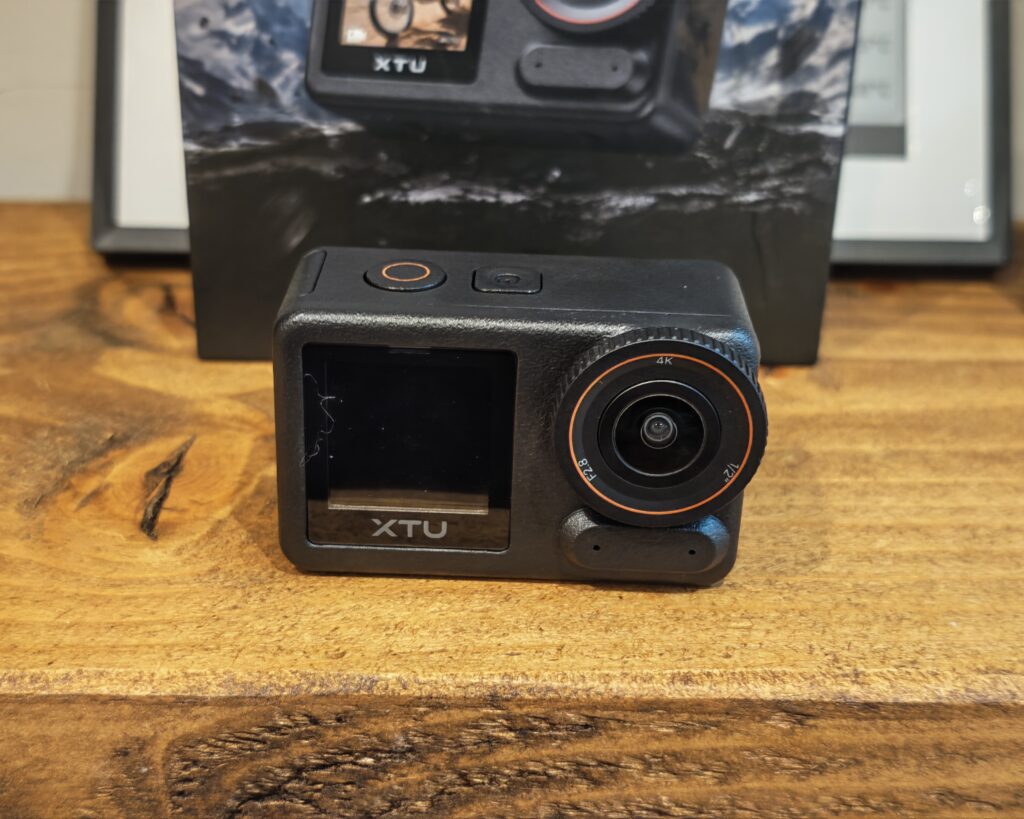
The S7 Pro follows the now-standard action camera template, and if you have handled a GoPro Hero, DJI Osmo Action or Insta360 Ace Pro, you will feel immediately at home. It is a black rectangular body with a prominent lens surrounded by an orange accent ring, a 2.29-inch touchscreen on the back and a smaller 1.4-inch colour screen on the front for framing selfies and vlogs. The rear display has a 426 PPI pixel density, which is noticeably sharper than the screens on most budget cameras I have used, and touch response is generally good, though I occasionally found it fiddly to exit menus when holding the camera at an awkward angle.


Build quality is better than I expected at this price. The body has a decent amount of weight to it without being heavy, the buttons have a positive click, and the battery door slides and locks with a reassuring action. The one weak point is the USB-C port flap, which pops off its hinge a little too easily. It clips back in without drama, but it is the sort of part I would expect to lose within a year of regular use.
There are two physical buttons: a power button on the side that doubles as the mode selector, and a record button on top. A long press of the record button switches between the front and rear screens, which is a sensible shortcut once you know it exists. The camera also supports voice control for starting and stopping recordings and taking photos, which works well enough in quiet conditions and is genuinely useful when the camera is mounted out of reach on a helmet or handlebars.


One thing worth flagging clearly: the S7 Pro body is not waterproof on its own. Unlike the DJI Osmo Action 4, which is rated to 18 metres without a case, or even the AKASO Brave 8 at 10 metres, the S7 Pro needs the separate dive housing for underwater use or heavy rain, at which point it is rated to 30 metres. Splashes and light rain should be fine, but if water sports are your main use case, factor the housing into the price. It is frustrating that XTU’s marketing leans on surfing and diving imagery when the camera in the box cannot actually get wet.
Mount and Accessories
In the box, you get the camera, one 1800mAh battery, a USB-C to USB-C cable, the magnetic quick-release mount and a user manual. The manual is a genuinely useful 25-page booklet in good English, which is more than can be said for a lot of budget cameras. There is no microSD card included, and XTU recommends a U3-rated card from a well-known brand, with support for up to 512GB. The included documentation also suggests formatting the card every three months, which is unusual advice but not bad practice for a camera that writes high-bitrate video constantly.
The magnetic quick-release mount is one of the best things about this camera. It is the same basic concept DJI and Insta360 use: the camera snaps onto the mount magnetically, and two side clips lock it in place so the magnet is not doing all the work. The magnet is strong, the clips give it a positive lock, and detaching takes a second with a squeeze of the clips. For anyone who moves a camera between a bike, a helmet and a tripod regularly, this is a far better system than GoPro’s traditional folding fingers and thumbscrew.
The catch is that the quick-release plate is the only mounting accessory you get. The plate has the standard GoPro-style folding fingers on its underside, so it will attach to the enormous ecosystem of existing GoPro-compatible mounts, but if you are starting from scratch you will need to buy those mounts separately. There is no frame, no adhesive mounts, no tripod adapter and no carry pouch.
I have noticed some people criticise the lack of accessories for this. If you go to the XTU website, it appears that they sell an accessory kit for £124, which includes two batteries and various accessories. However, it is not very clear what you get; the “what you get” image implies a camera is included! At £124 for an accessory bundle against a £110 camera, the pricing looks odd, and XTU would do well to clarify exactly what is in that kit. In the meantime, generic GoPro-compatible mount kits from Amazon cost £15 to £25 and will cover most needs. Also sold separately are the waterproof dive housing, a charging case, a camera cage, a magnetic neck mount and XTU’s own Bluetooth microphone. On that last point, note that the S7 Pro only supports XTU’s own Bluetooth microphones; third-party Bluetooth mics may connect but will not record audio properly, so do not plan on pairing your existing wireless lav.
Settings and UI


The on-camera interface is straightforward. A swipe down from the top of the rear screen opens a quick menu with Wi-Fi, screen lock, Bluetooth, voice control, settings and power options. The settings menu covers the essentials: auto sleep and auto power off timers, language (seven supported), NTSC or PAL video format, 50Hz or 60Hz anti-flicker, LED and tone toggles, date stamps, a composition grid, SD card formatting and a factory reset. There is also an emergency reverse charging option, which lets the camera give your phone a small top-up over USB-C. It is a niche feature, but a clever use of the 1800mAh battery in a pinch.
The depth of the shooting controls surprised me. Beyond the usual resolution and frame rate options, you get manual control over exposure compensation, shutter, ISO, white balance, metering mode, sharpness, colour filters, brightness, contrast and saturation. Video can be encoded in H.264 or H.265, image quality can be switched between standard and high, and there is a RAW photo mode. That is a more complete manual toolkit than several cameras costing twice as much, and it means the S7 Pro can grow with you rather than boxing you into full auto.
Two defaults are worth changing on day one. Image quality ships set to standard rather than high, and the camera stamps an “XTU ArtCam S7PRO” watermark on your footage until you disable the Stamp option in the settings. Shipping with a promotional watermark enabled is a poor decision, and finding the toggle to remove it took some digging. The other quirk is the auto segment option, which splits recordings into one-minute or three-minute files; there is an “all” option, but no clearly labelled off switch, which will annoy anyone who wants single continuous files for editing.
The XTU GO companion app (iOS and Android) connects over the camera’s own 5GHz Wi-Fi hotspot and provides a live preview, remote control of every setting, and file download. Once connected it works well, and controlling the camera from a phone while it is mounted somewhere inaccessible is genuinely practical; I did most of my test recordings this way. Getting connected the first time is less polished. The pairing flow is not intuitive, and the app currently sits at a mediocre rating on the Play Store, which reflects the rough edges rather than any fundamental problem. Wi-Fi 6 transfer is a real advantage though: XTU claims up to 30MB/s, and while real-world speeds depend on your phone, offloading 4K clips is dramatically quicker than the 2.4GHz transfers older budget cameras crawl along at. The camera also mounts as USB mass storage when plugged into a PC, and, in a pleasant surprise, offers a webcam mode over the same connection, so it can serve as a third camera source in OBS or Teams.
Performance – Video Quality
I suspect that the main issue people will have with this camera is that it is limited to 4K at 50fps. Additionally, this is only normal 4K, and not HDR. HDR recording is available, but only at 30fps in 4K, 2.7K and 1080p; the moment you push to 50fps, HDR drops away. There is also no 4K/60 and no 24fps option at all, which will bother anyone trying to intercut this footage with cinema-style 24fps material from another camera.
There is a further wrinkle around frame rates that caught out one of the overseas reviewers whose footage I studied alongside my own testing. The available frame rates depend on the video format setting. In PAL mode, which is what UK users should be running, you get 25fps and 50fps and the headline 4K/50 is available as advertised. Switch to NTSC and the options become 30fps at 4K, with the higher frame rates reserved for lower resolutions. For a UK audience this is largely academic, since PAL is the correct setting here and 4K/50 works as claimed, but it explains the confusion in some US reviews where the 4K/50 mode appears to be missing.
The full mode list is generous for the price. Alongside normal video you get timelapse, slow motion (1080p at 120fps and 720p at 240fps), a quick stories mode, an underwater colour mode, car looping for dash cam duty, a combined video and photo mode, and a dedicated night scene mode. The car looping mode is a nice inclusion, though having reviewed a fair few dedicated dash cams, I would treat it as an occasional backup rather than a replacement; a proper dash cam adds parking modes, GPS and hardwiring options that an action camera cannot match.
As for the actual footage, in good daylight the S7 Pro produces sharp, punchy 4K with pleasing colours straight out of the camera. XTU’s AI ISP processing leans towards a slightly saturated, social-media-ready look rather than a flat profile, and there is no 10-bit or log recording, so this is not a camera for anyone with a serious colour grading workflow. That is one of the clearest gaps between this and the DJI Osmo Action 4, which offers 10-bit D-Log M. Dynamic range is respectable for a 1/2-inch sensor; skies hold together better than I expected in backlit scenes, though you will still see highlights clip in harsh conditions where a larger-sensor camera would cope. Bitrates are healthy and the H.265 option keeps file sizes manageable. For the vlogging, cycling, travel and family footage that most people actually shoot, the output is comfortably good enough to post without apology, and that is the standard a £110 camera needs to meet.
Performance – Stabilisation
Stabilisation is where budget action cameras traditionally fall apart, and it is the area where the flagship brands most visibly earn their premium. The S7 Pro offers four options: off, Super, Super Enhanced, and Gyro Flow, plus the separate 360° horizon lock mode. Gyro Flow does not stabilise in camera at all; instead it records the gyroscope data alongside the footage so you can stabilise it afterwards in the free Gyroflow software, which gives the best possible results at the cost of adding a processing step to your edit.
In practice, the electronic stabilisation is good, and considerably better than I expected at this price. Walking footage with Super Enhanced enabled is smooth, with the characteristic action camera float rather than the jittery mess older budget cameras produce. Push it hard with rapid head shakes or sharp direction changes and you can provoke a slight wobble and a visible processing delay at the frame edges, which DJI’s RockSteady and GoPro’s HyperSmooth handle more gracefully. For cycling, walking, running and general handheld use, most viewers would struggle to tell the difference; it is only in the most aggressive movement that the gap shows.
The 360° horizon lock genuinely works. Rotate the camera through a full turn and the horizon stays level, at the cost of a crop into the sensor. This is a feature that only arrived on premium cameras relatively recently, and having it function properly on a £110 camera is impressive. It is worth remembering that horizon lock is not always what you want; for motorcycling or cornering footage, locking the horizon removes the sense of lean that makes the footage exciting, so it is good that it can be toggled per recording.
As with all electronic stabilisation, more correction means more crop and more latency, so it pays to match the mode to the activity rather than leaving everything maxed out. The sensible defaults are Super for general use and Super Enhanced for rougher activities, keeping Gyro Flow for footage you know you will edit properly.
Performance – Image Quality
Still photography is an area where the S7 Pro punches above its class on paper. The 48MP sensor comfortably out-resolves the 10MP stills from the DJI Osmo Action 4 and the 20MP output of the cheaper AKASO models, and there is a RAW mode alongside JPEG, plus long exposure, burst, timer and timelapse photo modes.
In practice, 48MP from a 1/2-inch sensor involves very small pixels, so do not expect the per-pixel quality of a larger-sensor camera or a flagship phone. Viewed at normal sizes, daylight photos are detailed and colourful, and the resolution gives you meaningful room to crop, which is handy given the fixed 152° wide-angle lens. Pixel-peep at 100% and the fine detail turns watery, particularly at the frame edges where the wide lens softens. Against a Samsung S24 Ultra or a recent Pixel, the phone wins on processing and low light every time, but the phone also costs many times more and does not strap to a helmet.
One practical tip that applies to both photos and video: switch the image quality setting from its standard default to high before judging the output. The difference is visible, and it baffles me that the better setting is not the default. The F2.8 aperture is reasonably bright for the class, and the 4:3 native sensor means full-resolution stills come out in 4:3 with 16:9 crops available, which is normal for action cameras even if it feels dated. The camera can also switch between 16:9 and 9:16 aspect ratios for video, which makes native vertical shooting for short-form content easy without cropping in post.
Performance – Low Light
Low light is the great equaliser for action cameras, and physics is not on the S7 Pro’s side. A 1/2-inch sensor packed with 48 million photosites simply cannot gather light the way the DJI Osmo Action 4’s larger 1/1.3-inch sensor can, and it shows. As light falls, noise rises, fine detail smears as the noise reduction works harder, and the stabilisation becomes less effective because the camera is fighting longer effective exposures.
XTU’s answer is an AI night vision algorithm and a dedicated night scene mode, and to be fair, they help. Evening and dusk footage is usable, street-lit scenes hold together better than I expected, and static night shots in the dedicated mode are respectable if you keep the camera still. The long exposure photo mode can also produce decent night stills from a tripod or any stable surface.
But moving footage in genuinely dark conditions is where the budget shows. If night riding, astro timelapses or dim indoor shooting are a significant part of your use case, this is the specification gap that justifies spending more on the DJI. For everyone else, the fair summary is that the S7 Pro is fine at dusk, acceptable under street lighting, and struggling in the dark, which is exactly what the sensor size predicts.
Battery Life and Charging
The S7 Pro uses a removable 1800mAh battery, a 31g unit that slides in behind a locking side door. XTU quotes up to around 200 minutes of recording, but read the small print: that figure is at 1080p/30, not 4K. In real-world 4K use with stabilisation active, expect somewhere in the region of 90 minutes to two hours depending on settings, screen use and Wi-Fi, which is competitive for the class. For comparison, DJI rates the Osmo Action 4 at up to 160 minutes, again at 1080p, and the AKASO Brave 8 manages roughly 90 minutes of 4K per battery.
The removable battery matters more than the raw numbers. A spare in a pocket solves the runtime question entirely, and it sidesteps the long-term problem of sealed batteries degrading. This is where the unclear £124 accessory kit with its two extra batteries would make sense if XTU sold it more transparently, and I would like to see individual spare batteries and a simple two-battery bundle listed clearly.
Charging is a highlight. The S7 Pro supports PD fast charging and goes from empty to roughly 80% in about 46 minutes, with a full charge taking a little over an hour. That is slower than the Osmo Action 4’s remarkable 18 minutes to 80%, but far better than the AKASO models, none of which support fast charging at all. The camera can also record while charging from a power bank, which effectively removes the runtime ceiling for static shots, timelapses and dash cam duty. The only caution is heat: the camera gets noticeably warm during extended 4K recording, and combining that with charging in a hot car or an enclosed housing is worth avoiding. Warmth during 4K recording is normal for the category, and I did not experience a thermal shutdown in testing, but it is something to keep an eye on in summer.
Price and Alternative Options
The XTU S7 Pro is available directly from XTU for £163, and it is on Amazon for £160 RRP but discounted to £110 at the time of writing. That discount appears to be semi-permanent in the way Amazon pricing often is, and my advice is simple: at £110 this camera is an easy recommendation, while at the full £160 the calculation changes and the competition gets much closer. If you see it back at RRP, it is worth waiting for the price to drop again.
The obvious premium alternative is the DJI Osmo Action 4, now typically £215 to £250 in the UK since the Action 5 Pro replaced it at the top of DJI’s range. The extra money buys you 4K at up to 120fps for proper slow motion, a larger sensor with clearly better low light performance, 10-bit D-Log M colour for grading, 18-metre waterproofing without a case, and faster charging. If any of those are must-haves, the DJI is worth the premium and I will not pretend otherwise. If they are not, you are paying roughly double for capability you may never touch.
Among the budget competition, the S7 Pro makes a strong case. The AKASO Brave 8 costs around twice as much and its headline advantages are 4K/60 and bare-body waterproofing to 10 metres, against which the S7 Pro counters with better stabilisation options, Wi-Fi 6, fast charging and the magnetic mount. The AKASO V50 Elite and Brave 4 are cheaper or similar in price but are showing their age, with weaker sensors, basic electronic stabilisation, slower Wi-Fi and no fast charging. The other name worth mentioning is Insta360, whose Go and Ace ranges offer more creative capture and a far more polished app, but at prices well above this bracket.
It is also worth remembering the hidden costs on all sides. The S7 Pro needs a U3 microSD card (around £15 to £20 for a decent 128GB card), probably a basic GoPro-compatible mount kit, and the dive housing if you want to take it underwater. Even fully kitted out, though, you will struggle to spend more than £170, which still lands below a bare Osmo Action 4.
Overall
The XTU S7 Pro is a better camera than its price suggests, and a more complete one than I expected when it arrived. The core experience holds up: sharp 4K/50 footage in PAL mode, stabilisation that is genuinely good rather than budget-camera good, a horizon lock that actually works, class-leading 48MP stills with RAW support, dual screens, Wi-Fi 6 transfer that makes offloading painless, PD fast charging and one of the nicest magnetic mounting systems at any price. The depth of manual control and the webcam mode are bonuses I did not expect to find here.
The compromises are real but mostly reasonable. No 4K/60 or 24fps, no HDR above 30fps, no 10-bit colour, a body that is not waterproof without a separate housing, low light performance that reflects the small sensor, a companion app with rough edges, and a bare-bones accessory situation made worse by XTU’s confusingly presented £124 accessory kit. The promotional watermark being enabled out of the box and the standard image quality default are small things, but they are the kind of small things that a more mature brand would not ship.
None of those compromises undermines the value case at £110. Sadly, the same cannot be said at the £160 RRP, where the gap to a discounted DJI narrows enough that I would think harder. But as it stands, the S7 Pro delivers the large majority of what most people actually buy an action camera for at a fraction of the flagship price, and for cyclists, travellers, vloggers and anyone wanting a first action camera without flagship money, it is an easy camera to recommend. Buy a spare battery and a decent U3 card, turn off the watermark, set image quality to high, and you have a very capable little camera for well under £150 all in.
XTU S7 PRO 4K Action Camera Review
-
Overall - 80%80%
Summary
The XTU S7 Pro is a highly capable budget action camera that delivers a core experience far exceeding its £110 price tag. While it cannot quite match premium flagship models in low-light conditions or offer high-frame-rate 4K, it provides sharp 4K footage at 50fps, genuinely effective stabilisation, and modern conveniences like fast charging. If you are willing to purchase a separate waterproof housing and a few generic mounts, it stands out as an easy recommendation for casual users, vloggers, and travellers.
Pros
xcellent value at discounted price.
Highly effective electronic video stabilisation.
Convenient magnetic quick-release mounting system.
Supports PD fast battery charging.
High-resolution 48MP still photography
Cons
Not waterproof without separate housing.
Noticeably poor low light performance.
Lacks 60fps in 4K resolution.
Requires purchasing basic mounting accessories.
Annoying default promotional video watermark

I am James, a UK-based tech enthusiast and the Editor and Owner of Mighty Gadget, which I’ve proudly run since 2007. Passionate about all things technology, my expertise spans from computers and networking to mobile, wearables, and smart home devices.
As a fitness fanatic who loves running and cycling, I also have a keen interest in fitness-related technology, and I take every opportunity to cover this niche on my blog. My diverse interests allow me to bring a unique perspective to tech blogging, merging lifestyle, fitness, and the latest tech trends.
In my academic pursuits, I earned a BSc in Information Systems Design from UCLAN, before advancing my learning with a Master’s Degree in Computing.
I’m proud to share that Vuelio has consistently ranked Mighty Gadget as one of the top technology blogs in the UK. With my dedication to technology and drive to share my insights, I aim to continue providing my readers with engaging and informative content.
I work directly with the companies he reviews products for or their chosen PR agency.
For Social Media, you can find me on: