AI Background Removal: Studio-Quality Product Photos Without a Studio
Anyone who has tried to sell something online knows the quiet tyranny of the product photo. The listing lives or dies on it. A clean, professional image on a crisp background signals a legitimate product and a trustworthy seller; a dim, cluttered snapshot on a kitchen worktop does the opposite, no matter how good the actual item is. For years, the only route to good product photography ran through expensive equipment or a hired photographer, both out of reach for the small seller working from a spare room. AI photo editing has changed that calculation entirely.
The Old Cost of a Good Product Shot
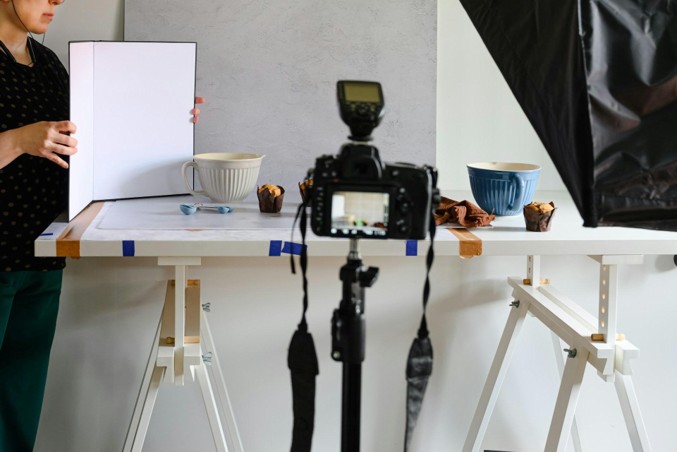
Traditional product photography carried real overhead. A lightbox or softbox setup, a decent camera, a clean backdrop, and the skill to use all three, or the budget to pay someone who had it. For a small business listing dozens or hundreds of items, that cost multiplied fast, and reshooting to keep a catalogue consistent was a recurring drain on time and money.
The result was a persistent disadvantage for small sellers competing against larger brands whose listings looked effortlessly polished. The gap was not usually the product. It was the photography.
Why the Photo Carries So Much Weight
It is easy to underestimate how much a single image decides. In a marketplace listing, the photo is doing the job that a shop window, a shelf display, and a salesperson would do in the physical world, all at once and in the fraction of a second before a shopper scrolls past. There is no picking the item up, no turning it over, no asking a question. The image has to answer everything.
This is borne out by how buyers behave. E-commerce usability research from the Baymard Institute, which studies online shopping behaviour in depth, has consistently found that image quality and the ability to see a product clearly are among the most important factors in whether shoppers trust a listing enough to buy. A poor photo does not just look bad; it actively seeds doubt about the product and the seller behind it. For a small business, that means the difference between an amateur snapshot and a clean, professional image is not cosmetic. It is conversion.
The Barriers That Used to Stand in the Way
Knowing the photo matters and being able to produce a good one were, until recently, two very different things. The small seller faced a stack of obstacles: the equipment to light and shoot a product properly, the editing skill to clean up the result, the time to do it across a whole catalogue, and the money to pay a professional if they could not do it themselves.
Any one of those could be enough to leave a seller stuck with substandard images. Together they formed a genuine moat around good product photography, one that favoured larger operations with dedicated resources and left independent sellers competing at a visible disadvantage. Removing even one barrier helped; removing all of them at once is what changed the picture entirely.
AI Closes the Gap
That gap is exactly what AI editing tools now fill, which is why so many small sellers now do their own product shots with the background remover in Pixelcut, an AI photo editor that lifts the background from a product photo in one click, drops the item onto a clean white background or an AI-generated studio scene with realistic shadows, and turns an ordinary phone snapshot into a listing-ready image. For a seller, that means shooting an item on the kitchen table, stripping the distracting background, and placing the product on a professional backdrop in the space of a couple of minutes, no studio or design skills required.
The features that matter most to sellers cluster around exactly this workflow. Precise cutouts that handle tricky edges keep the product looking clean rather than cut out. AI-generated backgrounds and shadows create the studio look without the studio. Batch editing applies the same treatment across a whole product set, so an entire catalogue shares one consistent, professional style. And templates sized for Amazon, Shopify, Etsy, and Instagram mean the finished image fits wherever it needs to go.
Consistency Is the Secret Weapon
For a store, the single biggest visual upgrade is often not any individual photo but consistency across all of them. A product grid where every item sits on the same clean background, at the same scale, with the same lighting, reads as professional in a way that a jumble of mismatched snapshots never will.
This is where batch AI editing genuinely changes the game for small operations. Achieving that uniformity by hand meant meticulous, repetitive work; done automatically, it becomes the default. A seller can process an entire inventory to a single consistent standard without the manual labour that used to make consistency a luxury.
Speed Changes What’s Possible
Beyond quality, the speed of AI editing changes how sellers operate. New stock can be photographed and listed the same day rather than waiting for a photography session. Seasonal refreshes, swapping in themed backgrounds for a sale or a holiday, become quick edits rather than full reshoots. Testing different presentations to see what converts better is suddenly practical when generating a new version takes seconds.
For a small business, that agility is a real competitive edge, letting it react to demand at a pace larger operations often cannot.
Getting the Most From a Phone Camera
Because AI does so much of the heavy lifting, the input photo matters less than it used to, but it still matters. A few simple habits meaningfully improve the final result. Shooting in good, even light, ideally soft daylight near a window, gives the background remover clean edges to work with and avoids harsh shadows that complicate the cutout. Keeping the product reasonably separated from its surroundings, rather than pressed against a busy backdrop, helps the AI distinguish subject from background.
Steady framing and a moment of focus before the shutter also pay off, since a sharp original upscales and cuts out far better than a blurry one. None of this requires equipment, just a little care, and it lets the AI start from the strongest possible position. The better the raw snapshot, the more convincing the studio-style result.
More Than Just Clean Backgrounds
While background removal is the headline feature for sellers, the surrounding tools often matter just as much for a finished listing. A Magic Eraser can remove a price sticker, a reflection, or a stray cable that would otherwise cheapen an image. Upscaling rescues an otherwise good shot that came out slightly soft or too low-resolution for a marketplace’s requirements. AI-generated lifestyle scenes let a seller show a product in context, on a styled shelf, a marble counter, an outdoor setting, without ever staging a real photoshoot.
Used together, these turn a single phone snapshot into a whole set of listing assets: a clean white-background hero image for the marketplace, a lifestyle version for social media, and consistent supporting shots for the rest of the listing. That range used to require a full studio session; now it comes from one photo and a few minutes of editing.
A Word on Honesty
With this much editing power comes a reasonable expectation of restraint. The goal of AI product editing should be to present an item clearly and attractively, not to misrepresent it. Cleaning up the background, correcting the lighting, and showing the product in an appealing context are all fair game and genuinely helpful to buyers. Altering the product itself, its colour, its proportions, its condition, in ways that mislead is a fast route to returns and lost trust. The sellers who benefit most treat these tools as a way to show their product at its honest best, which is exactly what good product photography always did.
The Levelling Effect
The broader story here is one of access. Tools that automate professional-grade product photography hand small sellers a capability that used to belong only to those with budgets for studios and specialists. The playing field is not perfectly level, larger brands still have advantages, but the specific disadvantage of amateur-looking photography is one a solo seller can now erase with a phone and an app. In a marketplace where the image is the first and often only impression, that is a change worth taking seriously.

I am James, a UK-based tech enthusiast and the Editor and Owner of Mighty Gadget, which I’ve proudly run since 2007. Passionate about all things technology, my expertise spans from computers and networking to mobile, wearables, and smart home devices.
As a fitness fanatic who loves running and cycling, I also have a keen interest in fitness-related technology, and I take every opportunity to cover this niche on my blog. My diverse interests allow me to bring a unique perspective to tech blogging, merging lifestyle, fitness, and the latest tech trends.
In my academic pursuits, I earned a BSc in Information Systems Design from UCLAN, before advancing my learning with a Master’s Degree in Computing.
I’m proud to share that Vuelio has consistently ranked Mighty Gadget as one of the top technology blogs in the UK. With my dedication to technology and drive to share my insights, I aim to continue providing my readers with engaging and informative content.
I work directly with the companies he reviews products for or their chosen PR agency.
For Social Media, you can find me on: