Orico 9758 5-Bay DAS Review with a mini PC for an Unraid NAS
Orico got in touch about reviewing their 97 series direct attached storage, and I picked the 5-bay 9758 on the basis that I could do something more interesting with it than simply bolt it onto a laptop. Direct attached storage, or DAS, is one of the less glamorous categories I cover. It is a box you fill with drives, plug into a computer over USB, and then mostly forget about. There is no operating system, no apps and no web interface. What you get is the bays, a controller, a fan and a power supply.
That simplicity is the whole point of the format. I wanted to find out whether the 9758 could pull double duty. The first job is as a plain USB enclosure attached directly to a PC. The second, and the one I was more curious about, is acting as the storage layer for a low cost Unraid NAS when paired with a mini PC. The short answer is that it works in both roles, with a couple of caveats I will come back to. The longer answer makes up the rest of this review.
I want to be clear about what this product is not. It is not a NAS, and it is not a Thunderbolt enclosure. It is a cheap, direct-attached storage enclosure built around a 5Gbps USB connection, and the price reflects that. Judged against what it actually costs, rather than against kit two or three times the price, it holds up reasonably well.

- 【Simple and Stylish】Featuring a press-to-open design, the external hard drive enclosure and hard drive enclosure solutions are easy and convenient to operate in just a few seconds. With a sleek, compact exterior and a modern, stylish look, they combine practicality and aesthetics, adding a touch of contemporary style to your living or desktop space.
- 【Massive Expansion】This 5 bay hard drive enclosure supports 2.5/3.5-inch SATA I, II, III hard drives, with a single-disk capacity up to 22TB and a total 5-bay DAS storage system capacity up to 110TB. It easily handles the rapid growth of your data, meeting all your high-capacity storage needs.
- 【Personal Database】Equipped with a USB C 2-in-1 data cable for seamless connection to USB/Type-C devices, this hard drive enclosure is compatible with Windows, Mac OS, and other systems. Plug and play, effortlessly creating a personal database for centralized data storage and backup management.
- 【High-Speed Transmission】Experience USB 3.1 Gen1 5Gbps transmission with real read/write speeds of 260MB/s. This HDD enclosure allows you to instantly transfer 1GB large files, ensuring a smooth experience whether working, studying, watching movies, or gaming. With the hard drive enclosure 3.5, one device meets all your high-speed transmission needs.
- 【Stable and Durable】Powered with an updated 120W power adapter, this sata enclosure supports simultaneous reading and writing across multiple disks. It features a 120mm silent fan to optimize chassis cooling, enhancing the safety of the internal hard drives and the durability of the unit.
What a DAS is, and who it suits
It is worth setting expectations before we get to the numbers, because DAS tends to confuse people who are used to NAS devices. A NAS, such as the TerraMaster unit I ran for years or the Ugreen NASync models I have reviewed more recently, runs its own operating system and serves files across the network to every device in the house. A DAS does none of that by itself. It presents its drives to whatever single machine it is plugged into, in the same way a standard external hard drive does, only with more bays and a shared USB link.
So who is it for? In my view there are three sensible buyers. The first is someone with a pile of spare drives who wants to consolidate them into one tidy enclosure rather than have a nest of single USB caddies and cables. The second is anyone who needs a large local backup target for a main PC or an existing NAS. The third, and this is where I spent most of my time, is the tinkerer who wants to build a do it yourself NAS by pairing the enclosure with a low power mini PC. If you fall outside those groups and you want network storage with redundancy out of the box, a proper NAS is the better buy.
Specification
The headline numbers are straightforward. The 9758 takes five 2.5in or 3.5in SATA drives, supports up to 110TB using five 22TB drives, and connects over a USB 3.2 Type-C port rated at 5Gbps. The smaller 9728 is the same idea in a two bay chassis with a 44TB ceiling. Both are plastic bodied and both work with Windows, macOS and Linux.
| Specification | ORICO-9728 | ORICO-9758 |
| Drive Bays | 2-bay | 5-bay |
| Material | ABS | ABS |
| Interface | USB 3.2 Type-C | USB 3.2 Type-C |
| Maximum Transfer Speed | 5 Gbps | 5 Gbps |
| Dimensions (L x W x H) | 94 x 146.5 x 213 mm | 140 x 213 x 223 mm |
| Maximum Capacity | 44 TB | 110 TB |
| Supported Operating Systems | Windows, macOS, Linux | Windows, macOS, Linux |
The key differences between the two models come down to bay count, capacity and physical size, which in turn shapes who each one suits.
| Feature | ORICO-9728 | ORICO-9758 |
| Number of Drive Bays | 2 | 5 |
| Maximum Storage Capacity | 44 TB | 110 TB |
| Physical Size | More compact | Larger chassis for additional drives |
| Best Suited For | Home users, backups, small media libraries | Power users, NAS backups, large media collections and archives |
Design / Build Quality
Build quality is adequate. The enclosure is mostly plastic, so it feels a bit light and cheap, and the drives slot in from the top down with nothing locking them in place. That is not perfect, but at this price I cannot really complain.
A bigger gripe for me is the USB-C port. The cable does not feel like it slots in very securely, and I worry that if the connector gets knocked it could be damaged or simply drop the connection. On a desktop drive that would be annoying. On a drive I am trusting to hold a NAS array, a loose connection is more of a problem, and I will come back to that point later.
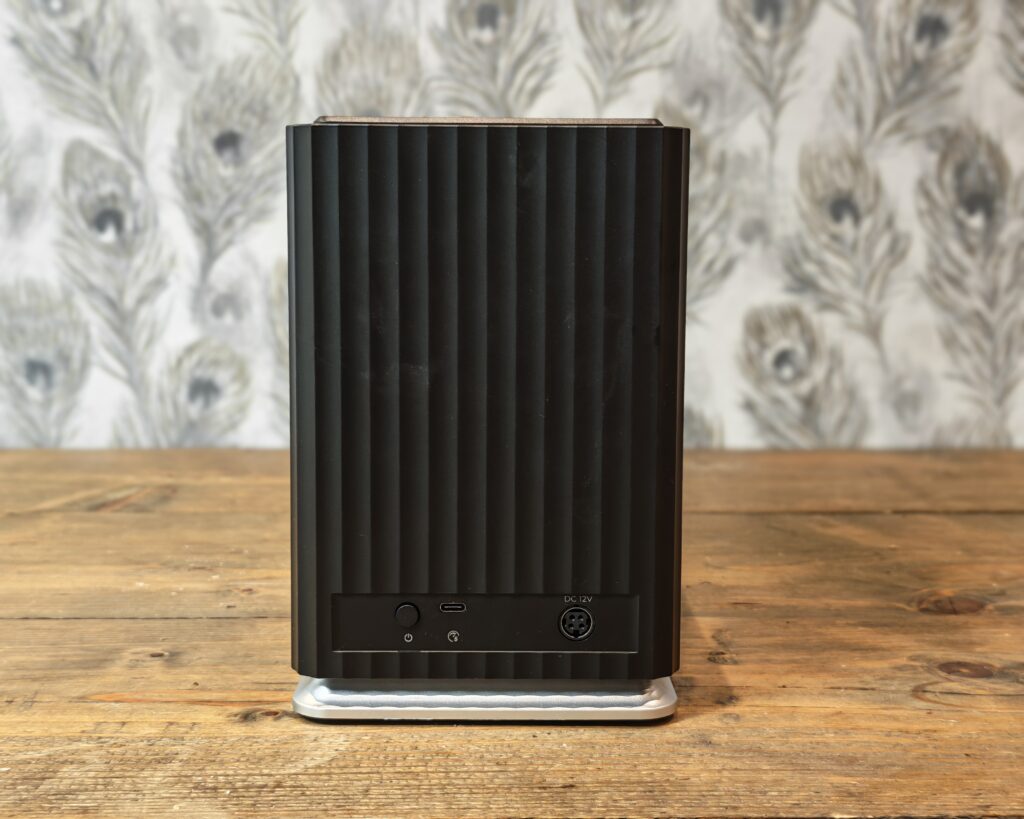
Overall, though, it is fine for the job. This is not the sort of device I will be moving around a lot. Once it is set up properly it sits on a shelf and is rarely touched. The chassis measures 140 x 213 x 223 mm, so it keeps a reasonably compact footprint for something holding five 3.5in drives stood on end. The top lid uses a press to open mechanism, which is a nice touch and means you do not need a tool to get the drives in and out of the top of the unit. Orico also bundles a chunky 120W power brick, which you need when five high capacity drives all spin up at once, plus a 2-in-1 cable that is USB-C with a USB-A adapter attached. That last detail is more useful than it sounds, and it became important during my Unraid testing.
If the plastic body puts you off, Orico sells an aluminium bodied version, the 9858U3, which is much the same internally but feels more solid and sheds heat better. It costs more, and I have listed the pricing further down.
Assembly
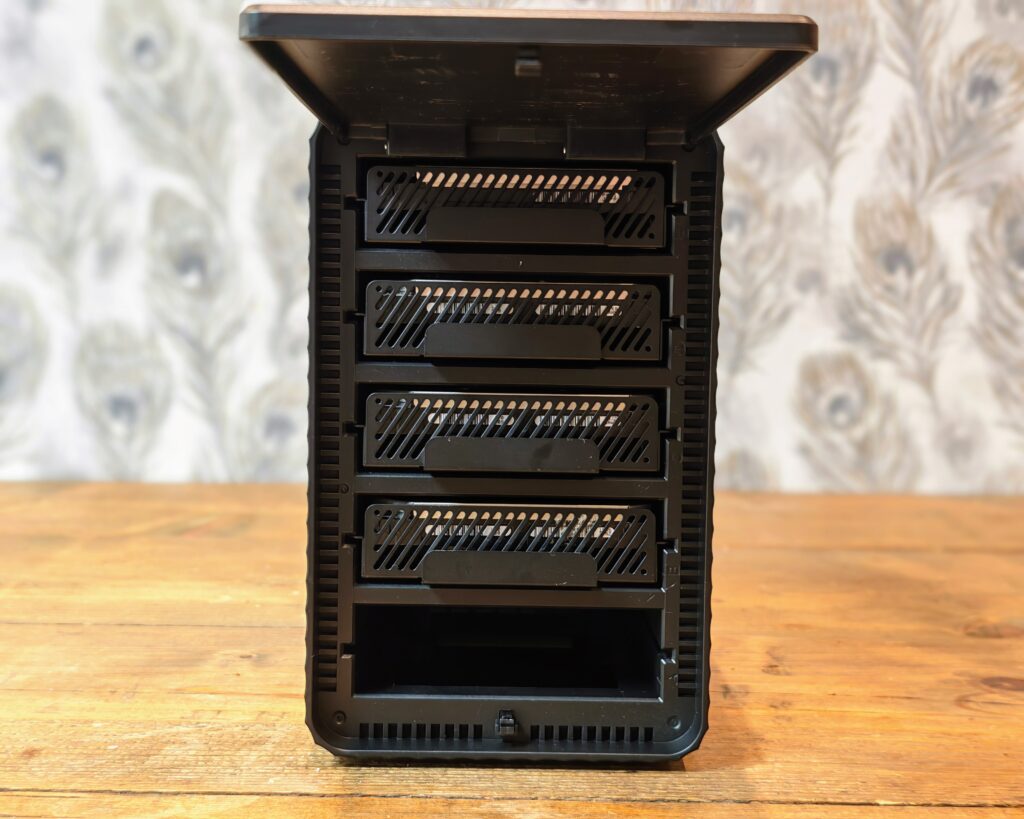
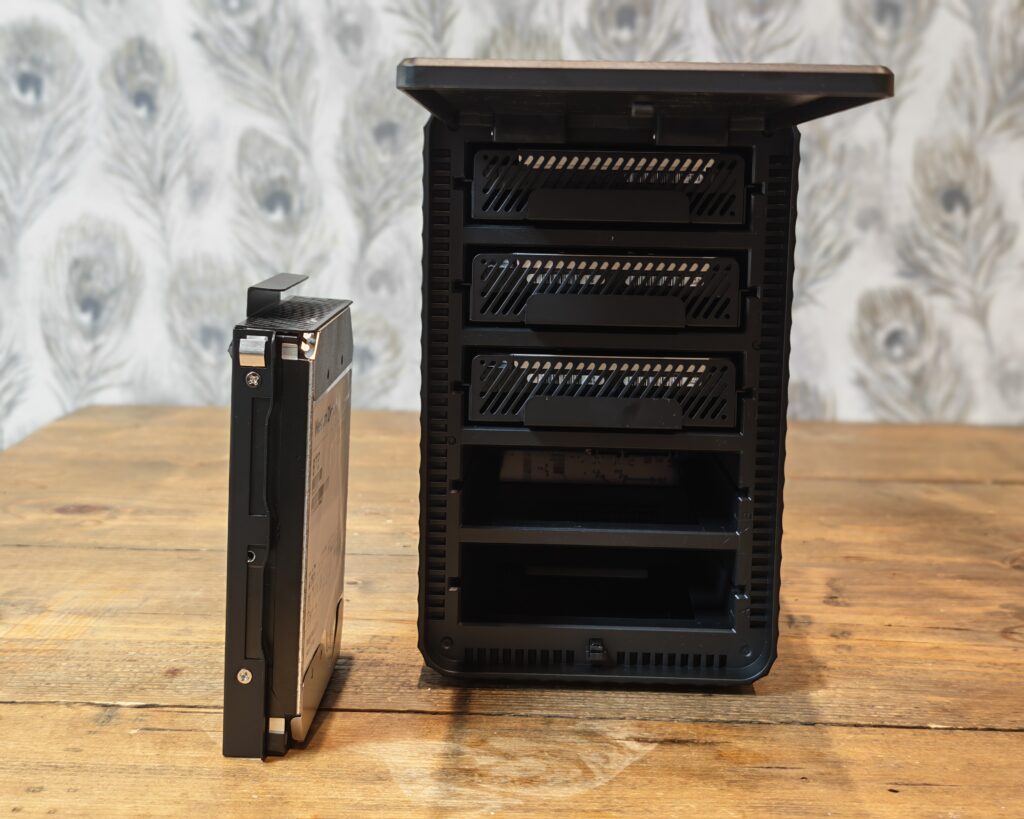
The drive sledges are not toolless, so each drive needs screwing into its tray. Orico includes a screwdriver and two sets of screws, one for 3.5in hard drives and one for 2.5in drives and SSDs, so you do not need to go hunting in a drawer to get started. Once a drive is screwed into its caddy it slots into the enclosure easily, although, as noted, it is not locked in place by any latch. In practice the drives sit firmly enough once the lid is closed, but anyone expecting the reassuring click of a hot swap NAS bay will not find it here.
Windows Performance
I will admit I would have preferred a DAS with a faster USB-C port. In reality, though, mechanical hard drives top out at around 250 MB/s of sustained throughput, which works out at roughly 2,000 Mbps. The 5Gbps USB link is therefore not the bottleneck you might assume when you are running spinning disks.
A quick word on units, because it trips people up. The connection is quoted in gigabits per second (Gbps), while file transfers are measured in megabytes per second (MB/s). There are eight bits in a byte, so a 5Gbps link has a theoretical ceiling of around 625 MB/s before overheads. In the real world, after protocol and controller overheads, the usable figure lands closer to 400 to 450 MB/s, which is the sort of speed you would expect from a single SATA SSD.
That matters because the USB link is shared across all five bays. The 5Gbps is a cap on the whole enclosure, not a figure each drive gets to itself. Fill it with mechanical drives in a striped array and you will saturate the link long before the disks themselves run out of steam. Fill it with SSDs and the USB connection becomes the limit. In my testing the numbers behaved exactly as the maths predicts. A single mechanical drive sat around the 250 MB/s mark, while a striped RAID 0 set of SSDs landed in the 300 to 340 MB/s range. Orico quotes real world speeds of up to 260 MB/s, and that is an honest figure rather than a marketing fantasy, which I appreciate.
One practical tip. Plug the enclosure directly into your computer rather than through a USB hub. When I first tested it through a hub I saw transfer speeds collapse to a fraction of what they should have been. Moving it to a port on the machine itself fixed it instantly. This is a common trait with multi bay USB enclosures and not unique to Orico, but it is worth knowing before you decide the unit is faulty.
It is also worth repeating that there is no hardware RAID chip in here. The enclosure simply presents the drives to the host, and any RAID is handled in software by the operating system. On Windows that means Disk Management or Storage Spaces, and on a Mac it means the RAID Assistant in Disk Utility. You can build a striped RAID 0 for speed and capacity with no redundancy, a mirrored RAID 1 for safety at the cost of capacity, or a simple JBOD that glues the drives into one volume and fills one disk at a time. RAID 0 is the fastest but offers no protection at all, so if a single drive fails the whole array is gone. If your data matters, mirror it or back it up elsewhere. Makers such as Areca and Promise Pegasus sell enclosures with hardware RAID controllers, but they cost a great deal more than this.
Using the Orico 97 with a mini-PC for an Unraid NAS
When Orico contacted me about this review, I immediately thought it would be good to repurpose a mini PC and build an Unraid NAS, using the Orico for the storage. It is not normally recommended to use external USB drives for a NAS, and I will explain why in a moment, but I wanted a bit more transcoding performance than my old TerraMaster NAS could manage, and a modern mini PC paired with this enclosure is a cheap way to get there.
Initially I ran into problems. Unraid would not recognise the DAS at all. I tried two different Geekom mini PCs and hit the same issue on both, so I was fairly sure the enclosure or the cable was the cause rather than one specific machine.
The problem turned out to be related to USB-C. Unraid would not recognise the DAS when I connected it with a USB-C to USB-C cable. When I switched to the USB-A end on the Geekom, using the bundled adapter, it worked straight away. This is exactly why I called out that 2-in-1 cable earlier. Without the USB-A option I would have been stuck. It is a frustrating quirk, and not one I have a clean explanation for, but it is the sort of thing you only discover by actually trying to use the hardware rather than reading the spec sheet.
There are good reasons external USB is discouraged for NAS duty, and they are worth understanding before you copy my setup. USB enclosures can hide or mangle the SMART health data the array relies on, they can spin drives down at the wrong moment, and a USB controller reset can drop a drive out of the array without warning. Unraid is more forgiving here than something like TrueNAS running ZFS, because Unraid writes to one drive at a time and does not stripe data across the array, so a momentary hiccup is less likely to take down the whole pool. Even so, this is a compromise rather than a recommended best practice. I went in with my eyes open and with backups in place.
Performance in this role is fine for what I am asking of it. Because Unraid writes to a single drive at a time, the 5Gbps link is rarely the limiting factor in day to day use. If you built a different NAS that used mirrored RAID or striped vdevs, you could in theory exceed the 5Gbps ceiling, but if you are building something that demanding you would not be reaching for this enclosure in the first place. For a home media server feeding a Plex or Jellyfin setup, with the mini PC handling the transcoding, it does the job.
Noise and power consumption
The cooling fan is one area where the marketing and reality diverge a little. Orico describes it as silent. It is not silent, but it is not loud either. It sits somewhere in the tolerable middle, and on a desk in front of you it produces a noticeable hum. With mechanical drives the bigger noise source is usually the disks themselves rather than the fan, so a set of SSDs makes the whole thing far quieter.
Power draw is modest. Empty, the enclosure pulls around 1.8 to 1.9W. Each mechanical drive then adds roughly 5 to 8W depending on the model, while a full set of five SSDs pushed the total to around 11 to 12W in testing. For an always on device feeding a home server, those are reassuringly low figures.
Price and Alternative Options
- 【Simple and Stylish】Featuring a press-to-open design, the external hard drive enclosure and hard drive enclosure solutions are easy and convenient to operate in just a few seconds. With a sleek, compact exterior and a modern, stylish look, they combine practicality and aesthetics, adding a touch of contemporary style to your living or desktop space.
- 【Massive Expansion】This 5 bay hard drive enclosure supports 2.5/3.5-inch SATA I, II, III hard drives, with a single-disk capacity up to 22TB and a total 5-bay DAS storage system capacity up to 110TB. It easily handles the rapid growth of your data, meeting all your high-capacity storage needs.
- 【Personal Database】Equipped with a USB C 2-in-1 data cable for seamless connection to USB/Type-C devices, this hard drive enclosure is compatible with Windows, Mac OS, and other systems. Plug and play, effortlessly creating a personal database for centralized data storage and backup management.
- 【High-Speed Transmission】Experience USB 3.1 Gen1 5Gbps transmission with real read/write speeds of 260MB/s. This HDD enclosure allows you to instantly transfer 1GB large files, ensuring a smooth experience whether working, studying, watching movies, or gaming. With the hard drive enclosure 3.5, one device meets all your high-speed transmission needs.
- 【Stable and Durable】Powered with an updated 120W power adapter, this sata enclosure supports simultaneous reading and writing across multiple disks. It features a 120mm silent fan to optimize chassis cooling, enhancing the safety of the internal hard drives and the durability of the unit.
The 5-bay Orico 97 DAS has an RRP of around $260 and is available directly from Orico for about $130. The 2-bay model has an RRP of around $140 and sells direct for roughly $70. In the UK it is listed on Amazon for about £150.
Orico also offers the 9858U3, which is much the same specification in a different design with an aluminium case, selling on Amazon for around £200. If you want RAID handled in the enclosure rather than in software, the Orico 9848RU3 is a four bay model that supports hardware RAID. Stepping up again, the 99 series 9958C3 supports a 10Gbps connection rather than the 5Gbps of the models above, and it is available for around $240 direct from Orico or about £190 on Amazon UK. If your drives are SSDs, that extra bandwidth is worth having.
Looking beyond Orico, Yottamaster has the PS500C3, a five bay DAS with broadly the same specification, available for around £150. TerraMaster, whose NAS hardware I have used for years, offers the D4-320, a four bay USB 3.2 Gen2 10Gbps Type-C enclosure for about £180, and the six bay D6-320 for around £295. Those TerraMaster units cost more, but the faster 10Gbps interface and the more substantial build may justify the difference if you are buying everything new.
There is one caveat that overshadows all of this at the moment, and it has nothing to do with Orico. The cost of hard drives has shot up a lot recently. If you are buying five new disks to fill this enclosure, the drives will dwarf the cost of the box, and at that point I think you should stretch your budget towards a better enclosure or, preferably, a proper NAS. The maths only really works in Orico’s favour if you are reusing drives you already own.
Overall
The Orico 9758 5-Bay DAS is a cheap and cheerful way to add a lot of storage to a computer. It is plastic, the USB-C socket feels flimsy, the fan is more audible than the marketing suggests, and the drive sleep behaviour is something to watch in a NAS role. None of that is a surprise at this price, and none of it stopped the unit doing what I needed.
The bigger question is whether a DAS is the right shape of product for you at all. If you are investing in five brand new drives, I would steer you towards a superior enclosure or a NAS with proper redundancy and network access. But if, like me, you are reusing drives you already have and you want flexible local storage, or you want to build a low cost Unraid box with a mini PC, this does the job well. Performance is good for hard disks, the included USB-A adapter saved my Unraid build, and once it is running it works perfectly fine. For the money, that is about all I can reasonably ask of it.
Orico 9758 5-Bay DAS Review
-
Overall - 80%80%
Summary
The Orico 9758 is a practical and affordable 5-bay DAS that provides plenty of storage expansion without the cost of a dedicated NAS. While the plastic construction, basic design and 5Gbps interface show where costs have been saved, it delivers reliable performance for hard drives and proved surprisingly capable when paired with a mini PC for an Unraid setup. If you already own a collection of drives and want a low-cost way to put them to use, the 9758 offers solid value for money.
Pros
- Affordable five-bay storage solution
- Good hard drive performance
- Supports up to 110TB
- Useful USB-A adapter included
- Works well with Unraid
Cons
- Plastic construction feels basic
- USB-C port feels flimsy
- No hardware RAID support
- Fan noise is noticeable

I am James, a UK-based tech enthusiast and the Editor and Owner of Mighty Gadget, which I’ve proudly run since 2007. Passionate about all things technology, my expertise spans from computers and networking to mobile, wearables, and smart home devices.
As a fitness fanatic who loves running and cycling, I also have a keen interest in fitness-related technology, and I take every opportunity to cover this niche on my blog. My diverse interests allow me to bring a unique perspective to tech blogging, merging lifestyle, fitness, and the latest tech trends.
In my academic pursuits, I earned a BSc in Information Systems Design from UCLAN, before advancing my learning with a Master’s Degree in Computing.
I’m proud to share that Vuelio has consistently ranked Mighty Gadget as one of the top technology blogs in the UK. With my dedication to technology and drive to share my insights, I aim to continue providing my readers with engaging and informative content.
I work directly with the companies he reviews products for or their chosen PR agency.
For Social Media, you can find me on: