Best Dual Wan Routers – Multi Wan Load Balancing & Failover Routers – 2026
I originally wrote this post back in 2022, and it was looking very out of date. Additionally, over the past couple of years, I have started working at an MSP providing IT support to companies that often require dual-WAN routers for failover.
Since starting that job, I migrated my entire network to Unifi, which our company uses. I was always reluctant to move to Unifi because I hated all the fanboyism around it, but I have to admit that running Unifi for the entire network does make life a lot easier.
With us all so reliant on the Internet, I think dual WAN routers have become increasingly important. In a business, I’d regard them as essential and for home users, I’d say they are a wise investment if you spend a lot of time online, and I’d argue essential for anyone who works from home.
For home users (and even businesses), the best solution I have found is to use a second 5G router to provide a backup connection. You can buy cheap data SIMs, which are adequate for backup connections. I tend to use pre-loaded Three data SIMs, which you can pick up on Amazon. I use a 500GB SIM, which you can pick up for just £133 with data loaded until July 2028 (time of writing was April 2026).


Or, if you don’t mind swapping the SIM out every few months, Lebara typically offers X months at a heavily discounted rate. I use these for when reviewing phones and normally get 6 months or so at £2 to £4 per month, depending on data.
What is a Dual WAN Router?
A dual WAN router has two or more WAN-capable ports, allowing it to connect to two separate internet connections simultaneously. These connections can be used in two distinct ways.
With load balancing, both WAN ports handle traffic at the same time, spreading the load across both connections. This can help in households or small businesses where multiple users are hammering a single connection, and it can also allow you to pin specific devices or services to a particular WAN.
With failover, the router monitors the primary WAN for connectivity and automatically switches to the secondary connection if it goes down. This is the more common use case for home and small business users. Many people run a fibre broadband primary connection with a 4G/LTE USB dongle or SIM-based router as a backup, and a dual WAN router makes that seamless.
It is worth noting that some routers support both simultaneously: you can load balance under normal conditions and have failover kick in if one connection drops entirely.
For home users, an alternative to a dual WAN router would be a router with WAN and 5G or 4G/LTE connectivity. It is basically the same thing, but rather than a WAN port, the failover is mobile connectivity. Some routers have dual WAN and mobile data support.
Best Dual WAN Routers with Load Balancing & Failover
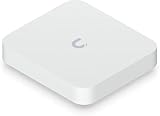
1. Ubiquiti UniFi Cloud Gateway Max (UCG-Max) – Top Pick
Price: approximately £190.80 (NS model without NVMe). Available from: Ubiquiti UK Store and Amazon | Full Review on Mighty Gadget
- UbiQuiti
- Networking Accessories
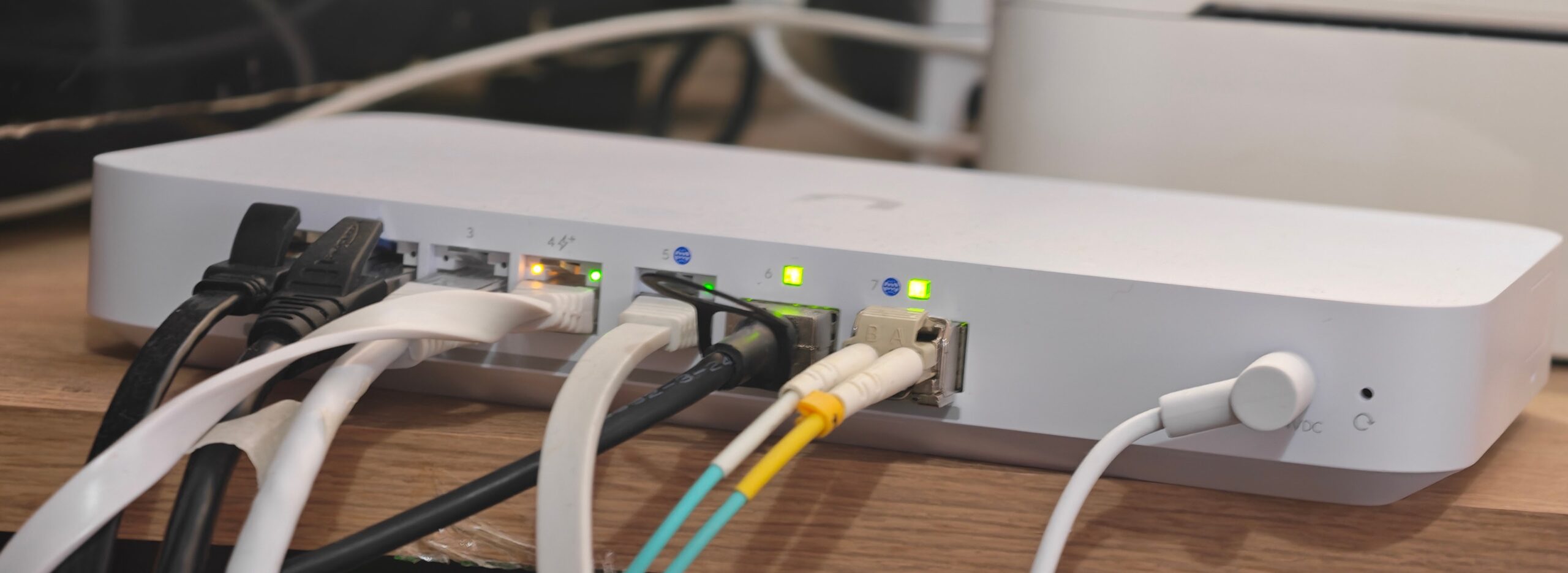
The UCG-Max is my top recommendation for the vast majority of people looking for a dual WAN router with a proper management interface, without wanting to spend enterprise money. I migrated my own home network to this device, and it has been rock solid. I ran this with Virgin for a couple of years, and it also worked well when I switched to CityFibre.
With Unifi, you have a dedicated WAN port, and you can then map any of the Ethernet ports as a WAN port, and you can run up to 8 WANs if you have enough ports to support that. When I had issues with Virgin, I ran this in multi-WAN mode with the Zyxel Nebula FWA510 5G Router providing a backup 5G connection, and it worked flawlessly.
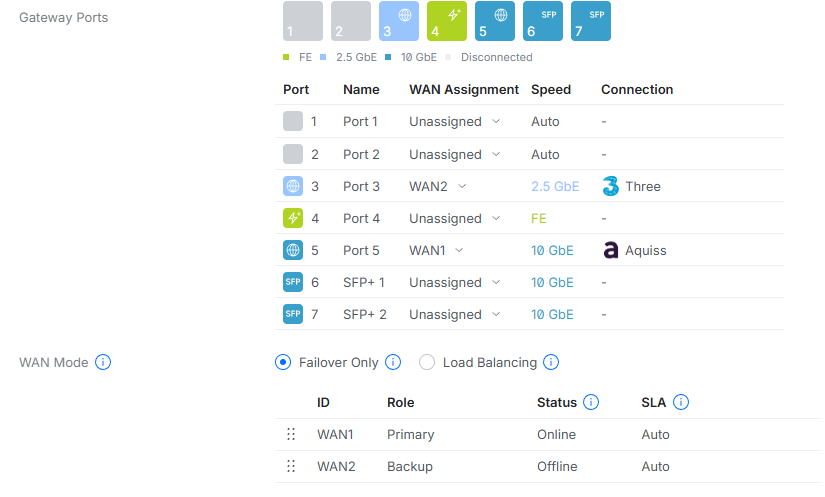
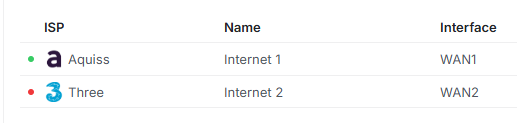
It is worth noting that this lacks WiFi, it is a router only and should be paired with an access point or mesh WiFi system. Personally, I think if you are looking for dual WAN routers, then your needs are probably advanced enough to separate router and WiFi.
Beyond all that, this run full UniFi Network application stack, which means you get a polished, genuinely capable management interface with deep traffic inspection, per-device and per-application QoS, VLAN support, IDS/IPS, and a proper VPN server built in. Redundant WAN with failover and load balancing is included as standard, and the implementation is straightforward to configure, even if you have never used UniFi before.
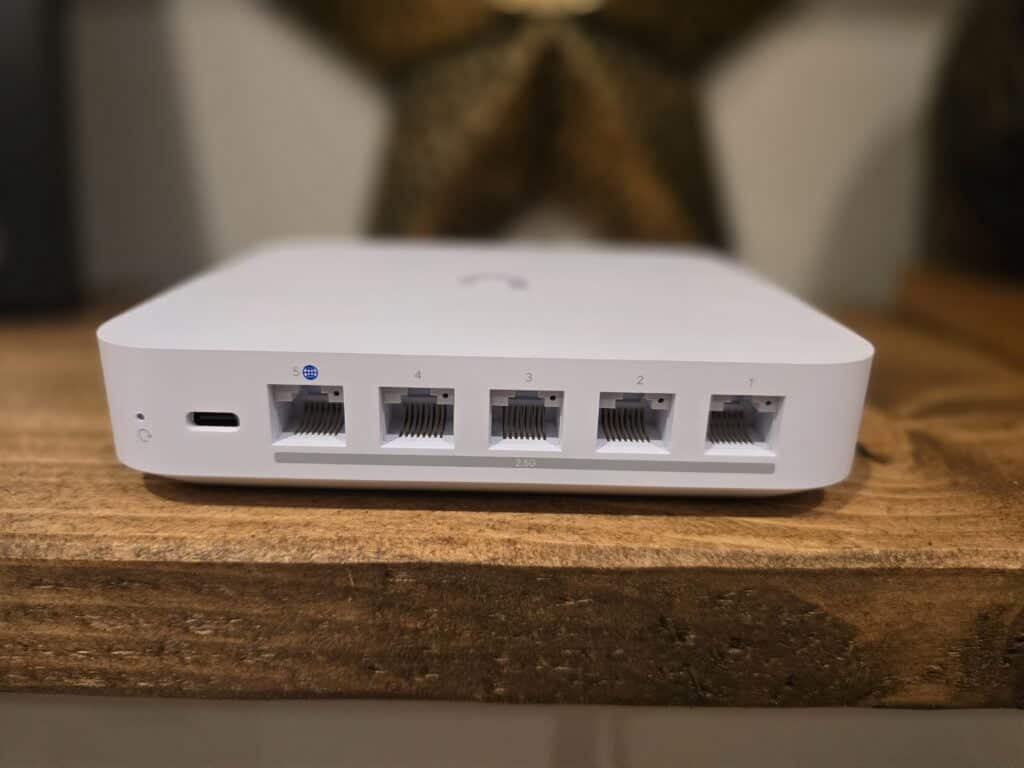
The hardware is compact, runs passively cooled, and sits on your desk without drawing attention to itself. The WAN port and all four LAN ports are 2.5 Gigabit, which means it will comfortably handle multi-gig broadband connections without a bottleneck. IDS/IPS throughput is rated at 1.5 Gbps. The NS (no storage) variant costs around £190.80; if you want to add UniFi Protect for camera management, you can add an NVMe drive.
- Processor: Quad-core ARM Cortex-A53 @ 1.5 GHz
- RAM: 3 GB DDR4
- WAN ports: 1 x 2.5 GbE RJ45 (secondary via LAN port config)
- LAN ports: 4 x 2.5 GbE RJ45
- IDS/IPS: 1.5 Gbps
- Power: USB-C 5V/5A (16.1W max)
- Cooling: Fanless
The one caveat worth flagging: on PPPoE connections, particularly those requiring significant CPU overhead, such as some CityFibre configurations, throughput can be lower than the headline figure. If you are on a 2.5 Gbps synchronous connection over PPPoE, the UCG-Fiber below is a better fit.
2. Ubiquiti UniFi Cloud Gateway Fiber (UCG-Fiber) – Best for Multi-Gig PPPoE
Price: £264.00. Available from: Ubiquiti UK Store

- UbiQuiti
- Gateway
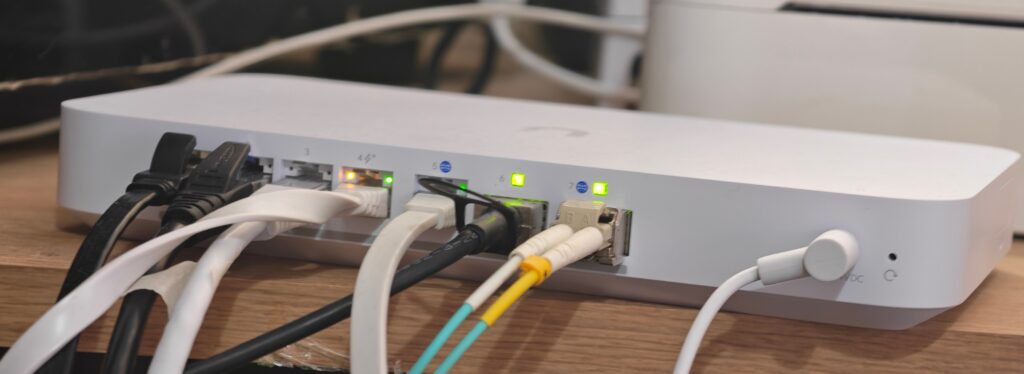
The UCG-Fiber is the option to pick if you are on a multi-gigabit broadband connection and want to make full use of it, particularly over PPPoE. I have personal experience of this: I moved to Aquiss on CityFibre with a 2,500 Mbps line. Initially, I had issues getting full speed; it turned out to be an issue with the ONT, but many people claim the UCG-MAX can struggle to get full speeds with all the features enabled. While the Max should be OK with a 2,500 Mbps line, I think it is worth spending a little extra on this for the improved performance, plus you have the option to go beyond 2,500 Mbps.
The issue with PPPoE is that it requires additional processing. Unifi does have hardware offloading, but many people had issues with earlier versions of the Max; however, this was later resolved with a firmware update. The UCG-Fiber buys you more wiggle room with a significantly improved chipset and 10GbE support, so you have the option to upgrade to 5Gbps Internet, which is available on some CityFibre services.
The port layout is considerably more generous than the UCG-Max. You get a 10 Gbps SFP+ WAN port, a 10 GbE RJ45 WAN port, a 10 Gbps SFP+ LAN port, four 2.5 GbE LAN ports (one of which supports PoE+), and up to six WAN connections when ports are reconfigured. IDS/IPS throughput is rated at 5 Gbps, more than triple the UCG-Max.
The processor is a quad-core ARM Cortex-A73 at 2.2 GHz, which is a meaningfully faster core than the A53 in the UCG-Max. Combined with hardware offload, this is genuinely capable of routing multi-gig traffic without breaking a sweat.
- Processor: Quad-core ARM Cortex-A73 @ 2.2 GHz
- RAM: 3 GB DDR4
- WAN ports: 1 x 10G SFP+, 1 x 10 GbE RJ45 (default), up to 6 WAN
- LAN ports: 4 x 2.5 GbE RJ45 (1 x PoE+/30W), 1 x 10G SFP+
- IDS/IPS: 5 Gbps
- Cooling: Active fan (In my experience, this is essentially silent)
The £264.00 price makes it only around £70 more than the UCG-Max, which is a remarkable value for what you are getting. If you are on a gigabit or faster connection and want headroom for the future, I would go straight to the UCG-Fiber rather than the UCG-Max. The only trade-off is the small fan inside, which makes it less suitable for very quiet environments. If silence matters, the fanless UCG-Max is the better pick for sub-gigabit connections.
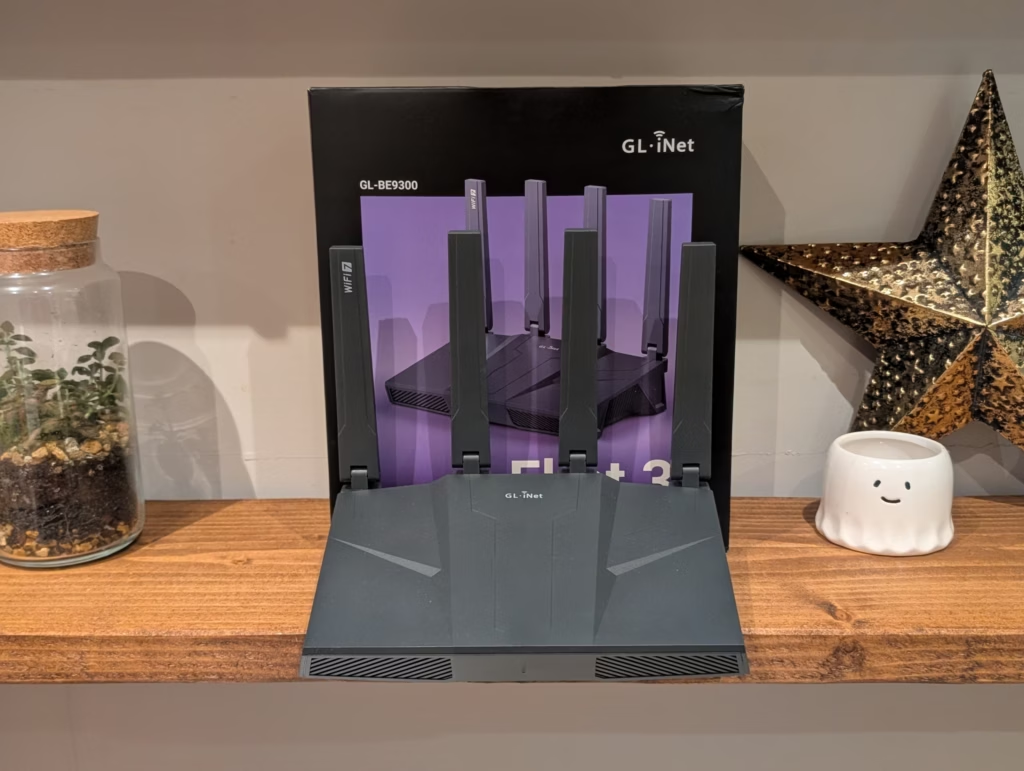
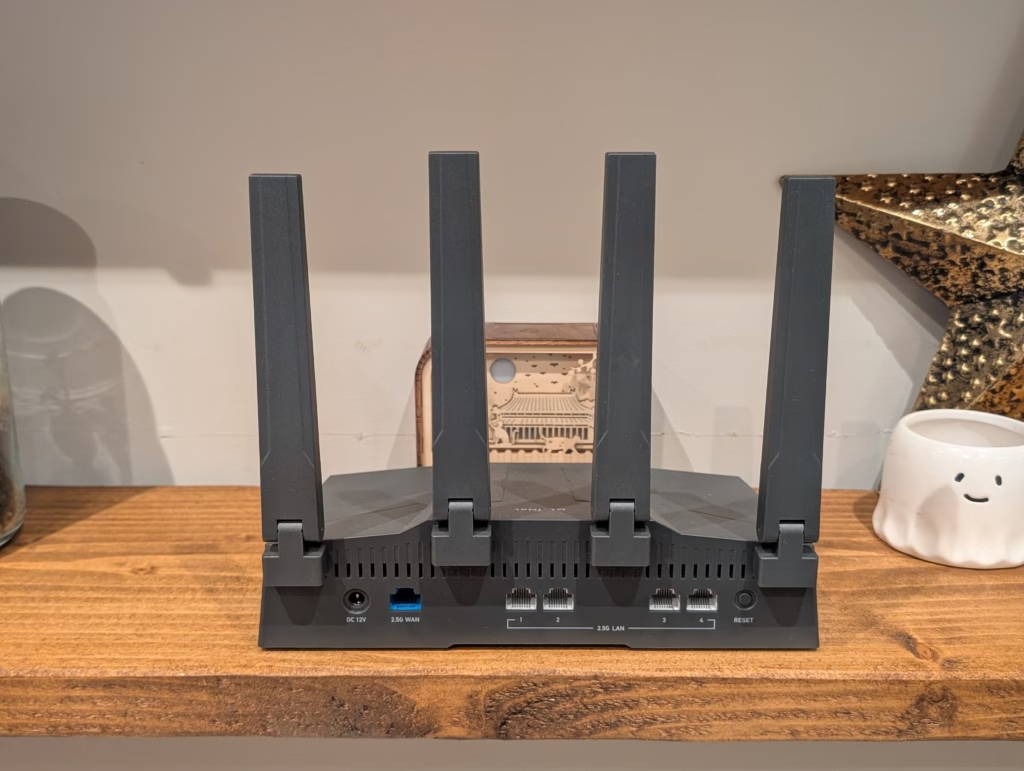
3. GL.iNet Flint 3 (GL-BE9300) – Best All-Rounder for Home Users
Price: approximately £190 from Amazon. Available from: Amazon UK | gl-inet.com | Full Review on Mighty Gadget

- 【Rapid OpenVPN & Wireguard speed】Wireguard VPN and OpenVPN speeds up to 644Mbps and 142Mbps respectively, giving you complete control over your gaming, steaming and working bandwidth. Actual speed may differ depending on internet service provider, network environment, VPN server location, VPN service provider, etc.
- 【AdGuard Home Supported】Enabling the use of a DNS server for blocking unwanted tracking and offers a convenient web interface for filtering selected digital advertisements. Users can take full control of their online experience and enjoy a clutter-free browsing environment with ease.
- 【Mass device connectivity】Experience enhanced online connectivity with our higher storage capacity, catering to over a hundred devices and fulfilling the requirements of DIY users seeking to install additional plugins. Enjoy stable and reliable connections, ensuring seamless performance and accommodating a wide range of digital needs.
- 【Easy Setup】Follow the Initial Set-up video tutorial on Amazon or Connect BE9300 to your computer via Ethernet cable to access the web Admin Panel.
- 【MLO Technology】Flint 3 represents the future of wireless technology, delivering ultra-fast speeds, significantly reduced latency, and improved connectivity in high-density environments through cutting-edge innovations like Multi-Link Operation (MLO), enhanced OFDMA, 4K QAM, and preamble puncturing.
The GL.iNet Flint 3 is a consumer Wi-Fi 7 router that doubles as a capable dual WAN gateway, and it is the option I would recommend to someone who wants a single box that handles routing, wireless, VPN, and ad blocking without needing a separate controller or access point.
I tested the Flint 3 personally as part of troubleshooting my Aquiss 2.5 Gbps CityFibre connection, and came away genuinely impressed. It is also the top Aquiss-recommended router for a 2.5 Gbps CityFibre connection.
It is built on OpenWrt, which means the feature set is deep: full WireGuard and OpenVPN support (up to 644 Mbps WireGuard throughput), built-in AdGuard Home for network-wide ad and tracker blocking, Tailscale integration, and dual WAN with failover. All five LAN/WAN ports are 2.5 Gigabit, which is unusual at this price point.
The Wi-Fi 7 tri-band radio supports MLO (Multi-Link Operation), 6 GHz, and claims up to 9,300 Mbps combined throughput. In practical terms, this is one of the fastest consumer routers available and it is genuinely a well-rounded package.
- Wi-Fi standard: Wi-Fi 7 (802.11be), tri-band
- WAN ports: 1 x 2.5 GbE (dual WAN via port config)
- LAN ports: 4 x 2.5 GbE
- WireGuard VPN: up to 644 Mbps
- Ad blocking: AdGuard Home built in
- VPN clients: WireGuard, OpenVPN, Tailscale, ZeroTier
It is worth being honest about the limitations: the management interface, while much improved, is not as polished as UniFi, and it does not have the enterprise feature depth of the UCG-Max. If you are running VLANs across a large network or need serious IDS/IPS, the UniFi options are better choices. But for a home user who wants one box, good Wi-Fi 7, and proper dual WAN with a built-in adblocker, the Flint 3 is hard to beat at this price.
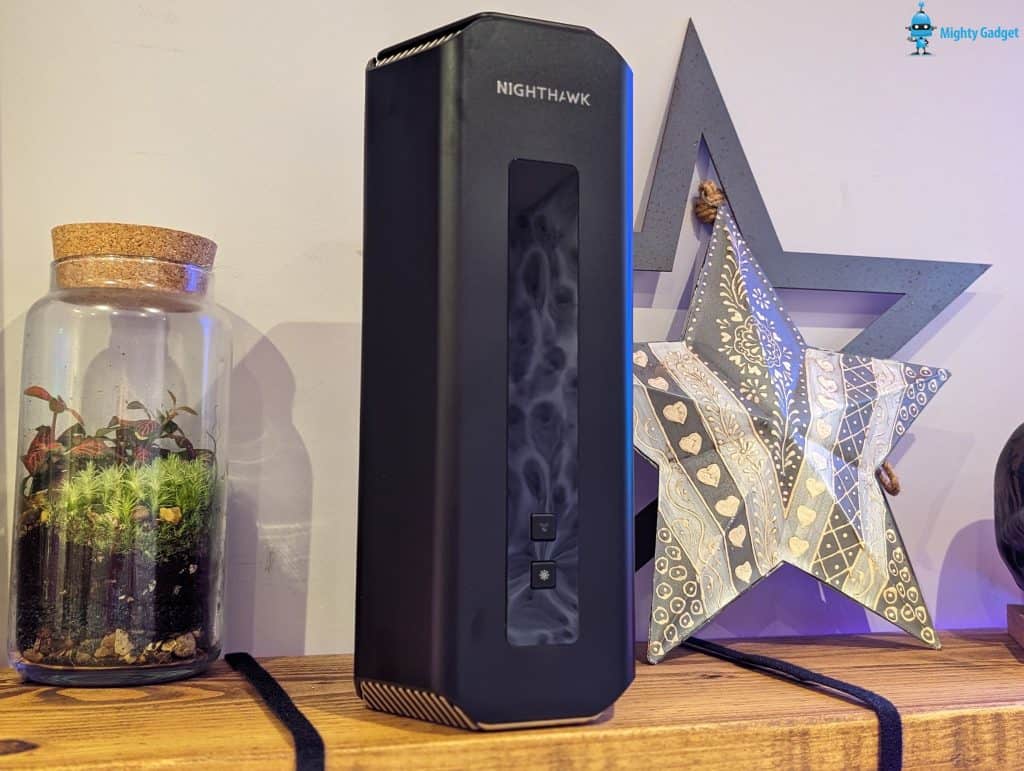
4. Netgear Nighthawk RS700S – Best High-End Consumer Option
Price: approximately £550 from Amazon. Available from: Amazon UK | Full Review on Mighty Gadget

- Unlock the next generation of highly interactive gaming, 4K/8K streaming, UHD video conferencing and AR/VR entertainment with blazing fast WiFi 7 speeds up to 19Gbps and lower latency for real-time responsiveness
- Supports the new WiFi 7 standard – 2.4x faster than WiFi 6, Fully backward compatible with older WiFi devices
- Sleek new body and high-performance antenna design leverages over 25 years of NETGEAR engineering expertise for a significantly smaller footprint and up to 3,500 sq. ft. of 360-degree WiFi coverage
- 10 Gig internet port unleashes the fastest download speeds of today & tomorrow, Connect to the latest cable or fiber internet service plan up to 10Gbps
- 1 x 10 Gig and 4 x 1 Gig Ethernet LAN ports designed for ultra-fast wired connections

The Netgear Nighthawk RS700S was one of the first Wi-Fi 7 routers to ship commercially, and it remains one of the most capable consumer routers available. I reviewed it and found it to be the first home router I have used that could genuinely saturate a 2.5 Gbps LAN connection.
From a dual WAN perspective, many of Netgear’s higher-end Nighthawk routers support WAN aggregation via a dedicated WAN port combined with a secondary LAN port that can be repurposed for WAN. The RS700S has a 10 Gigabit WAN port and supports WAN aggregation or failover depending on configuration. This makes it a strong option for people on multi-gig connections who also want integrated Wi-Fi 7 without building a separate AP infrastructure.
- Wi-Fi standard: Wi-Fi 7 (802.11be), tri-band
- Max wireless: 19 Gbps (combined, theoretical)
- WAN port: 1 x 10G
- LAN ports: 1 x 10G, 4 x 1G
- WAN aggregation: Yes (dedicated + secondary port)
- Coverage: up to 325 sq m
The caveat is the price. £550 is a lot to spend on a router, and the RS700S does not have the deep enterprise feature set of UniFi. If you are spending this kind of money and want more than just Wi-Fi 7 and fast WAN, the UCG-Fiber plus a UniFi access point would give you more long-term flexibility for a similar budget.
Personally, I’d recommend the GL.iNet Flint 3 over this, but the Netgear is still excellent.
5. TP-Link Omada ER605 – Best Budget Wired Option
Price: approximately £55. Available from: Amazon UK | omadanetworks.com

- 5 Gigabit Ports and Up to 4 WAN Ports: 1 gigabit WAN port and 3 gigabit WAN/LAN ports with load balance raise the utilization rate of multi-line broadband, High-speed wired connectivity
- Integrated into Omada SDN: Zero-Touch Provisioning (ZTP)**, Centralized Cloud Management, and Intelligent Monitoring
- Centralized Management: Cloud access and Omada app for ultra convenience and easy management
- Highly Secure VPN: Supports up to 20× LAN-to-LAN IPsec, 16× OpenVPN*, 16× L2TP, and 16× PPTP VPN connections
- Abundant Security Features: Advanced firewall policies, DoS defense,IP/MAC/URL filtering, and more security functions protect your network and data, with Life time warranty
The ER605 is a wired-only multi-WAN VPN router that has been in the Omada lineup for several years and remains the standby recommendation for anyone who just needs reliable multi-WAN at a minimal cost. It has one dedicated WAN port and four additional ports that can each be configured as WAN, giving you up to five simultaneous WAN connections.
For small businesses or home users who already have Wi-Fi sorted and just need a proper WAN failover box in front of their network, the ER605 is difficult to argue with at PS55. It integrates with the TP-Link Omada SDN controller, which provides centralised management similar in concept to UniFi, and it supports IPsec, L2TP, and OpenVPN. The throughput is limited to Gigabit WAN ports, so it is not suitable for multi-gig connections, but for standard 1 Gbps or below it performs well.
The higher-spec ER7206 sits above it at around £135 and adds more VPN tunnels (100 IPsec vs 20) and higher VPN throughput (291 Mbps vs 42 Mbps) for those who need it.
6. Zyxel DX3301-T0 – Best for VDSL/ADSL with Dual WAN
Available from: Broadband Buyer and Amazon
![Zyxel WiFi 6 AX1800 VDSL2 5-Port Super Vectoring Gateway (Up to 35B) and USB [DX3301-T0-EU02V1F]](https://m.media-amazon.com/images/I/21DQQm+voiL._SL160_.jpg "Best Dual Wan Routers – Multi Wan Load Balancing & Failover Routers - 2026 18")
- DX3301-T0-EU02V1F WIFI 6 AX1800 VDSL2 5-PORT SUPER VECTORING GAT
- Easy to use
- Good quality with performance
Most of the options in this guide assume you are connecting two separate Ethernet-based broadband services. The Zyxel DX3301-T0 covers a different scenario: built-in VDSL2/ADSL2+ modem combined with a secondary WAN port, all wrapped in a Wi-Fi 6 router.
This is the option to look at if you are still on FTTC (fibre to the cabinet, where the final connection to your property is copper) and want to add a second WAN, such as a cable or Ethernet-based connection, as either load balancing or failover. It removes the need for a separate modem and supports the VDSL2 profile used by BT Openreach infrastructure, including SUPERVECTORING 35b where available.
It is a niche product, but for the specific use case of VDSL as primary with ethernet failover, it is one of the few consumer devices that handles the modem and dual WAN in one box without a separate modem or converter.
7. MikroTik RB5009UG+S+IN – Enthusiast Option
Price: approximately £170. Available from: Linitx and Amazon

- Seven 1G Ethernet ports, one 2.5G Ethernet port, one 10G SFP+ cage
- New 4-in-1 rackmount installation
- 3 powering options: PoE-in, DC jack & 2-pin terminal
The MikroTik RB5009 is one of the most capable routers you can buy at this price point, but it earns that second qualifier: it is almost certainly too complicated for the average home user.
Running RouterOS v7, the RB5009 gives you eight ports (seven Gigabit and one 2.5 Gigabit) plus a 10 Gigabit SFP+ port, all in a compact fanless chassis. Multi-WAN with failover and load balancing is fully supported, as is a truly comprehensive firewall, BGP, OSPF, MPLS, and just about any routing protocol you can think of. For a network engineer or enthusiast who wants enterprise-grade routing capabilities and does not want to pay enterprise prices, this is a compelling option.
I would be misleading you if I suggested the configuration experience is straightforward. RouterOS uses its own paradigm, and Winbox or the web interface both require a reasonable understanding of networking fundamentals to get the most out of the device. If you already use MikroTik elsewhere in your network, or you are comfortable with manual interface configuration, this is excellent value. If you want something you can set up in an afternoon without reading documentation, look elsewhere.
- Processor: ARMv8 Marvell Armada quad-core @ 1.4 GHz
- RAM: 1 GB
- Ports: 7 x GbE, 1 x 2.5 GbE, 1 x 10G SFP+
- Cooling: Fully fanless
- OS: RouterOS v7 (License Level 5)
8. DrayTek Vigor 2927 – Established Business Choice
Price: approximately £240 (wired). Available from: Amazon UK

- DrayTek Vigor V2927 Ethernet 1 Gb Dual WAN Router, Firewall and VPN, Load Balancing, 5+1 GbE LAN Ports with VLANs, Ideal For SMB, Up to 1800Mbps (Router)
- High Performance Throughput: Delivers up to 1800Mbps throughput performance ensuring fast and efficient data transfer for demanding business applications
- Extended Warranty Coverage: Comes with 5 Year Warranty providing long-term protection and peace of mind for your network infrastructure investment
DrayTek has been making multi-WAN routers longer than most, and the Vigor 2927 remains a solid, well-supported option for small businesses that want a proven platform with a strong UK support presence. It delivers 950 Mbps hardware-accelerated throughput per WAN port and comes with a thorough feature set including 50 IPsec VPN tunnels, VLAN support, and proper load balancing across both WAN ports.
The 2927ax variant adds Wi-Fi 6 for those who want an all-in-one unit, and DrayTek access points can be added to form a managed mesh system. DrayTek’s software update track record is notably good for a business product in this price range, which matters for long-term security. The main limitation relative to 2026 alternatives is that the WAN ports are Gigabit only. If you are on a sub-gigabit connection and want a no-nonsense business dual WAN router with good UK support, the 2927 is still worth considering. If multi-gig WAN
Previous Recommendations
TP-Link TL-ER605 SafeStream Gigabit Multi-WAN VPN Router or TL-ER7206


These two routers appear to have the same functionality and feature Omada centralised management, much like the cloud networking from Ubiquiti and Zyxel Nebula.
The main difference is that the TL-ER7206 has a couple of extra ports and it. It then has more RAM and more VPN tunnels (100 IPSec VPN Tunnels vs 20), and has an internal power supply rather than an external brick.
Users report that the very affordable TP-Link TL-R605 has slow throughput when using IPsec VPN, and the official spec states 41.5 Mbps vs 291.6 Mbps of the ER7206.
Synology RT2600ac Wireless Mesh Router

- 1.7GHz Dual-core processor for fast, uncompromising performance
- Powerful 4x4 802.11ac wave 2 radios with MU-MIMO and up to 2.53Gbps breakthrough wireless speeds
- Smart Connect for seamless transition between maximum speed or range
- Hardware accelerated Layer 7 traffic control and monitoring. Power frequency: 50/60 Hz, Single phase
- Dual WAN capable for load balancing and failover support
The Synology RT2600ac is a couple of years old now and only WiFi 5, but it is attractively priced and well reviewed. This officially has load balancing and failover support, but you will have to sacrifice one of the 4 LAN ports if you want to use a second WAN.
One of the selling points of this router is that it has decent NAS features, including a Download Station, that includes BitTorrent and Usenet.
ASUS RT-AX89X / ASUS GT-AX11000 / Many More
| Preview | Product | Price | |
|---|---|---|---|

| ASUS RT-AX89X (AX6000) Dual Band 12-stream WiFi 6 Extendable Gaming Router, Dual 10G Ports, Gaming... | £266.78 | Buy on Amazon |

| Asus 4G-AC86U LTE Modem Router | Buy on Amazon |
A large number of ASUS routers feature dual WAN, I think it is natively integrated into the underlying firmware they use, and like many other routers, you have to use a LAN port for the second WAN.
The big advantage here is that you have an amazing selection of routers to choose from. You don’t have to choose something just because it is dual WAN.
The above two I have selected are premium options. I like the look of the ASUS RT-AX89X because it has one of the best port selections on the market with 1x 10GbE, 8x 1GbE, a 10Gbps SFP+, and a dedicated WAN port. It is also a WiFi 6 router, and thanks to AIMesh, it can be turned into a mesh system, though it is only dual-band, so the WiFi performance won’t be class-leading with the mesh satellites.
The ASUS GT-AX11000 is the flagship tri-band WiFi 6 model or you could get the new WiFi 6E GT-AXE11000.
ASUS has load balancing and failover support, however, it seems to be widely reported that the load balancing doesn’t work very well (and here), but failover does.
Zyxel USG Flex 100
![Zyxel ZyWALL Network Security/UTM Firewall Appliance Bundled with 1-year Security License Services [USGFLEX100]](https://m.media-amazon.com/images/I/41SKht+RhQL._SL160_.jpg "Best Dual Wan Routers – Multi Wan Load Balancing & Failover Routers - 2026 27")
- Unified security solution that delivers a flexible security solution with connectivity functions for small to mid-size organizations
- 900 Mbps firewall throughput, 360 Mbps UTM (AV+IDP) throughput, and support multi-WAN (Ethernet, SFP)
- Built-in with Zyxel Security Cloud with scale information about file and real-time threat data
- Analytics report and insights on cloud and device with user-friendly interface
- 1-year license services includes web filtering, application patrol, anti-malware, IDP, email security, SecuReporter, managed AP, hotspot management and concurrent device.
I have previously reviewed the Zyxel USG Flex 100. It is a superb firewall router with dual WAN connectivity. However, the security licence is quite expensive for home users, or even small businesses, and the throughput is a bit low if you have gigabit fibre and want all the features active.
Ubiquiti UDM-Pro UniFi Dream Machine Pro

- UbiQuiti
- Gateway
While I have left this here, I’d strongly recommend choosing the other Unifi routers listed above.
On paper, the Ubiquiti UDM-Pro UniFi Dream Machine Pro should be up there with the best of the dual WAN routers. It is a feature-rich router that runs every UniFi OS application, like Network and Protect. It features a built-in security gateway, 10G SFP+ WAN support, an 8-port Gigabit switch, and a network video recorder that supports compatible 3.5″ hard disk drives (HDDs).
Unfortunately, it lacks a load-balancing function and can currently only work with WAN1 as the primary and WAN2 as a backup. Ubiquiti has promised that load balancing will be launched at some point; it may even be available now, which is why I have included it on the list.
It is worth noting that I have not included any of the popular EdgeRouter options because they seem to be sold out everywhere, and Ubiquiti have discontinued them. It appears they are being rebranded as UISP; however, the only router in this range is also sold out.

I am James, a UK-based tech enthusiast and the Editor and Owner of Mighty Gadget, which I’ve proudly run since 2007. Passionate about all things technology, my expertise spans from computers and networking to mobile, wearables, and smart home devices.
As a fitness fanatic who loves running and cycling, I also have a keen interest in fitness-related technology, and I take every opportunity to cover this niche on my blog. My diverse interests allow me to bring a unique perspective to tech blogging, merging lifestyle, fitness, and the latest tech trends.
In my academic pursuits, I earned a BSc in Information Systems Design from UCLAN, before advancing my learning with a Master’s Degree in Computing.
I’m proud to share that Vuelio has consistently ranked Mighty Gadget as one of the top technology blogs in the UK. With my dedication to technology and drive to share my insights, I aim to continue providing my readers with engaging and informative content.
I work directly with the companies he reviews products for or their chosen PR agency.
For Social Media, you can find me on: