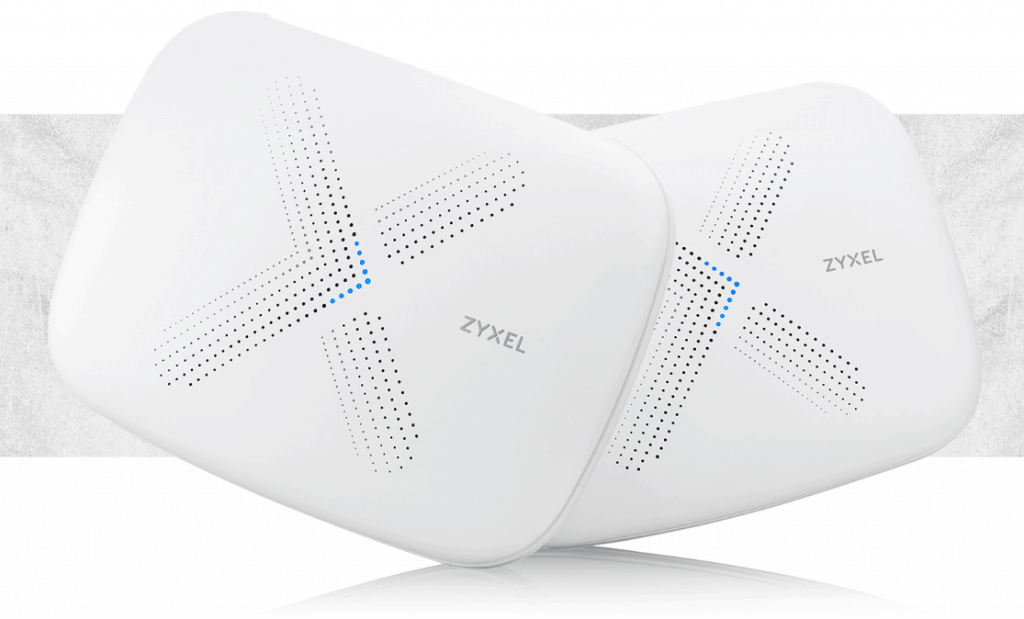
Zyxel Multy X AC3000 Whole Home Tri-Band Mesh Wi-Fi review
[button link=”https://amzn.to/2AHoYzW”] Buy the Zyxel Multy X Tri-Band from Amazon[/button]

Zyxel Multy X Tri-Band Mesh Wi-Fi Specification


 Recent firmware improvements have enabled the daisy chain feature; this allows each module to act as a relay for the next one, allowing you to cover a much greater distance. Without daisy chain, each module needs to connect to the base unit which limits the expansion.Even though each module has 4 ethernet ports, there are no options to enable ethernet backhaul currently supported. For most people this should not be an issue, the daisy chain and dedicated backhaul will provide a reliable connection.The system can be used in standard mode, or you can switch it to bridge. This disables all the router features and makes the modules work just as access points. This is what you would do if you want to keep your existing router.
[button link=”https://amzn.to/2AHoYzW”] Buy the Zyxel Multy X Tri-Band from Amazon[/button]
Set-up and App
You manage everything via the app; I use Android, so my experience was all via that app.The set-up is straightforward, the app guides you through the process step by step, it uses Bluetooth to establish the initial connection to the router which then passes the settings over.With the Wi-Fi, you can optionally combine the SSID or split them up into 2.4GHz and 5GHz bands. One network is more convenient, but some devices can have issues with this setup hence why it is good to have the option to split them.Once the first module is set up, you follow a similar procedure with the second. I was able to complete the set-up within 10 minutes, and it required little to no technical skills.With everything else you can play around with the different settings. While the management features will be adequate for most people, it is limited compared to more advanced dedicated routers such as the FritzBox. The only management options are port forwarding, DMZ, parental controls as well as UPnP.There are some useful diagnostic utilities including a Wi-Fi signal test which will allow you to place the satellite modules in optimal positions.The app is functional, and the UI is user-friendly, but it is very slow, selecting any option often requires waiting for several seconds for it to load up which can be frustrating.The Multy X system works with Alexa, so if you have an Amazon Echo device, you can verbally instruct it to disable the guest network, test your internet speed or temporarily suspend internet access. I found this works, but I don’t really see the need for it, it just seems to be the trend having everything Alexa enabled.Performance
The only thing that is important with a Mesh system is its Wi-Fi performance, and thankfully the Zyxel performs as advertised. Using one module in our front room where we watch TV and the 2nd upstairs in my office, I was able to get a strong signal throughout my home. Furthermore, the mesh system appears to hand off connections as it is supposed to, and my phone and other devices indicated a strong connection throughout the house, even when moving around. There were no noticeable dropouts during my testing period which is essential with a system like this.To provide to perspective, my house is moderately sized with 4 bedrooms and thick Accrington brick walls. I have had to run ethernet cable throughout the house to provide reliable connections to my various devices, so anything that can give a solid Wi-Fi signal across the house is a blessing.Close range performance I was able to transfer local files at around 90MB/s which equates to 720MBps. LAN to LAN transfers using hard drives typically only hit around 110MB/s so you are not losing out on much performance by using a system such as this.The four ports per module is a useful addition allowing you to create a wired connection to anything that requires as much speed as possible. Things like consoles and streaming devices will benefit from this setup.Overall
This is my first Mesh Wi-Fi system review, so I don’t have much to compare it to. However, I have come away very impressed with the Zyxel Multy X; what it lacks in software features it makes up for in Wi-Fi reliability. I experience no dropouts, with fast and stable Wi-Fi throughout my moderately sized home with thick walls.Price at £249.99 it is almost the same as the popular Netgear Orbi which offers similar features. Looking at user reviews online it appears that people that have used both systems favour the Zyxel for its reliability.The slow app and lack of settings such as manually assigning IP addresses to devices means I would be tempted to use a more advanced router to handle the networking of my home while using the Multy X in bridge mode to handle all the Wi-Fi[button link=”https://amzn.to/2AHoYzW”] Buy the Zyxel Multy X Tri-Band from Amazon[/button]
Zyxel Multy X Tri-Band Review
-
Features - 70%70%
-
Wi-Fi Performance - 85%85%
-
Ease of use - 80%80%
-
Price - 80%80%

I am James, a UK-based tech enthusiast and the Editor and Owner of Mighty Gadget, which I’ve proudly run since 2007. Passionate about all things technology, my expertise spans from computers and networking to mobile, wearables, and smart home devices.
As a fitness fanatic who loves running and cycling, I also have a keen interest in fitness-related technology, and I take every opportunity to cover this niche on my blog. My diverse interests allow me to bring a unique perspective to tech blogging, merging lifestyle, fitness, and the latest tech trends.
In my academic pursuits, I earned a BSc in Information Systems Design from UCLAN, before advancing my learning with a Master’s Degree in Computing.
I’m proud to share that Vuelio has consistently ranked Mighty Gadget as one of the top technology blogs in the UK. With my dedication to technology and drive to share my insights, I aim to continue providing my readers with engaging and informative content.
I work directly with the companies he reviews products for or their chosen PR agency.
For Social Media, you can find me on: