Memoket Gem AI Note-Taking Wristband Review
AI note-taking devices are all the rage right now. My first experience with them was the Plaud Note, then the Plaud Note Pro and Plaud NotePin S. Boya Notra AI Note Taker was next, and I then reviewed three tablets with similar features, the iFLYTEK AINote 2 and AINOTE Air 2, and more recently the TCL Note A1 NXTPAPER.
If you look at Amazon, it is flooded with Plaud clones.
The Memoket Gem is another product to launch, apparently created by a team from Anker Innovations, Tencent, Lenovo, Siemens, and Bosch.
It is essentially the same concept as other AI note-taking devices. It is a small device that records audio, which you then transfer to your phone, and it gets transcribed by the LLM of choice at the time, along with summaries and various other post-transcription processing such as a one-pager and action items.
The main difference between most of these devices is the form factor and the underlying features.
In the case of the Memoket Gem, I would argue it is one of the more appealing devices. The device is a tiny pebble or gem shape that mounts onto a wristband or can be worn on a clip-on lanyard, so it shares a similar form factor to the NotePin S.
It also has better underlying features than many competing devices. For example, you have integrations for Google Calendar, Outlook Calendar, Slack, and Notion, plus an MCP server for easy integration with LLMs such as Claude and ChatGPT.
Plaud, which has been available for much longer, only has a Google Calendar integration.
The calendar integration is interesting too. With Plaud, it just provides you with meeting reminders, but with Memoket, it synchronises actionable items with your calendar and can also add the recording itself to your calendar, assigning it the date and time the recording was made.
I have been using the Gem on my wrist for the past few weeks, both in the office at AGT and away from my desk, so this review covers the hardware, the app, and how well the AI actually holds up once you throw a genuinely messy real-world recording at it.
Design
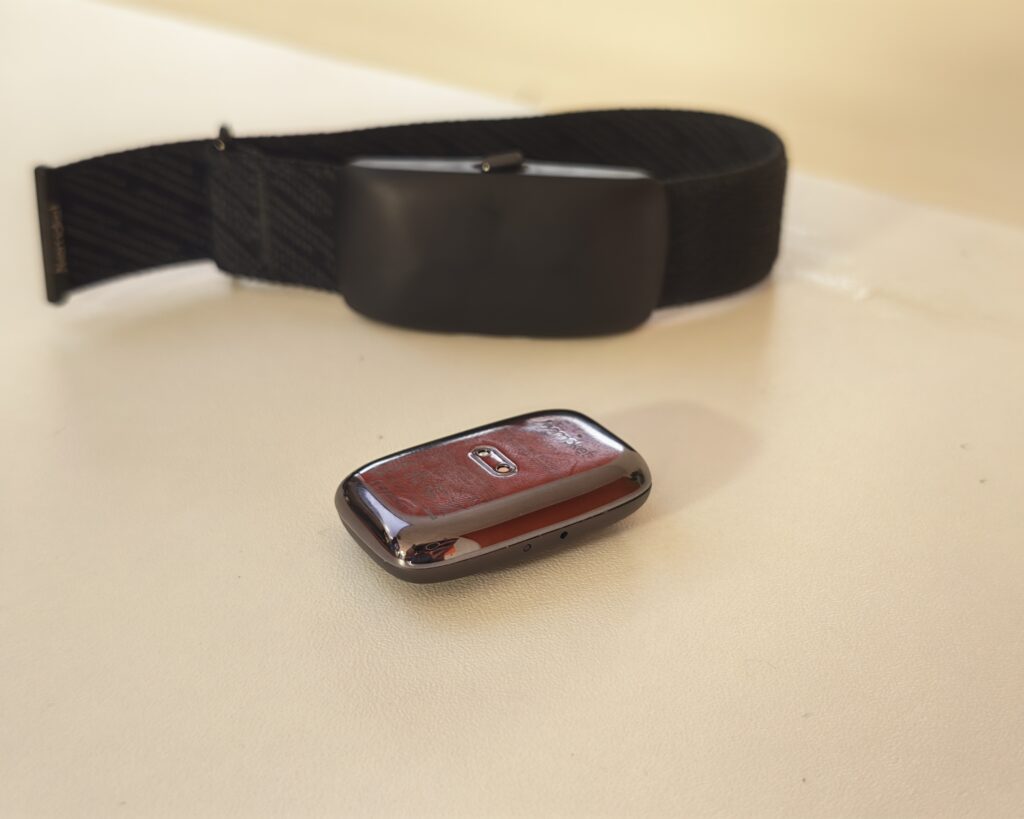
There is not a huge amount to say about the design, and that is largely a compliment. The Gem is a small aluminium alloy pebble weighing around 11 grams, roughly 40 x 25 x 10mm, so you barely notice it is there. It comes in two colours, Midnight Grey and Moon Silver.
There is a single button on one side with a microphone, and a light and a second button on the other. Press and hold for one second to start recording, and you get a single strong vibration and a red light. Press and hold again to stop, and you feel two vibrations. It is a simple, deliberate bit of feedback design, and it means you always know whether it is listening, which matters more than it sounds like it should when you are wearing something like this around other people.

When you order, you choose between a standard wristband, which fits wrists from 140mm to 220mm, or an Apple Watch Co-Wear Band. The Co-Wear Band is a fabric band, fastened with Velcro, that holds the Gem on the inside of your wrist while your actual Apple Watch sits on top. It works with Series 1 through 11, SE, and Ultra, in sizes from 38mm to 49mm. This is a genuinely smart bit of design. Rather than asking you to wear a second device, it slots underneath one you are already wearing every day, which solves the biggest problem with wearable note takers: you actually remember to have it with you. Pin clip and lanyard/necklace accessories are also available if a wristband is not your thing.

Charging is via a small magnetic dock with pogo pins, which clips onto the back of the Gem with a satisfying amount of grip, and the dock itself plugs into any USB-C outlet.
App and Set-Up


Set-up is straightforward. You pair the Gem with the Memoket app over Bluetooth, and recordings you have made while out and about (the Gem stores audio to internal memory even when it is not connected to your phone) sync across automatically. You can also connect it over Wi-Fi, which is worth doing if you record a lot, since a full hour-long conversation transfers in a matter of seconds over Wi-Fi rather than the couple of minutes Bluetooth can take.
Once a recording lands in the app, processing happens quickly. Within seconds of a short recording ending, you already have a transcript, a brief, and a summary waiting for you, with the one-pager following shortly after.
The app also has a chat feature called MemoChat, which lets you ask questions about a specific recording or across your whole history of recordings. The first time you use it, you get a consent screen explaining that your text and transcript content is processed by third-party AI providers, namely Microsoft Azure (OpenAI GPT), Anthropic Claude on AWS, and OpenAI directly. Memoket states this data is encrypted in transit and at rest, is not used to train any models, is not sold on, and is periodically deleted from provider servers. Given how much personal and business conversation this thing captures, I appreciated that this is spelt out clearly rather than buried in a terms and conditions page, and it is opt-in rather than forced on you.
Settings for calendar auto-sync (both for action items and for the recordings themselves) and third-party integrations live under a dedicated Integrations page in the app, which I will cover in more detail below.
Subscription and Features
The Memoket Gem comes with a 1-year Pro membership included, which provides 1,500 transcription minutes a month. After that first year, it drops down to the free Starter plan, providing 300 minutes a month, which matches most competing devices.
If you need more than the free allowance once your included year is up, the ongoing plans are:
- Starter (free): 300 transcription minutes a month, 153 languages including dialects, auto speaker labelling, and access to the brief, summary, one-pager, and action item formats.
- Pro: 1,500 transcription minutes a month, roughly £13.50 a month, or around £6.25 a month if you pay annually. This tier adds Proactive AI Insights and MCP connectors for ChatGPT, Claude, Manus, and n8n.
- Unlimited: transcription up to 24 hours a day, roughly £22.50 a month, or around £15 a month paid annually. This tier gets the latest AI models with automatic updates and customisable MCP connectors on top of everything in Pro.
Those figures are converted from Memoket’s US dollar pricing, so treat them as a rough guide rather than gospel, and check the site for the exact price in your currency at checkout.
All three tiers use three separate automatic speech recognition providers behind the scenes for accuracy, and you can choose which AI model handles your summaries and MemoChat answers. On the Starter and Pro tiers this includes GPT-5.1 or GPT-5.5 alongside Claude Opus 4.6 and Sonnet 4.6, while Unlimited gets access to the newest models as they are released, including Claude Opus 4.8, updated automatically. Custom templates for specific use cases, such as a financial planning layout, are listed as coming soon across all plans.
For comparison, Plaud charges £17.99 a month for 1,200 minutes, or £28.49 a month for unlimited transcription. It shares most of the same feature set, including an MCP connector, but currently lacks the wider third-party integrations Memoket offers.
Performance
I wanted a proper stress test rather than a quiet one-to-one chat, so I wore the Gem through a normal working day in our IT support office at AGT. It picked up a 2 hour 39 minute recording covering support calls, colleagues chatting between tickets, and LBC playing on the radio in the background the whole time. If a device can produce something usable out of that, it can handle a quiet meeting room without breaking a sweat.
Recording Quality
Memoket rates the dual microphones and noise reduction on the Gem to pick up clear audio from around 5 metres away, which lines up with what I experienced. Across that long office recording, with the radio competing for attention and several people talking at different distances from me, my voice and the voices of colleagues speaking directly to me stayed clear and distinct from the background chatter. It is not going to isolate a whisper across a noisy pub, but for meetings, calls, and normal office noise it holds up well.
There is also an AI voice enhancement option you can toggle on playback, which cleans up the recorded audio further if you want to listen back to it directly rather than just reading the transcript.
Transcription Accuracy
Like Plaud, you can transcribe audio from recordings the device has made, record directly from your phone, or manually import audio. This is something I find quite useful, as I often record meetings on my computer, but I normally wear a headset, so I cannot use a wearable device like the Gem to pick up that audio directly. Being able to drop an imported recording into the same app and get the same processing is handy.
On accuracy, the office recording is a genuinely difficult test case: multiple speakers, technical jargon, and a radio playing underneath the conversation for the entire two and a half hours. The transcript correctly picked up names, including colleagues and customers, and technical terms specific to our work, such as Canva, the Outlook connector, the Teams admin portal, and a client system called Stage200. Auto speaker labelling also worked, correctly separating out who was talking, even with the radio running alongside the conversation. Support for 153 languages, including dialects, and three separate ASR providers working behind the scenes, gives it a reasonable amount of redundancy if one engine stumbles on an accent or a piece of jargon.
Summaries and Templates

This is where the Gem earns its keep, and where it goes further than most competing devices.
Every recording gets processed into four formats. The brief is a short, scannable set of key points along with any action items, each one tagged to whoever needs to do it and given a suggested date and time, which you can add to Google Calendar or Outlook Calendar with a single tap. The summary is a more formal, structured write-up, broken into clear sections covering the different topics and issues discussed, useful if you want the detail without reading a full transcript. Then there is the full transcript itself, timestamped and speaker-labelled.


The one-pager is the standout feature for me. It takes the same recording and turns it into a colour-coded, visually organised document within seconds, broken into cards covering things like a snapshot of the day, the main issues discussed with numbered problem, investigation, and resolution steps, and any operational or logistics points raised. It genuinely looks like something you would put together in Canva rather than something an AI generated automatically from a recording. For our test recording, it correctly separated out the Canva email issue and a Teams phone number fault into their own structured cases, each broken down step by step, alongside a section on logistics for a laptop that needed shipping to a customer. Custom templates for specific use cases, such as a financial planning layout, are also on the roadmap, though not live yet at the time of writing.
The other genuinely useful feature is context linking. Rather than treating each recording as an isolated event, the app cross-references it against previous recordings and surfaces a “related context” section explaining how the current conversation connects to earlier ones, and it links directly back to those source recordings. On a long-running thread, such as our email delivery troubleshooting, it correctly picked up that this call continued a problem discussed in previous recordings and summarised how the issue had progressed. This is the feature that most clearly separates Memoket from most of the competition, which tends to treat every recording as its own silo. MemoChat, the AI chat feature, builds on this by letting you ask questions about a single recording or search across everything you have ever recorded, which is a genuinely practical way to find a decision or a detail from a meeting weeks ago without scrolling back through a list of transcripts.
Integrations


Integrations are one of Memoket’s clearer advantages over Plaud, which currently only offers a Google Calendar connection.
Memoket connects with Google Calendar, Outlook Calendar, and Apple Reminders for tasks and events, with auto-sync for both action items and the recordings themselves, so a meeting turns up on your calendar at the time it actually happened, not just as a generic reminder. For team workspaces, it integrates with Slack, Notion, and Jira, letting you push summaries and notes straight into a channel, a Notion page, or a ticket. For anyone who wants to build their own workflows, there is support for Zapier, Make, and n8n, plus an MCP connector for ChatGPT, Claude, and Manus, a CLI for scripting, and webhooks for signed triggers into other systems. Memoket is also now listed as an official connector within Claude directly, which is a genuinely useful bit of plumbing if you already work inside Claude day to day, since it means your recordings, summaries, and action items become something you can query and act on from within Claude itself, rather than a separate app you have to keep switching to.
For an MSP like ours, this is a big part of the appeal. Being able to turn a support call into an action item that lands directly on the right calendar, or push a summary into Slack for the rest of the team, saves a fair amount of admin that would otherwise fall on whoever took the call.
One small niggle: some of these integrations, such as Outlook Calendar sync, need the underlying calendar account connected and saved before the auto-sync toggle will switch on. It is not complicated, but it is an extra step compared with the Google Calendar connection, which worked immediately.
Battery Life
The Memoket Gem is rated for up to 20 hours of continuous recording on a single charge. In practice, since most people are not recording for 20 hours straight, that translates to roughly a working week of normal use between charges if you are only recording specific conversations rather than leaving it running all day. Topping it back up is quick thanks to the magnetic dock and USB-C charging.
Price and Alternative Options
The Memoket Gem is available for pre-order at $179, a 40 percent discount off the claimed RRP of $298, and that includes the 1-year Pro membership mentioned earlier. In the UK, the pre-order price is £134. Memoket has not published a separate UK RRP, but based on the discount, the full retail price would work out to roughly £223, so treat that as an estimate rather than an official figure.
Shipping is due to begin in August 2026, which is when I am writing this, and the early bird batch at this price was reportedly capped at 2,000 units, so it is worth checking the site directly, since the discounted pricing may have already moved by the time you read this.
During checkout you can also add on:
- Pin clip: £15.00
- Lanyard: £15.00
- Apple Watch Co-Wear Band: £23.00
- Wristband: £23.00
- Charging dock: £15.00
For comparison, the Plaud Note Pro is £169, the original Plaud Note is £149, and the Plaud NotePin S is £159. The Boya Notra AI Note Taker is cheaper at £120, but it is a noticeably inferior product to both Plaud and Memoket.
One reviewer worked out that if you add the standard retail price of the Gem to a full year of the Pro subscription, the combined value comes to somewhere around $430, which puts the discounted pre-order price at under half of that. Whether that maths holds up depends on whether you would have paid for the Pro tier anyway, but it is a reasonable way to think about the value if you were already planning to pay for a subscription-based note taker.
Pros and Cons
Strengths:
- The Apple Watch Co-Wear Band is a smart solution to the biggest problem with wearable AI recorders, which is that you forget to bring them. Slotting it under a watch you already wear daily solves that.
- Broader third-party integrations than most competitors, including Slack, Notion, Jira, Zapier, Make, n8n, and a direct Claude connector, on top of Google and Outlook calendar sync.
- Cross-recording context and the MemoChat search feature genuinely add something Plaud and most similar devices do not offer.
- The one-pager format is a well-designed, quick way to get a visual overview of a long recording without reading a full transcript.
- Solid battery life and a strong, unambiguous vibration and light system for starting and stopping recordings.
- Subscription pricing undercuts Plaud at every tier.
Weaknesses:
- No phone call recording, which the Plaud Note Pro offers.
- The full RRP of $298 is overpriced for what you get, and I doubt it will sell for that price for long, if at all.
- Custom templates are listed as coming soon rather than being available now.
- GDPR alignment is in place, but SOC 2 Type 2 compliance is still described as an audit in progress rather than complete.
- As a newer company compared with Plaud, there is inherently more uncertainty about long-term support and software updates.
Overall
I really like the Memoket Gem. The form factor works well for me. It lacks the phone call recording features of the Plaud Note Pro, but I find wearing it on my wrist more natural than having a device stuck to the back of my phone, and I am much more likely to actually use it as a result.
The discounted price undercuts the decent competing options, but the full RRP is overpriced, and I suspect it will never sell for this, or not for long. The subscription pricing is also slightly better than Plaud and many other similar products.
The transcription and summarisation features are superb. It is hard to say if it is better than Plaud, which has mind maps, for example, but the summaries, action items, and one-pagers are excellent. You can then sync the action items straight to your calendar, which I think is genuinely useful, and the context linking between recordings is the feature that stands out most compared with everything else I have tested in this category.
Overall, the Memoket Gem is not a revolutionary product. It essentially copies the Plaud concept, but it is the best alternative product I have tried so far and arguably better than Plaud in several respects, particularly around integrations and cross-conversation memory. If you are already someone who wears an Apple Watch, the Co-Wear Band alone makes this worth a look over most of the competition.
Memoket Gem AI Note-Taking Wristband Review
-
Overall - 90%90%
Summary
The Memoket Gem is one of the strongest Plaud alternatives I have tested. It does not fundamentally change the AI note-taking concept, but its wearable design, excellent transcription and summarisation, broad integrations and cross-recording context make it particularly practical for regular use. The one-pager and automatic action-item syncing are especially useful, while the Apple Watch Co-Wear Band makes it far easier to keep the Gem with you throughout the day.
The lack of phone call recording gives Plaud an advantage for some users, and the claimed full RRP looks difficult to justify. At the discounted pre-order price, however, the Gem offers strong value, particularly considering the included year of Pro membership and cheaper ongoing subscription pricing.

I am James, a UK-based tech enthusiast and the Editor and Owner of Mighty Gadget, which I’ve proudly run since 2007. Passionate about all things technology, my expertise spans from computers and networking to mobile, wearables, and smart home devices.
As a fitness fanatic who loves running and cycling, I also have a keen interest in fitness-related technology, and I take every opportunity to cover this niche on my blog. My diverse interests allow me to bring a unique perspective to tech blogging, merging lifestyle, fitness, and the latest tech trends.
In my academic pursuits, I earned a BSc in Information Systems Design from UCLAN, before advancing my learning with a Master’s Degree in Computing.
I’m proud to share that Vuelio has consistently ranked Mighty Gadget as one of the top technology blogs in the UK. With my dedication to technology and drive to share my insights, I aim to continue providing my readers with engaging and informative content.
I work directly with the companies he reviews products for or their chosen PR agency.
For Social Media, you can find me on: