Dell XPS 13 2-in-1 Review
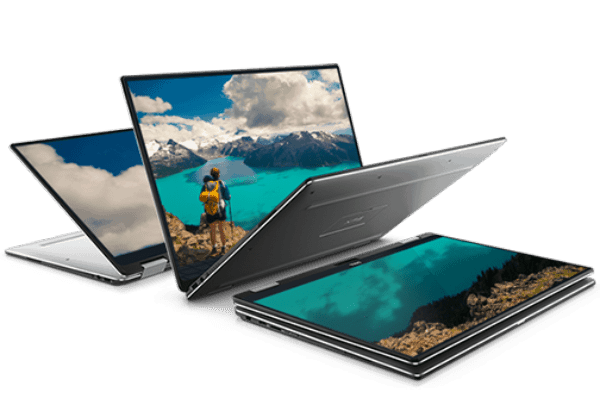
- 7th Generation Intel® Core™ i7-7Y75 Processor (4M cache, up to 3.6 GHz)
- Windows 10 Home 64bit English
- 8GB LPDDR3 1866MHz
- 256GB PCIe Solid State Drive
- 13” FHD (1920 x 1080) InfinityEdge touch display
Design and Build
The design and build of the XPS is fantastic, it is a little more muted than the Acer with a black and grey shell but the standout feature is the amazing InfinityEdge display. I don’t have the Acer to visually compare the 2 but from memory, the Dell feels considerably smaller than the Acer making it much more pleasant to use on my lap, or when travelling.The Acer is actually thinner than the Dell, but more importantly, the Dell is lighter at 1.24KG vs 1.6KG. Both are extremely light, and you might not notice the difference, but if you are carrying a laptop around all day long, any weight saving will be a bonus.The 2 steel hinges that allow the XPS to go from laptop to tablet mode are nice and firm with no wiggle when you are in any of your chosen modes.The Dell also has a fingerprint reader which makes logging in much easier than a pin/password. It also supports Windows Hello, allowing you to log in via facial recognition.As with many ultra-thin portables, the Dell XPS does not include full-sized USB ports, instead, you get two USB-C ports with one being used for power. It is not ideal, but it is just the way things are going.I loved the keyboard on the Latitude, and the same is true for the XPS. The keys are nicely spaced apart with a decent level of travel for such a thin laptop, unlike the Acer, you get backlighting too. The trackpad is well sized and responsive, you don’t get dedicated clicky left and right buttons, but they are visually separated with a line. The trackpad is actually smaller than the Acer, but I found I made far fewer mistakes with mouse clicks on the XPS. With the Acer, I would often right click instead of left. It is also compatible with Windows 10 multi-touch gestures and this worked without any issues.

Performance
As with the Acer, the Dell comes with one of the ultra-low powered i7-7Y75 chips which has a much lower base clock than the standard mobile i7-7500Uvariety chip at 1.3Ghz vs 2.7Ghz but they both have similar boost frequencies of 3.6Ghz & 3.5Ghz. The 7Y75, however, has a TDP of just 7W vs 25W which should provide much better battery life. The low TDP also means there is no need for active cooling, which is a big plus for me, as I find any fan noise quite irritating.In real-world usage, I found it to perform just fine with all my normal tasks. I went on a flight with it and it happily played 1080P movies with no slowdown, and more importantly, it got through the flight with minimal impact to its battery. During a day in the office, I used the Dell as a second machine for Emails, Skype and Telegram. It comfortably lasted all day and then intermittent use during the evening. The battery performance was significantly better than the Acer, which got around 5 hours+ vs the 8 hours+ of the Dell.Due to the low powered CPU and integrated graphics, it isn’t really designed for gaming, but you should be able to play some lightweight indie games.Overall
I have to say I loved my time with the XPS 13, I can confidently say it is a better machine than the Acer Spin 7. I would say it is better than the Acer in pretty much every department and for my personal usage requirements, the dimensions are a huge benefit with the 13” InfinityEdge display, as well as the superior battery. There also doesn’t appear to be any other laptop on the market offering the same sort of dimensions or bezel-less screen as the Dell, so they can get away with charging a premium here.That being said, it is hard to ignore the price difference, and if you are on a budget you can’t really fault the Acer Spin 7.If you don’t want to sacrifice the superb dimensions of the XPS but can live without the hybrid functionality, the latest XPS 13 9360 is £200 cheaper at £1,299.00.You get the more powerful i7-8550U CPU with a 60Whr battery vs 46Whr which should give a similar usage time overall. This XPS comes with full-sized USB 3.0 ports and is almost identical in weight too.
I am James, a UK-based tech enthusiast and the Editor and Owner of Mighty Gadget, which I’ve proudly run since 2007. Passionate about all things technology, my expertise spans from computers and networking to mobile, wearables, and smart home devices.
As a fitness fanatic who loves running and cycling, I also have a keen interest in fitness-related technology, and I take every opportunity to cover this niche on my blog. My diverse interests allow me to bring a unique perspective to tech blogging, merging lifestyle, fitness, and the latest tech trends.
In my academic pursuits, I earned a BSc in Information Systems Design from UCLAN, before advancing my learning with a Master’s Degree in Computing.
I’m proud to share that Vuelio has consistently ranked Mighty Gadget as one of the top technology blogs in the UK. With my dedication to technology and drive to share my insights, I aim to continue providing my readers with engaging and informative content.
I work directly with the companies he reviews products for or their chosen PR agency.
For Social Media, you can find me on: