Mighty Gadget is reader-supported. Links to retailers may be affiliate links, and I may earn a commission if you buy through them, at no extra cost to you. As an Amazon Associate I earn from qualifying purchases. How I test and review products.
Following the review of the surprisingly good
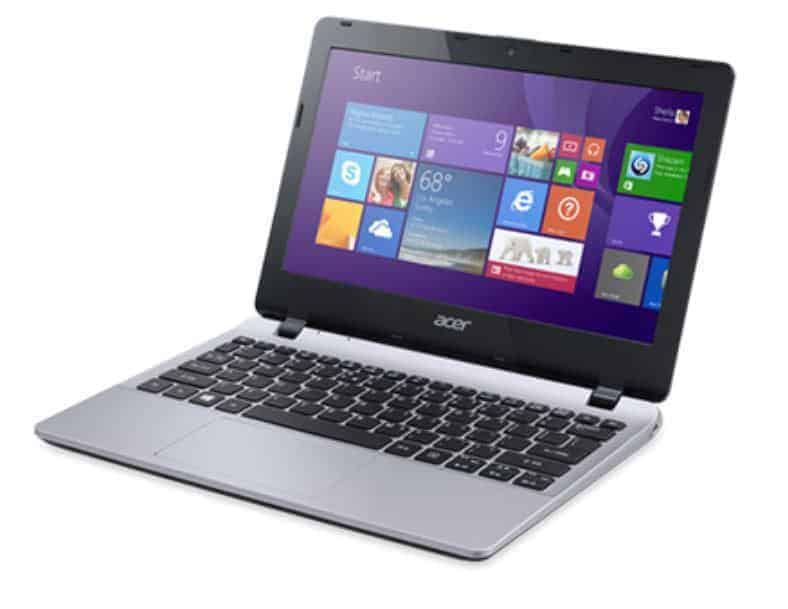
Acer Chromebook 13 we have spent the past few days with the Acer Aspire V11 Touch, an affordable, portable Windows notebook with a low-power processor.This diminutive laptop has an Intel Celeron quad core N3540 running at 2.16 GHz which is an amazing low TDP of just 7.5 W. There is also 4GB of DDR3 memory, 500GB mechanical HDD, and 802.11b/g/n + Bluetooth. The 11.6-inch touch screen has a 1366 x 768 resolution which is plenty for a screen the size of this. The laptop weighs just 1.39 kg making it very easy to travel around with.At the current time pinning down this exact model seems to be quite difficult but there are multiple similar models including:
While this laptop is not going to offer the power to replace a desktop or more expensive laptops, the new range of low powered Celeron CPUs provide enough power to do most of the jobs your average person wants.
The overall design is quite basic with the bottom being made from plastic and lid and keyboard surround being faux aluminium, it is a far cry from the expensive ultrabooks being produced now, but the price reflects this. The overall build quality appears to be solid though.Booting up and logging in isn’t super fast but once logged in the system runs reasonably snappy with no obvious lag. Certainly a long way from the Atom nettops of yesteryear. Running Chrome with multiple tabs open while also streaming Spotify ran smoothly. Obviously you are not going to be able to do any gaming or video editing on this.Unfortunately one of the biggest issues we had was the bloatware pre-installed on the laptop, this is not an uncommon problem with laptops nowadays and it is easy enough to remove the applications if you want.Typing up documents on Word was quite pleasant for a laptop the size of this, it probably wouldn’t be that comfortable for extended periods of time but short bursts of work while you are away from your PC is perfectly acceptable.Both the screen resolution and quality of the screen were more than acceptable for a laptop of this price and size.We are not 100% convinced with the need for a touch screen, in general we just didn’t use it and forgot we even had it. This feature is much more useful for convertibles when you use the laptop in a tablet mode.During our time we got around 6 hours battery life from the Aspire which is a solid amount of time and should happily see you through a working commute. Due to the low powered nature of the CPU they have managed to keep the power supply small, which makes carrying it around no issue at all.Overall this is a great little laptop. Intel have come a long way with their low cost low powered CPUs which now makes these laptops pleasurable to use rather than torture. It is more than capable of doing day to day tasks and would be perfect for people that commute frequently and don’t have the budget for an all-singing, all-dancing ultra portable. That being said, depending on exactly what you want to do with your laptop, a Chromebook such as the Acer Chromebook 13 may offer better performance in web browsing and general responsiveness.We would personally look at trying to save a few pounds and go for the non touch screen version which can be had for £179 – 270 depending on the exact configuration you go for.

I am James, a UK-based tech enthusiast and the Editor and Owner of Mighty Gadget, which I’ve proudly run since 2007. Passionate about all things technology, my expertise spans from computers and networking to mobile, wearables, and smart home devices.
As a fitness fanatic who loves running and cycling, I also have a keen interest in fitness-related technology, and I take every opportunity to cover this niche on my blog. My diverse interests allow me to bring a unique perspective to tech blogging, merging lifestyle, fitness, and the latest tech trends.
In my academic pursuits, I earned a BSc in Information Systems Design from UCLAN, before advancing my learning with a Master’s Degree in Computing.
I’m proud to share that Vuelio has consistently ranked Mighty Gadget as one of the top technology blogs in the UK. With my dedication to technology and drive to share my insights, I aim to continue providing my readers with engaging and informative content.
I work directly with the companies I review products for or their chosen PR agency.
For Social Media, you can find me on:
Twitter/X – Instagram – Facebook – LinkedIn – Strava