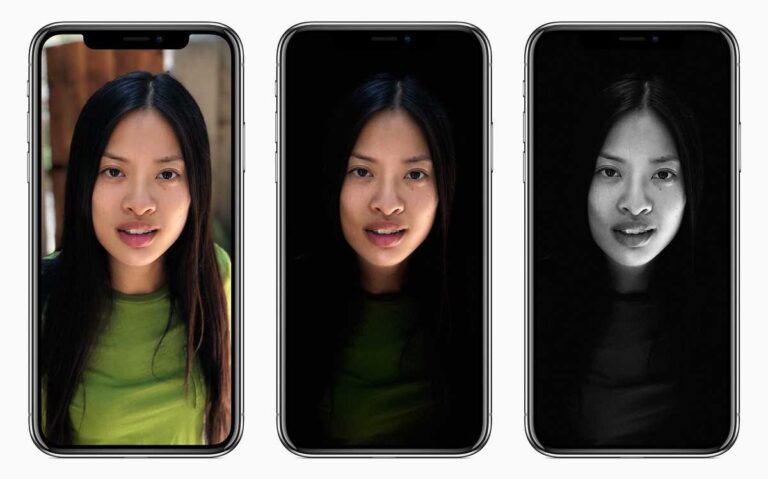
With iOS 11 and the new iPhone 8 Plus and iPhone X, Apple has added a new feature to the camera that people are going to like and probably overuse on Instagram. Regardless, it’s a cool feature, and it’s called portrait lighting.
How portrait lightening worksJust like
portrait mode that we’re used to by now, portrait lightening uses the dual cameras on the iPhone to judge depth and create that bokeh depth of field look using software. This mode uses the dual camera setup and takes software magic just a step further. Instead of you being able to have a bokeh effect, Apple has added the ability to then use that depth information to create different lighting effects, from natural lighting all the way to the much more dramatic stage lighting. This way, you’ll be able to take
professional photos with simply just your iPhone.In a professional studio, photographers use all sorts of lights when taking a photograph. By changing these lights, an experienced photographer can use the light on or around the subject to emphasize certain areas of the photo. Portrait Lighting allows users to do the same thing, but digitally. You can choose one of five different lighting settings to adjust your iPhone’s “virtual” light. And as with Apple’s other editing features, it’s non-destructive: You can add or remove Portrait Lighting at any time.
How to use portrait lighteningSo now, to use the portrait lighting effect:
- You simply open the camera
- Tap on portrait like you normally would above the shutter button (a wheel of lighting effects now comes up)
The first one is natural light, and this is the same as the original portrait mode basically. It’ll blur the background, but not adjust the lighting from what’s actually there. The next is studio light, this mode tries to even out the lighting across the subject as if they were in a studio with controlled lighting around them. Next is contour light, which is the same as a studio, but with the addition of adding shadows to the subject’s contours, like their checks, for example, to create a more pronounced look. Then theirs have stage light, probably the most dramatic of the lighting effects. Stage light does the same as the contour light to the subject, but will also try and black out everything else, giving the effect of being on say a black box stage type of situation. Finally, there is the stage light mono, which is the same as stage light, but it just removes all of the colour to get a black and white version.Once you’ve chosen the one you want:
- You simply position the subject in the centre and far enough away (like the normal portrait mode)
- Now focus and snap the shot.
You’ll then see it in your photos app with the effect applied. If you want, you can change between the effects after taking the image by tapping on the photo in the photo app, then tapping edit, and you’ll see the same options from the camera appear along the bottom of the photo. You can then select them to change the mode. Keep in mind, you’ll only be able to change the portrait mode on photos that were taken with one of the portrait modes, you can not magically add these to a standard photo after taking it.

I am James, a UK-based tech enthusiast and the Editor and Owner of Mighty Gadget, which I’ve proudly run since 2007. Passionate about all things technology, my expertise spans from computers and networking to mobile, wearables, and smart home devices.
As a fitness fanatic who loves running and cycling, I also have a keen interest in fitness-related technology, and I take every opportunity to cover this niche on my blog. My diverse interests allow me to bring a unique perspective to tech blogging, merging lifestyle, fitness, and the latest tech trends.
In my academic pursuits, I earned a BSc in Information Systems Design from UCLAN, before advancing my learning with a Master’s Degree in Computing.
I’m proud to share that Vuelio has consistently ranked Mighty Gadget as one of the top technology blogs in the UK. With my dedication to technology and drive to share my insights, I aim to continue providing my readers with engaging and informative content.
I work directly with the companies he reviews products for or their chosen PR agency.
For Social Media, you can find me on:
Twitter/X – Instagram – Facebook – LinkedIn – Strava