Samsung SmartThings Review – 2018 V3 Hub and sensors
[button link=”https://amzn.to/2KBhGPr”] Buy SmartThings from Amazon[/button]
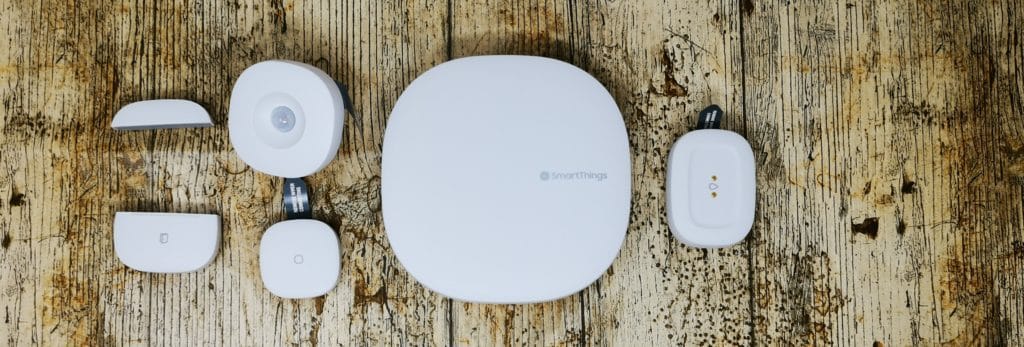 The kit I was sent included the new version three Hub and the following accessories:
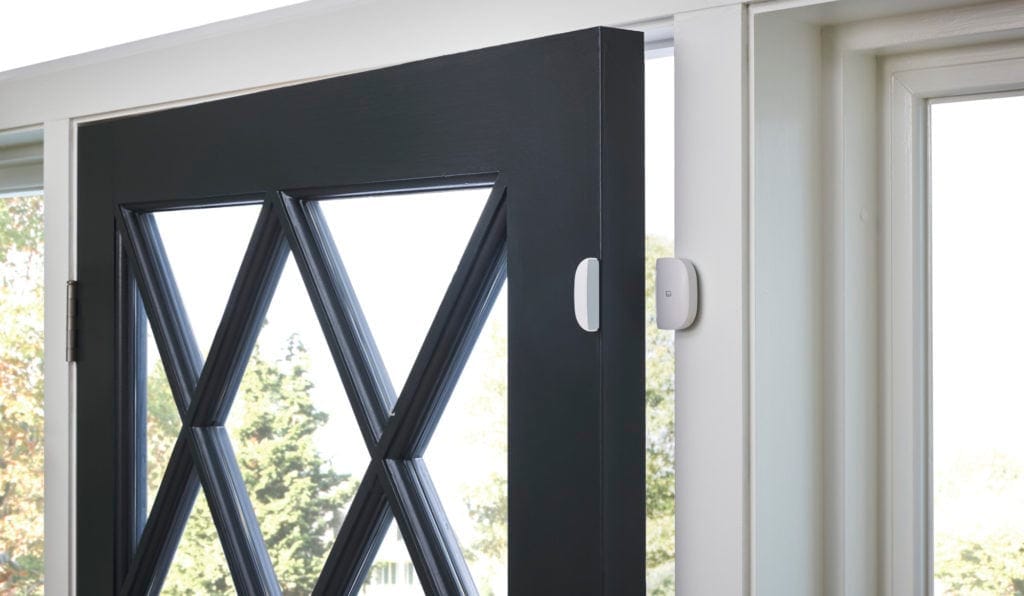
- Multipurpose sensor – this is a two-part sensor and at first appears just to be an open/close sensor, but it also has a temperature and vibration sensory built in which can be used to trigger actions based on a variety of conditions.
- Water leak sensor – as the name suggests, it detects water, there are two electrons on the top of it and when these are bridged with moisture, it will trigger.
- Motion sensor – self-explanatory, however, this comes with a useful magnetic ball mount and 3MM mounting tape, allowing you to stick it anywhere and alter its position afterwards.
- Smart Button – similar to the paddle of the Devolo, this small button can be used for multiple actions and with single, double or long presses you can carry out different functions.
2018 SmartThings Hub upgrades
The new 2018 hub has had some useful updates that Samsung has implemented following user feedback.The overall design of the hub and each sensor has been improved to blend in with the style of your home, and includes a range of new features to make entering the Smart Home market more accessible than ever.The SmartThings Hub is now working with Wi-Fi and Ethernet, giving you the flexibility to place it anywhere in your home for a tidy installation. You can then access the hub and all its features via the mobile app, or any compatible Samsung TV or connected fridge.The new hub uses the latest Zigbee and Z-Wave protocols as well as Bluetooth 4.1, but SmartThings claims that V2 will receive Zigbee 3.0 support later this year.SmartThings is now fully compatible with all voice assistants, whether you prefer Samsung Bixby, Amazon Alexa or Google Assistant, and I would expect this to be true with the older hubs too.The hub now allows you to:- Receive alerts and notifications from connected devices wherever you are when something unexpected happens in your home. You will know just in an instant if there is a leak or intrusion, and even better you will never have to worry about leaving anything on accidently like your oven, iron or hair straighteners
- Manage connected devices in your home with SmartThings scenes for Good Morning, Goodbye and Good Night. For example, with a single tap to the Good Night scene on your app, you can arm your security alarm, lock the doors, turn off the TV and lights, activate motion sensors and link them to your security camera to start recording, change the temperature, and have a peaceful sleep knowing SmartThings is protecting your home.
- Use Automations which can control devices and run scenes whenever certain conditions are met. Automate connected devices in your home and set them to turn on or off when doors are opened, as people come and go, and much more.
Set-up
The SmartThings system comes neatly but basically packaged in lots of blue and white boxes. The overall appearance of the system is quite simple and functional.One thing that is notable is the sensor sizes, while they may not be the prettiest of things, they are small and relatively discrete, being considerably smaller than the movement and temperature sensors by Devolo.Set-up is a relatively quick and painless affair, one you plug your hub in you can follow the set-up procedure via the SmartThings app. It uses Bluetooth for the initial connection and using this you can optionally set up your system via Ethernet or Wi-Fi. I prefer ethernet for any device that isn’t moved around a lot, plus this will live in the mess of a room with all my other networking gear.Once connected you will be asked some basic info about your location, which is then used for geofencing functions for automation.Using the auto detect function it immediately picked up my Bose SoundTouch soundbar and the Sonos One speaker.With the other accessories that were included, I added these manually. You do this by pulling the battery tab from the sensor, selecting what you want to add in the app and then scan the QR code. I found with a couple of sensors it took a little while to add, if the screen times out then adding it will fail. This could be due to the Mate 20 having quirky battery management features. Overall it was quite simple though, and I was done within 20 minutes.Samsung allows connection to a large number of its home appliances, apart from TVs you can link up Wi-Fi hubs, stoves, dishwashers, robotic vacuums, washing machines, and more.


3rd Party Functionality
Setting up the Samsung sensors worked straight out of the box, but you will notice during the set-up procedure there are a considerable number of things you can add beyond the Samsung made sensors.You should technically be able to add any Zigbee or Z-Wave but the app has listings for some specific devices which presumably will make the pairing a little more straightforward.- With motions sensors you have options for Fibaro, and NEO Coolcam.
- Multi-sensors has an Aeotec option
- Open/Closed has Aeotec, Fibaro, Neo, Nyce, and Sensative
- Cameras has Netgear Arlo and Ring
- Doorbell has Ring and Skybell
- Lightbulb includes options from Belkin WeMo, Hue, LiFi, Osram, and others
- Locks has Yale and Danalock
- Outlets has Aurora, Fibaro, Innr, Neo and Osram
- Smoke detectors has Fibaro and Sprue
- Thermostats has Danfoss and Honeywell


Automation and Functionality
Once you have everything within the Smartthings app, you can start the exciting process of automating things.Samsung simplifies things a little by giving you an option to set up some predefined automation.One of these is a home security option; you can use the motion sensor, or the multi-sensor on your door as your trigger point. These can then trigger various actions such as a push notification to your phone, lighting up your lights, triggering a siren or sending audio to a speaker.For me I had all my lights light up, a notification sent to my phone, and a dog barking sent to my Sonos. Once this is set up, you can arm or disarm of the function for when you are away. During my testing, it worked flawlessly and quickly, though thankfully I have had no real-life alerts yet.


Alexa and Google Assistant
I primarily use Alexa, and with this it has control for your connected lights (Hue, LIFX, OSRAM Lightify, Cree, GE, and Leviton), smart plugs, thermostats, and locks. It also supports motion and contact sensors allowing you to ask Alexa if the front door is open.For me, there was limited functionality here, as Alexa is already connected to Hue and Kasa and the SmartThings sensors I have trigger things independently from Alexa. The main thing I enabled was allowing me to arm the security system within SmartThings at night.With more complex systems you could unlock the door or control your heating with voice commands.Home Automation
The biggest issue with SmartThings, and all Z-Wave controllers is the level of investment required to make them useful. If I didn’t have Hue, Ring, and Sonos then the system I have been sent would be limited to notifications to my mobile. Even with my system, the end result is quite a basic home automation experience. If you really want a smart home, you will then need to invest in things like radiator valves, compatible plug sockets, connected smart locks as well as buying dozens of sensors to trigger all these devices. So, while the initial investment is relatively small, to make the most out of it you could be spending a fortune. There is no way around this though, and SmartThings does this in the most affordable and user-friendly way possible so I would suggest it is the best option you have to get into proper home automation.Conclusion
Overall, I love the SmartThings system, it is the cheapest Z-Wave controller that I know of, and from my limited experience, it is the most user-friendly.While compatibility with other systems isn’t perfect, it is better than most other Z-Wave options on the market, and the combination of Alexa/Google Assistant plus IFTTT supports means you should be able to find a way to integrate all the connected devices in your home.Achieving a truly smart home using Z-Wave is a costly affair, but the SmartThings system has the lowest entry point with some excellent and affordable sensors and trigger devices.[button link=”https://amzn.to/2KBhGPr”] Buy SmartThings from Amazon[/button]
Samsung SmartThings V3 Hub Review
-
Overall - 85%85%

I am James, a UK-based tech enthusiast and the Editor and Owner of Mighty Gadget, which I’ve proudly run since 2007. Passionate about all things technology, my expertise spans from computers and networking to mobile, wearables, and smart home devices.
As a fitness fanatic who loves running and cycling, I also have a keen interest in fitness-related technology, and I take every opportunity to cover this niche on my blog. My diverse interests allow me to bring a unique perspective to tech blogging, merging lifestyle, fitness, and the latest tech trends.
In my academic pursuits, I earned a BSc in Information Systems Design from UCLAN, before advancing my learning with a Master’s Degree in Computing.
I’m proud to share that Vuelio has consistently ranked Mighty Gadget as one of the top technology blogs in the UK. With my dedication to technology and drive to share my insights, I aim to continue providing my readers with engaging and informative content.
I work directly with the companies he reviews products for or their chosen PR agency.
For Social Media, you can find me on: